1. ആമുഖം
The AJAZZ AK680 is a compact 65% wired mechanical gaming keyboard designed for efficiency and performance. Featuring 68 keys, hot-swappable switches, and customizable backlighting, it offers a versatile typing and gaming experience. This manual provides essential information for setting up, operating, maintaining, and troubleshooting your keyboard.

ചിത്രം 1.1: കഴിഞ്ഞുview of the AJAZZ AK680 keyboard highlighting its compact design and key features.
പ്രധാന സവിശേഷതകൾ:
- ഒതുക്കമുള്ള 68-കീ ലേഔട്ട്: Saves desk space and enhances portability.
- മുഴുവൻ കീ ഹോട്ട്-സ്വാപ്പ് ചെയ്യാവുന്നത്: Compatible with most 3-pin mechanical switches for easy customization without soldering.
- ആന്റി-ഗോസ്റ്റിംഗ് & എൻ-കീ റോൾഓവർ: Ensures all key presses are registered accurately, even during rapid input.
- EVA Sandwich Design: Reduces typing noise and provides a more solid feel.
- Mixed Color Backlighting: Features 19 different customizable lighting effects.
- Programmable Software: Allows for macro editing, light effect customization, and key redefinition.
- എർഗണോമിക് ഡിസൈൻ: Provides comfort during extended use.
2. സജ്ജീകരണം
2.1 പാക്കേജ് ഉള്ളടക്കം
- AJAZZ AK680 മെക്കാനിക്കൽ കീബോർഡ്
- USB കേബിൾ
- കീക്യാപ്പ് പുള്ളർ / സ്വിച്ച് പുള്ളർ (സംയോജിപ്പിക്കാം)
- ഉപയോക്തൃ മാനുവൽ
2.2 കീബോർഡ് ബന്ധിപ്പിക്കുന്നു
- കീബോർഡിൽ USB-C പോർട്ടും കമ്പ്യൂട്ടറിൽ USB-A പോർട്ടും കണ്ടെത്തുക.
- നൽകിയിരിക്കുന്ന കേബിളിന്റെ USB-C അറ്റം കീബോർഡുമായി ബന്ധിപ്പിക്കുക.
- നിങ്ങളുടെ കമ്പ്യൂട്ടറിൽ ലഭ്യമായ ഒരു USB പോർട്ടിലേക്ക് കേബിളിന്റെ USB-A അറ്റം ബന്ധിപ്പിക്കുക.
- നിങ്ങളുടെ ഓപ്പറേറ്റിംഗ് സിസ്റ്റം കീബോർഡ് സ്വയമേവ തിരിച്ചറിയും. അടിസ്ഥാന പ്രവർത്തനങ്ങൾക്ക് സാധാരണയായി അധിക ഡ്രൈവറുകൾ ആവശ്യമില്ല.
അനുയോജ്യത: The AK680 keyboard is compatible with Windows Vista/XP/7/8/10/11, MAC, Android, and Linux operating systems.
3. പ്രവർത്തന നിർദ്ദേശങ്ങൾ
3.1 അടിസ്ഥാന കീ പ്രവർത്തനങ്ങൾ
The AK680 features a 68-key layout. Many functions are accessed via the Fn മറ്റ് കീകളുമായി സംയോജിപ്പിച്ച കീ.

Image 3.1: The compact 65% layout of the AK680 keyboard, showing its dimensions and some Fn key functions.
3.2 ബാക്ക്ലൈറ്റ് നിയന്ത്രണം
The keyboard features mixed color backlighting with multiple effects.
- അമർത്തുക Fn + | to cycle through 19 different backlight modes and color designs.
- Specific key combinations for brightness and speed adjustment may vary; refer to the included quick guide or software for detailed controls.
3.3 പ്രോഗ്രാമബിൾ സോഫ്റ്റ്വെയർ
To unlock the full customization potential of your AK680 keyboard, download and install the official AJAZZ software from the manufacturer's webസൈറ്റ്. സോഫ്റ്റ്വെയർ നിങ്ങളെ ഇനിപ്പറയുന്നവ അനുവദിക്കുന്നു:
- മാക്രോ എഡിറ്റിംഗ്: Create and assign complex key sequences to a single key.
- Light Effect Customization: Fine-tune backlight patterns, colors, and speeds.
- കീ പുനർനിർവചനം: വ്യത്യസ്ത പ്രവർത്തനങ്ങൾ നിർവഹിക്കുന്നതിന് വ്യക്തിഗത കീകൾ റീമാപ്പ് ചെയ്യുക.
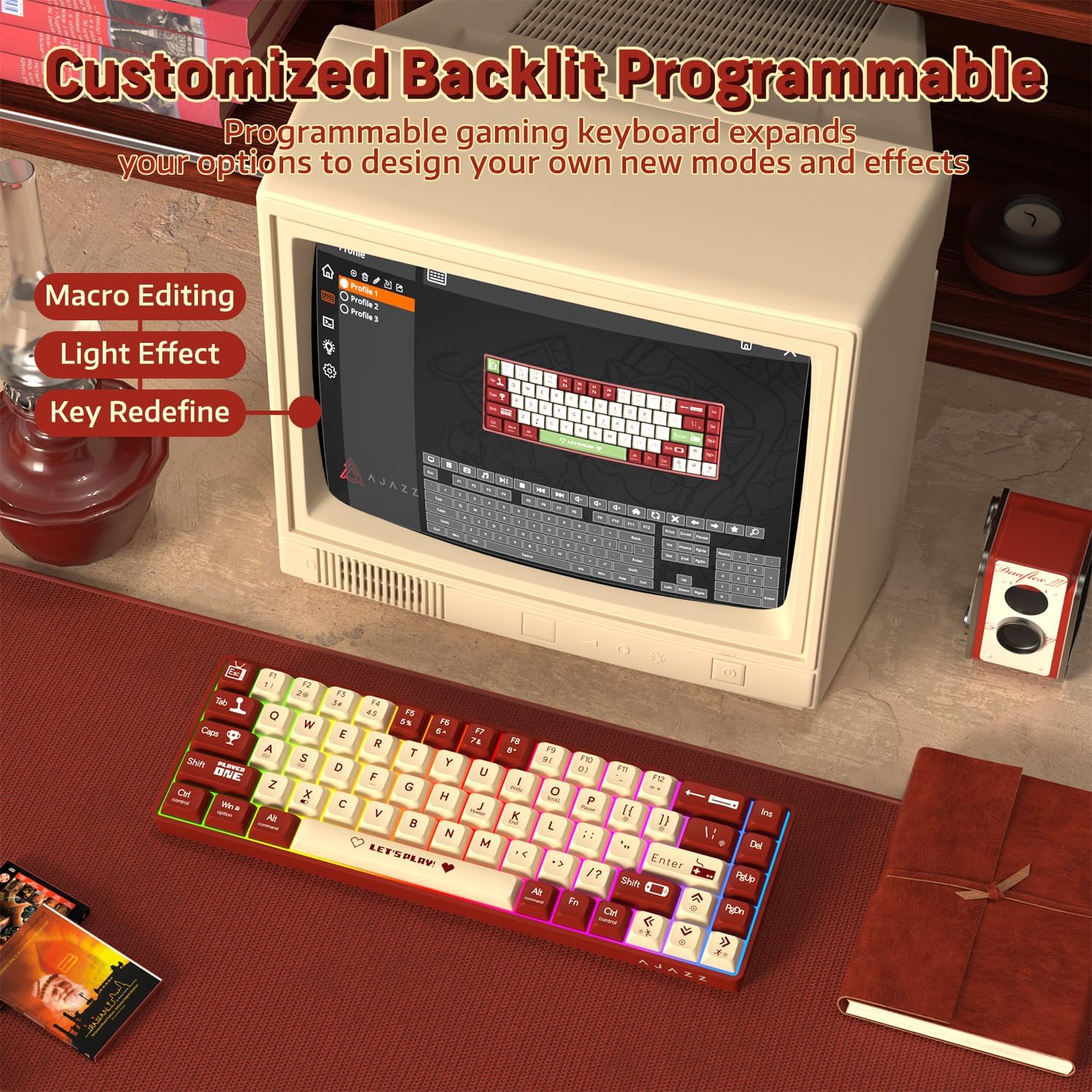
Image 3.2: The programmable software interface for customizing key functions and lighting effects.
4. പരിപാലനം
4.1 കീബോർഡ് വൃത്തിയാക്കൽ
- വൃത്തിയാക്കുന്നതിനുമുമ്പ് നിങ്ങളുടെ കമ്പ്യൂട്ടറിൽ നിന്ന് കീബോർഡ് വിച്ഛേദിക്കുക.
- മൃദുവായ, ലിൻ്റ് രഹിത തുണി ഉപയോഗിക്കുകampകീക്യാപ്പുകളും ഷാസികളും തുടയ്ക്കാൻ വെള്ളമോ നേരിയ ക്ലീനിംഗ് ലായനിയോ ഉപയോഗിച്ച് നനയ്ക്കുക.
- കീക്യാപ്പുകൾക്കിടയിലുള്ള പൊടിയും അവശിഷ്ടങ്ങളും ഉണ്ടെങ്കിൽ, കംപ്രസ് ചെയ്ത വായു അല്ലെങ്കിൽ ഒരു ചെറിയ ബ്രഷ് ഉപയോഗിക്കുക.
- കീബോർഡിലേക്ക് നേരിട്ട് ദ്രാവകങ്ങൾ സ്പ്രേ ചെയ്യുന്നത് ഒഴിവാക്കുക.
4.2 സ്വിച്ചുകൾ മാറ്റിസ്ഥാപിക്കൽ
The AK680 features hot-swappable sockets, allowing you to change switches without soldering.
- ആവശ്യമുള്ള കീക്യാപ്പ് ശ്രദ്ധാപൂർവ്വം നീക്കം ചെയ്യാൻ നൽകിയിരിക്കുന്ന കീക്യാപ്പ് പുള്ളർ ഉപയോഗിക്കുക.
- Use the provided switch puller to gently grip the top and bottom clips of the switch.
- പിസിബിയിൽ നിന്ന് നീക്കം ചെയ്യാൻ സ്വിച്ച് നേരെ മുകളിലേക്ക് വലിക്കുക.
- Align the pins of the new 3-pin switch with the holes on the PCB.
- പുതിയ സ്വിച്ച് ക്ലിക്ക് ആകുന്നതുവരെ അതിൽ ഉറപ്പിച്ച് അമർത്തുക. പിന്നുകൾ വളഞ്ഞിട്ടില്ലെന്ന് ഉറപ്പാക്കുക.
- കീക്യാപ്പ് വീണ്ടും ഘടിപ്പിക്കുക.

Image 4.1: Illustration of the hot-swappable switch mechanism and how to replace switches.
5. പ്രശ്നപരിഹാരം
5.1 കീബോർഡ് പ്രതികരിക്കുന്നില്ല
- യുഎസ്ബി കേബിൾ കീബോർഡിലേക്കും കമ്പ്യൂട്ടറിലേക്കും സുരക്ഷിതമായി ബന്ധിപ്പിച്ചിട്ടുണ്ടെന്ന് ഉറപ്പാക്കുക.
- നിങ്ങളുടെ കമ്പ്യൂട്ടറിലെ മറ്റൊരു USB പോർട്ടിലേക്ക് കീബോർഡ് ബന്ധിപ്പിക്കാൻ ശ്രമിക്കുക.
- സിസ്റ്റം-നിർദ്ദിഷ്ട പ്രശ്നങ്ങൾ ഒഴിവാക്കാൻ മറ്റൊരു കമ്പ്യൂട്ടറിൽ കീബോർഡ് പരിശോധിക്കുക.
- നിങ്ങളുടെ കമ്പ്യൂട്ടർ പുനരാരംഭിക്കുക.
5.2 ബാക്ക്ലൈറ്റ് പ്രവർത്തിക്കുന്നില്ല അല്ലെങ്കിൽ തെറ്റാണ്
- കീബോർഡ് ശരിയായി ബന്ധിപ്പിച്ചിട്ടുണ്ടെന്നും വൈദ്യുതി ലഭിക്കുന്നുണ്ടെന്നും ഉറപ്പാക്കുക.
- അമർത്തുക Fn + | ബാക്ക്ലൈറ്റ് മോഡുകളിലൂടെ സൈക്കിൾ ചെയ്യാൻ.
- Check the programmable software for any disabled lighting effects or brightness settings.
5.3 കീകൾ രജിസ്റ്റർ ചെയ്യുന്നില്ല അല്ലെങ്കിൽ ഇരട്ട-ടൈപ്പിംഗ് ചെയ്യുന്നില്ല
- This could indicate a faulty switch. Try replacing the affected switch as described in Section 4.2.
- സ്വിച്ച് അതിന്റെ സോക്കറ്റിൽ പൂർണ്ണമായും സ്ഥാപിച്ചിട്ടുണ്ടെന്ന് ഉറപ്പാക്കുക.
- Clean around the affected keycap and switch to remove any debris.

Image 5.1: The AK680 features full anti-ghosting to prevent key conflicts during rapid typing.
6 സ്പെസിഫിക്കേഷനുകൾ
| ഫീച്ചർ | വിശദാംശങ്ങൾ |
|---|---|
| ബ്രാൻഡ് | അജാസ് |
| മോഡൽ നമ്പർ | എകെ 680 |
| ലേഔട്ട് | 65% (68 കീകൾ) |
| കണക്റ്റിവിറ്റി | വയർഡ് (യുഎസ്ബി) |
| സ്വിച്ച് തരം | Mechanical (Red Switches, Hot-swappable 3-pin) |
| ബാക്ക്ലൈറ്റ് | Mixed Color / Rainbow RGB |
| ആൻ്റി-ഗോസ്റ്റിംഗ് | പൂർണ്ണ കീ ആന്റി-ഗോസ്റ്റിംഗ് |
| അനുയോജ്യത | വിൻഡോസ്, മാക്ഒഎസ്, ആൻഡ്രോയിഡ്, ലിനക്സ് |
| മെറ്റീരിയൽ | Plastic chassis, ABS keycaps |
| അളവുകൾ (ഏകദേശം) | 32.7 x 13.8 x 4.4 സെ.മീ (12.87 x 5.43 x 1.73 ഇഞ്ച്) |
| ഭാരം (ഏകദേശം) | 270 ഗ്രാം (0.6 പൗണ്ട്) |
7. വാറൻ്റിയും പിന്തുണയും
7.1 വാറൻ്റി വിവരങ്ങൾ
Please refer to the specific warranty terms provided by your retailer or the manufacturer at the time of purchase. Warranty periods and coverage may vary by region and seller. Typically, manufacturing defects are covered for a limited period.
7.2 ഉപഭോക്തൃ പിന്തുണ
For technical assistance, product inquiries, or warranty claims, please contact the seller or visit the official AJAZZ webപിന്തുണാ ഉറവിടങ്ങൾക്കും ബന്ധപ്പെടാനുള്ള വിവരങ്ങൾക്കുമുള്ള സൈറ്റ്.


