1. ആമുഖം
Thank you for choosing the SKY TOPPOWER STP3005 DC Power Supply. This adjustable lab bench power supply is designed for various applications including circuit testing, electrolysis, DIY electronics projects, battery charging, repairing, and research. It offers high accuracy with 0.1V (100mV) and 0.01A (10mA) regulation, a 3-digit LED display, and multiple protection features to ensure safe and reliable operation.
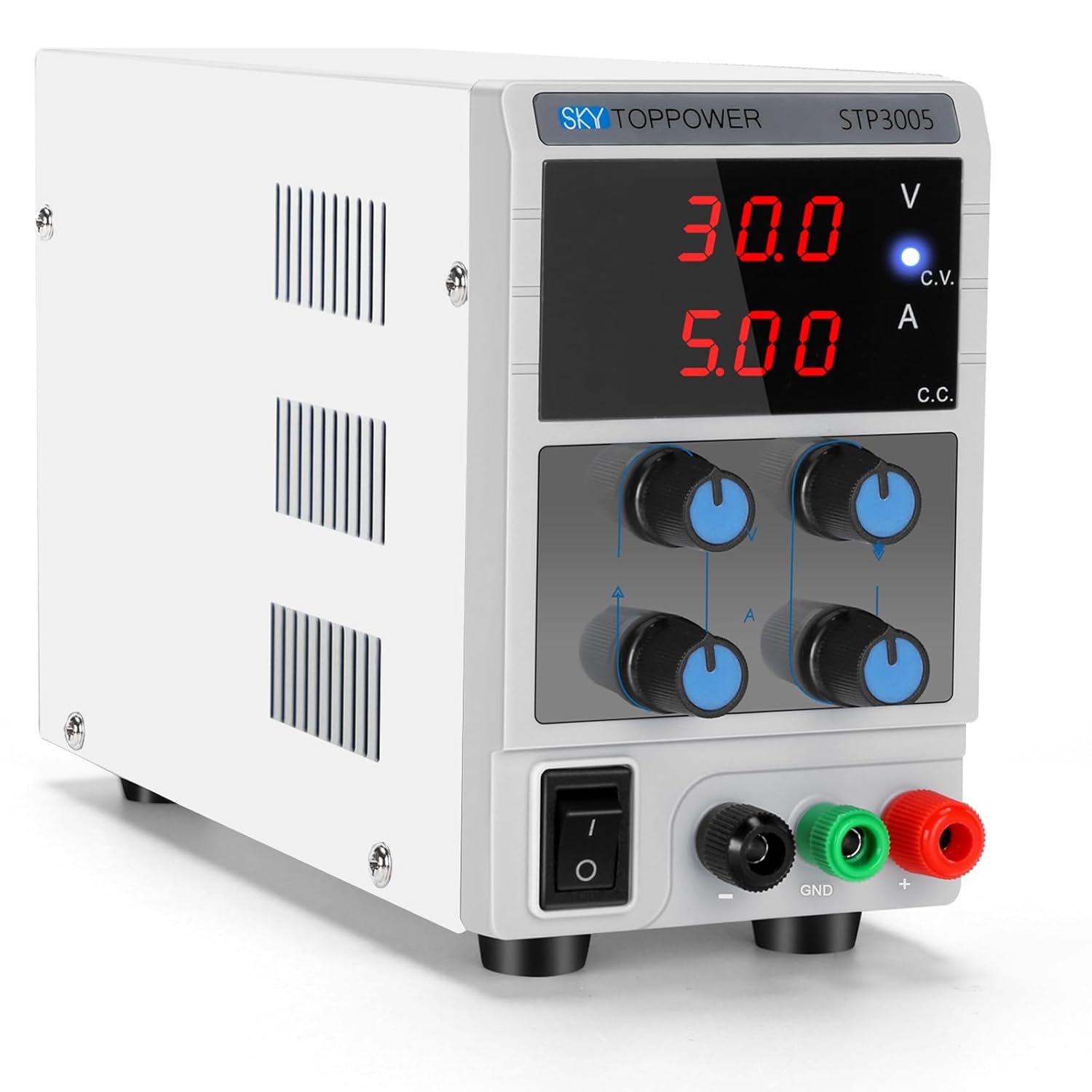
ചിത്രം 1.1: മുൻഭാഗം view of the SKY TOPPOWER STP3005 DC Power Supply.
സുരക്ഷാ മുൻകരുതലുകൾ
- Always connect the grounding wire to a proper ground source to prevent electric shock.
- Ensure the power supply is turned off before connecting or disconnecting any leads or loads.
- വെറ്റ് അല്ലെങ്കിൽ ഡിയിൽ ഉപകരണം പ്രവർത്തിപ്പിക്കരുത്amp വ്യവസ്ഥകൾ.
- Avoid short-circuiting the output terminals for extended periods, although the unit has short-circuit protection.
- അമിതമായി ചൂടാക്കുന്നത് തടയാൻ യൂണിറ്റിന് ചുറ്റും ശരിയായ വായുസഞ്ചാരം ഉറപ്പാക്കുക.
2. സജ്ജീകരണം
2.1 അൺപാക്കിംഗും പരിശോധനയും
Carefully remove the power supply from its packaging. Inspect the unit for any signs of damage that may have occurred during transit. Verify that all accessories, including the power cord and alligator clip leads, are present.
2.2 പ്ലേസ്മെൻ്റ്
Place the power supply on a stable, flat surface. Ensure there is adequate space around the unit for proper ventilation. The compact design (approximately 8.89(D)x3.3(W)x5.5(H) inches and 2.75 lbs) allows it to save valuable workbench space.

Figure 2.1: The compact and lightweight design of the power supply.
2.3 പവർ കണക്ഷൻ
Connect the provided power cord to the AC input on the rear of the power supply and then to a grounded electrical outlet. Ensure the power switch on the front panel is in the OFF position before plugging in.
3. പ്രവർത്തന നിർദ്ദേശങ്ങൾ
3.1 ഫ്രണ്ട് പാനൽ ഓവർview

ചിത്രം 3.1: വിശദമായി view of the front panel controls and indicators.
- വാല്യംtagഇ ഡിസ്പ്ലേ: ഔട്ട്പുട്ട് വോളിയം കാണിക്കുന്നുtage വോൾട്ടുകളിൽ (V).
- നിലവിലെ ഡിസ്പ്ലേ: ഔട്ട്പുട്ട് കറന്റ് കാണിക്കുന്നത് Ampഈറസ് (എ).
- C.V. Indicator Light: യൂണിറ്റ് കോൺസ്റ്റന്റ് വോള്യത്തിൽ പ്രവർത്തിക്കുമ്പോൾ പ്രകാശിക്കുന്നു.tagഇ മോഡ്.
- C.C. Indicator Light: Illuminates when the unit is operating in Constant Current mode.
- Putട്ട്പുട്ട് വോളിയംtage Coarse/Fine Knobs: Theട്ട്പുട്ട് വോളിയം ക്രമീകരിക്കുകtage. Use Coarse for large changes, Fine for precise adjustments.
- Output Current Coarse/Fine Knobs: Adjust the output current limit. Use Coarse for large changes, Fine for precise adjustments.
- വൈദ്യുതി സ്വിച്ച്: യൂണിറ്റ് ഓൺ/ഓഫ് ചെയ്യുന്നു.
- Putട്ട്പുട്ട് ടെർമിനലുകൾ: Black (-) for negative, Green (GND) for ground, Red (+) for positive.

ചിത്രം 3.2: ക്ലോസപ്പ് view വാല്യംtage/current adjustment knobs and output terminals.
3.2 Presetting Voltagഇയും കറൻ്റും
It is recommended to preset the desired voltage and current before connecting your load to prevent damage. The unit features a constant voltage and constant current mode that automatically switches based on the load.
- പ്രീസെറ്റിംഗ് വോളിയംtage:
- ഔട്ട്പുട്ട് ടെർമിനലുകളിലേക്ക് ലോഡ് ബന്ധിപ്പിച്ചിട്ടില്ലെന്ന് ഉറപ്പാക്കുക.
- പവർ സ്വിച്ച് ഉപയോഗിച്ച് വൈദ്യുതി വിതരണം ഓണാക്കുക.
- ക്രമീകരിക്കുക Putട്ട്പുട്ട് വോളിയംtagഇ നാടൻ ഒപ്പം നന്നായി knobs until the desired voltage is displayed. The C.V. indicator light should be on.
- Presetting Current (Short-Circuit Method):
- After presetting the voltage, turn off the power supply.
- Connect the positive (+) and negative (-) output terminals together using a shorting wire or the provided alligator clip leads (ensure the leads are rated for the maximum current).
- Turn on the power supply. The C.C. indicator light should illuminate, and the voltage display will drop to near zero.
- ക്രമീകരിക്കുക Output Current Coarse ഒപ്പം നന്നായി knobs until the desired current limit is displayed.
- Turn off the power supply and remove the shorting wire. The unit is now ready to connect to your load with the preset voltagഇ, നിലവിലെ പരിധി.
Video 3.1: Demonstration of presetting voltage and current, and connecting a load.
This video illustrates the process of setting the desired voltage and current limits on the power supply. It also shows how to connect a load and observe the unit operating in constant voltage, സ്ഥിരമായ കറന്റ് മോഡുകൾ.
3.3 ലോഡ് ബന്ധിപ്പിക്കുന്നു
With the power supply off and voltage/current preset:
- Connect the positive (+) lead from the power supply to the positive terminal of your load.
- Connect the negative (-) lead from the power supply to the negative terminal of your load.
- If required, connect the ground (GND) terminal to the chassis or ground of your circuit.
- Turn on the power supply. The display will show the actual voltage and current being supplied to the load.

Figure 3.3: The power supply demonstrating high accuracy in voltage output, compared with a multimeter reading.

Figure 3.4: The power supply in a laboratory environment, connected to test equipment.
3.4 സ്ഥിരം വാല്യംtage (CV), കോൺസ്റ്റന്റ് കറന്റ് (CC) മോഡുകൾ
The STP3005 automatically switches between Constant Voltage (CV) and Constant Current (CC) modes depending on the load conditions:
- കോൺസ്റ്റന്റ് വോളിയംtagഇ (സിവി) മോഡ്: When the load current is less than the preset current limit, the unit operates as a constant voltage source. The output voltage remains stable at the preset value, and the C.V. indicator light is on.
- സ്ഥിരമായ കറന്റ് (സിസി) മോഡ്: If the load current attempts to exceed the preset current limit, the unit automatically switches to constant current mode. The output current is maintained at the preset limit, the voltage drops to protect the load, and the C.C. indicator light is on.
3.5 അപേക്ഷകൾ
This power supply is suitable for a wide range of applications:
- Laboratory experiments and research
- Electronic equipment maintenance and repair
- Product line testing
- Battery charging (e.g., lead-acid batteries, LiFePO4 batteries)
- Anodizing processes
- DIY ഇലക്ട്രോണിക്സ് പ്രോജക്ടുകൾ
- Educational purposes in schools and universities

Figure 3.5: Instructions for battery charging using the power supply.

Figure 3.6: Wide range of applications for the DC power supply.
4. പരിപാലനം
4.1 വൃത്തിയാക്കൽ
യൂണിറ്റിന്റെ പുറംഭാഗം വൃത്തിയാക്കാൻ, ഒരു സോഫ്റ്റ്, ഡി ഉപയോഗിക്കുകamp cloth. Do not use abrasive cleaners or solvents. Ensure the unit is unplugged and turned off before cleaning.
4.2 വെന്റിലേഷൻ
The power supply has a built-in fan to reduce operational noise and prolong product life. Ensure that the ventilation openings on the sides and rear of the unit are not obstructed. Regular inspection for dust buildup in these areas is recommended.
4.3 സംഭരണം
When not in use for extended periods, store the power supply in a cool, dry place, away from direct sunlight and excessive dust.
5. പ്രശ്നപരിഹാരം
നിങ്ങൾ നേരിട്ടേക്കാവുന്ന പൊതുവായ പ്രശ്നങ്ങൾക്കുള്ള പരിഹാരങ്ങൾ ഈ വിഭാഗം നൽകുന്നു. ഇവിടെ പട്ടികപ്പെടുത്തിയിട്ടില്ലാത്ത പ്രശ്നങ്ങൾക്ക്, ദയവായി ഉപഭോക്തൃ പിന്തുണയുമായി ബന്ധപ്പെടുക.
| പ്രശ്നം | സാധ്യമായ കാരണം | പരിഹാരം |
|---|---|---|
| പവർ/ഡിസ്പ്ലേ ഓഫല്ല | പവർ കോർഡ് ബന്ധിപ്പിച്ചിട്ടില്ല; പവർ സ്വിച്ച് ഓഫ്; ഫ്യൂസ് പൊട്ടി. | Check power cord connection; Turn on power switch; Check and replace fuse if necessary (refer to specifications for fuse type). |
| ട്ട്പുട്ട് വോളിയം ഇല്ലtagഇ/കറൻ്റ് | Output terminals not connected; Voltage/current knobs set to zero; Unit in protection mode. | Ensure leads are properly connected; Adjust voltage/current knobs; Check for short circuits or overloads on the load. |
| വാല്യംtage drops significantly under load | Unit is in Constant Current (CC) mode; Load resistance too low for preset current. | Increase the preset current limit; Verify the load's current requirements. |
| യൂണിറ്റ് അമിതമായി ചൂടാക്കുന്നു | Poor ventilation; Excessive load for extended periods. | Ensure ventilation openings are clear; Reduce load or operating time; Allow unit to cool down. |
സംരക്ഷണ സവിശേഷതകൾ
The SKY TOPPOWER STP3005 includes multiple protection mechanisms:
- താപ സംരക്ഷണം: Automatically shuts down if internal temperature exceeds safe limits.
- Limit Current Protection: Prevents current from exceeding the preset limit, protecting both the power supply and the load.
- വാല്യംtage Overload Protection: അമിതമായ വോളിയത്തിനെതിരായ സംരക്ഷണങ്ങൾtagഇ വ്യവസ്ഥകൾ.
- ഷോർട്ട് സർക്യൂട്ട് സംരക്ഷണം: Protects the unit from damage in case of a short circuit at the output.
- Anti-Reverse Connection Protection: Unique function to protect the equipment and power supply from reverse polarity connections.

Figure 5.1: Illustration of the anti-reverse connection protection feature.
6 സ്പെസിഫിക്കേഷനുകൾ
| ഫീച്ചർ | വിശദാംശങ്ങൾ |
|---|---|
| മോഡൽ നമ്പർ | എസ്ടിപി 3005 |
| ബ്രാൻഡ് | സ്കൈ ടോപ്പവർ |
| Putട്ട്പുട്ട് വോളിയംtage | 0-30V (ക്രമീകരിക്കാവുന്നത്) |
| ഔട്ട്പുട്ട് കറൻ്റ് | 0-5A (ക്രമീകരിക്കാവുന്നത്) |
| ഡിസ്പ്ലേ തരം | 3-Digit LED Digital Display |
| വാല്യംtagഇ കൃത്യത | 0.1V (100mV) |
| നിലവിലെ കൃത്യത | 0.01A (10mA) |
| അളവുകൾ (D x W x H) | 8.89 x 3.3 x 5.5 ഇഞ്ച് (ഏകദേശം) |
| ഇനത്തിൻ്റെ ഭാരം | 2.75 പൗണ്ട് (1.3 കിലോഗ്രാം) |
| കണക്റ്റർ തരം | ബാരൽ കണക്റ്റർ |
| മാതൃരാജ്യം | ചൈന |
| ആദ്യം ലഭ്യമായ തീയതി | ഓഗസ്റ്റ് 10, 2018 |
7. വാറൻ്റിയും പിന്തുണയും
SKY TOPPOWER is committed to providing high-quality products and excellent customer service. While specific warranty terms may vary by region or retailer, we offer professional technical support services.
For any questions regarding the use, maintenance, or troubleshooting of your STP3005 DC Power Supply, please do not hesitate to contact the SKY TOPPOWER Team. Our customer service is available 24/7 to assist you.
Please refer to your purchase documentation or the official SKY TOPPOWER webഏറ്റവും കാലികമായ ബന്ധപ്പെടാനുള്ള വിവരങ്ങൾക്കും വാറന്റി വിശദാംശങ്ങൾക്കുമുള്ള സൈറ്റ്.


