1. ആമുഖം
Thank you for choosing the MOFII SK-09BT Ultra-Slim Bluetooth Wireless Keyboard. This manual provides essential information for setting up, operating, and maintaining your new keyboard. Please read it thoroughly before use to ensure optimal performance and longevity of your device.
The MOFII SK-09BT is designed for versatility and portability, offering seamless connectivity across various operating systems including iOS, Mac OS, Android, and Windows. Its compact and lightweight design makes it an ideal companion for your tablet, laptop, or smartphone, enhancing your typing experience on the go.

ചിത്രം: കഴിഞ്ഞുview of the MOFII Bluetooth Wireless Keyboard highlighting its key attributes.
2. സജ്ജീകരണം
2.1 ബോക്സിൽ എന്താണുള്ളത്
- MOFII SK-09BT Bluetooth Wireless Keyboard
- USB Cable (for charging, if applicable, or for wired connection if supported)
- ഉപയോക്തൃ മാനുവൽ (ഈ പ്രമാണം)
2.2 ബാറ്ററി ഇൻസ്റ്റാളേഷൻ
The keyboard requires two AAA batteries for operation. To install the batteries:
- കീബോർഡിന്റെ പിൻഭാഗത്ത് ബാറ്ററി കമ്പാർട്ട്മെന്റ് കണ്ടെത്തുക.
- ബാറ്ററി കമ്പാർട്ട്മെന്റ് കവർ പതുക്കെ സ്ലൈഡ് ചെയ്ത് തുറക്കുക.
- ശരിയായ പോളാരിറ്റി (+/-) ഉറപ്പാക്കിക്കൊണ്ട് രണ്ട് AAA ബാറ്ററികൾ ഇടുക.
- ബാറ്ററി കമ്പാർട്ട്മെൻ്റ് കവർ സുരക്ഷിതമായി അടയ്ക്കുക.

ചിത്രം: പിൻഭാഗം view of the keyboard, indicating the power switch, connect button, and battery slot.
2.3 പവർ ഓൺ/ഓഫ്
To power on the keyboard, slide the ON/OFF switch located on the back of the keyboard to the 'ON' position. To power off, slide the switch to the 'OFF' position.
2.4 ബ്ലൂടൂത്ത് ജോടിയാക്കൽ
Follow these steps to pair your MOFII SK-09BT keyboard with your device:
- കീബോർഡ് ഓണാണെന്ന് ഉറപ്പാക്കുക.
- Press the 'Connect' button on the back of the keyboard. The Bluetooth indicator light (usually blue) will start flashing, indicating it's in pairing mode.
- On your device (tablet, smartphone, laptop), navigate to the Bluetooth settings.
- ബ്ലൂടൂത്ത് ഓണാക്കി ലഭ്യമായ ഉപകരണങ്ങൾക്കായി തിരയുക.
- Select 'Bluetooth Keyboard' or 'SK-09BT' from the list of found devices.
- If prompted, enter the pairing code displayed on your device's screen using the MOFII keyboard, then press Enter.
- Once connected, the Bluetooth indicator light on the keyboard will stop flashing and remain solid or turn off, depending on the model.

Image: Visual guide demonstrating the Bluetooth connection process.
2.5 സിസ്റ്റം അനുയോജ്യത
The keyboard is compatible with multiple operating systems. To optimize key functions for your specific system, use the following key combinations:
- എഫ്എൻ + ക്യു: For iOS / Mac OS devices
- എഫ്എൻ + ഡബ്ല്യു: Android ഉപകരണങ്ങൾക്കായി
- Fn + E: വിൻഡോസ് ഉപകരണങ്ങൾക്കായി

Image: Keys Q, W, and E showing their respective system compatibility labels (Apple, Android, Windows).
3. കീബോർഡ് പ്രവർത്തിപ്പിക്കൽ
3.1 ടൈപ്പിംഗ് അനുഭവം
The MOFII SK-09BT features scissor-switch keys, providing a smooth and responsive typing experience. The ultra-slim design ensures comfortable use and portability.

ചിത്രം: വിശദമായത് view of the scissor switch key mechanism for enhanced typing comfort.
3.2 Multi-Function Keys
The keyboard includes 12 multimedia key combinations (F1-F12) that allow quick access to various functions such as home page, brightness control, search, media playback, volume control, and lock screen. These functions are typically accessed by pressing the 'Fn' key in combination with the desired F-key.

Image: Layout of the multi-function keys and their assigned actions.
3.3 എർഗണോമിക് ഡിസൈൻ
The keyboard is designed with a built-in kickstand that provides a comfortable 7-degree typing angle, reducing wrist strain during extended use. It also features silicone non-slip pads for stability.
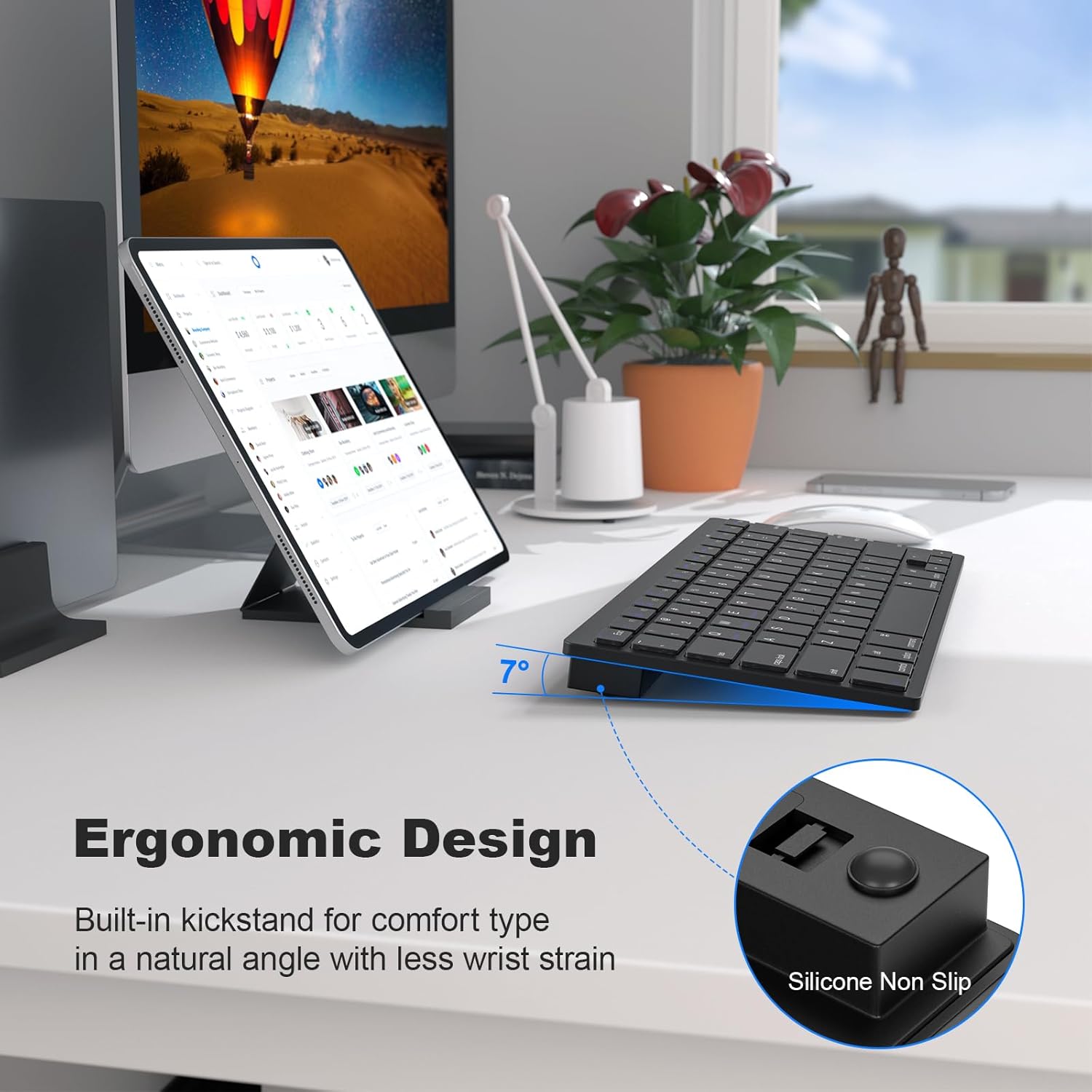
Image: Ergonomic design with a 7-degree tilt and non-slip features for comfortable typing.
4. പരിപാലനം
4.1 വൃത്തിയാക്കൽ
To clean your keyboard, power it off and use a soft, lint-free cloth. For stubborn dirt, slightly dampen the cloth with water or a mild, non-abrasive cleaner. Avoid excessive moisture and do not spray liquids directly onto the keyboard.
4.2 ബാറ്ററി മാറ്റിസ്ഥാപിക്കൽ
When the keyboard's performance diminishes or the low battery indicator illuminates, it's time to replace the two AAA batteries. Refer to section 2.2 for battery installation instructions.
4.3 സംഭരണം
When not in use for extended periods, power off the keyboard to conserve battery life. Store it in a cool, dry place away from direct sunlight and extreme temperatures.
5. പ്രശ്നപരിഹാരം
5.1 കീബോർഡ് കണക്റ്റുചെയ്യുന്നില്ല
- കീബോർഡ് ഓണാണെന്നും പുതിയ ബാറ്ററികൾ ഉണ്ടെന്നും ഉറപ്പാക്കുക.
- നിങ്ങളുടെ ഉപകരണത്തിൽ ബ്ലൂടൂത്ത് പ്രവർത്തനക്ഷമമാക്കിയിട്ടുണ്ടെന്ന് ഉറപ്പാക്കുക.
- Press the 'Connect' button on the back of the keyboard to enter pairing mode.
- നിങ്ങളുടെ ഉപകരണത്തിന്റെ ബ്ലൂടൂത്ത് ക്രമീകരണങ്ങളിൽ നിന്ന് കീബോർഡ് ജോടി വിച്ഛേദിച്ച് വീണ്ടും ജോടിയാക്കാൻ ശ്രമിക്കുക.
- Ensure your device is within the Bluetooth range (typically 10 meters or 33 feet).
5.2 കീകൾ പ്രതികരിക്കുന്നില്ല
- ബാറ്ററി ലെവലുകൾ പരിശോധിച്ച് ആവശ്യമെങ്കിൽ മാറ്റിസ്ഥാപിക്കുക.
- കീബോർഡ് ബ്ലൂടൂത്ത് വഴി ശരിയായി ബന്ധിപ്പിച്ചിട്ടുണ്ടെന്ന് ഉറപ്പാക്കുക.
- Restart both the keyboard and your connected device.
- Verify that the correct system mode (iOS/Mac, Android, Windows) is selected using Fn + Q/W/E.
5.3 Frequent Disconnections
- ശക്തമായ ബ്ലൂടൂത്ത് സിഗ്നൽ ഉറപ്പാക്കാൻ നിങ്ങളുടെ ഉപകരണത്തിന് അടുത്തേക്ക് നീങ്ങുക.
- Avoid interference from other wireless devices operating on the same frequency.
- നിങ്ങളുടെ ഉപകരണത്തിന്റെ ബ്ലൂടൂത്ത് ഡ്രൈവറുകൾ കാലികമാണെന്ന് ഉറപ്പാക്കുക.
- The keyboard features an auto-sleep function after 30 minutes of inactivity to save battery life. Press any key to wake it up.
6 സ്പെസിഫിക്കേഷനുകൾ
| മോഡൽ നമ്പർ | SK-09BT |
| ഉൽപ്പന്ന അളവുകൾ | 11.26 x 4.68 x 0.2 ഇഞ്ച് (28.6 x 11.9 x 0.5 സെ.മീ) |
| ഇനത്തിൻ്റെ ഭാരം | 12.3 ഔൺസ് (348.7 ഗ്രാം) |
| കണക്റ്റിവിറ്റി ടെക്നോളജി | ബ്ലൂടൂത്ത് |
| കീബോർഡ് വിവരണം | Membrane, Scissor Switch Keys |
| അനുയോജ്യമായ ഉപകരണങ്ങൾ | Laptop, PC, Smartphone, Tablet, iPad (iOS, Mac OS, Android, Windows) |
| പ്രത്യേക സവിശേഷതകൾ | Ergonomic, Hotkeys and Media Keys, Lightweight, Portable, Auto-sleep |
| നിറം | കറുപ്പ് |
| മെറ്റീരിയൽ | പ്ലാസ്റ്റിക് |
| പവർ ഉറവിടം | 2 x AAA ബാറ്ററികൾ |
7. ഉൽപ്പന്നം കഴിഞ്ഞുview വീഡിയോ
വീഡിയോ: ഒരു സംക്ഷിപ്ത വിവരണംview of the MOFII Bluetooth Keyboard, demonstrating its features and compact design.
8. വാറണ്ടിയും പിന്തുണയും
8.1 വാറൻ്റി വിവരങ്ങൾ
Specific warranty details for the MOFII SK-09BT keyboard are not provided in this manual. Please refer to the product packaging or contact the retailer/manufacturer for warranty terms and conditions.
8.2 ഉപഭോക്തൃ പിന്തുണ
For technical assistance, troubleshooting, or product inquiries, please contact MOFII customer support through the contact information provided on the product packaging or the official MOFII webസൈറ്റ്.


