1. ആമുഖം
This manual provides essential information for setting up, operating, maintaining, and troubleshooting your Fujitsu Esprimo D757 Small Form Factor (SFF) PC. This refurbished desktop computer is equipped with an Intel Core i5-6400 processor, 16GB DDR4 RAM, a 480GB SSD, and comes with Windows 11 Pro pre-installed. Please read this manual thoroughly before using your computer to ensure proper operation and longevity.
2 സുരക്ഷാ വിവരങ്ങൾ
Observe the following safety precautions to prevent damage to the computer and to ensure your personal safety:
- Do not open the computer casing unless instructed by qualified personnel.
- Ensure the computer is placed on a stable, flat surface with adequate ventilation.
- Keep the computer away from liquids, excessive heat, and direct sunlight.
- Use only the power cable supplied with the computer or a compatible replacement.
- Disconnect the power cable from the wall outlet before cleaning or performing any maintenance.
- വെൻ്റിലേഷൻ ഓപ്പണിംഗുകൾ തടയുന്നത് ഒഴിവാക്കുക.
3. പാക്കേജ് ഉള്ളടക്കം
പാക്കേജിൽ എല്ലാ ഇനങ്ങളും ഉണ്ടെന്ന് ഉറപ്പാക്കുക:
- Fujitsu Esprimo D757 SFF PC
- പവർ കേബിൾ
ഏതെങ്കിലും ഇനങ്ങൾ നഷ്ടപ്പെട്ടാലോ കേടുപാടുകൾ സംഭവിച്ചാലോ, ഉടൻ തന്നെ നിങ്ങളുടെ വിൽപ്പനക്കാരനെ ബന്ധപ്പെടുക.
4. സജ്ജീകരണം
4.1 പെരിഫറലുകൾ ബന്ധിപ്പിക്കുന്നു
Follow these steps to connect your monitor, keyboard, mouse, and other peripherals:
- Place the Fujitsu Esprimo D757 SFF PC on a stable surface.
- Connect your monitor to one of the video output ports on the rear of the PC (DisplayPort or DVI-D).
- Connect your keyboard and mouse to the USB ports (USB 2.0 or USB 3.0) or PS/2 ports on the rear of the PC.
- Connect any other USB devices (e.g., external hard drives, printers) to the available USB ports on the front or rear.
- Connect an Ethernet cable to the RJ-45 LAN port for wired network access (optional).
- ഓഡിയോ ഔട്ട്പുട്ട് ജാക്കിലേക്ക് സ്പീക്കറുകളോ ഹെഡ്ഫോണുകളോ ബന്ധിപ്പിക്കുക.
- Connect the power cable to the PC's power input and then to a wall outlet.
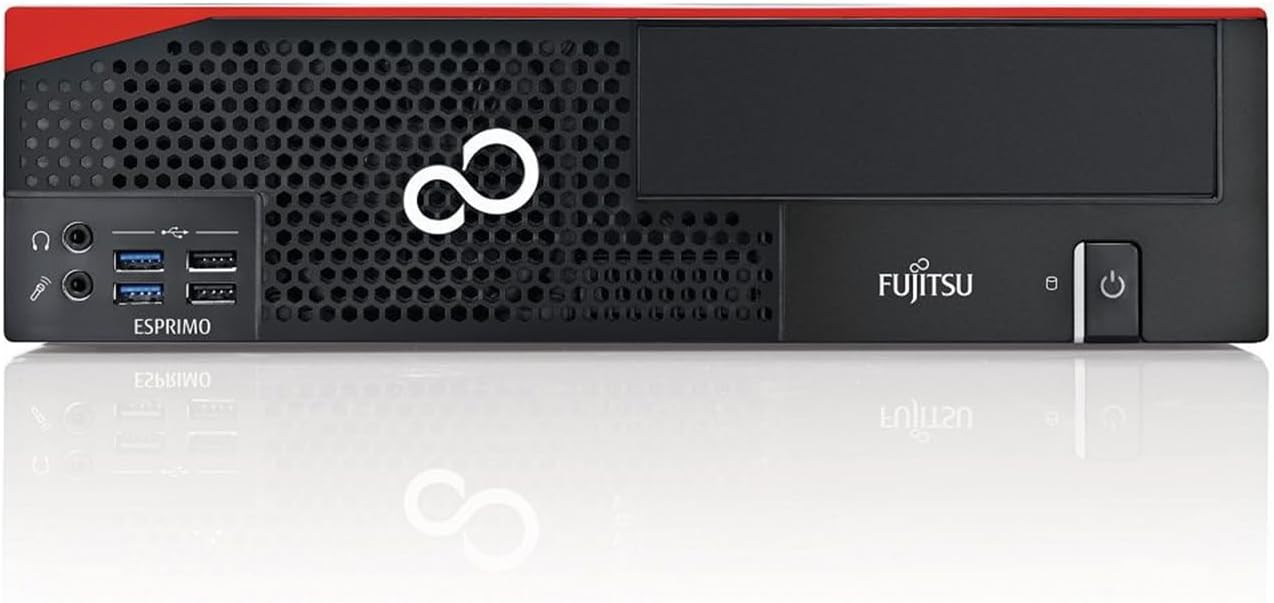
Figure 4.1: Front Panel Connections. This image displays the front of the Fujitsu Esprimo D757 SFF PC, highlighting the accessible ports including USB 3.0, USB 2.0, headphone jack, and microphone jack.

Figure 4.2: Rear Panel Connections. This image shows the back of the Fujitsu Esprimo D757 SFF PC, detailing the various ports such as USB 3.0, USB 2.0, PS/2, DVI-D, DisplayPort, RJ-45 LAN, and audio jacks.
5. പ്രവർത്തന നിർദ്ദേശങ്ങൾ
5.1 പവർ ഓൺ/ഓഫ്
- പവർ ഓണാക്കാൻ: Press the power button located on the front panel of the PC. The system will boot into Windows 11 Pro.
- പവർ ഓഫ് ചെയ്യാൻ: Click the Start button in Windows 11, then select the Power icon, and choose "Shut down". Do not unplug the power cable directly without shutting down the operating system first, as this may cause data loss or system corruption.
- പുനരാരംഭിക്കുക: From the Power menu, select "Restart" to reboot the system.
- ഉറക്കം: From the Power menu, select "Sleep" to put the system into a low-power state.
5.2 അടിസ്ഥാന ഉപയോഗം
Your Fujitsu Esprimo D757 SFF PC comes with Windows 11 Pro pre-installed. For detailed instructions on using Windows 11, please refer to Microsoft's official documentation or online resources.
- ആദ്യ ബൂട്ട്: Upon the first boot, you may be prompted to complete the Windows 11 setup process, including setting up user accounts and network connections.
- സോഫ്റ്റ്വെയർ ഇൻസ്റ്റാളേഷൻ: Install necessary drivers and software as required for your specific applications.
- ഇൻ്റർനെറ്റ് കണക്ഷൻ: Connect to the internet via Ethernet or a compatible Wi-Fi adapter (not included).
6. പരിപാലനം
6.1 വൃത്തിയാക്കൽ
- പുറം: ഒരു സോഫ്റ്റ് ഉപയോഗിക്കുക, ഡിamp cloth to wipe the exterior of the computer. Avoid using harsh chemicals or abrasive cleaners.
- വെന്റിലേഷൻ ഓപ്പണിംഗുകൾ: Periodically clean dust from the ventilation openings using compressed air to ensure proper airflow and prevent overheating.
- തുറമുഖങ്ങൾ: Gently clean dust from ports using compressed air or a soft brush.
6.2 സോഫ്റ്റ്വെയർ അപ്ഡേറ്റുകൾ
Regularly update your Windows 11 operating system and drivers to ensure optimal performance and security. You can check for updates via Windows Update in the Settings menu.
7. പ്രശ്നപരിഹാരം
This section addresses common issues you might encounter with your Fujitsu Esprimo D757 SFF PC.
| പ്രശ്നം | സാധ്യമായ കാരണം | പരിഹാരം |
|---|---|---|
| കമ്പ്യൂട്ടർ പവർ ഓൺ ചെയ്യുന്നില്ല. | പവർ കേബിൾ ശരിയായി ബന്ധിപ്പിച്ചിട്ടില്ല; പവർ ഔട്ട്ലെറ്റ് പ്രശ്നം. | Ensure power cable is securely connected to both the PC and the wall outlet. Test the outlet with another device. |
| മോണിറ്ററിൽ ഡിസ്പ്ലേ ഇല്ല. | Monitor not connected; incorrect input selected on monitor; monitor power issue. | Check monitor cable connections. Ensure monitor is powered on and set to the correct input source (e.g., DisplayPort, DVI). |
| Computer starts but BIOS does not detect hard drive. | SSD connection issue; SSD failure; BIOS settings. | Ensure the SSD is properly seated and connected. If the issue persists, contact technical support as this may indicate a hardware fault. |
| സിസ്റ്റം മന്ദഗതിയിലാണ് അല്ലെങ്കിൽ പ്രതികരിക്കുന്നില്ല. | വളരെയധികം പ്രോഗ്രാമുകൾ പ്രവർത്തിക്കുന്നു; ആവശ്യത്തിന് RAM ഇല്ല; മാൽവെയർ. | Close unnecessary applications. Check Task Manager for resource usage. Run a full system scan for viruses/malware. Consider upgrading RAM if frequently experiencing slowdowns. |
8 സ്പെസിഫിക്കേഷനുകൾ
Detailed technical specifications for the Fujitsu Esprimo D757 SFF PC:
| ഫീച്ചർ | വിശദാംശങ്ങൾ |
|---|---|
| ബ്രാൻഡ് | ഫുജിത്സു |
| മോഡൽ നമ്പർ | D757-SFF-I5 |
| ഓപ്പറേറ്റിംഗ് സിസ്റ്റം | വിൻഡോസ് 11 പ്രോ |
| പ്രോസസ്സർ | Intel Core i5-6400 (2.7 GHz, up to 3.3 GHz Turbo Boost, 4 Cores, 4 Threads) |
| ഗ്രാഫിക്സ് | ഇൻ്റഗ്രേറ്റഡ് ഇൻ്റൽ എച്ച്ഡി ഗ്രാഫിക്സ് 530 |
| റാം | 16 GB DDR4 (Max. 64 GB, 4 DDR4 slots, 2400 MHz supported) |
| സംഭരണം | 480 GB SATA 2.5" SSD |
| മദർബോർഡ് | FUJITSU D3531-A11 |
| വൈദ്യുതി വിതരണം | 250 W |
| ഫ്രണ്ട് പോർട്ടുകൾ | 2 x USB 3.0, 2 x USB 2.0, 1 x Headphone, 1 x Microphone |
| പിൻ തുറമുഖങ്ങൾ | 4 x USB 3.0, 2 x USB 2.0, 2 x PS/2, 1 x DVI-D, 2 x DisplayPort, 1 x RJ-45 LAN (10/100/1000Mbps), 2 x Audio |
| ആന്തരിക സ്ലോട്ടുകൾ | 1 x M.2 2280 (PCIe), 1 x PCI-Express 3.0 16x (Low Profile), 1 x PCI-Express 2.0 16x (Low Profile), 2 x PCI-Express 1x (Low Profile), 5 x SATA (1 occupied) |
| അളവുകൾ (H x W x D) | 332 x 338 x 89 മിമി |
| ഭാരം | 8 കി.ഗ്രാം |
9. വാറൻ്റിയും പിന്തുണയും
This product is professionally refurbished and comes with a 12 മാസ വാറൻ്റി. For warranty claims or technical support, please contact your vendor or the authorized service center. Keep your purchase receipt as proof of purchase.
For additional support and resources, you may visit the official Fujitsu support website or consult online forums for common issues and solutions related to the Esprimo D757 series.


