1. ആമുഖം
Thank you for choosing the IDOLPRO UHF-X3 Golden Phoenix Dual Wireless Microphone System. This system is designed to provide high-quality audio performance for various applications, including karaoke, live performances, and presentations. It features a 900 MHz frequency range for reliable signal transmission, an engraved handheld microphone design, and advanced functionalities like intelligent frequency scanning and vocal support technology. Please read this manual thoroughly to ensure proper setup, operation, and maintenance of your new wireless microphone system.
2 സുരക്ഷാ വിവരങ്ങൾ
- വൈദ്യുതി വിതരണം: Use only the specified power adapter for the receiver. Ensure the voltagഇ ആവശ്യകതകളുമായി പൊരുത്തപ്പെടുന്നു.
- ബാറ്ററി സുരക്ഷ: Use only AA batteries for the microphones. Do not mix old and new batteries, or different types of batteries. Remove batteries if the microphones will not be used for an extended period.
- ഈർപ്പവും ചൂടും: Keep the system away from water, high humidity, and extreme temperatures. Do not expose to direct sunlight or heat sources.
- വെൻ്റിലേഷൻ: Ensure adequate ventilation for the receiver to prevent overheating. Do not block ventilation openings.
- സേവനം: ഈ ഉൽപ്പന്നം സ്വയം സേവിക്കാൻ ശ്രമിക്കരുത്. യോഗ്യതയുള്ള സേവന ഉദ്യോഗസ്ഥർക്ക് എല്ലാ സേവനങ്ങളും റഫർ ചെയ്യുക.
- പ്ലേസ്മെൻ്റ്: Place the receiver on a stable, flat surface. Avoid placing it near other electronic devices that may cause interference.
3. പാക്കേജ് ഉള്ളടക്കം
പെട്ടി ശ്രദ്ധാപൂർവ്വം അൺപാക്ക് ചെയ്ത് എല്ലാ ഇനങ്ങളും ഉണ്ടെന്ന് ഉറപ്പാക്കുക:
- 1 x UHF-X3 Wireless Receiver
- 2 x UHF-X3 Wireless Microphones (Golden Phoenix Engraved)
- 1 x Power Adapter for Receiver
- 1 x 1/4" TS Cable
- 4 x AA Batteries (2 for each microphone)
4. ഉൽപ്പന്നം കഴിഞ്ഞുview
4.1. വയർലെസ് റിസീവർ
The receiver unit processes the audio signals from the microphones and outputs them to your sound system.

ചിത്രം: പിൻഭാഗം view of the UHF-X3 wireless receiver, showing the DC power input, two antenna ports, CH B Balanced XLR output, CH A+B 1/4" audio output, and CH A Balanced XLR output.
- ആന്റിന: For receiving wireless signals from the microphones.
- പവർ ഇൻപുട്ട് (DC 12V): നൽകിയിരിക്കുന്ന പവർ അഡാപ്റ്ററിലേക്ക് ബന്ധിപ്പിക്കുന്നു.
- ഓഡിയോ pട്ട്പുട്ടുകൾ: Includes balanced XLR outputs for each channel (CH A, CH B) and a mixed 1/4" TS output (CH A+B) for connecting to an amplifier or karaoke machine.
- ഫ്രണ്ട് പാനൽ ഡിസ്പ്ലേ: Transparent LCDs show important information like battery levels and signal strengths for each microphone.
4.2. വയർലെസ് മൈക്രോഫോണുകൾ
The handheld microphones feature a durable design and an integrated display.
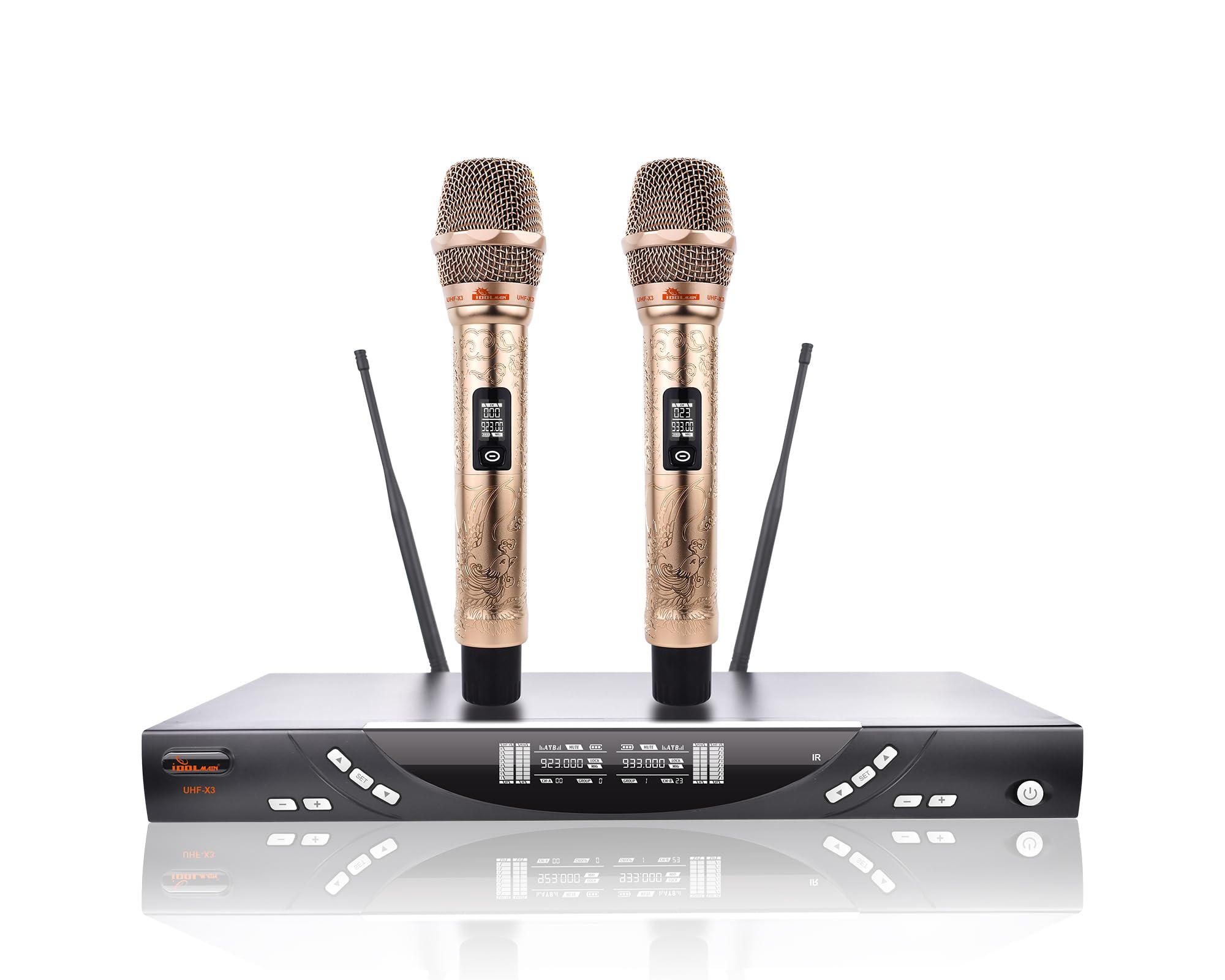
Image: A single IDOLPRO UHF-X3 wireless microphone, showcasing its golden finish, intricate phoenix engraving, and the LCD screen displaying channel and frequency information.
- മൈക്രോഫോൺ ഹെഡ്: Features a cardioid polar pattern to minimize background noise and feedback.
- LCD ഡിസ്പ്ലേ: Shows channel, frequency, and battery status.
- പവർ ബട്ടൺ: Turns the microphone on/off.
- ബാറ്ററി കമ്പാർട്ട്മെൻ്റ്: താഴെയായി സ്ഥിതിചെയ്യുന്നു, രണ്ട് AA ബാറ്ററികൾ സൂക്ഷിക്കുന്നു.
- Engraved Design: The microphone body features a Golden Phoenix engraving, made from a premium iron shell with a scratch-resistant coating.
5. സജ്ജീകരണ നിർദ്ദേശങ്ങൾ
- Position the Receiver: Place the UHF-X3 receiver on a stable surface, ensuring good line of sight to where the microphones will be used. Extend the antennas vertically.
- പവർ ബന്ധിപ്പിക്കുക: Connect the provided power adapter to the DC 12V input on the rear of the receiver, then plug it into a power outlet.
- ഓഡിയോ put ട്ട്പുട്ട് കണക്റ്റുചെയ്യുക:
- For individual microphone control, use XLR cables (not included) to connect the CH A and CH B Balanced XLR outputs to your mixer or ampജീവൻ.
- For a combined stereo signal, use the provided 1/4" TS cable to connect the CH A+B output to your mixer or ampജീവൻ.
- Install Microphone Batteries: Unscrew the bottom cap of each microphone. Insert two AA batteries into each microphone, observing the correct polarity (+/-). Screw the cap back on securely.
- പവർ ഓൺ: Turn on the receiver using its power button. Then, turn on each microphone by pressing and holding its power button. The microphone's LCD display should illuminate.
- Frequency Scanning (Automatic Pairing): The system is designed for intelligent frequency scanning. Upon powering on, the receiver and microphones will automatically scan for the best available channel and pair. Ensure the microphone's channel matches the receiver's display for that channel.
- നേട്ടം ക്രമീകരിക്കുക: The receiver features adjustable gain controls for each microphone channel. Start with the gain set to a low level and gradually increase it during a sound check to achieve optimal audio levels without distortion or feedback.
6. പ്രവർത്തന നിർദ്ദേശങ്ങൾ
6.1. Using the Microphones
- Holding the Microphone: Hold the microphone firmly, pointing the top (grille) towards the sound source. Avoid covering the grille with your hand, as this can affect sound quality and signal reception.
- കാർഡിയോയിഡ് പോളാർ പാറ്റേൺ: The microphones utilize a cardioid polar pattern, which is most sensitive to sound from the front and less sensitive to sound from the sides and rear. This helps to isolate the desired sound source and reduce background noise and feedback.
- Vocal Support Technology: This system incorporates vocal support technology to enhance vocal performances. Experiment with your vocal delivery to utilize this feature effectively.
6.2. സിസ്റ്റം സവിശേഷതകൾ
- Auto Sound Cut-off: If a microphone is dropped, the system will automatically cut off the sound to prevent damage and loud thumps through the sound system.
- ECO-MODE: To conserve energy, the system will switch to a power-saving ECO-MODE after five minutes of microphone inactivity.
- യാന്ത്രിക ഷട്ട്ഡൗൺ: If a microphone remains inactive for 30 minutes, it will automatically shut down to prevent overheating and further conserve battery life.
- Transparent LCDs: Monitor battery levels and signal strengths on both the microphone and receiver displays for optimal performance management.
7. പരിപാലനം
- വൃത്തിയാക്കൽ: റിസീവറും മൈക്രോഫോണുകളും വൃത്തിയാക്കാൻ മൃദുവായതും ഉണങ്ങിയതുമായ തുണി ഉപയോഗിക്കുക. ലിക്വിഡ് ക്ലീനറുകളോ ഉരച്ചിലുകളുള്ള വസ്തുക്കളോ ഉപയോഗിക്കരുത്.
- ബാറ്ററി മാറ്റിസ്ഥാപിക്കൽ: Replace AA batteries in the microphones when the low battery indicator appears on the LCD. Always replace both batteries in a microphone simultaneously.
- സംഭരണം: When not in use for extended periods, remove batteries from the microphones and store the system in a cool, dry place away from direct sunlight.
8. പ്രശ്നപരിഹാരം
| പ്രശ്നം | സാധ്യമായ കാരണം | പരിഹാരം |
|---|---|---|
| മൈക്രോഫോണിൽ നിന്ന് ശബ്ദമില്ല | Microphone or receiver not powered on; low batteries; incorrect audio connection; microphone not paired. | Ensure all devices are powered on. Replace batteries. Check audio cable connections. Verify microphone and receiver are paired (check LCD displays). |
| ഇടപെടൽ അല്ലെങ്കിൽ സ്റ്റാറ്റിക് | Other wireless devices nearby; receiver too far from microphones; environmental obstacles. | Move receiver closer to microphones. Ensure clear line of sight. Avoid placing receiver near Wi-Fi routers or other strong signal sources. The system uses intelligent frequency scanning to find clear channels. |
| കുറഞ്ഞ ശബ്ദം അല്ലെങ്കിൽ വികലമായ ശബ്ദം | Microphone gain set too low or too high; low microphone batteries; speaking too far from microphone. | Adjust the gain control on the receiver. Replace microphone batteries. Speak closer to the microphone head. |
| Microphone automatically shuts off | Inactivity for 30 minutes. | This is a normal power-saving feature. Turn the microphone back on if needed. |
| Microphone enters ECO-MODE | Inactivity for 5 minutes. | This is a normal power-saving feature. Resume use to exit ECO-MODE. |
9 സ്പെസിഫിക്കേഷനുകൾ
| മോഡലിൻ്റെ പേര് | UHF-X3 |
| ബ്രാൻഡ് | IDOLPRO |
| ഫ്രീക്വൻസി റേഞ്ച് | 900 MHz |
| മൈക്രോഫോൺ ഫോം ഫാക്ടർ | ഹാൻഡ്ഹെൽഡ് |
| ചാനലുകളുടെ എണ്ണം | 2 |
| പോളാർ പാറ്റേൺ | ഏകദിശയിലുള്ള (കാർഡിയോയിഡ്) |
| കണക്റ്റിവിറ്റി ടെക്നോളജി | XLR |
| കണക്റ്റർ തരം | XLR, 1/4" TS |
| മൈക്രോഫോൺ പവർ സോഴ്സ് | 2 AA batteries per microphone |
| റിസീവർ പവർ ഉറവിടം | കോർഡഡ് ഇലക്ട്രിക് (DC 12V) |
| Microphone Material | Aluminum (Premium Iron Shell) |
| സിഗ്നൽ-ടു-നോയിസ് അനുപാതം | 60 ഡി.ബി |
| ഇനത്തിൻ്റെ ഭാരം | 7 പൗണ്ട് (ആകെ സിസ്റ്റം) |
| ശുപാർശ ചെയ്യുന്ന ഉപയോഗങ്ങൾ | കരോക്കെ |
| പ്രത്യേക സവിശേഷതകൾ | Battery Indicator Light, Vocal Enhance, Intelligent Frequency Scanning, Auto Sound Cut-off, ECO-MODE, Automatic Shutdown |
10. വാറൻ്റിയും പിന്തുണയും
This product comes with a manufacturer's warranty. For specific warranty details, please refer to the documentation included with your purchase or visit the official IDOLPRO website. For technical support, troubleshooting assistance, or service inquiries, please contact IDOLPRO customer service through their official channels.


