1. ആമുഖം
This manual provides detailed instructions for setting up, operating, and maintaining your BoyKeep 2K Wi-Fi Indoor Camera. Designed for indoor surveillance, this camera offers high-resolution video, two-way audio, motion detection, and versatile storage options, making it ideal for monitoring pets, babies, or general home security.

Figure 1: BoyKeep 2K Wi-Fi Indoor Camera (White model).
2. പാക്കേജ് ഉള്ളടക്കം
- BoyKeep 2K Wi-Fi Indoor Camera (Model K30)
- പവർ അഡാപ്റ്റർ
- യുഎസ്ബി പവർ കേബിൾ
- മൗണ്ടിംഗ് ആക്സസറികൾ
- ഉപയോക്തൃ മാനുവൽ (ഈ പ്രമാണം)
3. സജ്ജീകരണ ഗൈഡ്
3.1 പ്രാരംഭ പവർ-അപ്പ്
- Unpack the camera and all accessories.
- Connect the USB power cable to the camera's power port and the power adapter.
- Plug the power adapter into a standard electrical outlet. The camera will power on and initiate its self-test.
- Wait for the camera's indicator light to flash, indicating it is ready for connection.
3.2 ആപ്പ് ഇൻസ്റ്റാളേഷനും അക്കൗണ്ട് സൃഷ്ടിയും
- Download the "BoyKeep" app from your smartphone's app store (available for Android and iOS).
- ആപ്പ് തുറന്ന് സ്ക്രീനിലെ നിർദ്ദേശങ്ങൾ പാലിച്ച് പുതിയൊരു അക്കൗണ്ട് സൃഷ്ടിക്കുക അല്ലെങ്കിൽ നിങ്ങൾക്ക് ഇതിനകം അക്കൗണ്ട് ഉണ്ടെങ്കിൽ ലോഗിൻ ചെയ്യുക.
3.3 Wi-Fi-ലേക്ക് ബന്ധിപ്പിക്കുന്നു
- In the BoyKeep app, tap the "+" icon to add a new device.
- ലിസ്റ്റിൽ നിന്ന് നിങ്ങളുടെ ക്യാമറ മോഡൽ തിരഞ്ഞെടുക്കുക.
- Follow the app's instructions to connect the camera to your Wi-Fi network. The camera supports both 2.4 GHz and 5 GHz Wi-Fi bands.
- Ensure your smartphone is connected to the same Wi-Fi network you intend to connect the camera to.
- Scan the QR code displayed on your phone screen with the camera lens when prompted. Hold the phone approximately 15-20 cm (6-8 inches) from the camera.
- Once connected, the camera's indicator light will turn solid, and you will hear a confirmation sound.

Figure 2: Illustrates the camera's 355° horizontal pan and 95° vertical tilt capabilities, along with key features like motion tracking, two-way audio, 2K video, and night vision.
4. പ്രവർത്തന നിർദ്ദേശങ്ങൾ
4.1 തത്സമയം View കൂടാതെ പാൻ/ടിൽറ്റ് നിയന്ത്രണം
- Open the BoyKeep app and select your camera from the device list to access the live view.
- Use the directional controls within the app to pan the camera horizontally (355°) and tilt it vertically (95°) to adjust the viewing ആംഗിൾ.

Figure 3: The camera offers a wide 360-degree coverage, allowing comprehensive monitoring of your space.
4.2 ടു-വേ ഓഡിയോ
- തത്സമയം മുതൽ view, ക്യാമറയുടെ സ്പീക്കറിലൂടെ സംസാരിക്കാൻ മൈക്രോഫോൺ ഐക്കണിൽ ടാപ്പ് ചെയ്യുക.
- ക്യാമറയുടെ ചുറ്റുപാടിൽ നിന്നുള്ള ഓഡിയോ കേൾക്കാൻ സ്പീക്കർ ഐക്കണിൽ ടാപ്പ് ചെയ്യുക.

ചിത്രം 4: ക്യാമറ ടു-വേ ഓഡിയോയെ പിന്തുണയ്ക്കുന്നു, ഇത് ക്യാമറയ്ക്ക് സമീപമുള്ള വ്യക്തികളുമായി ആശയവിനിമയം സാധ്യമാക്കുന്നു.
4.3 മോഷൻ ഡിറ്റക്ഷനും അലേർട്ടുകളും
- Enable motion detection in the app settings to receive real-time alerts on your smartphone when motion is detected.
- Adjust sensitivity levels and set specific monitoring zones to minimize false alarms.
- The camera can automatically track detected motion and record video clips.
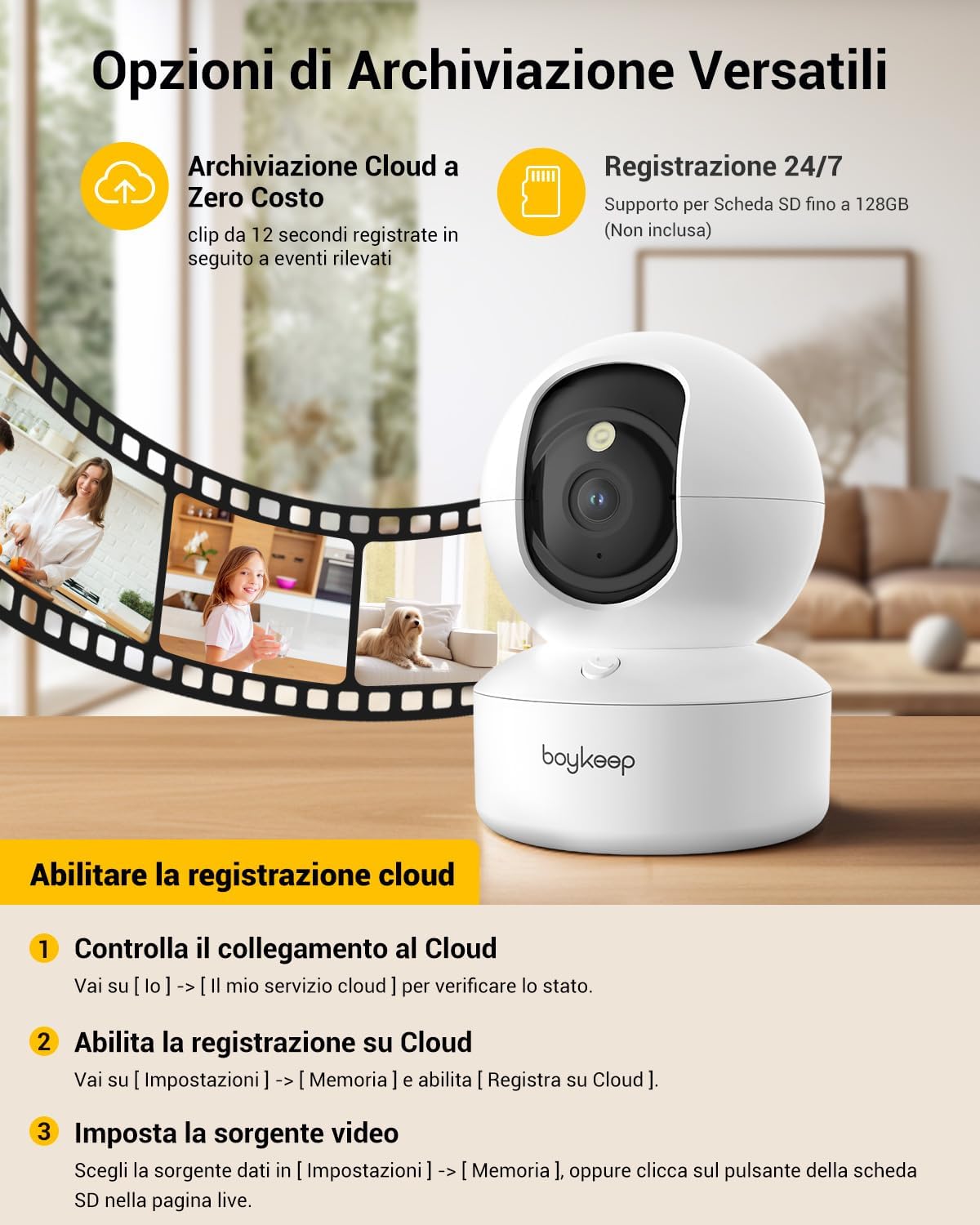
Figure 5: The camera features intelligent AI detection and tracking for people and pets, capturing key moments.
4.4 നൈറ്റ് വിഷൻ
- The camera automatically switches to night vision mode in low-light conditions using its infrared LEDs.
- This provides clear black-and-white video footagപൂർണ്ണമായ ഇരുട്ടിൽ 10 മീറ്റർ വരെ.

Figure 6: The camera provides clear 24-hour crystal-clear vision, including effective night vision.
4.5 റെക്കോർഡിംഗ്, സംഭരണ ഓപ്ഷനുകൾ
- ക്ലൗഡ് സംഭരണം: The camera offers free cloud storage for 12-second event clips over the last 24 hours (requires activation in the app). This provides a secure backup.
- മൈക്രോ എസ്ഡി കാർഡ് സംഭരണം: Insert a Micro SD card (up to 128 GB, not included) into the camera's slot for continuous recording or event-triggered recording.

ചിത്രം 7: ഓവർview of versatile storage options, including free cloud storage for 12-second event clips and 24/7 recording support via Micro SD card (up to 128GB, not included).
4.6 Enabling Cloud Recording (App Instructions)
- Open the BoyKeep app and select your camera.
- പോകുക [ഞാൻ] → [My Cloud Service] നില പരിശോധിക്കാൻ.
- നാവിഗേറ്റ് ചെയ്യുക [ക്രമീകരണങ്ങൾ] → [ഓർമ്മ] കൂടാതെ പ്രവർത്തനക്ഷമമാക്കുക [Record to Cloud].
- Choose your video source from [ക്രമീകരണങ്ങൾ] → [ഓർമ്മ], or click the SD card button on the live page.
Video 1: Demonstrates the process of enabling cloud recording within the BoyKeep app settings.
Video 2: Shows the BoyKeep indoor camera in action, highlighting its features and functionality.
5. പരിപാലനം
- വൃത്തിയാക്കൽ: Gently wipe the camera lens and body with a soft, dry cloth. Do not use liquid cleaners or abrasive materials.
- സോഫ്റ്റ്വെയർ അപ്ഡേറ്റുകൾ: Regularly check the BoyKeep app for firmware updates to ensure optimal performance and security.
- പ്ലേസ്മെൻ്റ്: Ensure the camera is placed on a stable surface or securely mounted to prevent accidental falls. Avoid placing it in direct sunlight or near heat sources.
6. പ്രശ്നപരിഹാരം
| ഇഷ്യൂ | സാധ്യമായ കാരണം / പരിഹാരം |
|---|---|
| ക്യാമറ ഓഫ്ലൈനിൽ | Check Wi-Fi connection, ensure camera is powered on, restart camera and router. |
| Wi-Fi-യിലേക്ക് കണക്റ്റുചെയ്യാൻ കഴിയില്ല | Ensure correct Wi-Fi password, camera is within router range, and you are connecting to a supported 2.4GHz or 5GHz network. Try resetting the camera. |
| മോശം വീഡിയോ നിലവാരം | Check network speed, ensure lens is clean, adjust camera placement for better lighting. |
| ചലന മുന്നറിയിപ്പുകൾ ലഭിച്ചില്ല. | Verify motion detection is enabled in app settings, check notification settings on your phone, ensure app is running in the background. |
| ടു-വേ ഓഡിയോ പ്രവർത്തിക്കുന്നില്ല | Check microphone and speaker settings in the app, ensure volume is up on your phone and camera. |
7 സ്പെസിഫിക്കേഷനുകൾ
| ഫീച്ചർ | വിശദാംശങ്ങൾ |
|---|---|
| മോഡൽ നമ്പർ | K30 |
| റെസലൂഷൻ | 2K (1296p) |
| പാൻ ആംഗിൾ | 355° |
| ടിൽറ്റ് ആംഗിൾ | 95° |
| കണക്റ്റിവിറ്റി | വൈഫൈ (2.4GHz & 5GHz) |
| നൈറ്റ് വിഷൻ റേഞ്ച് | 10 മീറ്റർ വരെ |
| സ്റ്റോറേജ് ഓപ്ഷനുകൾ | ക്ലൗഡ് സ്റ്റോറേജ്, മൈക്രോ എസ്ഡി കാർഡ് (128GB വരെ) |
| പവർ ഉറവിടം | Wired Electric (5V, 3W) |
| അളവുകൾ (LxWxH) | 8.38 x 8.38 x 16.26 സെ.മീ |
| ഭാരം | 310 ഗ്രാം |
| ഉപയോഗം | ഇൻഡോർ |
8. വാറൻ്റിയും പിന്തുണയും
BoyKeep provides a 24-month warranty for this product. For any issues, questions, or suggestions, please contact BoyKeep customer support. They aim to provide 100% satisfactory solutions within 3 working days.
You can typically find support contact information within the BoyKeep app or on the official BoyKeep webസൈറ്റ്.


