1. ഉൽപ്പന്നം കഴിഞ്ഞുview
The Meross Connected Indoor Thermometer Hygrometer, model MS130H, is a smart device designed to monitor various environmental parameters within your home. When paired with the Meross MSH450 Hub, it provides real-time data on temperature, humidity, light levels, dew point temperature, and saturated water vapor pressure difference. This device integrates seamlessly into your smart home ecosystem, offering remote monitoring, alert notifications, and multi-scene device linking capabilities.

Figure 1: Meross MS130H Thermometer Hygrometer, showing the device, the Meross app interface, and the Meross Hub with compatibility logos for Alexa, Google Home, and Apple Home.
പ്രധാന സവിശേഷതകൾ:
- Multi-Scene Device Linking: Monitor environmental data and link with other Meross smart devices (e.g., humidifiers, plugs, switches) to automate actions based on predefined conditions.
- High Precision and Long Battery Life: Equipped with an advanced Swiss sensor, offering temperature accuracy of ±0.1°C and humidity accuracy of ±2%. Powered by 4 AA batteries (included), providing up to 3 years of battery life.
- Remote Monitoring & Alarm Notifications: Access real-time environmental data from anywhere via the Meross app. Receive instant notifications when temperature, humidity, or light levels exceed set thresholds.
- Large LCD Screen & Shortcut Buttons: A 3.7-inch LCD screen displays temperature, humidity, date, time, light, comfort level, and battery status, refreshing every 3 seconds. Two shortcut buttons on top allow for quick smart scene activation.
- മൾട്ടി-പ്ലാറ്റ്ഫോം അനുയോജ്യത: When paired with the Meross MSH450 Hub, it is compatible with Matter, Apple HomeKit, Alexa, Google Home, and SmartThings.
- Historical Data Storage & Export: View and export up to two years of historical data (temperature and humidity curves) from the cloud via the Meross app.

Figure 2: Key features of the Meross Thermometer Hygrometer, highlighting its high precision sensor (±0.1°C, ±2% accuracy, 4-second data refresh), 36 months of battery life, and the integrated Swiss Sensirion chip.
2. സജ്ജീകരണ ഗൈഡ്
To set up your Meross Thermometer Hygrometer (MS130H), you will need the Meross MSH450 Hub and the Meross app. Ensure your Wi-Fi network is 2.4 GHz and your smartphone meets the minimum OS requirements.
2.1 പാക്കേജ് ഉള്ളടക്കം:
- 1 x Meross Connected Thermometer Hygrometer (MS130H)
- 1 x Meross Hub MSH450
- 4 x AA ആൽക്കലൈൻ ബാറ്ററികൾ
- 1 x ഉപയോക്തൃ മാനുവൽ (ഈ പ്രമാണം)
2.2 ബാറ്ററി ഇൻസ്റ്റാളേഷൻ:
- Locate the battery compartment on the back of the MS130H device.
- കമ്പാർട്ട്മെന്റ് കവർ തുറക്കുക.
- 4 AA ആൽക്കലൈൻ ബാറ്ററികൾ ഇടുക, ശരിയായ പോളാരിറ്റി (+/-) ഉറപ്പാക്കുക.
- ബാറ്ററി കമ്പാർട്ട്മെൻ്റ് കവർ സുരക്ഷിതമായി അടയ്ക്കുക.
2.3 Meross App and Hub Setup:
- മെറോസ് ആപ്പ് ഡൗൺലോഡ് ചെയ്യുക: ഇതിനായി തിരയുക "Meross" in the Apple App Store or Google Play Store and download the official app.
- ഒരു അക്കൗണ്ട് സൃഷ്ടിക്കുക: മെറോസ് ആപ്പ് തുറന്ന് പുതിയൊരു അക്കൗണ്ടിനായി രജിസ്റ്റർ ചെയ്യുക അല്ലെങ്കിൽ നിങ്ങൾക്ക് ഇതിനകം ഒരു അക്കൗണ്ട് ഉണ്ടെങ്കിൽ ലോഗിൻ ചെയ്യുക.
- Set up the Meross Hub (MSH450):
- Plug in your Meross MSH450 Hub to a power outlet.
- Follow the in-app instructions to add the Hub to your Meross account and connect it to your 2.4 GHz Wi-Fi network.
- Add the Thermometer Hygrometer:
- In the Meross app, tap the "+" icon to add a new device.
- Select the Thermometer Hygrometer (MS130H) from the list of available devices.
- Follow the on-screen prompts to pair the MS130H with your Meross MSH450 Hub. This typically involves pressing a button on the device or scanning a QR code.
- അനുയോജ്യത ആവശ്യകതകൾ:
- An existing 2.4 GHz Wi-Fi network is required.
- Smartphone with iOS 16.1 or higher, or Android 8.1 or higher.
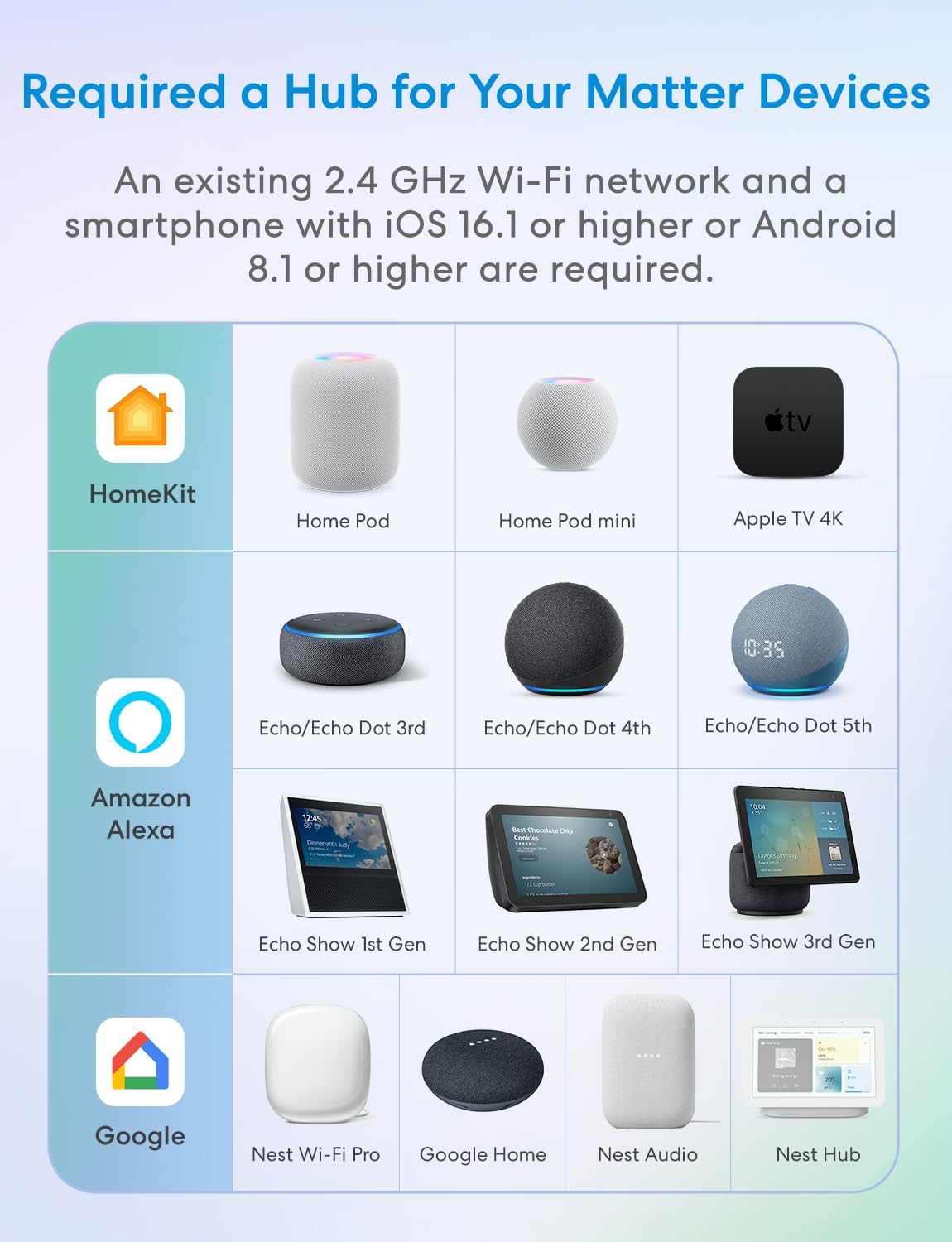
Figure 3: Diagram illustrating the Meross Hub's compatibility with various smart home platforms, including Apple HomeKit (HomePod, Apple TV 4K), Amazon Alexa (Echo, Echo Show devices), and Google Home (Nest Wi-Fi Pro, Google Home, Nest Audio, Nest Hub).
3. പ്രവർത്തന നിർദ്ദേശങ്ങൾ
Once your Meross Thermometer Hygrometer is set up, you can begin monitoring your environment and utilizing its smart features.
3.1 Understanding the LCD Display:
The 3.7-inch LCD screen provides comprehensive real-time information, refreshing every 3 seconds. The display typically shows:
- Current Temperature (°C/°F)
- ആപേക്ഷിക ആർദ്രത (%)
- തീയതിയും സമയവും
- ലൈറ്റ് ലെവൽ (ലക്സ്)
- Comfort Indicator (e.g., suitability, rain gear icons)
- ബാറ്ററി നില
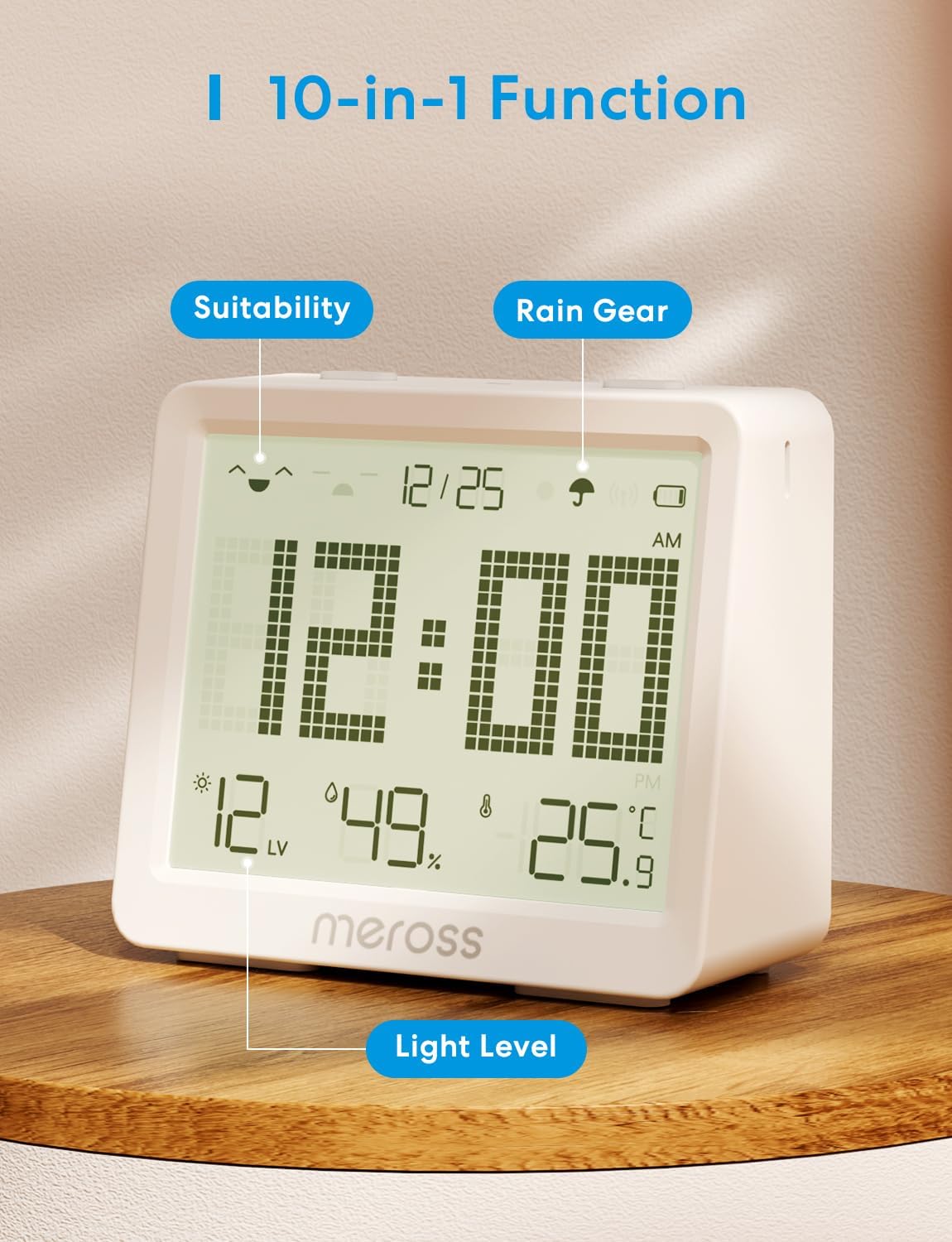
Figure 4: Close-up of the Meross Thermometer Hygrometer's LCD display, highlighting indicators for suitability, rain gear, and light level, demonstrating its multi-functional display capabilities.
3.2 Using Shortcut Buttons:
The two buttons located on the top of the device can be configured within the Meross app to trigger smart scenes or control other Meross products. Refer to the Meross app for detailed instructions on customizing these buttons.

Figure 5: The Meross Thermometer Hygrometer placed on a nightstand, illustrating how its top buttons can be used to control other Meross smart home devices, such as a smart lamp, smart blinds, or smart plugs.
3.3 Remote Monitoring and Alerts:
The Meross app allows you to monitor environmental changes remotely. You can set custom thresholds for temperature, humidity, and light. If these thresholds are exceeded, the app will send instant notifications to your smartphone.

Figure 6: Screenshot of the Meross app displaying real-time alerts for temperature and humidity, showing customizable alarm thresholds for both parameters.
3.4 Historical Data Access:
The Meross app stores historical temperature and humidity data in the cloud for up to two years. You can view this data in graphical format (hourly, daily, weekly, monthly) and export it for further analysis.

Figure 7: A smartphone displaying the Meross app's historical data view, showing temperature and humidity trends over time, with options to view data by day, week, month, or year, and an option to export data.
3.5 Multi-Scene Function:
Leverage the Meross Hub to create automated smart home scenarios. For example, you can set a rule to automatically turn on a humidifier if the humidity drops below a certain percentage, or activate a fan if the temperature rises too high.

Figure 8: An illustration of the Meross multi-scene function, where the thermometer hygrometer (center) triggers a humidifier (left) to turn on when humidity levels are low, creating a comfortable environment.
3.6 Voice Query Function:
With compatibility for Alexa and Google Home, you can use voice commands to inquire about the current temperature and humidity readings. Ensure your Meross Hub is linked to your preferred voice assistant platform.
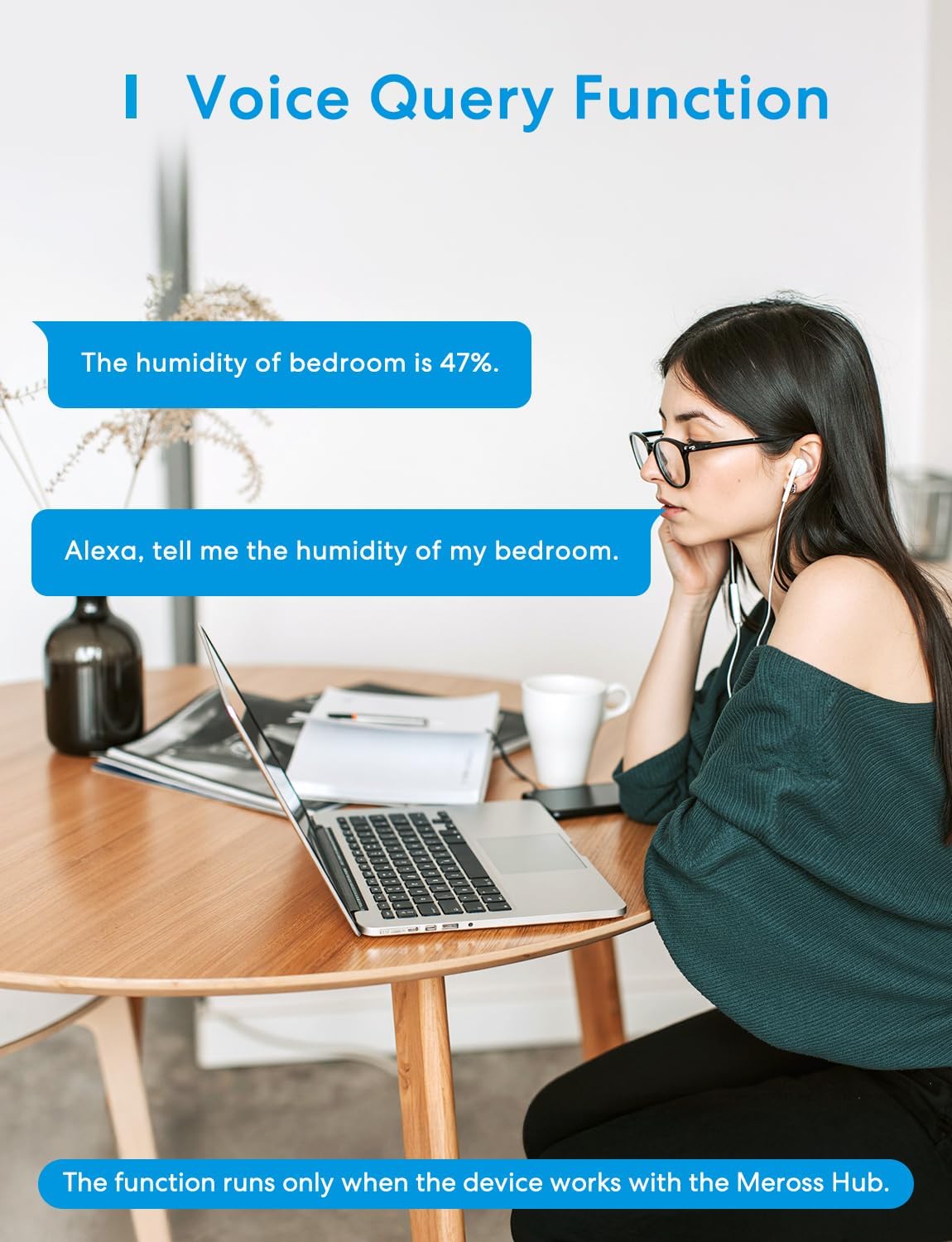
Figure 9: A user interacting with a voice assistant to query the humidity level, demonstrating the voice query function of the Meross Thermometer Hygrometer through platforms like Alexa.
4. പരിപാലനം
4.1 ബാറ്ററി മാറ്റിസ്ഥാപിക്കൽ:
The Meross MS130H is designed for long battery life (up to 3 years). When the battery indicator on the LCD screen or in the Meross app shows low power, replace all 4 AA alkaline batteries. Follow the battery installation steps outlined in Section 2.2.
4.2 വൃത്തിയാക്കൽ:
To clean the device, gently wipe the exterior with a soft, dry cloth. Do not use abrasive cleaners or immerse the device in water. Keep the sensor openings clear of dust and debris to ensure accurate readings.
5. പ്രശ്നപരിഹാരം
5.1 Device Not Connecting to Hub:
- Ensure the Meross MSH450 Hub is powered on and connected to your 2.4 GHz Wi-Fi network.
- Check if the MS130H has fresh batteries and is powered on.
- Make sure the device is within range of the Meross Hub.
- Try restarting both the MS130H (by removing and reinserting batteries) and the Meross Hub.
- Follow the pairing instructions in the Meross app carefully.
5.2 Inaccurate Readings:
- നേരിട്ട് സൂര്യപ്രകാശം, ഡ്രാഫ്റ്റുകൾ, താപ സ്രോതസ്സുകൾ എന്നിവയിൽ നിന്ന് മുക്തമായ ഒരു സ്ഥലത്താണ് ഉപകരണം സ്ഥാപിച്ചിരിക്കുന്നതെന്ന് ഉറപ്പാക്കുക, ഇത് വായനയെ ബാധിച്ചേക്കാം.
- സെൻസർ തുറക്കലുകളിൽ പൊടിയോ അവശിഷ്ടങ്ങളോ തടസ്സമില്ലെന്ന് ഉറപ്പാക്കുക.
- Allow the device some time to stabilize after placement or battery replacement.
5.3 No Notifications Received:
- Check your smartphone's notification settings to ensure the Meross app has permission to send notifications.
- Verify that the alert thresholds are correctly set in the Meross app.
- Ensure your Meross Hub and MS130H are connected to the internet.
5.4 Historical Data Not Updating:
- Confirm that the MS130H is continuously connected to the Meross Hub and the internet.
- മെറോസ് ആപ്പ് ഏറ്റവും പുതിയ പതിപ്പിലേക്ക് അപ്ഡേറ്റ് ചെയ്തിട്ടുണ്ടെന്ന് ഉറപ്പാക്കുക.
6 സ്പെസിഫിക്കേഷനുകൾ
| ആട്രിബ്യൂട്ട് | മൂല്യം |
|---|---|
| നിർമ്മാതാവ് | മെറോസ് |
| മോഡൽ നമ്പർ | MS130H |
| അളവുകൾ | 23.1 x 14.7 x 5.5 സെ.മീ |
| ഭാരം | 560 ഗ്രാം |
| ബാറ്ററികൾ | 4 x AA Alkaline (included) |
| നിറം | വെള്ള |
| ശൈലി | WITH HUB (MSH450) |
| അളക്കൽ കൃത്യത | Temperature: ±0.1℃, Humidity: ±2% |
| പ്രത്യേക സവിശേഷതകൾ | High precision, large screen, alarm |
| ഘടകങ്ങൾ ഉൾപ്പെടുത്തിയിട്ടുണ്ട് | 1 x Connected Thermometer, 1 x Meross Hub MSH450, 1 x User Manual |
| സർട്ടിഫിക്കേഷനുകൾ | CE |
7. വാറൻ്റിയും പിന്തുണയും
7.1 വാറന്റി വിവരങ്ങൾ:
Specific warranty details for the Meross MS130H Thermometer Hygrometer are typically provided with the product packaging or can be found on the official Meross website. Please refer to these sources for comprehensive warranty terms and conditions.
7.2 ഉപഭോക്തൃ പിന്തുണ:
For technical assistance, troubleshooting, or any inquiries regarding your Meross product, please contact Meross customer support through the following channels:
- Meross App: Access the "Help" or "Support" section within the Meross application for FAQs and direct contact options.
- Official Meross Webസൈറ്റ്: സന്ദർശിക്കുക www.meross.com പിന്തുണാ ഉറവിടങ്ങൾ, ഉൽപ്പന്ന രജിസ്ട്രേഷൻ, ബന്ധപ്പെടാനുള്ള വിവരങ്ങൾ എന്നിവയ്ക്കായി.


