ആമുഖം
Welcome to the user manual for your new XIXIMENG R35 Plus Retro Handheld Game Console. This guide provides essential information for setting up, operating, maintaining, and troubleshooting your device to ensure an optimal gaming experience.
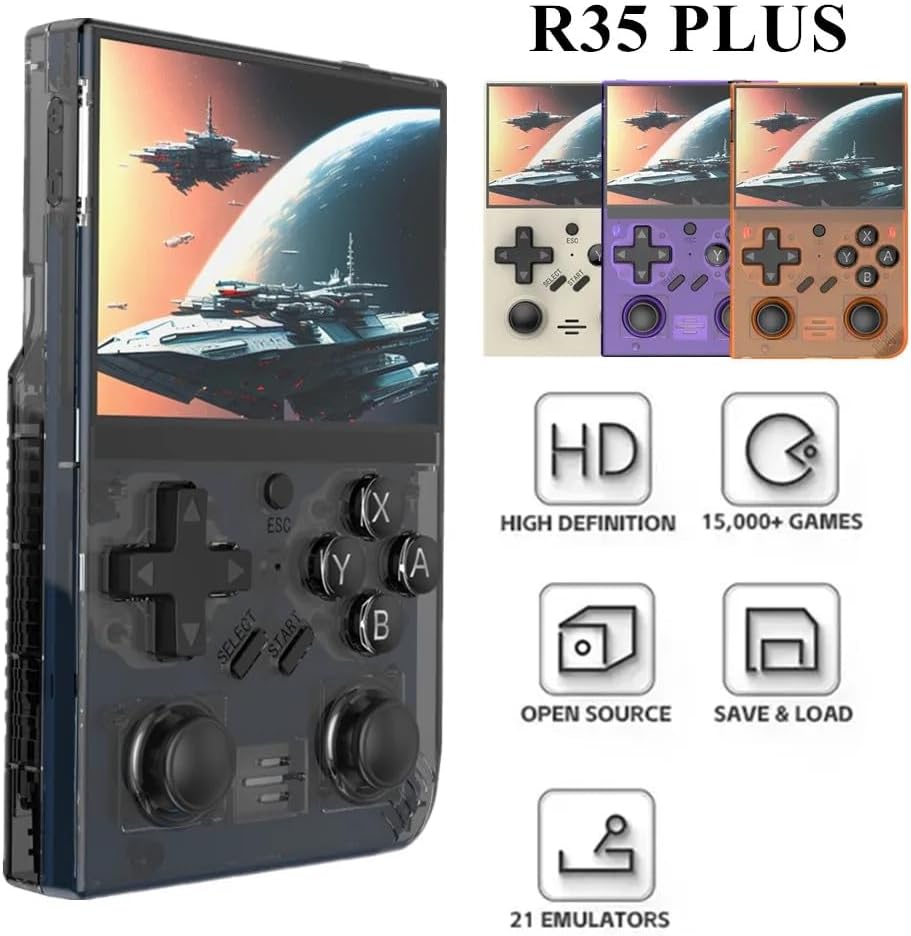
Image: The R35 Plus console showcasing അതിന്റെ രൂപകൽപ്പനയും പ്രധാന സവിശേഷതകളും.
ഉൽപ്പന്നം കഴിഞ്ഞുview
The R35 Plus is a portable retro gaming console featuring a 3.5-inch IPS screen, a 64-bit quad-core processor, and an open-source system. It comes pre-loaded with over 15,000 games and supports expansion via a TF card. Below is a detailed diagram of the console's buttons and ports.
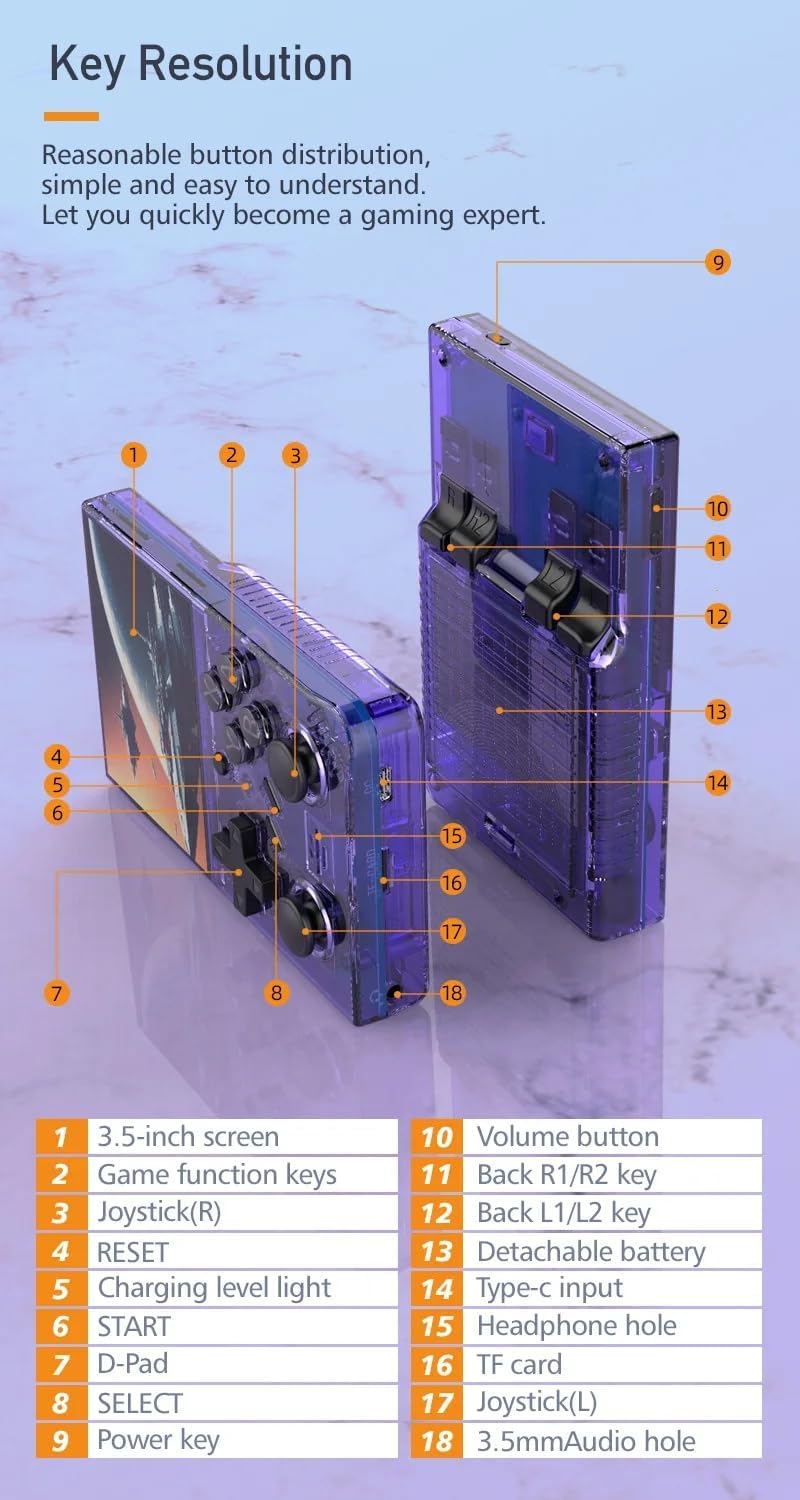
Image: Labeled diagram of the R35 Plus console's controls and ports.
- 3.5 ഇഞ്ച് സ്ക്രീൻ
- Game function keys (A, B, X, Y)
- Joystick (Right)
- റീസെറ്റ് ബട്ടൺ
- ചാർജിംഗ് ലെവൽ ലൈറ്റ്
- START ബട്ടൺ
- ഡി-പാഡ്
- തിരഞ്ഞെടുക്കൽ ബട്ടൺ
- പവർ കീ
- വോളിയം ബട്ടൺ
- Back R1/R2 keys
- Back L1/L2 keys
- വേർപെടുത്താവുന്ന ബാറ്ററി കമ്പാർട്ട്മെന്റ്
- ടൈപ്പ്-സി ഇൻപുട്ട് പോർട്ട്
- ഹെഡ്ഫോൺ ദ്വാരം
- TF കാർഡ് സ്ലോട്ട്
- Joystick (Left)
- 3.5mm Audio hole
സജ്ജമാക്കുക
Charging the Console
Before first use, fully charge the console. Connect the console to a power source using the provided Type-C cable. The charging level light will indicate the charging status. A single full charge provides up to 6 hours of gameplay.

Image: The R35 Plus console's battery compartment and battery.
TF കാർഡ് ചേർക്കുന്നു
Locate the TF card slot (labeled 16 in the diagram) on the console. Gently insert the pre-loaded TF card or your own compatible TF card into the slot until it clicks into place. Ensure the card is inserted correctly to avoid damage.
പവർ ചെയ്യുന്നത് ഓൺ/ഓഫ്
To power on, press and hold the Power key (labeled 9 in the diagram) until the screen illuminates. To power off, press and hold the Power key until the shutdown options appear on the screen, then select "Power Off".
പ്രവർത്തന നിർദ്ദേശങ്ങൾ
അടിസ്ഥാന നിയന്ത്രണങ്ങൾ
The R35 Plus features a D-Pad (labeled 7), dual joysticks (labeled 3 and 17), and action buttons (A, B, X, Y, labeled 2), along with L/L1/R/R1 keys (labeled 11 and 12) on the back for enhanced gameplay.
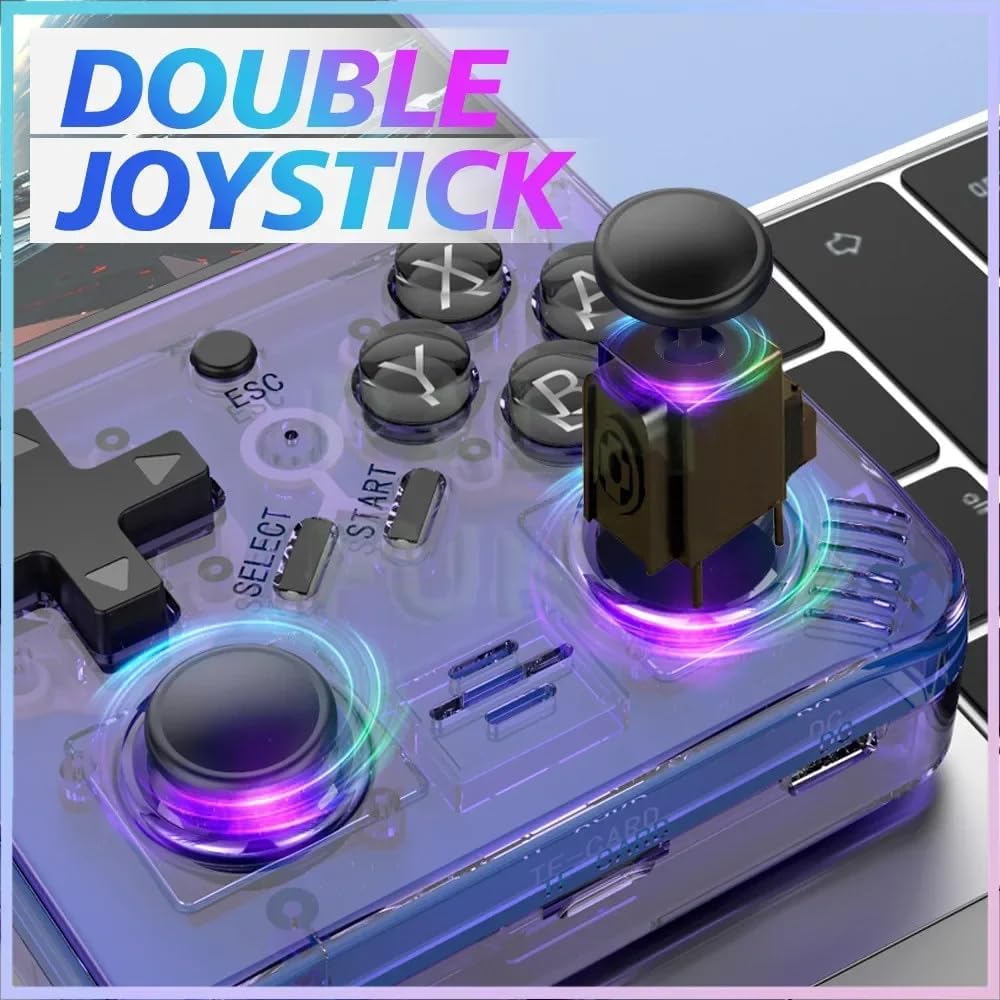
Image: The R35 Plus console's dual joysticks.

Image: The R35 Plus console's crystal buttons.
സിസ്റ്റം നാവിഗേറ്റ് ചെയ്യുന്നു
Use the D-Pad or joysticks to navigate through the system menus. The A button typically confirms selections, while the B button cancels or goes back to the previous screen.
ഗെയിമുകൾ കളിക്കുന്നു
Select a game from the main menu. The console supports over 21 emulators, allowing you to play a wide variety of retro titles. Game controls will vary depending on the emulator and game.
Saving and Loading Game Progress
Most emulators on the R35 Plus support save states. Refer to the specific emulator's in-game menu or documentation for instructions on how to save and load your game progress. This often involves a combination of system buttons (e.g., SELECT + START) to access the emulator menu.
ബാഹ്യ ഉപകരണങ്ങളിലേക്ക് കണക്റ്റുചെയ്യുന്നു
The console includes a 3.5mm audio jack (labeled 15 and 18 in the diagram) for connecting headphones or external speakers, allowing for private listening or enhanced audio experience.
മെയിൻ്റനൻസ്
വൃത്തിയാക്കൽ
Use a soft, dry, lint-free cloth to clean the console's exterior. Avoid using liquid cleaners, solvents, or abrasive materials, as these can damage the finish or internal components.
സംഭരണം
Store the console in a cool, dry place away from direct sunlight, extreme temperatures, and high humidity. When not in use for extended periods, it is recommended to store it in its original packaging or a protective case.
ബാറ്ററി കെയർ
To prolong battery life, avoid fully discharging the battery frequently. Charge the console regularly, even if not in use for extended periods. Do not expose the battery to extreme heat or puncture it.
ട്രബിൾഷൂട്ടിംഗ്
Console Does Not Power On
- Ensure the battery is charged. Connect the console to a power source using the Type-C cable and allow it to charge for at least 30 minutes before attempting to power on again.
- Try a different Type-C cable and power adapter to rule out faulty accessories.
Games Not Loading or Crashing
- Verify that the TF card is properly inserted into its slot. Remove and reinsert it firmly.
- Check if the game files are corrupted or incompatible with the installed emulators. Try loading other games to isolate the issue.
- Ensure the console's firmware is up to date, if applicable.
Screen Issues (e.g., unresponsive, flickering)
- Try restarting the console.
- Ensure the screen is clean and free from physical damage.
- പ്രശ്നം നിലനിൽക്കുകയാണെങ്കിൽ, ഉപഭോക്തൃ പിന്തുണയുമായി ബന്ധപ്പെടുക.
സ്പെസിഫിക്കേഷനുകൾ
| ഫീച്ചർ | വിശദാംശങ്ങൾ |
|---|---|
| സ്ക്രീൻ വലിപ്പം | 3.5 ഇഞ്ച് |
| റെസലൂഷൻ | 640 x 480 |
| സിസ്റ്റം | Open Source, 64-bit Quad-Core Processor |
| ബിൽറ്റ്-ഇൻ ഗെയിമുകൾ | 15000+ |
| TF കാർഡ് വിപുലീകരണം | Up to 64GB (15000+ games) |
| Emulators Supported | 21 |
| ബാറ്ററി ശേഷി | 3000mAh |
| ബാറ്ററി ലൈഫ് | 6 മണിക്കൂർ വരെ |
| ചാർജിംഗ് പോർട്ട് | ടൈപ്പ്-സി |
| ഓഡിയോ പോർട്ട് | 3.5 എംഎം ഹെഡ്ഫോൺ ജാക്ക് |
| നിയന്ത്രണങ്ങൾ | D-Pad, Dual Joysticks, A/B/X/Y Buttons, L/L1/R/R1 Buttons |
| ഉൽപ്പന്ന അളവുകൾ | 6.37 x 1.41 x 5.5 ഇഞ്ച് |
| ഇനത്തിൻ്റെ ഭാരം | 3.2 ഔൺസ് |
| മെറ്റീരിയൽ | പ്ലാസ്റ്റിക് |
പിന്തുണ വിവരം
For further assistance, technical support, or warranty inquiries, please refer to the manufacturer's official website or contact their customer service directly. Please have your product model and ASIN ready when contacting support.
- നിർമ്മാതാവ്: XIXIMENG
- മോഡൽ: R35 പ്ലസ്
- ASIN: B0D25ZFGS9


