1 സുരക്ഷാ വിവരങ്ങൾ
ഈ ഉൽപ്പന്നം ഉപയോഗിക്കുന്നതിന് മുമ്പ് ദയവായി എല്ലാ സുരക്ഷാ നിർദ്ദേശങ്ങളും ശ്രദ്ധാപൂർവ്വം വായിക്കുക. ഭാവിയിലെ റഫറൻസിനായി ഈ മാനുവൽ സൂക്ഷിക്കുക.
- ഉപകരണത്തെ തീവ്രമായ താപനിലയിലോ, നേരിട്ടുള്ള സൂര്യപ്രകാശത്തിലോ, ഉയർന്ന ആർദ്രതയിലോ തുറന്നുകാട്ടരുത്.
- സ്പീക്കറെ ശക്തമായ ആഘാതങ്ങൾക്ക് വിധേയമാക്കുകയോ താഴെയിടുകയോ ചെയ്യുന്നത് ഒഴിവാക്കുക.
- സ്പീക്കർ സ്വയം ഡിസ്അസംബ്ലിംഗ് ചെയ്യുകയോ നന്നാക്കുകയോ പരിഷ്കരിക്കുകയോ ചെയ്യരുത്. ആവശ്യമെങ്കിൽ യോഗ്യതയുള്ള സേവന ഉദ്യോഗസ്ഥരെ ബന്ധപ്പെടുക.
- സ്പീക്കർ വെള്ളത്തിൽ നിന്നും മറ്റ് ദ്രാവകങ്ങളിൽ നിന്നും അകറ്റി നിർത്തുക.
- Use only the provided charging cable and a compatible power adapter (DC 5V/1A) to charge the device.
- പ്രാദേശിക നിയന്ത്രണങ്ങൾ അനുസരിച്ച് ബാറ്ററിയും ഉപകരണവും നശിപ്പിക്കുക.
2. പാക്കേജ് ഉള്ളടക്കം
പാക്കേജിൽ എല്ലാ ഇനങ്ങളും ഉണ്ടെന്ന് ഉറപ്പാക്കുക:
- Aresrora T20 Portable Retro Bluetooth Speaker
- TYPE-C Charging Cable (x1)
- AUX Audio Cable (x1)
- ഉപയോക്തൃ മാനുവൽ (ഈ പ്രമാണം)
3. ഉൽപ്പന്നം കഴിഞ്ഞുview
The Aresrora T20 is a compact and versatile portable Bluetooth speaker, featuring multiple playback options and a retro design. It measures approximately 4.5 x 2.5 x 2.78 inches and weighs 8 ounces.
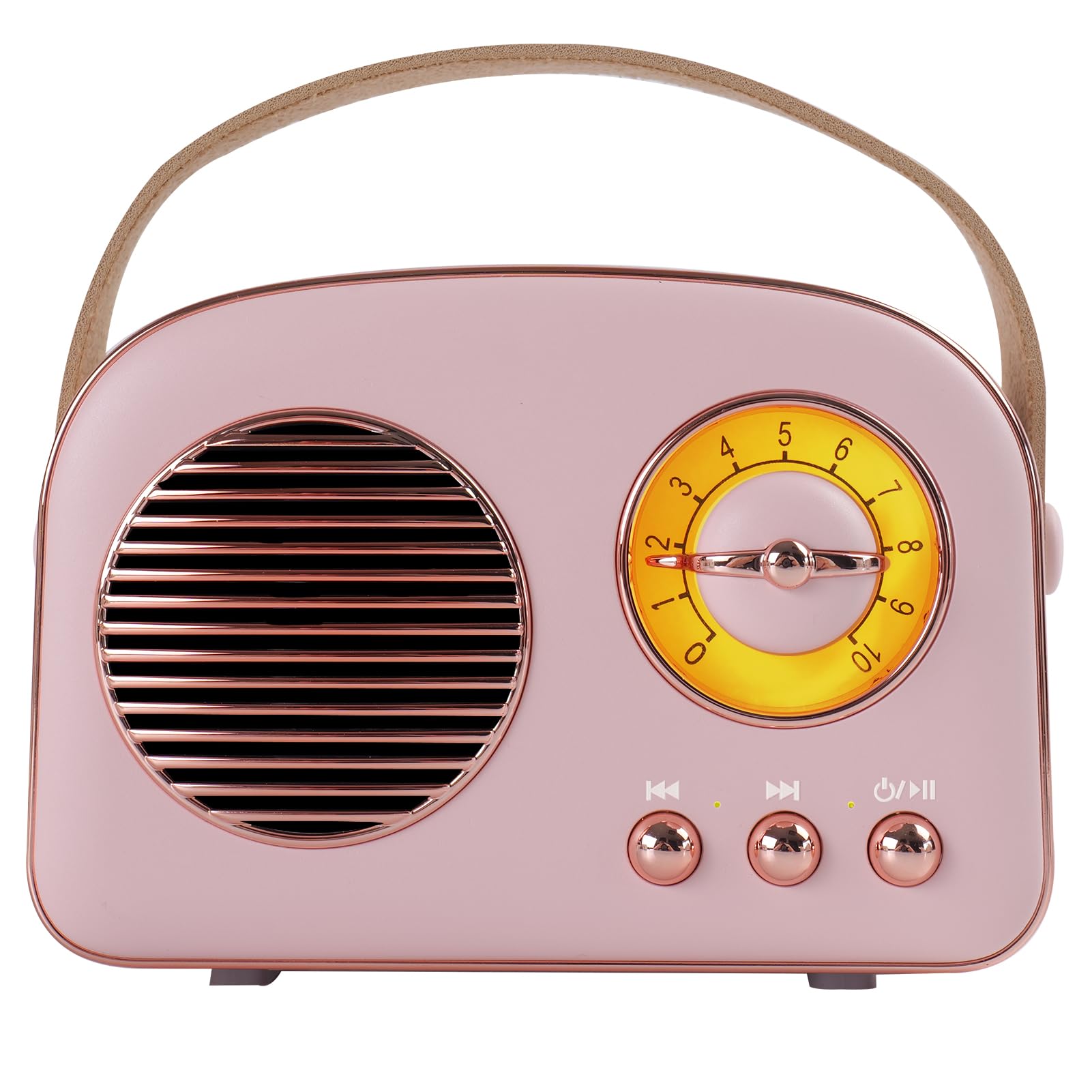
ചിത്രം 3.1: മുൻഭാഗം view of the Aresrora T20 Portable Retro Bluetooth Speaker.
നിയന്ത്രണങ്ങളും തുറമുഖങ്ങളും

Figure 3.2: Detailed diagram of speaker controls and ports.
- വോളിയം നിയന്ത്രണം: Rotary knob on the front.
- Previous Song / TWS Pairing Button: Short press for previous song, long press for TWS pairing.
- Power ON/OFF / Mode Button: Long press to power on/off, short press to switch modes (Bluetooth, FM, AUX, USB/TF Card).
- അടുത്ത ഗാന ബട്ടൺ: അടുത്ത പാട്ടിനായി ഹ്രസ്വ അമർത്തുക.
- ചാർജിംഗ് സൂചകം: ചാർജിംഗ് നില സൂചിപ്പിക്കുന്ന LED ലൈറ്റ്.
- MIC: ഹാൻഡ്സ് ഫ്രീ കോളുകൾക്കായി ബിൽറ്റ്-ഇൻ മൈക്രോഫോൺ.
- PU Handle: പോർട്ടബിലിറ്റിക്ക് വേണ്ടി.
- USB ജാക്ക്: For USB storage playback.
- Audio Cable Jack (AUX): ബാഹ്യ ഓഡിയോ ഉപകരണങ്ങൾക്കായി 3.5mm ഇൻപുട്ട്.
- ടിഎഫ് കാർഡ് സ്ലോട്ട്: മൈക്രോ എസ്ഡി കാർഡ് പ്ലേബാക്കിനായി (128 ജിബി വരെ പിന്തുണയ്ക്കുന്നു).
- TYPE-C ചാർജിംഗ് പോർട്ട്: സ്പീക്കർ ചാർജ് ചെയ്തതിന്.
4. സജ്ജീകരണം
4.1. സ്പീക്കറിൽ നിന്ന് നിരക്ക് ഈടാക്കുന്നു
Before first use, fully charge the speaker. Connect the provided TYPE-C charging cable to the speaker's charging port and the other end to a USB power adapter (DC 5V/1A, not included) or a computer USB port. The charging indicator will show the charging status. A full charge typically takes approximately 1.5 hours and provides 4-5 hours of playtime.
4.2. പവർ ഓൺ/ഓഫ്
സ്പീക്കർ ഓൺ ചെയ്യാൻ, ദീർഘനേരം അമർത്തുക Power ON/OFF / Mode button. The speaker will emit an audible prompt. To power off, long press the same button again.
5. പ്രവർത്തന നിർദ്ദേശങ്ങൾ
5.1. സ്വിച്ചിംഗ് മോഡുകൾ
ഷോർട്ട് അമർത്തുക Power ON/OFF / Mode button to cycle through available modes: Bluetooth, FM Radio, AUX Input, and Micro SD/USB Playback.

Figure 5.1: The speaker supports various playback methods.
5.2. ബ്ലൂടൂത്ത് ജോടിയാക്കൽ
- Power on the speaker. It will automatically enter Bluetooth pairing mode (indicated by an audible prompt).
- നിങ്ങളുടെ ഉപകരണത്തിൽ (സ്മാർട്ട്ഫോൺ, ടാബ്ലെറ്റ്, കമ്പ്യൂട്ടർ), ബ്ലൂടൂത്ത് പ്രവർത്തനക്ഷമമാക്കി ലഭ്യമായ ഉപകരണങ്ങൾക്കായി തിരയുക.
- Select "Aresrora T20" from the list of devices.
- Once paired, the speaker will confirm with an audible prompt. You can now play audio from your device.
5.3. എഫ്എം റേഡിയോ മോഡ്
- Switch the speaker to FM Radio mode.
- Connect the TYPE-C charging cable to the charging port; it acts as an external antenna to improve signal reception.
- Long press the "Previous Song" or "Next Song" button to automatically scan and save available FM stations.
- Short press the "Previous Song" or "Next Song" button to switch between saved stations.
5.4. Micro SD Card / USB Playback
- Insert a Micro SD card (up to 128GB) into the TF Card slot or a USB storage device into the USB jack.
- Switch the speaker to Micro SD/USB mode. The speaker will automatically detect and play audio files from the inserted storage.
- Use the "Previous Song" and "Next Song" buttons to navigate tracks.
5.5. AUX ഇൻപുട്ട്
- Connect one end of the provided 3.5mm AUX audio cable to the speaker's AUX input port.
- നിങ്ങളുടെ ബാഹ്യ ഉപകരണത്തിന്റെ ഓഡിയോ ഔട്ട്പുട്ട് ജാക്കുമായി AUX കേബിളിന്റെ മറ്റേ അറ്റം ബന്ധിപ്പിക്കുക.
- Switch the speaker to AUX Input mode. Audio will now play through the speaker.
5.6. TWS (ട്രൂ വയർലെസ് സ്റ്റീരിയോ) ജോടിയാക്കൽ
To achieve a stereo sound experience, you can pair two Aresrora T20 speakers together.

Figure 5.2: TWS pairing for stereo audio playback.
- Ensure both Aresrora T20 speakers are powered on and in Bluetooth mode, but not yet connected to any device.
- On one of the speakers, long press the "Previous Song / TWS Pairing" button. The speaker will emit a pairing tone.
- The two speakers will automatically connect to each other. Once connected, they will emit a confirmation tone.
- Now, connect your device to one of the paired speakers via Bluetooth as described in section 5.2. Audio will play in stereo through both speakers.
5.7. ഹാൻഡ്സ്-ഫ്രീ കോളിംഗ്
When connected via Bluetooth to a smartphone, the built-in microphone allows for hands-free calling. Incoming calls will pause music playback. Press the Power ON/OFF / Mode button to answer or end a call.
6. പരിപാലനം
- മൃദുവായതും ഉണങ്ങിയതുമായ തുണി ഉപയോഗിച്ച് സ്പീക്കർ വൃത്തിയാക്കുക. അബ്രസീവ് ക്ലീനറുകളോ ലായകങ്ങളോ ഉപയോഗിക്കരുത്.
- ഉപയോഗിക്കാത്തപ്പോൾ തണുത്തതും വരണ്ടതുമായ സ്ഥലത്ത് സ്പീക്കർ സൂക്ഷിക്കുക.
- Avoid blocking the speaker grille or ports to ensure proper airflow and sound quality.
7. പ്രശ്നപരിഹാരം
| പ്രശ്നം | സാധ്യമായ കാരണം | പരിഹാരം |
|---|---|---|
| സ്പീക്കർ പവർ ഓൺ ചെയ്യുന്നില്ല. | കുറഞ്ഞ ബാറ്ററി. | Charge the speaker fully using the provided TYPE-C cable. |
| ശബ്ദമില്ല. | ശബ്ദം വളരെ കുറവാണ്; തെറ്റായ മോഡ് തിരഞ്ഞെടുത്തു; ഉപകരണം കണക്റ്റുചെയ്തിട്ടില്ല. | Increase volume; ensure correct mode (Bluetooth, AUX, etc.) is selected; re-pair Bluetooth device or check cable connection. |
| ബ്ലൂടൂത്ത് ജോടിയാക്കൽ പരാജയപ്പെട്ടു. | സ്പീക്കർ ജോടിയാക്കൽ മോഡിൽ ഇല്ല; ഉപകരണം ബ്ലൂടൂത്ത് ഓഫാണ്; സ്പീക്കറിൽ നിന്ന് വളരെ അകലെയാണ്. | Ensure speaker is in Bluetooth mode; enable Bluetooth on your device; move device closer to speaker (within 10 meters). |
| മോശം എഫ്എം റേഡിയോ സ്വീകരണം. | No antenna connected; weak signal. | Connect the TYPE-C charging cable to act as an antenna; try moving the speaker to a different location. |
| TWS ജോടിയാക്കൽ പരാജയപ്പെടുന്നു. | സ്പീക്കറുകൾ ഇതിനകം ഒരു ഉപകരണത്തിലേക്ക് കണക്റ്റുചെയ്തിരിക്കുന്നു; ജോടിയാക്കൽ നടപടിക്രമം തെറ്റാണ്. | Ensure both speakers are disconnected from other devices; follow TWS pairing steps carefully. |
8 സ്പെസിഫിക്കേഷനുകൾ
| ഫീച്ചർ | വിശദാംശങ്ങൾ |
|---|---|
| മോഡൽ നമ്പർ | T20 |
| സ്പീക്കർ ഔട്ട്പുട്ട് | 5W |
| ഉൽപ്പന്ന അളവുകൾ | 4.5"L x 2.5"W x 2.78"H (115 x 64 x 70.6 മിമി) |
| ഇനത്തിൻ്റെ ഭാരം | 8 ഔൺസ് (0.5 പൗണ്ട്) |
| കണക്റ്റിവിറ്റി | ബ്ലൂടൂത്ത് 5.0, AUX, USB, TF കാർഡ് |
| എഫ്എം റേഡിയോ ഫ്രീക്വൻസി | 87-108MHz |
| ബാറ്ററി | 1 ലിഥിയം പോളിമർ ബാറ്ററി (ഉൾപ്പെടുത്തിയിരിക്കുന്നു) |
| ഇൻപുട്ട് ചാർജ് ചെയ്യുന്നു | ഡിസി 5V/1A (ടൈപ്പ്-സി) |
| കളിസമയം | ഏകദേശം 4-5 മണിക്കൂർ |
| TF കാർഡ് പിന്തുണ | 128 ജിബി വരെ |
| പ്രത്യേക സവിശേഷതകൾ | Built-in Microphone, Portable, TWS Pairing |
9. വാറൻ്റിയും പിന്തുണയും
For warranty information or technical support, please refer to the contact details provided with your purchase or visit the official Aresrora webസൈറ്റ്. ഏതെങ്കിലും വാറന്റി ക്ലെയിമുകൾക്ക് നിങ്ങളുടെ വാങ്ങലിന്റെ തെളിവ് സൂക്ഷിക്കുക.


