ആമുഖം
The Naztech Xpods PRO are true wireless earbuds designed for an immersive audio experience with advanced features for daily use and active lifestyles. These earbuds offer high-definition sound, noise isolation, and extended battery life, all within a compact and durable design.
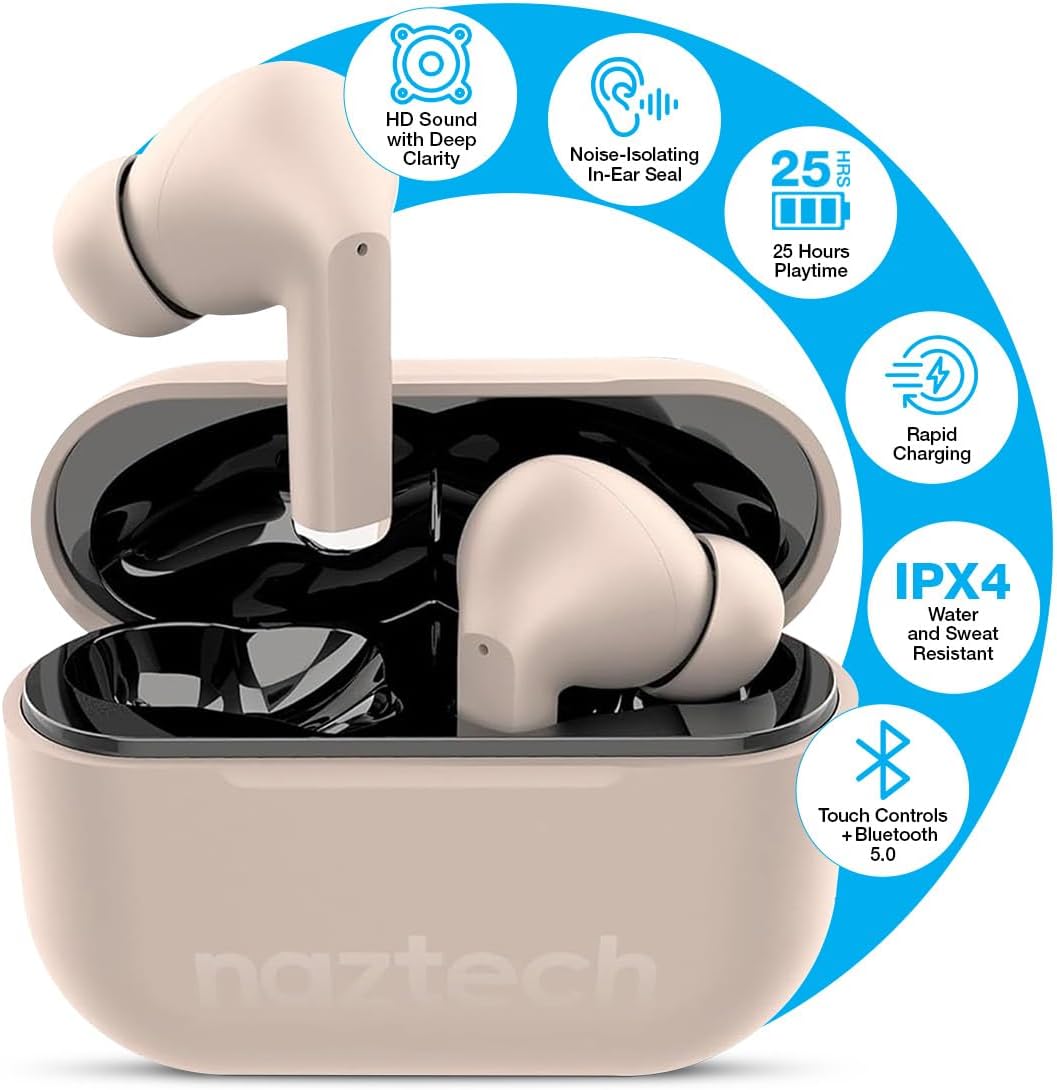
Image: Naztech Xpods PRO True Wireless Earbuds in Sandstone, resting in their open charging case.
ബോക്സിൽ എന്താണുള്ളത്
- Naztech Xpods PRO True Wireless Earbuds
- വയർലെസ് ചാർജിംഗ് കേസ്
- USB-C ചാർജിംഗ് കേബിൾ
- ഒന്നിലധികം വലുപ്പത്തിലുള്ള സിലിക്കൺ ഇയർ ടിപ്പുകൾ
- ഇൻസ്ട്രക്ഷൻ മാനുവൽ
സജ്ജമാക്കുക
1. ഇയർബഡുകളും കേസും ചാർജ് ചെയ്യുന്നു
Before first use, fully charge the Xpods PRO charging case and earbuds. The case can be charged via the included USB-C cable or a compatible Qi wireless charging pad (sold separately).
- USB-C ചാർജിംഗ്: USB-C കേബിൾ കേസിലെ ചാർജിംഗ് പോർട്ടിലേക്കും ഒരു പവർ സ്രോതസ്സിലേക്കും ബന്ധിപ്പിക്കുക.
- വയർലെസ് ചാർജിംഗ്: ഒരു Qi-അനുയോജ്യമായ വയർലെസ് ചാർജിംഗ് പാഡിൽ ചാർജിംഗ് കേസ് സ്ഥാപിക്കുക.
- The LED indicator on the case will show charging status. A full charge provides up to 25 hours of total playtime (5 hours per charge from earbuds + 20 hours from case). A 10-minute quick charge can provide 1 hour of playback.

Image: Naztech Xpods PRO charging case on a wireless charging pad, illustrating 25 hours total playtime and quick charge feature.
2. നിങ്ങളുടെ ഉപകരണവുമായി ജോടിയാക്കുന്നു
The Xpods PRO utilize Bluetooth 5.0 for stable and universal compatibility with Android and iPhone devices.
- ഇയർബഡുകൾ ചാർജിംഗ് കെയ്സിലാണെന്നും കേസ് ചാർജ് ചെയ്തിട്ടുണ്ടെന്നും ഉറപ്പാക്കുക.
- ചാർജിംഗ് കേസ് തുറക്കുക. ഇയർബഡുകൾ സ്വയമേവ ജോടിയാക്കൽ മോഡിലേക്ക് പ്രവേശിക്കും.
- നിങ്ങളുടെ സ്മാർട്ട്ഫോണിലോ ബ്ലൂടൂത്ത് പ്രവർത്തനക്ഷമമാക്കിയ ഉപകരണത്തിലോ, ബ്ലൂടൂത്ത് ക്രമീകരണങ്ങളിലേക്ക് പോകുക.
- Select "Naztech Xpods Pro" from the list of available devices.
- കണക്റ്റ് ചെയ്തുകഴിഞ്ഞാൽ, നിങ്ങൾക്ക് ഒരു കേൾക്കാവുന്ന സ്ഥിരീകരണം കേൾക്കാൻ കഴിയും, ഇയർബഡുകൾ ഉപയോഗത്തിന് തയ്യാറാകും.

Image: Naztech Xpods PRO earbuds and a smartphone screen showing successful Bluetooth pairing.
പ്രവർത്തന നിർദ്ദേശങ്ങൾ
The Xpods PRO feature intuitive touch controls for easy management of audio playback and calls.
ടച്ച് നിയന്ത്രണ പ്രവർത്തനങ്ങൾ

Image: Visual guide to touch sensor controls on the Naztech Xpods PRO earbuds.
- പ്ലേ/താൽക്കാലികമായി നിർത്തുക: ഇയർബഡുകളിൽ ഏതെങ്കിലുമൊന്നിൽ ഒറ്റ ടാപ്പ് ചെയ്യുക.
- അടുത്ത ട്രാക്ക്: വലതുവശത്തെ ഇയർബഡിൽ രണ്ടുതവണ ടാപ്പ് ചെയ്യുക.
- മുമ്പത്തെ ട്രാക്ക്: ഇടതുവശത്തെ ഇയർബഡിൽ രണ്ടുതവണ ടാപ്പ് ചെയ്യുക.
- ഉത്തരം/അവസാന കോൾ: ഇയർബഡുകളിൽ ഏതെങ്കിലുമൊന്നിൽ ഒറ്റ ടാപ്പ് ചെയ്യുക.
- കോൾ നിരസിക്കുക: ഏതെങ്കിലും ഇയർബഡിൽ 2 സെക്കൻഡ് അമർത്തിപ്പിടിക്കുക.
- വോയ്സ് അസിസ്റ്റന്റിനെ സജീവമാക്കുക: ഇയർബഡുകളിൽ ഏതെങ്കിലുമൊന്നിൽ മൂന്ന് തവണ ടാപ്പ് ചെയ്യുക.
കോളുകൾ ചെയ്യലും സ്വീകരിക്കലും
The Xpods PRO feature dual microphones with advanced voice capture technology to filter out wind and background noise, ensuring clear conversations.
- Use the touch controls as described above to manage calls.
- Audio will automatically switch to the earbuds when a call is initiated or received while connected.
പരിചരണവും പരിപാലനവും
To ensure the longevity and optimal performance of your Naztech Xpods PRO, follow these care guidelines:
- വൃത്തിയാക്കൽ: ഇയർബഡുകളും ചാർജിംഗ് കെയ്സും മൃദുവായതും ഉണങ്ങിയതും ലിന്റ് രഹിതവുമായ തുണി ഉപയോഗിച്ച് പതിവായി വൃത്തിയാക്കുക. കഠിനമായ രാസവസ്തുക്കളോ ഉരച്ചിലുകളോ ഉള്ള വസ്തുക്കൾ ഉപയോഗിക്കുന്നത് ഒഴിവാക്കുക.
- ചെവി ടിപ്പുകൾ: സിലിക്കോൺ ചെവിയുടെ അറ്റങ്ങൾ ഇടയ്ക്കിടെ നീക്കം ചെയ്ത് നേരിയ സോപ്പും വെള്ളവും ഉപയോഗിച്ച് വൃത്തിയാക്കുക. വീണ്ടും ഘടിപ്പിക്കുന്നതിന് മുമ്പ് അവ പൂർണ്ണമായും ഉണങ്ങിയെന്ന് ഉറപ്പാക്കുക.
- ജല പ്രതിരോധം: The Xpods PRO are IPX4 water and sweat resistant, meaning they are protected against splashing water from any direction. They are suitable for workouts and light rain but should not be submerged in water.
- സംഭരണം: ഉപയോഗത്തിലില്ലാത്തപ്പോൾ, ഇയർബഡുകൾ സംരക്ഷിക്കുന്നതിനും ചാർജ്ജ് ചെയ്ത നിലയിൽ നിലനിർത്തുന്നതിനും അവ ചാർജിംഗ് കേസിൽ സൂക്ഷിക്കുക.
- താപനില: ഉയർന്ന താപനിലയിൽ (ചൂട് അല്ലെങ്കിൽ തണുപ്പ്) അല്ലെങ്കിൽ നേരിട്ടുള്ള സൂര്യപ്രകാശം ദീർഘനേരം ഏൽക്കുന്നത് ഒഴിവാക്കുക.

Image: Naztech Xpods PRO earbuds designed for active lifestyles, featuring IPX4 water resistance.
ട്രബിൾഷൂട്ടിംഗ്
If you encounter issues with your Xpods PRO, refer to the following common solutions:
- ഇയർബഡുകൾ ജോടിയാക്കുന്നില്ല:
- Ensure both earbuds are charged and in the case.
- നിങ്ങളുടെ ഉപകരണത്തിന്റെ Bluetooth ഓഫാക്കി ഓണാക്കുക.
- Forget/delete "Naztech Xpods Pro" from your device's Bluetooth list and attempt to re-pair.
- ഒരു ഇയർബഡ് മാത്രം പ്രവർത്തിക്കുന്നു:
- രണ്ട് ഇയർബഡുകളും ചാർജിംഗ് കെയ്സിലേക്ക് തിരികെ വയ്ക്കുക, ലിഡ് അടയ്ക്കുക, കുറച്ച് നിമിഷങ്ങൾ കാത്തിരിക്കുക, തുടർന്ന് അത് വീണ്ടും തുറക്കുക.
- രണ്ട് ഇയർബഡുകളും ചാർജ്ജ് ചെയ്തിട്ടുണ്ടെന്ന് ഉറപ്പാക്കുക.
- ചാർജിംഗ് പ്രശ്നങ്ങൾ:
- USB-C കേബിളും പവർ അഡാപ്റ്ററും കേടുപാടുണ്ടോ എന്ന് പരിശോധിക്കുക.
- ഇയർബഡുകളിലെയും കേസിലെയും ചാർജിംഗ് കോൺടാക്റ്റുകൾ വൃത്തിയുള്ളതും അവശിഷ്ടങ്ങളില്ലാത്തതുമാണെന്ന് ഉറപ്പാക്കുക.
- വയർലെസ് ചാർജിംഗ് ഉപയോഗിക്കുകയാണെങ്കിൽ, ചാർജിംഗ് പാഡിൽ കേസ് ശരിയായി വിന്യസിച്ചിട്ടുണ്ടെന്ന് ഉറപ്പാക്കുക.
- Low Sound Quality/Noise:
- Ensure the ear tips provide a secure seal in your ear. Try different sizes.
- Clean the earbud speakers and ear tips.
- Ensure your device's volume is adequately set.
സ്പെസിഫിക്കേഷനുകൾ
| ഫീച്ചർ | സ്പെസിഫിക്കേഷൻ |
|---|---|
| മോഡൽ നമ്പർ | 15352 |
| ബ്ലൂടൂത്ത് പതിപ്പ് | 5.0 |
| ബ്ലൂടൂത്ത് ശ്രേണി | 33 അടി |
| ബാറ്ററി ലൈഫ് (ആകെ) | Up to 25 Hours (5 hours per charge + 20 hours with charging case) |
| ചാർജിംഗ് സമയം | 1 Hour (for case) |
| നിയന്ത്രണ രീതി | സ്പർശിക്കുക |
| ജല പ്രതിരോധ നില | IPX4 (വാട്ടർ റെസിസ്റ്റൻ്റ്) |
| ഇനത്തിൻ്റെ ഭാരം | 4 ഔൺസ് |
| ഉൽപ്പന്ന അളവുകൾ | 4.7 x 4.7 x 1.2 ഇഞ്ച് |
| അനുയോജ്യമായ ഉപകരണങ്ങൾ | Any device with Bluetooth capabilities |
| ഓഡിയോ ഡ്രൈവർ തരം | ഡൈനാമിക് ഡ്രൈവർ |
| ശബ്ദ നിയന്ത്രണം | Active Noise Cancellation (Passive Noise Isolation from fit) |
വാറൻ്റിയും പിന്തുണയും
For warranty information or technical support, please refer to the official Naztech webസൈറ്റിൽ ബന്ധപ്പെടുകയോ അവരുടെ ഉപഭോക്തൃ സേവന വിഭാഗവുമായി ബന്ധപ്പെടുകയോ ചെയ്യുക. ഏതെങ്കിലും വാറന്റി ക്ലെയിമുകൾക്കായി നിങ്ങളുടെ വാങ്ങലിന്റെ തെളിവ് സൂക്ഷിക്കുക.


