1. ആമുഖം
The ENGWE Folding 4 Wheel Mobility Scooter is designed to provide reliable and comfortable transportation for seniors and adults with mobility challenges. Featuring a powerful 250W motor, a long-range battery, and a stable four-wheel design, this scooter offers enhanced independence for daily activities and outdoor excursions. Its user-friendly controls and thoughtful safety features ensure a secure and enjoyable riding experience.
This manual provides essential information on the assembly, operation, maintenance, and specifications of your new mobility scooter. Please read it thoroughly before first use to ensure proper setup and safe operation.

Figure 1: The ENGWE Folding 4 Wheel Mobility Scooter.
2 സുരക്ഷാ വിവരങ്ങൾ
നിങ്ങളുടെ സുരക്ഷയാണ് പരമപ്രധാനം. ഇനിപ്പറയുന്ന സുരക്ഷാ മാർഗ്ഗനിർദ്ദേശങ്ങൾ എപ്പോഴും പാലിക്കുക:
- Always wear appropriate safety gear, including a helmet, if local regulations require or if you feel it enhances your safety.
- Ensure the scooter is fully charged before each use, especially for longer trips.
- Familiarize yourself with all controls, including the throttle, brakes, and horn, before operating the scooter.
- മദ്യത്തിൻ്റെയും മയക്കുമരുന്നിൻ്റെയും ലഹരിയിൽ സ്കൂട്ടർ പ്രവർത്തിപ്പിക്കരുത്.
- Maintain a safe speed and always be aware of your surroundings, including pedestrians and other vehicles.
- Avoid sudden stops or turns, especially at higher speeds.
- പരമാവധി ഭാര ശേഷി 265 പൗണ്ട് (120 കിലോഗ്രാം) കവിയരുത്.
- Engage the parking brake when stopped on an incline or when dismounting.
- Regularly inspect tires, brakes, and battery connections for any signs of wear or damage.
- The scooter is designed with a slope safety mechanism, ensuring it remains motionless on slopes when parked.
3. പാക്കേജ് ഉള്ളടക്കം
അസംബ്ലി ചെയ്യുന്നതിനുമുമ്പ്, പാക്കേജിൽ എല്ലാ ഘടകങ്ങളും ഉണ്ടെന്ന് ദയവായി ഉറപ്പാക്കുക:
- പ്രധാന സ്കൂട്ടർ ബോഡി
- സീറ്റ് അസംബ്ലി
- ഇടത്, വലത് കൈത്തണ്ടകൾ
- ഫ്രണ്ട് ബാസ്ക്കറ്റ്
- ബാറ്ററി ചാർജർ
- Installation Tools (wrenches, Allen keys)
4. സജ്ജീകരണവും അസംബ്ലിയും
Follow these steps to assemble your ENGWE Mobility Scooter:
4.1. അൺബോക്സിംഗും പ്രാരംഭ തയ്യാറെടുപ്പും
Carefully remove all components from the packaging. Ensure all protective wrapping is removed from the scooter body and parts.
4.2. Folding Riser Installation (Handlebar Adjustment)
Adjust the handlebar to your desired height and secure it firmly. The handlebar can be folded for compact storage or transport.
4.3 സീറ്റ് ഇൻസ്റ്റാളേഷൻ
- Insert the seat post into the designated opening on the scooter body.
- Press the seat fixed rod to lock the seat securely in place.
- Install the left and right armrests onto the seat assembly, tightening the adjustment knobs to secure them.
4.4. ബാസ്കറ്റ് ഇൻസ്റ്റലേഷൻ
Attach the front basket to the designated mounting point on the handlebar column. Press and tighten it down to ensure it is secure.

Figure 2: Visual guide for the four main assembly steps.
Video 1: ENGWE EASE1 Mobility Scooter Unboxing & Assembly. This video demonstrates the complete unboxing and assembly process, including attaching the seat, armrests, and basket.
5. പ്രവർത്തന നിർദ്ദേശങ്ങൾ
Understand how to operate your scooter safely and effectively.
5.1 ബാറ്ററി ചാർജ് ചെയ്യുന്നു
Locate the charging port on the handlebar column. Connect the provided charger to the port and then to a standard electrical outlet. The battery indicator lights will show the charging status. Ensure the battery is fully charged before first use and after each significant period of use.

Figure 3: The switchable handbrake, which also controls power.
5.2. പവർ ഓൺ/ഓഫ്, മോഡ് തിരഞ്ഞെടുക്കൽ
Before use, ensure the brake lever is adjusted backward to electric mode for the scooter to run properly. Insert the key into the ignition and turn it to the 'ON' position to power on the scooter. To power off, turn the key to the 'OFF' position.
The scooter has two modes: Manual (Push Only) and Electric (Drive). To switch to manual mode, push the brake lever forward. In this mode, the scooter cannot use electric functions and can only be pushed by hand. To switch to electric mode, pull the brake lever backward. In this mode, the scooter can be driven electrically but cannot be pushed by hand.
Video 2: Manual Mode - Push Only, Cannot Use Electric Function. This video demonstrates how to engage manual mode for pushing the scooter.
Video 3: Mobility Scooter - Electric Mode - Can Drive, Cannot Hand Push. This video shows the scooter operating in electric mode.
5.3. നിയന്ത്രണ പാനൽ ഓവർview
The control panel is located on the handlebar. It includes:
- Speed Adjustment Knob: Turn clockwise for higher speed, counter-clockwise for lower speed.
- ബാറ്ററി ലൈഫ് ഇൻഡിക്കേറ്റർ: നിലവിലെ ബാറ്ററി ചാർജ് നില പ്രദർശിപ്പിക്കുന്നു.
- ഹെഡ്ലൈറ്റ് ബട്ടൺ: Press to turn the front light on or off.
- ഹോൺ ബട്ടൺ: ഹോൺ മുഴക്കാൻ അമർത്തുക.
- ഫോർവേഡ്/ബാക്ക്വേർഡ് ലിവറുകൾ: Press the right thumb throttle to move forward. Press the left thumb throttle to move backward.

ചിത്രം 4: വിശദമായി view of the scooter's operation panel.
5.4. Driving and Maneuvering
Once powered on and in electric mode, gently press the appropriate throttle lever to begin moving. The scooter offers stable performance on various terrains, including grass, damaged concrete, and rocky roads, thanks to its four 8-inch solid tires and 5.5 inches of ground clearance.

Figure 5: The scooter is designed for stability on diverse surfaces.
5.5. ഗതാഗതത്തിനായുള്ള മടക്കൽ
The scooter is designed to fold in 10 seconds and 2 steps, making it compact for transport in an RV or SUV.
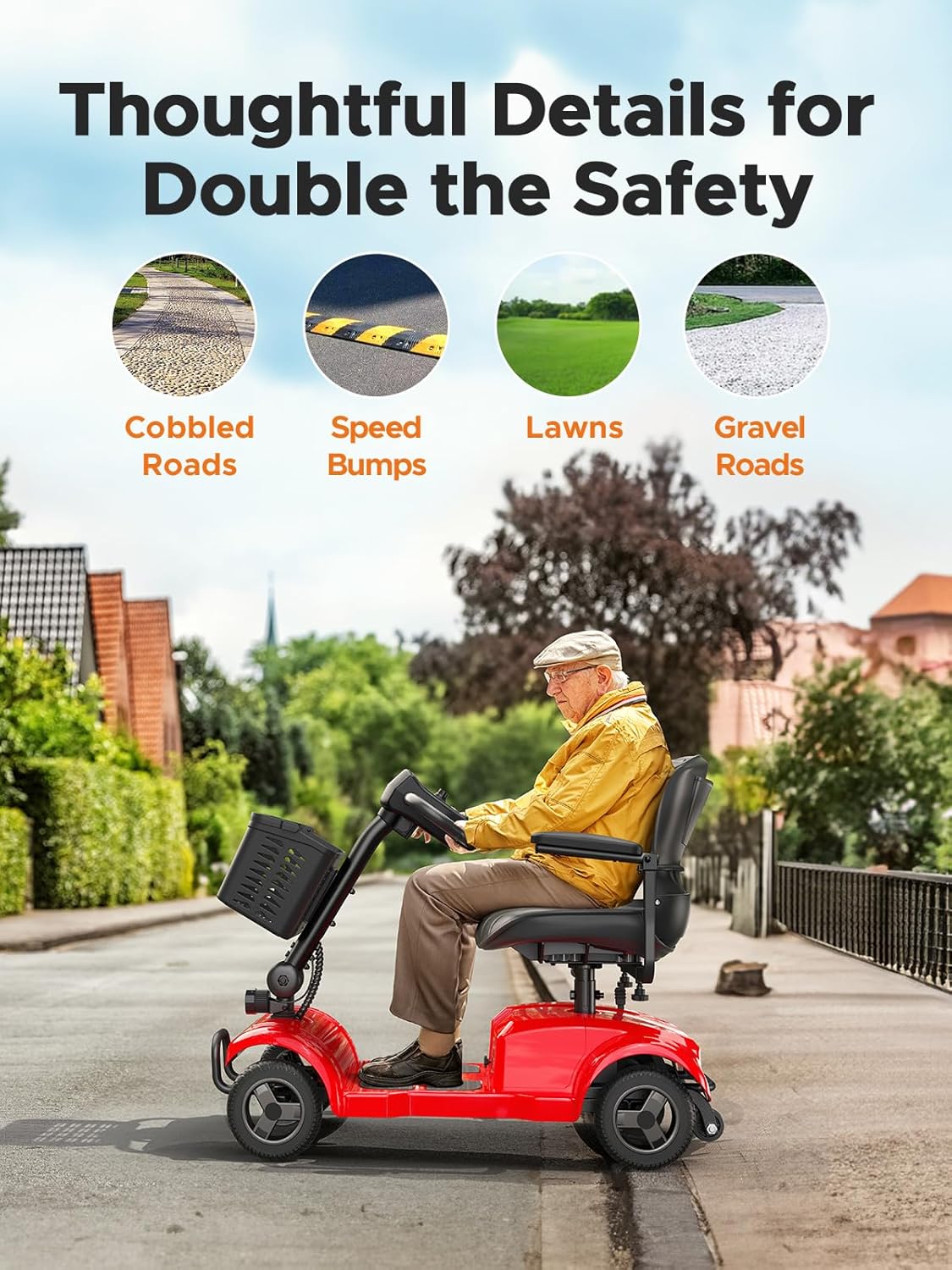
Figure 6: The scooter's compact folded size for easy transport.
6. പരിപാലനം
Regular maintenance ensures the longevity and optimal performance of your mobility scooter:
- ബാറ്ററി കെയർ: Always charge the battery fully after each use. Avoid completely draining the battery, as this can reduce its lifespan. Store the scooter in a cool, dry place when not in use.
- വൃത്തിയാക്കൽ: പരസ്യം ഉപയോഗിച്ച് സ്കൂട്ടർ തുടയ്ക്കുകamp തുണി. കഠിനമായ രാസവസ്തുക്കളോ അബ്രാസീവ് ക്ലീനറുകളോ ഉപയോഗിക്കുന്നത് ഒഴിവാക്കുക. ഇലക്ട്രിക്കൽ ഘടകങ്ങളിലേക്ക് നേരിട്ട് വെള്ളം തളിക്കരുത്.
- ടയറുകൾ: While the scooter uses solid tires, regularly check them for any signs of wear or damage.
- പൊതു പരിശോധന: Periodically check all nuts, bolts, and fasteners to ensure they are tight. Inspect the seat, armrests, and basket for any damage.
7. പ്രശ്നപരിഹാരം
ചില സാധാരണ പ്രശ്നങ്ങളും അവയുടെ സാധ്യമായ പരിഹാരങ്ങളും ഇതാ:
| പ്രശ്നം | സാധ്യമായ കാരണം | പരിഹാരം |
|---|---|---|
| സ്കൂട്ടർ ഓൺ ആകുന്നില്ല. | Battery is not charged; Key is not fully inserted or turned to 'ON'; Brake lever is in manual mode. | Charge the battery; Ensure key is fully inserted and turned to 'ON'; Adjust brake lever to electric mode. |
| സ്കൂട്ടർ പതുക്കെ നീങ്ങുന്നു അല്ലെങ്കിൽ പവർ ഇല്ല. | Low battery charge; Speed adjustment knob set too low; Exceeding weight capacity. | Recharge the battery; Adjust speed knob clockwise; Ensure user weight is within limits. |
| പ്രവർത്തന സമയത്ത് അസാധാരണമായ ശബ്ദങ്ങൾ. | അയഞ്ഞ ഘടകങ്ങൾ; ചക്രങ്ങളിൽ തടസ്സം. | Check and tighten all fasteners; Inspect wheels for debris. |
If you encounter issues not listed here or if solutions do not resolve the problem, please contact ENGWE customer support for assistance.
8 സ്പെസിഫിക്കേഷനുകൾ
Key specifications for the ENGWE Folding 4 Wheel Mobility Scooter (Model EASE1-RED):
| ഫീച്ചർ | സ്പെസിഫിക്കേഷൻ |
|---|---|
| മോഡൽ നമ്പർ | EASE1-RED |
| മോട്ടോർ പവർ | 24V 250W |
| ബാറ്ററി | 24V 12Ah |
| Rated Range | ഏകദേശം 15.5 മൈൽ (25 കി.മീ) |
| ടോപ്പ് സ്പീഡ് | 6.2 mph (10 km/h) |
| ഭാരം ശേഷി | 265 പൗണ്ട് (120 കി.ഗ്രാം) |
| ഗ്രൗണ്ട് ക്ലിയറൻസ് | 5.5 ഇഞ്ച് |
| ടയർ തരം | 8 ഇഞ്ച് സോളിഡ് ടയറുകൾ |
| സീറ്റ് മെറ്റീരിയൽ | വ്യാജമായത് |
| സീറ്റ് ഉയരം | 15.8 ഇഞ്ച് |
| നിറം | ചുവപ്പ് |
| മാതൃരാജ്യം | ചൈന |
9. വാറൻ്റിയും പിന്തുണയും
For information regarding the product warranty, please refer to the warranty card included with your purchase or contact ENGWE customer support directly. Keep your proof of purchase for any warranty claims.
For technical support, spare parts, or any other inquiries, please visit the official ENGWE webസൈറ്റിൽ നൽകുകയോ അവരുടെ ഉപഭോക്തൃ സേവന വിഭാഗവുമായി ബന്ധപ്പെടുകയോ ചെയ്യുക. കോൺടാക്റ്റ് വിവരങ്ങൾ സാധാരണയായി ഉൽപ്പന്ന പാക്കേജിംഗിലോ നിർമ്മാതാവിന്റെയോ webസൈറ്റ്.


