1. ആമുഖം
The GOYOJO HP320 is an intelligent wireless spectral power meter designed for light source color testing. This handheld device integrates advanced micro spectrometer technology, embedded operating systems, and microcomputer technology to provide efficient and accurate measurements. It is suitable for a wide range of applications, from on-site commercial and health lighting assessments to laboratory research and quality control.
This manual provides essential information for the safe and effective operation of your HP320 Portable Spectrometer. Please read it thoroughly before use and retain it for future reference.
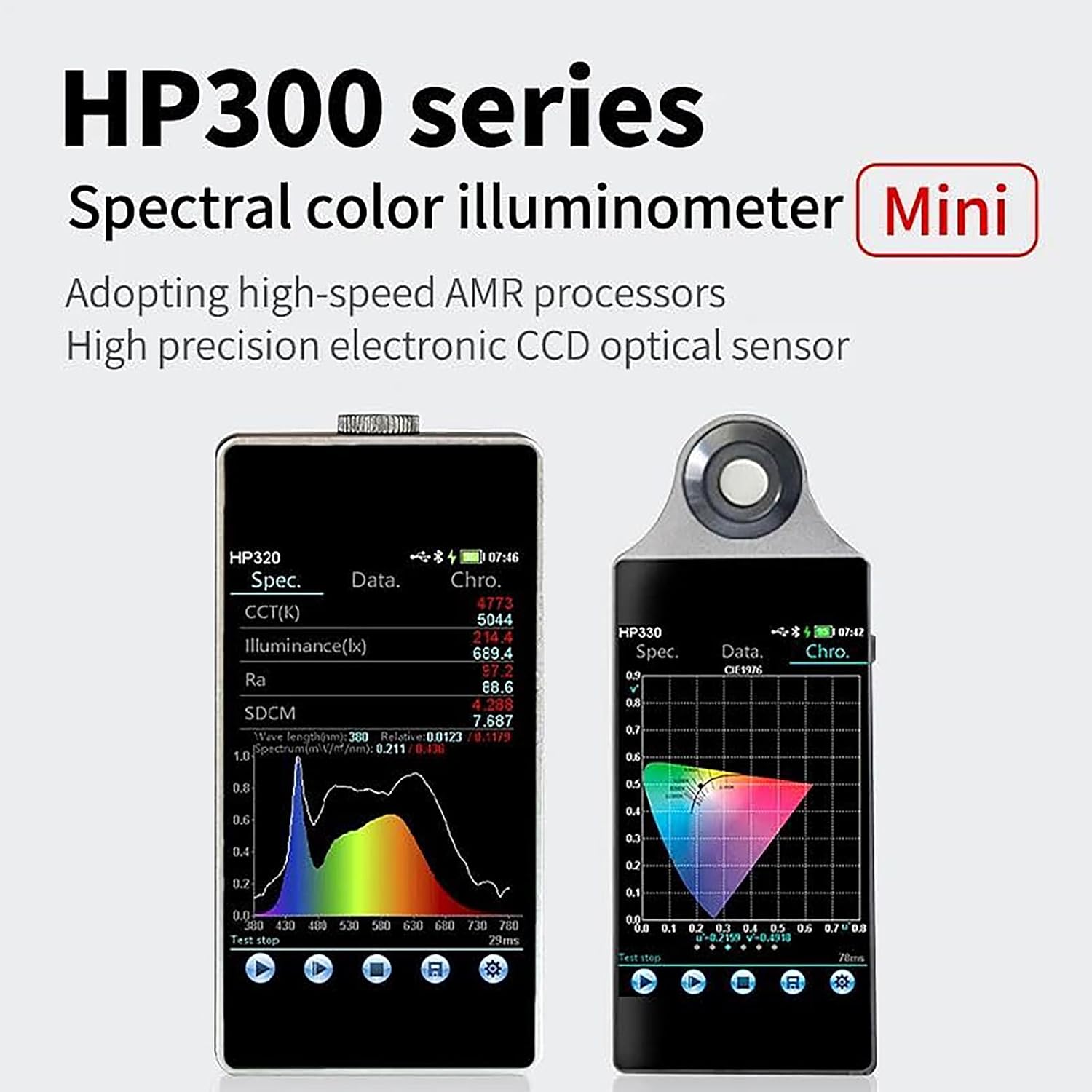
Image 1.1: The HP300 series, featuring the HP320 and HP330 models. The HP320 is on the left, displaying spectral data, while the HP330 is on the right, showing a color coordinate graph.
2 പ്രധാന സവിശേഷതകൾ
- Advanced Technology Integration: Combines micro spectrometer technology with embedded operating systems and microcomputer technology for high efficiency and accuracy.
- Convenient Field Testing: Equipped with a 3.5-inch IPS touch screen for easy on-site operation and consistent parameter analysis.
- ബഹുമുഖ പ്രയോഗങ്ങൾ: Suitable for commercial, health, home, building lighting, laboratory research, product development, quality control, and online monitoring.
- സ ible കര്യപ്രദമായ പ്രവർത്തനം: Supports USB communication and multi-platform operation via PC software or the integrated IPS touch screen.
- High-Precision Measurement: Features a TCD1254 CCD detector, enhanced coating grating, 16-bit high-speed AD sampling, and a high-precision optical path.
- Comprehensive Parameters: Measures color temperature (K), illuminance (lx), color tolerance (SDCM), Color index (Ra), color coordinate, wavelength (nm), color purity, light and dark visual ratio (S/P), and transmittance.
- ഒതുക്കമുള്ളതും പോർട്ടബിൾ: Slim body design (15mm) for easy portability.

Image 2.1: The HP320 device highlighting its key specifications and features, including wavelength range, photometric linearity, spectral resolution, battery capacity, and connectivity options.
3. സജ്ജീകരണം
3.1 അൺപാക്കിംഗ്
Carefully remove the HP320 spectrometer and all accessories from the packaging. Verify that all components listed in the packing list are present and undamaged. If any items are missing or damaged, contact your supplier immediately.
3.2 ഉപകരണം ചാർജ് ചെയ്യുന്നു
The HP320 is equipped with a built-in lithium battery. Before initial use, fully charge the device using the provided charging adapter and Type-C data cable.
- Connect the Type-C data cable to the charging port on the HP320.
- കേബിളിന്റെ മറ്റേ അറ്റം ചാർജിംഗ് അഡാപ്റ്ററുമായി ബന്ധിപ്പിക്കുക.
- Plug the charging adapter into a standard power outlet.
- The device's screen will indicate the charging status. Allow the device to charge until the battery indicator shows a full charge.
3.3 പവർ ഓൺ/ഓഫ്
- പവർ ഓണാക്കാൻ: Press and hold the power button (location typically on the side or top of the device) for a few seconds until the screen illuminates.
- പവർ ഓഫ് ചെയ്യാൻ: Press and hold the power button until a power-off prompt appears on the screen, then confirm your selection. Alternatively, a short press might bring up a menu with power options.
3.4 Initial Connection (Optional)
The HP320 supports connection to a PC via USB for data analysis and control, and to Android mobile devices for data export.
- പിസി കണക്ഷൻ: Connect the device to your computer using the Type-C data cable. Install the provided PC software (if applicable) to access advanced analysis features.
- മൊബൈൽ കണക്ഷൻ: For Android devices, ensure the relevant application is installed. Connect the HP320 to your mobile device for data transfer and viewing.
4. പ്രവർത്തന നിർദ്ദേശങ്ങൾ
The HP320 features a 3.5-inch IPS touch screen for intuitive operation. Navigation and settings are primarily controlled through the touch interface.
4.1 അടിസ്ഥാന അളവ്
- Power on the device as described in Section 3.3.
- Navigate to the main measurement interface using the touch screen.
- Position the HP320's optical sensor towards the light source you wish to measure. Ensure the sensor is clean and unobstructed.
- Initiate a measurement by tapping the "Measure" or "Start" button on the screen.
- The device will display various parameters such as color temperature (K), illuminance (lx), color index (Ra), and spectral distribution.

Image 4.1: The HP320 screen showing professional data, including spectral power distribution, CIE color coordinates, and a list of measured parameters for clear analysis.
4.2 Data Analysis and Processing
The HP320 allows for efficient analysis and processing of data directly on the device or through connected software.
- On-Device Review: Use the touch screen to navigate through measurement history and view detailed reports.
- പിസി സോഫ്റ്റ്വെയർ: Connect to a computer to utilize the dedicated PC software for in-depth analysis, comparative testing, timing testing, wavelength adjustment, and compensation for test results.
4.3 ഡാറ്റ എക്സ്പോർട്ട്
Test data can be exported directly as PDF reports for easy sharing and documentation.
- After completing measurements, navigate to the data export option on the device.
- Select the desired data or reports for export.
- Choose the export method: direct PDF export to a connected computer or mobile device (Android only).
- Confirm the export. The device will generate and transfer the PDF report.

Image 4.2: A mobile phone screen showing a spectral measurement report generated by the HP320, with icons for sharing, downloading, and printing the data.

Image 4.3: A laptop screen showing detailed spectral data analysis from the HP320, illustrating the device's compatibility with both Mac and Windows operating systems for data processing.
5. പരിപാലനം
5.1 വൃത്തിയാക്കൽ
- Gently wipe the device's exterior with a soft, dry cloth.
- For the optical sensor, use a lens cleaning cloth or a soft brush to remove dust. Avoid touching the sensor directly with fingers.
- അബ്രാസീവ് ക്ലീനറുകളോ, ലായകങ്ങളോ, കഠിനമായ രാസവസ്തുക്കളോ ഉപയോഗിക്കരുത്, കാരണം ഇവ ഉപകരണത്തിന് കേടുവരുത്തും.
5.2 സംഭരണം
When not in use, store the HP320 in a clean, dry environment.
- താപനില: Store at temperatures below 50°C (122°F).
- ഈർപ്പം: Store in environments with humidity less than 70% RH.
- നേരിട്ടുള്ള സൂര്യപ്രകാശം, തീവ്രമായ താപനില, ഉയർന്ന ഈർപ്പം എന്നിവ ഒഴിവാക്കുക.
- Keep the device in its protective case (if provided) to prevent physical damage.
5.3 ബാറ്ററി കെയർ
- ബാറ്ററി ലൈഫ് വർദ്ധിപ്പിക്കാൻ, ബാറ്ററി ഇടയ്ക്കിടെ പൂർണ്ണമായും ഡിസ്ചാർജ് ചെയ്യുന്നത് ഒഴിവാക്കുക.
- If storing the device for an extended period, charge it to approximately 50% every few months.
6. പ്രശ്നപരിഹാരം
This section addresses common issues you might encounter with the HP320 spectrometer. If you experience a problem not listed here, or if the suggested solutions do not resolve the issue, please contact customer support.
| പ്രശ്നം | സാധ്യമായ കാരണം | പരിഹാരം |
|---|---|---|
| ഉപകരണം പവർ ഓണാക്കുന്നില്ല. | ബാറ്ററി ഡിസ്ചാർജ് ചെയ്തു. | ഉപകരണം ചാർജറുമായി ബന്ധിപ്പിച്ച് വീണ്ടും പവർ ഓൺ ചെയ്യാൻ ശ്രമിക്കുന്നതിന് മുമ്പ് കുറഞ്ഞത് 30 മിനിറ്റെങ്കിലും ചാർജ് ചെയ്യാൻ അനുവദിക്കുക. |
| കൃത്യമല്ലാത്ത വായനകൾ. | Dirty optical sensor; improper measurement distance/angle; device not calibrated. | Clean the optical sensor. Ensure correct positioning relative to the light source. Perform a calibration if available in the device settings. |
| Cannot connect to PC/Mobile. | Incorrect cable; driver issues (PC); app not installed/updated (mobile); incompatible OS (mobile). | Ensure you are using the correct Type-C data cable. For PC, check device manager for driver issues. For mobile, verify the app is installed and updated, and confirm your device is Android. |
| ടച്ച് സ്ക്രീൻ പ്രതികരിക്കുന്നില്ല. | Temporary software glitch; screen damage. | ഉപകരണം പുനരാരംഭിക്കുക. പ്രശ്നം നിലനിൽക്കുകയാണെങ്കിൽ, ഉപഭോക്തൃ പിന്തുണയുമായി ബന്ധപ്പെടുക. |
7 സ്പെസിഫിക്കേഷനുകൾ
| പരാമീറ്റർ | വിശദാംശങ്ങൾ |
|---|---|
| മോഡൽ | HP320 |
| ഡിറ്റക്ടർ | TCD1254 CCD |
| Sampലിംഗം | 16-bit high-speed AD sampലിംഗം |
| തരംഗദൈർഘ്യ ശ്രേണി | 380-780nm |
| സ്പെക്ട്രൽ റെസല്യൂഷൻ | 0.2nm |
| Photometric Linearity | 0.3% |
| പ്രദർശിപ്പിക്കുക | 3.5-inch IPS touch screen |
| കണക്റ്റിവിറ്റി | USB (PC), Wireless (Android mobile) |
| പവർ ഉറവിടം | Built-in Lithium Battery, Type-C charging |
| പ്രവർത്തന പരിസ്ഥിതി | Temperature: -10°C to +40°C (14°F to 104°F) ഈർപ്പം: 0-70% RH |
| സംഭരണ പരിസ്ഥിതി | Temperature: <50°C (122°F) ഈർപ്പം: <70% RH |

Image 7.1: The HP320's compact and lightweight design, highlighting its slim profile എളുപ്പത്തിൽ കൊണ്ടുപോകാൻ.
8. വാറൻ്റിയും പിന്തുണയും
For warranty information, technical support, or service inquiries, please refer to the documentation included with your purchase or contact GOYOJO customer service directly. Keep your purchase receipt as proof of purchase for warranty claims.
GOYOJO Customer Service: Please visit the official GOYOJO webസൈറ്റ് അല്ലെങ്കിൽ നിങ്ങളുടെ ഉൽപ്പന്ന പാക്കേജിംഗിൽ നൽകിയിരിക്കുന്ന കോൺടാക്റ്റ് വിവരങ്ങൾ റഫർ ചെയ്യുക.


