1. ആമുഖം
വാങ്ങിയതിന് നന്ദി.asing the Bobtot K701S 5.1/2.1 Channel Surround Sound System. This system is designed to provide a powerful and immersive audio experience for your home entertainment. With 800W peak power and a 6.5-inch subwoofer, it delivers clear, dynamic sound. This manual will guide you through the setup, operation, and maintenance of your new sound system.

Image 1.1: Bobtot K701S 5.1/2.1 Channel Surround Sound System with subwoofer, satellite speakers, and remote control.
2. പ്രധാന സുരക്ഷാ നിർദ്ദേശങ്ങൾ
Please read and follow these safety instructions carefully before operating the system to prevent electric shock, fire, or damage to the unit.
- ഈ ഉപകരണം മഴയിലോ ഈർപ്പത്തിലോ തുറന്നുകാട്ടരുത്.
- വെന്റിലേഷൻ തുറസ്സുകളൊന്നും തടയരുത്. നിർമ്മാതാവിന്റെ നിർദ്ദേശങ്ങൾക്കനുസൃതമായി ഇൻസ്റ്റാൾ ചെയ്യുക.
- റേഡിയറുകൾ, ഹീറ്റ് രജിസ്റ്ററുകൾ, സ്റ്റൗകൾ, അല്ലെങ്കിൽ മറ്റ് ഉപകരണങ്ങൾ (ഉൾപ്പെടെ) പോലെയുള്ള താപ സ്രോതസ്സുകൾക്ക് സമീപം ഇൻസ്റ്റാൾ ചെയ്യരുത്. ampലൈഫയറുകൾ) ചൂട് ഉത്പാദിപ്പിക്കുന്നത്.
- പ്രത്യേകിച്ച് പ്ലഗുകൾ, കൺവീനിയൻസ് റെസെപ്റ്റക്കിളുകൾ, ഉപകരണത്തിൽ നിന്ന് പുറത്തുകടക്കുന്ന ഇടം എന്നിവയിൽ നടക്കുകയോ നുള്ളുകയോ ചെയ്യുന്നതിൽ നിന്ന് പവർ കോർഡ് സംരക്ഷിക്കുക.
- നിർമ്മാതാവ് വ്യക്തമാക്കിയ അറ്റാച്ച്മെൻ്റുകൾ/ആക്സസറികൾ മാത്രം ഉപയോഗിക്കുക.
- മിന്നൽ കൊടുങ്കാറ്റുകളുടെ സമയത്തോ ദീർഘനേരം ഉപയോഗിക്കാത്ത സമയത്തോ ഈ ഉപകരണം അൺപ്ലഗ് ചെയ്യുക.
- യോഗ്യതയുള്ള സേവന ഉദ്യോഗസ്ഥർക്ക് എല്ലാ സേവനങ്ങളും റഫർ ചെയ്യുക. ഉപകരണം ഏതെങ്കിലും വിധത്തിൽ കേടുവരുമ്പോൾ സർവീസ് ആവശ്യമാണ്.
3. പാക്കേജ് ഉള്ളടക്കം
പെട്ടി ശ്രദ്ധാപൂർവ്വം അൺപാക്ക് ചെയ്ത് എല്ലാ ഇനങ്ങളും ഉണ്ടെന്നും നല്ല നിലയിലാണെന്നും ഉറപ്പാക്കുക. ഏതെങ്കിലും ഇനങ്ങൾ നഷ്ടപ്പെട്ടിട്ടുണ്ടെങ്കിലോ കേടുപാടുകൾ സംഭവിച്ചിട്ടുണ്ടെങ്കിലോ, ദയവായി ഉപഭോക്തൃ പിന്തുണയുമായി ബന്ധപ്പെടുക.
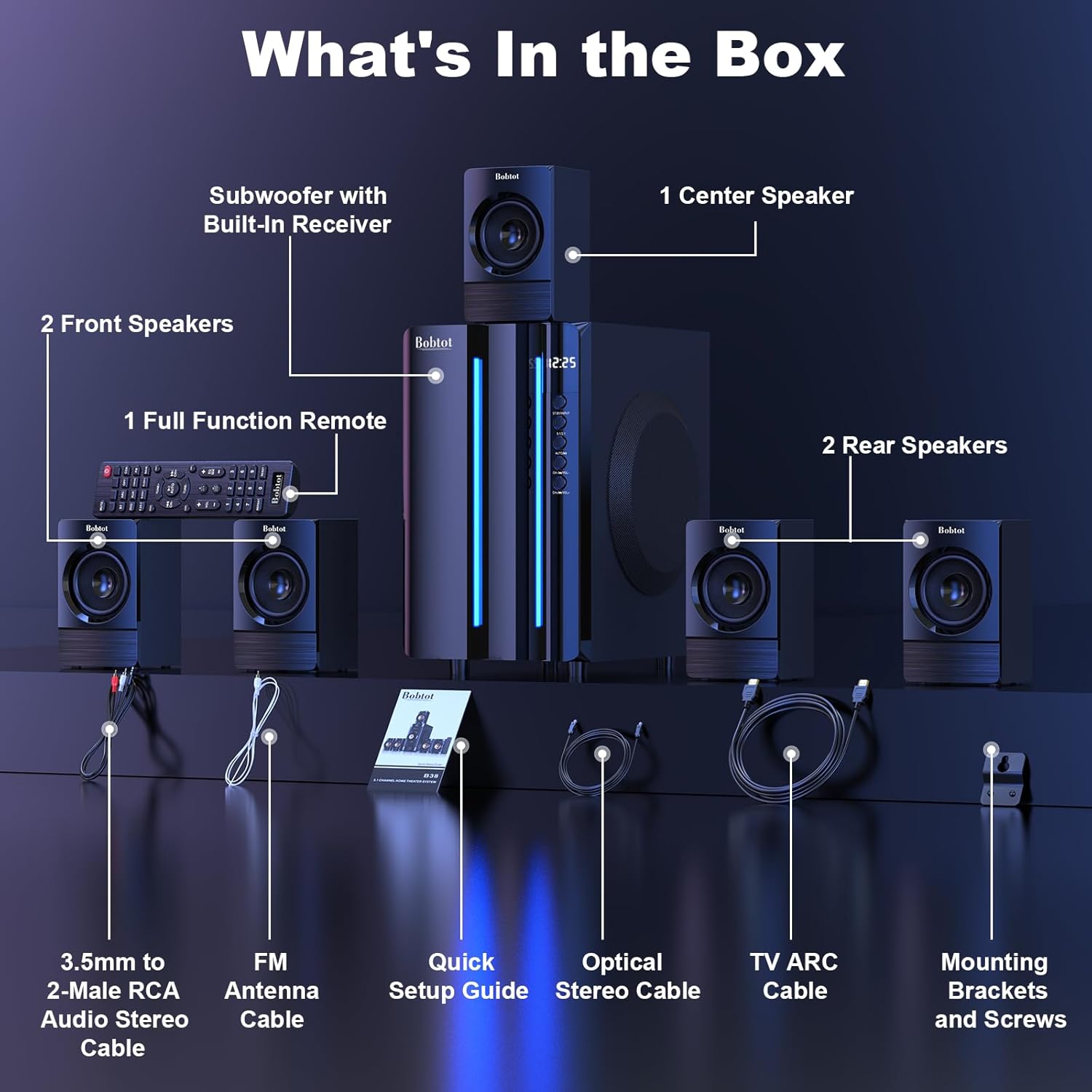
Image 3.1: Visual representation of all items included in the Bobtot K701S package.
- 1 x Subwoofer with Built-in Receiver
- 1 x Center Speaker
- 2 x Front Speakers
- 2 x Rear Speakers
- 1 x Full Function Remote Control
- 1 x 3.5mm to 2-Male RCA Audio Stereo Cable
- 1 x FM Antenna Cable
- 1 x ദ്രുത സജ്ജീകരണ ഗൈഡ്
- 1 x Optical Stereo Cable
- 1 x TV ARC Cable (HDMI)
- 1 x കോക്സിയൽ കേബിൾ
- 1 x ഓക്സ് കേബിൾ
- 1 x RCA കേബിൾ
- മൗണ്ടിംഗ് ബ്രാക്കറ്റുകളും സ്ക്രൂകളും
- ഉപയോക്തൃ മാനുവൽ (ഈ പ്രമാണം)
4. ഘടകങ്ങൾ കഴിഞ്ഞുview
4.1 Subwoofer (Main Unit)
The subwoofer houses the main receiver and amplifier for the entire system. It features a 6.5-inch driver for deep bass and includes all input/output ports.

ചിത്രം 4.1: വിശദമായത് view of the 6.5-inch subwoofer, highlighting its internal components.
4.2 സാറ്റലൈറ്റ് സ്പീക്കറുകൾ
The system includes five satellite speakers: one center, two front (left/right), and two rear (left/right). These speakers are wired and connect directly to the subwoofer unit.
4.3 വിദൂര നിയന്ത്രണം
The full-function remote control allows you to manage power, input modes, volume, channel selection, and other settings from a distance.
5. സിസ്റ്റം സജ്ജീകരണം
Follow these steps to set up your Bobtot K701S surround sound system.
5.1 സ്പീക്കർ കണക്ഷൻ
The five satellite speakers come with integrated cables. Connect each speaker to the corresponding "Audio Output" slot on the rear of the subwoofer unit. The cables are color-coded or labeled for easy identification (e.g., FL for Front Left, FR for Front Right, CEN for Center, SL for Surround Left, SR for Surround Right).
- Front Center and L/R speakers: Cables are approximately 13 feet long.
- Rear L/R speakers: Cables are approximately 31 feet long.
Place all speakers in the same room for optimal surround sound performance.

Image 5.1: Recommended speaker placement for a 5.1 channel surround sound experience.
5.2 Power On and Initial Test
- Connect the subwoofer to a power outlet using the provided power cable.
- പവർ സ്വിച്ച് ഉപയോഗിച്ച് സബ് വൂഫർ ഓണാക്കുക.
- Press the power button on the remote control or the front panel.
- Test the remote control functionality.
- Switch to "BT" (Bluetooth) mode and connect your mobile device to "B701D" via Bluetooth to ensure audio playback.
5.3 ബാഹ്യ ഉപകരണങ്ങൾ ബന്ധിപ്പിക്കുന്നു
Choose the appropriate input mode and connect your external device (e.g., TV, projector, DVD player, game console) to the subwoofer using the corresponding audio cables provided.
- Ensure the cable is securely plugged into the correct input slot on the subwoofer.
- Select the matching input mode on the system (e.g., HDMI ARC, OPT, COA, AUX, USB, DVD).

ചിത്രം 5.2: കഴിഞ്ഞുview of the rear panel connections and supported multimedia inputs.
6. പ്രവർത്തന നിർദ്ദേശങ്ങൾ
6.1 വിദൂര നിയന്ത്രണ പ്രവർത്തനങ്ങൾ
The remote control provides full command over your sound system. Always press the power button before selecting an input mode when turning on the unit.

Image 6.1: Detailed diagram of the remote control buttons and their functions.
- പവർ ഓൺ/ഓഫ്: സിസ്റ്റം ഓൺ അല്ലെങ്കിൽ ഓഫ് ചെയ്യുന്നു.
- ഇൻപുട്ട് മോഡ് തിരഞ്ഞെടുക്കുക: Buttons for BT, ARC, OPT, COA, DVD, AUX, USB/SD, FM to switch between audio sources.
- 5.1/2.1 Channel Select: Toggles between 5.1 surround sound and 2.1 stereo mode (in 2.1 mode, only the two front speakers play).
- Volume Control (VOL +/-): മൊത്തത്തിലുള്ള സിസ്റ്റം വോളിയം ക്രമീകരിക്കുന്നു.
- Mic Volume Adjustment (MIC +/-): Adjusts the volume for connected microphones (supports wireless/wired microphones).
- Echo Control (ECHO +/-): മൈക്രോഫോണുകൾക്കുള്ള എക്കോ ഇഫക്റ്റ് ക്രമീകരിക്കുന്നു.
- ട്യൂൺ +/-: For FM radio tuning.
- CH +/-: For FM radio channel selection.
- മ്യൂട്ട്: ഓഡിയോ ഔട്ട്പുട്ട് നിശബ്ദമാക്കുകയോ അൺമ്യൂട്ടുചെയ്യുകയോ ചെയ്യുന്നു.
6.2 Input Modes
The Bobtot K701S supports various input methods:
- ബ്ലൂടൂത്ത് (ബിടി): For wireless connection to smartphones, tablets, and other Bluetooth-enabled devices.
- എച്ച്ഡിഎംഐ ആർസി: Connects to your TV's HDMI ARC port for high-quality audio transmission and TV remote control integration.
- Optical (OPT): Digital audio input for TVs, game consoles, and other devices with an optical output.
- Coaxial (COA): Digital audio input, similar to optical, for compatible devices.
- ഓക്സ്: Analog audio input using a 3.5mm or RCA cable for a wide range of devices.
- USB/SD: ഓഡിയോ പ്ലേ ചെയ്യുക files directly from USB drives or SD cards.
- എഫ്എം റേഡിയോ: Built-in FM tuner for listening to radio stations.
- ഡിവിഡി: Dedicated input for DVD players.
6.3 Channel Configuration (5.1 / 2.1)
The system offers two channel modes: 5.1 and 2.1. You can switch between these modes using the remote control or the front panel. In 5.1 mode, all five satellite speakers and the subwoofer are active, providing a full surround sound experience. In 2.1 mode, only the two front speakers and the subwoofer are active, suitable for stereo audio.
7. Connectivity Guide
This section details how to connect various devices to your sound system.
7.1 ബ്ലൂടൂത്ത് കണക്ഷൻ
- Press the "BT" button on the remote control or front panel to select Bluetooth mode. The display will show "BT".
- നിങ്ങളുടെ മൊബൈൽ ഉപകരണത്തിൽ, ബ്ലൂടൂത്ത് പ്രവർത്തനക്ഷമമാക്കി ലഭ്യമായ ഉപകരണങ്ങൾക്കായി തിരയുക.
- Select "B701D" from the list to pair. Once connected, you will hear a confirmation sound.
7.2 HDMI ARC കണക്ഷൻ
- Connect one end of the HDMI ARC cable to the "HDMI ARC" port on the subwoofer.
- Connect the other end to the "HDMI ARC" port on your TV.
- Select "ARC" input mode on the sound system.
- Ensure your TV's audio output is set to HDMI ARC or external speakers.
7.3 Optical/Coaxial Connection
- Connect an optical or coaxial cable from your device's digital audio output to the corresponding "OPT" or "COA" input on the subwoofer.
- Select "OPT" or "COA" input mode on the sound system.
- Ensure your device's audio output is set to PCM (Pulse-code modulation) for optical/coaxial connections, as some devices may default to other formats not supported by the system.
7.4 ഓക്സ് കണക്ഷൻ
- Use the provided 3.5mm to 2-Male RCA cable or a standard RCA cable.
- Connect the cable from your device's audio output (e.g., headphone jack, RCA L/R output) to the "AUX" input on the subwoofer.
- Select "AUX" input mode on the sound system.
7.5 യുഎസ്ബി/എസ്ഡി പ്ലേബാക്ക്
- Insert a USB flash drive or SD card containing audio files into the respective port on the subwoofer.
- Select "USB/SD" input mode. The system will automatically begin playing compatible audio files.
7.6 എഫ്എം റേഡിയോ
- Connect the FM antenna cable to the "FM ANTENNA" port on the subwoofer. Extend the antenna for better reception.
- Select "FM" input mode.
- Use the "TUNE +/-" or "CH +/-" buttons on the remote to scan for and select radio stations.
8 സ്പെസിഫിക്കേഷനുകൾ
| ഫീച്ചർ | സ്പെസിഫിക്കേഷൻ |
|---|---|
| മോഡൽ നമ്പർ | കെ 701 എസ് |
| സ്പീക്കർ തരം | ഉപഗ്രഹം |
| സറൗണ്ട് സൗണ്ട് ചാനൽ കോൺഫിഗറേഷൻ | 5.1 |
| പീക്ക് ഔട്ട്പുട്ട് പവർ | 800 വാട്ട്സ് |
| സബ് വൂഫർ വ്യാസം | 6.5 ഇഞ്ച് |
| ഫ്രീക്വൻസി പ്രതികരണം | 20 KHz |
| വയർലെസ് കമ്മ്യൂണിക്കേഷൻ ടെക്നോളജി | ബ്ലൂടൂത്ത് 5.0 |
| കണക്റ്റിവിറ്റി ടെക്നോളജി | Bluetooth, HDMI ARC, Optical, Coaxial, AUX, USB, DVD, FM |
| നിയന്ത്രണ രീതി | റിമോട്ട് കൺട്രോൾ |
| പവർ ഉറവിടം | കോർഡഡ് ഇലക്ട്രിക് |
| ഇൻപുട്ട് വോളിയംtage | 120 വോൾട്ട് |
| ഉൽപ്പന്ന അളവുകൾ (L x W x H) | 31.8 x 19.8 x 33 സെ.മീ |
| ഇനത്തിൻ്റെ ഭാരം | 6.56 കിലോഗ്രാം |
| മെറ്റീരിയൽ | Wood (MDF), Acrylonitrile Butadiene Styrene (ABS) |
| പ്രത്യേക ഫീച്ചർ | ബാസ് Ampലിഫിക്കേഷൻ |
9. പ്രശ്നപരിഹാരം
If you encounter issues with your Bobtot K701S system, refer to the following common problems and solutions:
9.1 ശബ്ദമില്ല
- പവർ പരിശോധിക്കുക: Ensure the system is powered on and the power cable is securely connected.
- വോളിയം നില: Increase the master volume on the system and your connected device.
- ഇൻപുട്ട് മോഡ്: Verify that the correct input mode is selected on the system (e.g., BT, ARC, OPT).
- കേബിൾ കണക്ഷനുകൾ: Ensure all audio cables are securely connected to both the system and the source device.
- Source Device Output: Check the audio output settings on your source device (e.g., TV, DVD player) to ensure it's sending audio to the correct output port and format (e.g., PCM for optical/coaxial).
9.2 Poor Sound Quality / Distortion
- വോളിയം നില: Reduce the volume if it's too high, causing distortion.
- കേബിൾ സമഗ്രത: ഓഡിയോ കേബിളുകൾക്ക് കേടുപാടുകൾ സംഭവിച്ചിട്ടുണ്ടോ അല്ലെങ്കിൽ കണക്ഷനുകൾ അയഞ്ഞിട്ടുണ്ടോ എന്ന് പരിശോധിക്കുക.
- സ്പീക്കർ സ്ഥാനം: Ensure speakers are placed correctly and not obstructed.
- ഉറവിട നിലവാരം: മറ്റൊരു ഓഡിയോ ഉറവിടം ഉപയോഗിച്ച് പരീക്ഷിക്കുക അല്ലെങ്കിൽ file to rule out issues with the original content.
9.3 റിമോട്ട് കൺട്രോൾ പ്രവർത്തിക്കുന്നില്ല
- ബാറ്ററികൾ: റിമോട്ട് കൺട്രോളിൽ ബാറ്ററികൾ മാറ്റിസ്ഥാപിക്കുക.
- വീക്ഷണരേഖ: Ensure there is a clear line of sight between the remote and the system's IR receiver.
- ദൂരം: Operate the remote within its effective range.
9.4 ബ്ലൂടൂത്ത് കണക്ഷൻ പ്രശ്നങ്ങൾ
- ജോടിയാക്കൽ മോഡ്: Ensure the system is in Bluetooth pairing mode.
- ഉപകരണ സാമീപ്യം: Keep your Bluetooth device within a few meters of the system.
- ഇടപെടൽ: തടസ്സം സൃഷ്ടിച്ചേക്കാവുന്ന മറ്റ് വയർലെസ് ഉപകരണങ്ങളിൽ നിന്ന് മാറുക.
- ഉപകരണം മറക്കുക: On your mobile device, "forget" or "unpair" the "B701D" and attempt to reconnect.
10. പരിചരണവും പരിപാലനവും
- വൃത്തിയാക്കൽ: Use a soft, dry cloth to clean the surfaces of the system. Do not use liquid cleaners or aerosols.
- വെൻ്റിലേഷൻ: Ensure the subwoofer has adequate ventilation and is not placed in an enclosed space that could restrict airflow.
- പ്ലേസ്മെൻ്റ്: സിസ്റ്റം നേരിട്ട് സൂര്യപ്രകാശം ഏൽക്കുന്നിടത്തോ, താപ സ്രോതസ്സുകൾക്ക് സമീപമോ, ഉയർന്ന ഈർപ്പം ഉള്ള സ്ഥലങ്ങളിലോ സ്ഥാപിക്കുന്നത് ഒഴിവാക്കുക.
- പവർ ഓഫ്: Turn off and unplug the system when not in use for extended periods.
11. വാറണ്ടിയും ഉപഭോക്തൃ പിന്തുണയും
Bobtot is committed to providing a positive customer experience. If you encounter any issues with your B701D Home Surround Sound System, please refer to this user manual for initial troubleshooting.
For further assistance, please contact Bobtot customer support through the Amazon buyer-seller messaging service. Our support team is available to help you with any questions or concerns you may have.


