1. ആമുഖം
This manual provides essential information for setting up, operating, and maintaining your Vibox VI-162 Gaming PC. This entry-level gaming PC is designed for casual gamers, featuring integrated graphics capable of running less demanding titles and indie games efficiently. It is an ideal system for beginners or those seeking an affordable computer with potential for future upgrades.

Image 1.1: The complete Vibox VI-162 gaming PC bundle, including the tower, 22-inch monitor, keyboard, mouse, and headset.
2. ബോക്സിൽ എന്താണുള്ളത്?
നിങ്ങളുടെ പാക്കേജിൽ താഴെ പറയുന്ന എല്ലാ ഇനങ്ങളും ഉണ്ടെന്ന് ഉറപ്പാക്കുക:
- Vibox VI-162 Gaming PC Tower
- 22 ഇഞ്ച് മോണിറ്റർ
- കീബോർഡ്
- മൗസ്
- പവർ കേബിൾ(കൾ)
- Display Cable (HDMI/DisplayPort)
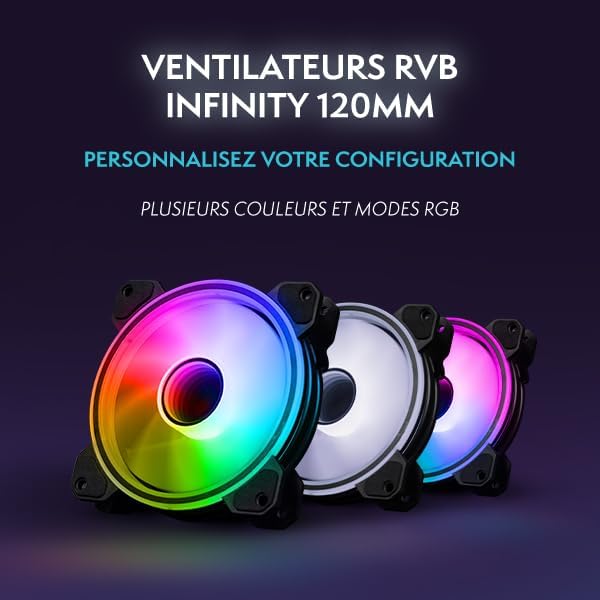
- RGB Lighting Accessories (if applicable)
3. സജ്ജീകരണ നിർദ്ദേശങ്ങൾ
3.1 അൺപാക്കിംഗ്
- എല്ലാ ഘടകങ്ങളും അവയുടെ പാക്കേജിംഗിൽ നിന്ന് ശ്രദ്ധാപൂർവ്വം നീക്കം ചെയ്യുക.
- Place the PC tower on a stable, flat surface with adequate ventilation.
- Remove any protective films or internal packaging materials from the PC tower.
3.2 പെരിഫറലുകൾ ബന്ധിപ്പിക്കുന്നു
- നിരീക്ഷിക്കുക: Connect the monitor to the PC's graphics output port (HDMI or DisplayPort) using the provided cable. Ensure the monitor's power cable is also connected to a power outlet.
- കീബോർഡും മൗസും: Connect the keyboard and mouse to the available USB ports on the rear or front of the PC tower.
- ശക്തി: Connect the PC's power cable to the power supply unit (PSU) at the rear of the PC, then plug it into a wall outlet.
- നെറ്റ്വർക്ക്: For wired internet, connect an Ethernet cable to the LAN port on the rear of the PC. For wireless internet, ensure the Wi-Fi antenna (if provided) is securely attached.
- ഓഡിയോ: Connect your headset or speakers to the appropriate audio jacks (headphone/microphone) on the front or rear panel.

Image 3.1: Front panel connectivity of the Vibox VI-162 PC, showing ports for headphones, microphone, USB 2.0, USB 3.0, RGB control, reset, and power buttons.
3.3 ആദ്യ ബൂട്ട്
- Press the power button on the front of the PC tower.
- നിങ്ങളുടെ മോണിറ്റർ ഓണാക്കുക.
- The system will boot into the pre-installed Linux Mint operating system. Follow the on-screen prompts for initial setup, such as language selection, time zone, and user account creation.
- Once the setup is complete, your PC is ready for use.
4. പ്രവർത്തന നിർദ്ദേശങ്ങൾ
4.1 ഓപ്പറേറ്റിംഗ് സിസ്റ്റം
Your Vibox VI-162 PC comes with Linux Mint pre-installed. Linux Mint is a user-friendly and efficient operating system, ideal for maximizing system resources during gaming and general use. It offers a robust platform with strong community support and regular updates.
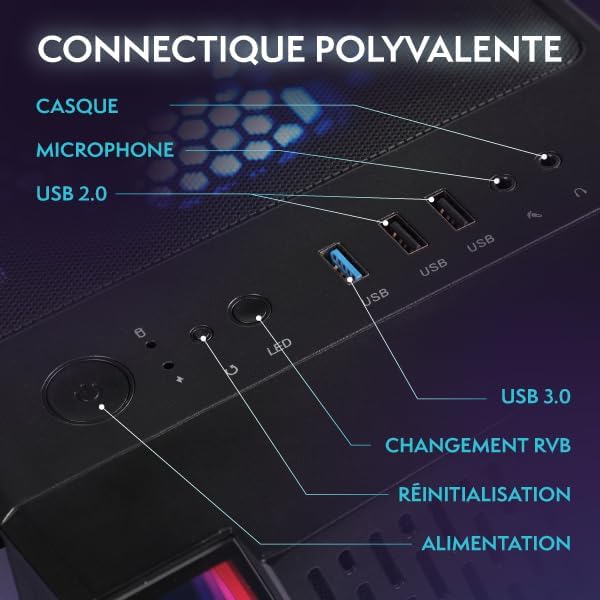
Image 4.1: Key features of the Linux Mint operating system, including its lightweight design, user-friendly interface, and support for gaming platforms like Steam, Lutris, and Proton.
You have the flexibility to install your preferred operating system if desired. Refer to the specific installation guide for your chosen OS.
4.2 ഗെയിമിംഗും പ്രകടനവും
The PC is equipped with an AMD Ryzen 3 3200G processor and integrated Radeon Vega 8 graphics, suitable for less demanding games and indie titles. For optimal performance, ensure your graphics drivers are up to date.
ചിത്രം 4.2: ആന്തരികം view of the Vibox VI-162 PC tower, showcasing the motherboard and CPU cooler.
4.3 RGB ലൈറ്റിംഗ് നിയന്ത്രണം
The PC tower features customizable RGB lighting. Use the dedicated RGB change button on the front panel (refer to Image 3.1) to cycle through different colors and lighting modes. For more advanced control, consult the motherboard or case manufacturer's software documentation if available.
5. പരിപാലനം
5.1 വൃത്തിയാക്കൽ
- പുറം: Use a soft, dry, anti-static cloth to clean the exterior surfaces of the PC tower and monitor. Avoid abrasive cleaners.
- പൊടി: Periodically use compressed air to clear dust from ventilation grilles and internal components. Ensure the PC is powered off and unplugged before cleaning.
5.2 വെന്റിലേഷൻ
Ensure the PC has adequate airflow. Do not block the ventilation openings on the front, rear, top, or sides of the tower. Proper ventilation helps prevent overheating and maintains system stability.
6. പ്രശ്നപരിഹാരം
This section addresses common issues you might encounter with your Vibox VI-162 PC.
6.1 വൈദ്യുതിയില്ല
- Check if the power cable is securely connected to both the PC and the wall outlet.
- Ensure the power switch on the PSU (located at the rear of the PC) is in the 'ON' position.
- വാൾ ഔട്ട്ലെറ്റ് പ്രവർത്തനക്ഷമമാണെന്ന് ഉറപ്പാക്കാൻ മറ്റൊരു ഉപകരണം ഉപയോഗിച്ച് അത് പരിശോധിക്കുക.
6.2 മോണിറ്ററിൽ ഡിസ്പ്ലേ ഇല്ല
- Verify that the monitor is powered on and its power cable is connected.
- Ensure the display cable (HDMI/DisplayPort) is securely connected to both the PC and the monitor.
- മോണിറ്ററിന്റെ ഇൻപുട്ട് ഉറവിടം ശരിയായി സജ്ജീകരിച്ചിട്ടുണ്ടെന്ന് ഉറപ്പാക്കുക (ഉദാ. HDMI 1, ഡിസ്പ്ലേ പോർട്ട്).
6.3 Peripherals Not Responding
- Try connecting the keyboard or mouse to a different USB port.
- പിസി പുനരാരംഭിക്കുക.
- Ensure drivers for specific peripherals are installed and up to date (if required by the peripheral).
6.4 സിസ്റ്റം സ്ലോഡൗൺ അല്ലെങ്കിൽ ഫ്രീസിംഗ്
- പശ്ചാത്തലത്തിൽ പ്രവർത്തിക്കുന്ന അനാവശ്യ ആപ്ലിക്കേഷനുകൾ അടയ്ക്കുക.
- Check for sufficient free storage space on your SSD.
- Ensure the PC has proper ventilation to prevent thermal throttling.
- Update your operating system and drivers.
7 സ്പെസിഫിക്കേഷനുകൾ
Detailed technical specifications for the Vibox VI-162 Gaming PC:
| ഫീച്ചർ | സ്പെസിഫിക്കേഷൻ |
|---|---|
| ബ്രാൻഡ് | വൈബോക്സ് |
| നിർമ്മാതാവ് | വൈബോക്സ് |
| പരമ്പര | വി.ടി.എക്സ്-2 |
| ഉൽപ്പന്ന അളവുകൾ | 37 x 20 x 46 സെ.മീ |
| ഉൽപ്പന്ന മോഡൽ നമ്പർ | VI-162 |
| നിറം | VTX-2 Black Bundle |
| ഫോം ഫാക്ടർ | ടവർ |
| Screen Size (Monitor) | 22 ഇഞ്ച് |
| Screen Resolution (Monitor) | 1920 x 1080 പിക്സലുകൾ |
| പരമാവധി മിഴിവ് | 1920 x 1080 പിക്സലുകൾ |
| പ്രോസസർ നിർമ്മാതാവ് | എഎംഡി |
| പ്രോസസ്സർ തരം | Ryzen 3 3200G |
| പ്രോസസ്സർ വേഗത | 3.6 GHz (Max 4.0 GHz) |
| പ്രോസസർ സോക്കറ്റ് | സോക്കറ്റ് AM4 |
| പ്രോസസ്സറുകളുടെ എണ്ണം | 4 |
| റാം ശേഷി | 16 ജിബി |
| മെമ്മറി ടെക്നോളജി | DDR4 |
| കമ്പ്യൂട്ടർ മെമ്മറി തരം | DDR4 SDRAM |
| Maximum Supported Memory | 128 ജിബി |
| മെമ്മറി ക്ലോക്ക് സ്പീഡ് | 3200 MHz |
| Hard Drive Description | എസ്എസ്ഡി |
| ഹാർഡ് ഡ്രൈവ് ഇൻ്റർഫേസ് | സോളിഡ് സ്റ്റേറ്റ് |
| സംഭരണ ശേഷി | 1 ടി.ബി |
| ഗ്രാഫിക്സ് കോപ്രൊസസർ | AMD Radeon Vega 8 |
| Graphics Card Brand | എഎംഡി |
| ഗ്രാഫിക്സ് കാർഡ് വിവരണം | സംയോജിപ്പിച്ചത് |
| Graphics Memory Type | പങ്കിട്ടു |
| Graphics RAM Capacity | 2 ജിബി |
| ഗ്രാഫിക്സ് കാർഡ് ഇൻ്റർഫേസ് | സംയോജിപ്പിച്ചത് |
| കണക്റ്റിവിറ്റി തരം | വൈഫൈ |
| വയർലെസ് കണക്ഷൻ തരം | 802.11n |
| USB 2.0 പോർട്ടുകളുടെ എണ്ണം | 3 |
| USB 3.0 പോർട്ടുകളുടെ എണ്ണം | 3 |
| ഒപ്റ്റിക്കൽ ഡ്രൈവ് തരം | ഒന്നുമില്ല |
| പവർ ഉറവിടം | DC |
| ഹാർഡ്വെയർ പ്ലാറ്റ്ഫോം | PC |
| ഓപ്പറേറ്റിംഗ് സിസ്റ്റം | ലിനക്സ് |
| ഉൽപ്പന്ന ഭാരം | 15.6 കി.ഗ്രാം |
| നിർദ്ദിഷ്ട ഉൽപ്പന്ന ഉപയോഗങ്ങൾ | Image Editing, Video Editing, Video Games |
| പേഴ്സണൽ കമ്പ്യൂട്ടർ ഡിസൈൻ തരം | കമ്പ്യൂട്ടർ ടവർ |
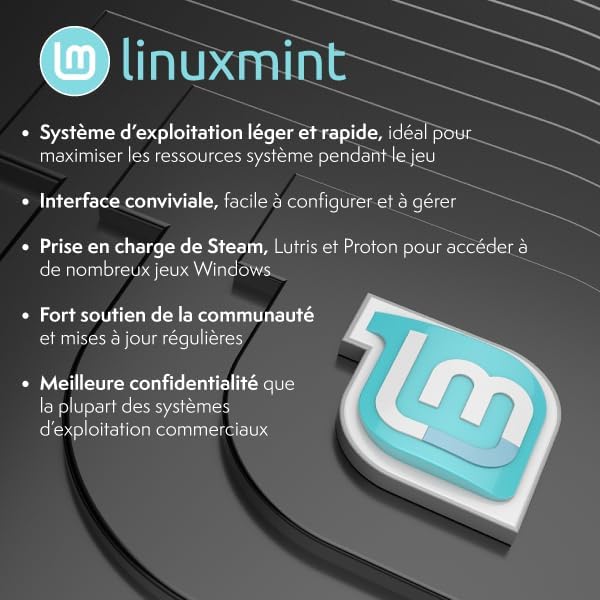
Image 7.1: Dimensions of the Vibox VI-162 PC tower: 46cm height, 38cm depth, and 20cm width.
8. വാറൻ്റിയും പിന്തുണയും
8.1 വാറൻ്റി വിവരങ്ങൾ
Your Vibox VI-162 PC is covered by a manufacturer's warranty. For specific details regarding warranty duration, terms, and conditions, please refer to the documentation included with your purchase or visit the official Vibox webസൈറ്റ്. വാറന്റി ക്ലെയിമുകൾക്കായി നിങ്ങളുടെ വാങ്ങലിന്റെ തെളിവ് സൂക്ഷിക്കുക.
8.2 സാങ്കേതിക പിന്തുണ
If you encounter any issues not covered in the troubleshooting section or require further assistance, please contact Vibox customer support. You can typically find contact information on the official Vibox webസൈറ്റ് അല്ലെങ്കിൽ നിങ്ങളുടെ റീട്ടെയിലർ വഴി.
Vibox Official Webസൈറ്റ്: www.vibox.co.uk (ദയവായി ശ്രദ്ധിക്കുക: URL may vary by region. Check your local Vibox website for the most accurate support information.)


