1. ആമുഖം
വാങ്ങിയതിന് നന്ദി.asing the WANBO X2 Max Projector. This manual provides essential information for setting up, operating, and maintaining your projector. Please read it thoroughly before use to ensure optimal performance and safety. The WANBO X2 Max is a versatile projector offering Full HD 1080p resolution, 450 ANSI lumens brightness, and an integrated Android 9.0 operating system for a seamless entertainment experience.
2 സുരക്ഷാ വിവരങ്ങൾ
- l ചെയ്യുമ്പോൾ പ്രൊജക്ടർ ലെൻസിലേക്ക് നേരിട്ട് നോക്കരുത്amp ഓണാണ്.
- അമിതമായി ചൂടാകുന്നത് തടയാൻ പ്രൊജക്ടറിന് ചുറ്റും ശരിയായ വായുസഞ്ചാരം ഉറപ്പാക്കുക.
- Keep the projector away from water, moisture, and flammable materials.
- പ്രൊജക്ടറിനൊപ്പം നൽകിയിരിക്കുന്ന പവർ അഡാപ്റ്റർ മാത്രം ഉപയോഗിക്കുക.
- പ്രൊജക്ടർ സ്വയം വേർപെടുത്താനോ നന്നാക്കാനോ ശ്രമിക്കരുത്. സഹായത്തിനായി യോഗ്യതയുള്ള സേവന ഉദ്യോഗസ്ഥരെ ബന്ധപ്പെടുക.
- Keep the projector out of reach of children.
3. പാക്കേജ് ഉള്ളടക്കം
നിങ്ങളുടെ പാക്കേജിൽ എല്ലാ ഇനങ്ങളും ഉണ്ടോ എന്ന് ദയവായി പരിശോധിക്കുക:
- WANBO X2 Max Projector
- റിമോട്ട് കൺട്രോൾ
- പവർ കേബിൾ
- ഉപയോക്തൃ മാനുവൽ (ഈ പ്രമാണം)
4. ഉൽപ്പന്നം കഴിഞ്ഞുview
Familiarize yourself with the components and ports of your WANBO X2 Max Projector.

ചിത്രം 4.1: മുകളിൽ നിന്ന് താഴേക്ക് view of the WANBO X2 Max Projector, showcasing അതിന്റെ മിനുസമാർന്ന വെളുത്ത ഡിസൈൻ.

ചിത്രം 4.2: മുൻഭാഗം view of the projector, highlighting the main lens and the 'wanbo' branding.

ചിത്രം 4.3: പിൻഭാഗം view of the projector, displaying the various input/output ports including USB, HDMI, AV, Audio, and the power input.
പ്രധാന ഘടകങ്ങൾ:
- പ്രൊജക്ഷൻ ലെൻസ്: ചിത്രം സ്ക്രീനിലേക്ക് എമിറ്റ് ചെയ്യുന്നു.
- പവർ ഇൻപുട്ട്: പവർ കേബിളുമായി ബന്ധിപ്പിക്കുന്നു.
- USB പോർട്ടുകൾ: USB സംഭരണ ഉപകരണങ്ങൾ ബന്ധിപ്പിക്കുന്നതിന്.
- HDMI പോർട്ടുകൾ: For connecting external devices like laptops, gaming consoles, or Blu-ray players.
- എവി പോർട്ട്: പഴയ അനലോഗ് ഉപകരണങ്ങൾ ബന്ധിപ്പിക്കുന്നതിന്.
- ഓഡിയോ ഔട്ട്പുട്ട്: ബാഹ്യ സ്പീക്കറുകളോ ഹെഡ്ഫോണുകളോ ബന്ധിപ്പിക്കുന്നതിന്.
- ഐആർ റിസീവർ: For receiving signals from the remote control.
5. സജ്ജീകരണം
5.1 പ്ലേസ്മെൻ്റ്
Choose a flat, stable surface for the projector. Ensure there is enough space for proper ventilation. The projection distance will determine the screen size. For optimal viewപ്രൊജക്ടർ നിങ്ങളുടെ പ്രൊജക്ഷൻ പ്രതലത്തിന് നേരെ മുന്നിൽ സ്ഥാപിക്കുക.
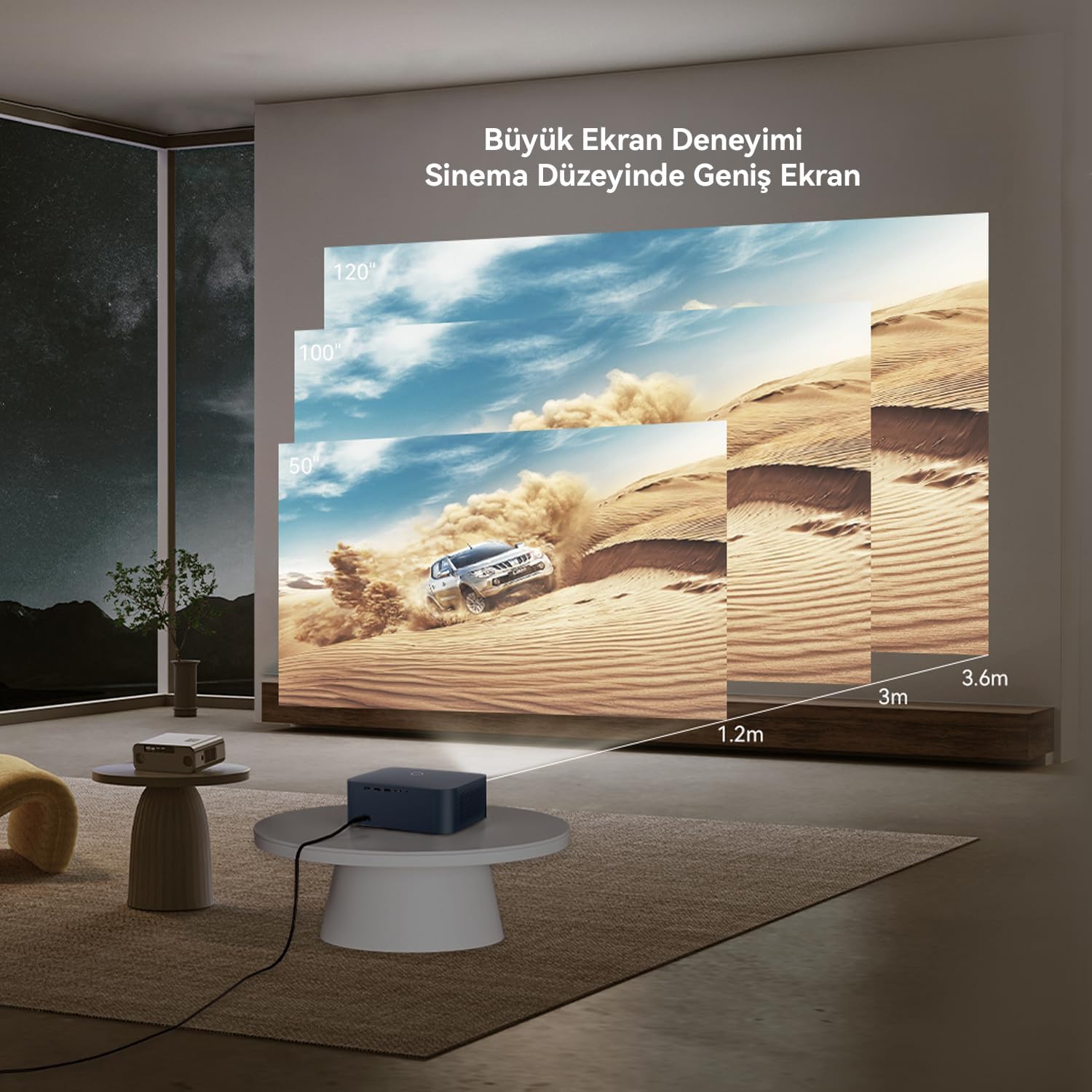
Figure 5.1: Guide for projection distances and corresponding screen sizes. For example, a 1.2m distance yields approximately a 50-inch screen, while 3.6m can achieve a 120-inch screen. The projector supports up to a 300-inch maximum image size.
5.2 പവർ കണക്ഷൻ
- പ്രൊജക്ടറിന്റെ പവർ ഇൻപുട്ട് പോർട്ടിലേക്ക് പവർ കേബിൾ ബന്ധിപ്പിക്കുക.
- പവർ കേബിളിൻ്റെ മറ്റേ അറ്റം പവർ ഔട്ട്ലെറ്റിലേക്ക് പ്ലഗ് ചെയ്യുക.
- അത് ഓണാക്കാൻ പ്രൊജക്ടറിലോ റിമോട്ട് കൺട്രോളിലോ ഉള്ള പവർ ബട്ടൺ അമർത്തുക.
5.3 ഫോക്കസും കീസ്റ്റോൺ ക്രമീകരണവും
The WANBO X2 Max features automatic focus and keystone correction. When the projector is powered on or moved, its AI vision algorithm system will automatically adjust the image to ensure clarity and a rectangular shape.

Figure 5.2: The projector's automatic focus system ensures a clear image upon startup or movement, utilizing Wanbo's proprietary AI vision algorithm.
6. പ്രവർത്തിക്കുന്നു
6.1 ഉപകരണങ്ങൾ ബന്ധിപ്പിക്കുന്നു
പ്രൊജക്ടർ ഒന്നിലധികം കണക്റ്റിവിറ്റി ഓപ്ഷനുകളെ പിന്തുണയ്ക്കുന്നു:

ചിത്രം 6.1: ഓവർview of multi-device connection capabilities, including tablets, smartphones, PCs, laptops, DVD players, TV boxes, gaming consoles (Xbox/PS5), and cameras. The projector offers Audio, HDMI, AV, and USB ports.
- എച്ച്ഡിഎംഐ: Connect laptops, gaming consoles, Blu-ray players, or TV sticks using an HDMI cable. Select the corresponding HDMI input from the projector's source menu.
- USB: മീഡിയ പ്ലേ ചെയ്യുന്നതിന് USB പോർട്ടിലേക്ക് ഒരു USB ഫ്ലാഷ് ഡ്രൈവ് അല്ലെങ്കിൽ എക്സ്റ്റേണൽ ഹാർഡ് ഡ്രൈവ് ചേർക്കുക. fileനേരിട്ട്.
- ഓഫ്: Use an AV cable to connect older devices like DVD players or VCRs.
- ഓഡിയോ Outട്ട്: Connect external speakers or headphones via the 3.5mm audio jack for enhanced sound.
6.2 റിമോട്ട് കൺട്രോൾ ഉപയോഗിക്കുന്നു
The included remote control allows you to navigate the projector's interface, adjust settings, and control media playback. Ensure the remote has batteries installed and is pointed towards the projector's IR receiver.
6.3 Navigating Android 9.0 Interface
The projector runs on Android 9.0, providing access to various apps and streaming services. Use the remote control to navigate the home screen, open applications, and adjust system settings.

Figure 6.2: The Android 9.0 interface offers a wide range of content, including films, TV series, shows, animations, and documentaries. Popular streaming service logos like Netflix, YouTube, Prime Video, and Disney+ are shown, indicating potential access to content.
6.4 വൈഫൈ കണക്ഷൻ
To access online content and features, connect the projector to a Wi-Fi network:
- Go to the 'Settings' menu on the Android home screen.
- 'നെറ്റ്വർക്ക് & ഇന്റർനെറ്റ്' തിരഞ്ഞെടുക്കുക.
- വൈഫൈ ഓണാക്കി ലിസ്റ്റിൽ നിന്ന് നിങ്ങൾക്ക് ആവശ്യമുള്ള നെറ്റ്വർക്ക് തിരഞ്ഞെടുക്കുക.
- ആവശ്യപ്പെടുകയാണെങ്കിൽ Wi-Fi പാസ്വേഡ് നൽകുക.
The projector supports Dual-band WiFi 6, which significantly reduces latency for smoother streaming and online experiences.

Figure 6.3: Demonstration of the projector's WiFi 6 capabilities, illustrating reduced delay for a smooth and fast movie streaming experience.
6.5 സ്ക്രീൻ മിററിംഗ്
You can mirror content from your smartphone or tablet to the projector. Refer to the specific screen mirroring app or feature on your device and the projector's Android interface for instructions.
പ്രധാന കുറിപ്പ്: Due to copyright protection, certain streaming services like Netflix, Amazon Prime Video, and Disney+ may not allow direct screen mirroring of their content. For these services, it is recommended to use a dedicated TV stick (e.g., Amazon Fire TV Stick, Google Chromecast) connected to the projector's HDMI port.
7. പരിപാലനം
7.1 ലെൻസ് വൃത്തിയാക്കൽ
പ്രൊജക്ടർ ലെൻസ് മൃദുവായി തുടയ്ക്കാൻ ഒപ്റ്റിക്കൽ ലെൻസുകൾക്കായി പ്രത്യേകം രൂപകൽപ്പന ചെയ്ത മൃദുവായ, ലിന്റ് രഹിത തുണി ഉപയോഗിക്കുക. അബ്രസീവ് ക്ലീനറുകളോ അമിതമായ ബലമോ ഉപയോഗിക്കരുത്, കാരണം ഇത് ലെൻസിൽ പോറൽ വീഴ്ത്തിയേക്കാം.
7.2 പൊതു പരിചരണം
- Keep the projector in a clean, dry environment.
- Avoid exposing the projector to extreme temperatures or direct sunlight.
- Regularly clean the projector's exterior with a soft, dry cloth.
- വെന്റിലേഷൻ ഓപ്പണിംഗുകൾ തടഞ്ഞിട്ടില്ലെന്ന് ഉറപ്പാക്കുക.
7.3 എൽamp ജീവിതം
The projector's light source has an estimated lifespan of up to 50,000 hours, providing long-term usage without frequent lamp മാറ്റിസ്ഥാപിക്കൽ.
8. പ്രശ്നപരിഹാരം
നിങ്ങളുടെ പ്രൊജക്ടറിൽ പ്രശ്നങ്ങൾ നേരിടുകയാണെങ്കിൽ, ഇനിപ്പറയുന്ന പൊതുവായ പ്രശ്നങ്ങളും പരിഹാരങ്ങളും പരിശോധിക്കുക:
| പ്രശ്നം | സാധ്യമായ കാരണം | പരിഹാരം |
|---|---|---|
| ശക്തിയില്ല | Power cable not connected; Power outlet faulty; Projector off | Check power cable connection; Try a different outlet; Press power button on projector/remote |
| ചിത്രമില്ല | Input source not selected; Device not connected; Lens cap on | Select correct input source (HDMI, USB, AV); Ensure device is connected and powered on; Remove lens cap |
| ചിത്രം മങ്ങുന്നു | Focus issue; Projector moved | Allow automatic focus to adjust; If manual adjustment is needed (rare), check settings. |
| Image distorted (trapezoid) | Keystone issue; Projector not perpendicular to screen | Allow automatic keystone correction to adjust. |
| ശബ്ദമില്ല | ശബ്ദം വളരെ കുറവാണ്; മ്യൂട്ട് ചെയ്തു; ബാഹ്യ ഓഡിയോ ഉപകരണം കണക്റ്റുചെയ്തിട്ടില്ല/തിരഞ്ഞെടുത്തിട്ടില്ല. | Increase volume; Unmute; Check external audio connections and settings |
| റിമോട്ട് കൺട്രോൾ പ്രവർത്തിക്കുന്നില്ല | Batteries low/dead; Obstruction; Out of range | Replace batteries; Remove obstructions; Ensure remote is pointed at IR receiver within range |
9 സ്പെസിഫിക്കേഷനുകൾ
Detailed technical specifications for the WANBO X2 Max Projector:

Figure 9.1: Infographic summarizing key features including 1080P FHD, 4K Support, 450 ANSI lumens, Android 9.0, Automatic Focus, Automatic Keystone Correction, 2000:1 Contrast, Dual Band 6G WiFi, 10W Hi-Fi Speaker, Tripod and Ceiling Mount Compatibility, 50,000 hour Lamp Life, Lightweight and Portable design.
| ഫീച്ചർ | സ്പെസിഫിക്കേഷൻ |
|---|---|
| ബ്രാൻഡ് | വാൻബോ |
| മോഡൽ നമ്പർ | WPA23 |
| നേറ്റീവ് റെസല്യൂഷൻ | 1920 x 1080 (പൂർണ്ണ HD) |
| തെളിച്ചം | 450 ആൻസി ലുമെൻസ് |
| കോൺട്രാസ്റ്റ് റേഷ്യോ | 2000:1 |
| ഓപ്പറേറ്റിംഗ് സിസ്റ്റം | ആൻഡ്രോയിഡ് 9.0 |
| കണക്റ്റിവിറ്റി ടെക്നോളജി | HDMI, USB, AV, Dual-band WiFi 6 |
| പരമാവധി ഇമേജ് വലുപ്പം | 300 ഇഞ്ച് |
| Lamp ജീവിതം | 50,000 മണിക്കൂർ വരെ |
| ഓഡിയോ ഔട്ട്പുട്ട് | 10W Hi-Fi Speaker, 3.5mm Audio Jack |
| പ്രത്യേക സവിശേഷതകൾ | Automatic Focus, Automatic Keystone Correction, Portable, Tripod and Ceiling Mount Compatible |
| അളവുകൾ (L x W x H) | 28 x 27 x 16 സെൻ്റീമീറ്റർ |
| ഭാരം | 1.4 കിലോഗ്രാം |
10. വാറൻ്റിയും പിന്തുണയും
10.1 നിർമ്മാതാവിന്റെ വാറന്റി
The WANBO X2 Max Projector comes with a 2-year manufacturer's warranty. This warranty covers defects in materials and workmanship under normal use. Please retain your proof of purchase for warranty claims.
10.2 ഉപഭോക്തൃ പിന്തുണ
For technical assistance, troubleshooting, or warranty inquiries, please contact Wanbo customer support. Refer to the official Wanbo webഏറ്റവും കാലികമായ ബന്ധപ്പെടാനുള്ള വിവരങ്ങൾക്ക് സൈറ്റ് അല്ലെങ്കിൽ നിങ്ങളുടെ വാങ്ങൽ ഡോക്യുമെന്റേഷൻ സന്ദർശിക്കുക.
നിങ്ങൾക്ക് സന്ദർശിക്കാനും കഴിയും Wanbo Store on Amazon കൂടുതൽ ഉൽപ്പന്ന വിവരങ്ങൾക്കും പിന്തുണാ ഉറവിടങ്ങൾക്കും.


