ആമുഖം
This user manual provides essential information for the safe and efficient operation of your ROPVACNIC Robot Vacuum Cleaner and Mop Combo. Please read this manual thoroughly before using the product and retain it for future reference.
The ROPVACNIC Robot Vacuum Cleaner and Mop Combo is designed to provide automated cleaning for various floor types, offering both vacuuming and mopping functionalities. It features 4000Pa suction power, personalized cleaning adjustments, and self-charging capabilities.
സുരക്ഷാ നിർദ്ദേശങ്ങൾ
തീ, വൈദ്യുതാഘാതം അല്ലെങ്കിൽ പരിക്കുകൾ എന്നിവ കുറയ്ക്കുന്നതിന് വൈദ്യുത ഉപകരണങ്ങൾ ഉപയോഗിക്കുമ്പോൾ എല്ലായ്പ്പോഴും അടിസ്ഥാന സുരക്ഷാ മുൻകരുതലുകൾ പാലിക്കുക.
- Do not operate the robot vacuum near open flames or heat sources.
- Ensure the charging base is placed on a flat, stable surface against a wall.
- അയഞ്ഞ വസ്ത്രങ്ങൾ, മുടി, ശരീരഭാഗങ്ങൾ എന്നിവ ചലിക്കുന്ന ഭാഗങ്ങളിൽ നിന്ന് അകറ്റി നിർത്തുക.
- Do not allow children to operate the robot vacuum. Supervise children and pets when the device is in use.
- Do not use the robot vacuum to pick up large debris, sharp objects, or liquids.
- Unplug the charging base during long periods of non-use.
- ഉൽപ്പന്നത്തിനൊപ്പം നൽകിയിരിക്കുന്ന യഥാർത്ഥ പവർ അഡാപ്റ്ററും ചാർജിംഗ് ബേസും മാത്രം ഉപയോഗിക്കുക.
- Do not immerse the robot vacuum or its charging base in water.
പാക്കേജ് ഉള്ളടക്കം
പാക്കേജിൽ എല്ലാ ഇനങ്ങളും ഉണ്ടെന്ന് ഉറപ്പാക്കുക:
- ROPVACNIC Robot Vacuum Cleaner
- ചാർജിംഗ് ബേസ്
- പവർ അഡാപ്റ്റർ
- സൈഡ് ബ്രഷുകൾ (2 ജോഡി)
- Mop Pad (1)
- ഡസ്റ്റ്ബിൻ
- വാട്ടർ ടാങ്ക്
- ക്ലീനിംഗ് ടൂൾ
- ഉപയോക്തൃ മാനുവൽ
- റിമോട്ട് കൺട്രോൾ
- HEPA Filters (2)

Image: All components included in the ROPVACNIC Robot Vacuum Cleaner package, including the robot, charging base, remote control, brushes, and cleaning tools.
ഉൽപ്പന്ന ഡയഗ്രം
നിങ്ങളുടെ റോബോട്ട് വാക്വമിന്റെ പ്രധാന ഘടകങ്ങളുമായി പരിചയപ്പെടുക.
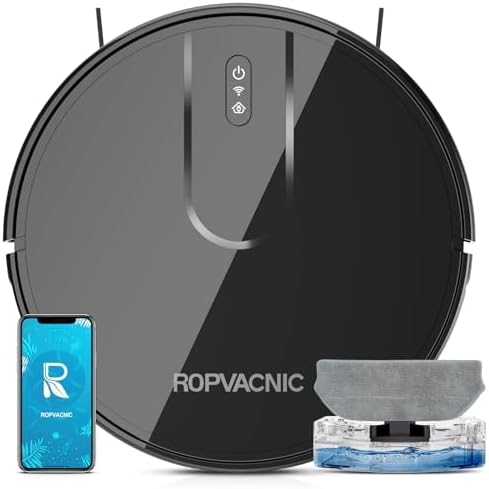
ചിത്രം: മുകളിൽ view of the ROPVACNIC Robot Vacuum Cleaner, showing the power button, Wi-Fi indicator, and dustbin access.
- പ്രധാന യൂണിറ്റ്: Houses the motor, battery, and sensors.
- ഡസ്റ്റ്ബിൻ: ഉണങ്ങിയ അവശിഷ്ടങ്ങൾ ശേഖരിക്കുന്നു.
- വാട്ടർ ടാങ്ക്: Holds water for mopping function.
- സൈഡ് ബ്രഷുകൾ: Sweep debris into the vacuum's path.
- ചാർജിംഗ് കോൺടാക്റ്റുകൾ: Connects to the charging base.
- യൂണിവേഴ്സൽ വീൽ: 360 ഡിഗ്രി ചലനം അനുവദിക്കുന്നു.
- ക്ലിഫ് സെൻസറുകൾ: Detects drops to prevent falls.
സജ്ജമാക്കുക
1. സൈഡ് ബ്രഷുകൾ ഇൻസ്റ്റാൾ ചെയ്യുക
Press the side brushes onto the square posts at the bottom of the robot until they click into place. Ensure the brushes are correctly aligned (L for left, R for right).
2. Place the Charging Base
Place the charging base against a wall in an open, uncluttered area. Ensure there is at least 0.5 meters (1.6 feet) of clear space on both sides and 1.5 meters (4.9 feet) in front of the charging base. Connect the power adapter to the charging base and plug it into a wall outlet.

Image: The robot vacuum automatically returning to its charging base, illustrating the self-charging feature.
3. പ്രാരംഭ നിരക്ക്
Place the robot vacuum onto the charging base, ensuring the charging contacts align. The indicator light on the robot will show charging status. For first-time use, fully charge the robot for at least 6 hours.
4. Connect to App (Optional)
For enhanced control and scheduling, download the "ROPVACNIC Smart" app from your app market. Follow the in-app instructions to connect your robot. This typically involves pressing and holding the power button for 5 seconds, then long-pressing the "power" and "home" buttons for 5 seconds until the green light flashes, connecting to 2.4GHz Wi-Fi, and adding your S1 robot vacuum to the app.

Image: Screenshot of the ROPVACNIC Smart app interface, showing options for scheduling, cleaning modes, and water control settings.
For app connection details, refer to the APP Instruction in the package or visit https://a.smart321.com/ropvacnicsmart.
പ്രവർത്തന നിർദ്ദേശങ്ങൾ
ഭാഗം 1 ഒരു ക്ലീനിംഗ് സൈക്കിൾ ആരംഭിക്കുക
- മാനുവൽ ആരംഭം: റോബോട്ടിലെ പവർ ബട്ടൺ അല്ലെങ്കിൽ റിമോട്ട് കൺട്രോളിലെ "ക്ലീൻ" ബട്ടൺ അമർത്തുക.
- ആപ്പ് നിയന്ത്രണം: Use the ROPVACNIC Smart app to start, stop, or schedule cleaning.
- ശബ്ദ നിയന്ത്രണം: Compatible with Amazon Alexa and Google Home. Enable the ROPVACNIC skill/action and use commands like "Alexa, turn on vacuum cleaner."
ക്ലീനിംഗ് മോഡുകൾ
The robot vacuum offers multiple cleaning modes to suit different needs:
- ഓട്ടോ ക്ലീനിംഗ്: The robot automatically navigates and cleans the entire floor area.
- സ്പോട്ട് ക്ലീനിംഗ്: Concentrates cleaning on a specific dirty area. Place the robot in the center of the area and activate spot cleaning.
- എഡ്ജ് ക്ലീനിംഗ്: ചുവരുകളിലും ഫർണിച്ചറിന്റെ അരികുകളിലും വൃത്തിയാക്കുന്നു.
- ഷെഡ്യൂൾ ചെയ്ത ക്ലീനിംഗ്: ആപ്പ് വഴി റോബോട്ടിന് യാന്ത്രികമായി വൃത്തിയാക്കാൻ പ്രത്യേക സമയം സജ്ജമാക്കുക.
- സ്വമേധയാലുള്ള നിയന്ത്രണം: Use the remote control or app to direct the robot's movement.

Image: Illustrations of different cleaning modes including Smart, Edge, Scheduled, Spot, and Manual, demonstrating the robot's versatility.
മോപ്പിംഗ് ഫംഗ്ഷൻ ഉപയോഗിക്കുന്നു
മോപ്പിംഗ് ഫംഗ്ഷൻ ഉപയോഗിക്കുന്നതിന്:
- Fill the water tank with clean water. Do not use cleaning solutions that may clog the nozzle.
- മോപ്പ് പാഡ് വാട്ടർ ടാങ്കിൽ സുരക്ഷിതമായി ഘടിപ്പിക്കുക.
- Insert the filled water tank into the robot vacuum.
- Select the desired water flow setting (4-stage adjustment) via the app.
- ഒരു ക്ലീനിംഗ് സൈക്കിൾ ആരംഭിക്കുക. റോബോട്ട് ഒരേസമയം വാക്വം ചെയ്യുകയും മോപ്പ് ചെയ്യുകയും ചെയ്യും.
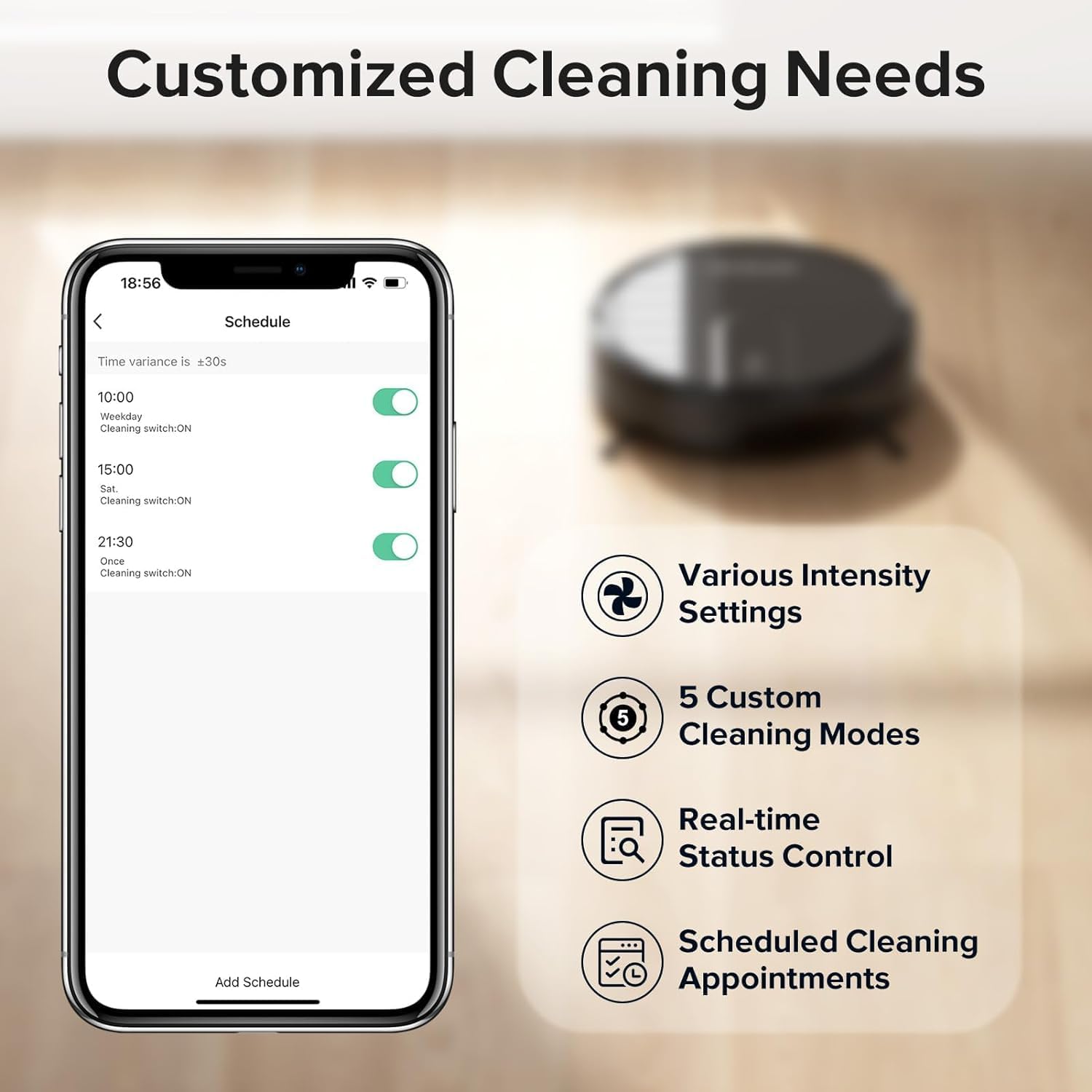
Image: The ROPVACNIC Robot Vacuum actively mopping a hard floor, showing the water flow and coverage area.
The robot features an electrically controlled water tank for precise water output and a large, thickened flannel particle mopping pad for effective cleaning.
മെയിൻ്റനൻസ്
പതിവ് അറ്റകുറ്റപ്പണികൾ ഒപ്റ്റിമൽ പ്രകടനം ഉറപ്പാക്കുകയും നിങ്ങളുടെ റോബോട്ട് വാക്വമിന്റെ ആയുസ്സ് വർദ്ധിപ്പിക്കുകയും ചെയ്യുന്നു.
ഡസ്റ്റ്ബിൻ ശൂന്യമാക്കുന്നു
Empty the dustbin after each cleaning cycle or when the "Dustbin Full" indicator appears. Press the release button to remove the dustbin, open it, and discard the contents. Rinse the dustbin with water if necessary, and allow it to air dry completely before reinserting.
ക്ലീനിംഗ് ഫിൽട്ടറുകൾ
Tap the HEPA filter to remove loose dirt. Rinse the primary filter with water. Do not wash the HEPA filter. Replace filters every 3-6 months, or more frequently depending on usage.
സൈഡ് ബ്രഷുകൾ വൃത്തിയാക്കുന്നു
Check side brushes regularly for tangled hair or debris. Use the provided cleaning tool or scissors to cut and remove any tangled material. Replace worn or damaged brushes.
സെൻസറുകളും ചാർജിംഗ് കോൺടാക്റ്റുകളും വൃത്തിയാക്കൽ
Wipe the cliff sensors and charging contacts on both the robot and the charging base with a clean, dry cloth. This prevents charging issues and ensures proper navigation.
Cleaning the Mop Pad and Water Tank
After mopping, remove the mop pad and wash it thoroughly. Allow it to air dry. Empty any remaining water from the water tank and rinse it. Ensure the water tank is dry before storage.
ട്രബിൾഷൂട്ടിംഗ്
| പ്രശ്നം | സാധ്യമായ കാരണം | പരിഹാരം |
|---|---|---|
| റോബോട്ട് ഓണാക്കുന്നില്ല. | ബാറ്ററി കുറവാണ്; പവർ സ്വിച്ച് ഓഫ്. | Charge the robot; Ensure power switch is ON. |
| Robot cannot charge. | Charging contacts dirty; Charging base not powered. | Clean charging contacts; Check power connection to charging base. |
| റോബോട്ട് ഇടയ്ക്കിടെ കുടുങ്ങിപ്പോകാറുണ്ട്. | Obstacles (cables, rugs); Cliff sensors dirty. | തടസ്സങ്ങൾ നീക്കുക; പാറ സെൻസറുകൾ വൃത്തിയാക്കുക. |
| മോശം ക്ലീനിംഗ് പ്രകടനം. | Dustbin full; Filters clogged; Brushes tangled. | Empty dustbin; Clean/replace filters; Clean brushes. |
| മോപ്പിംഗ് പ്രവർത്തനം പ്രവർത്തിക്കുന്നില്ല. | Water tank empty; Mop pad not attached correctly. | Fill water tank; Reattach mop pad securely. |
| ആപ്പ് കണക്ഷൻ പ്രശ്നങ്ങൾ. | Incorrect Wi-Fi (not 2.4GHz); Robot not in pairing mode. | Ensure 2.4GHz Wi-Fi; Re-enter pairing mode as per setup instructions. |
സ്പെസിഫിക്കേഷനുകൾ
| ഫീച്ചർ | വിശദാംശങ്ങൾ |
|---|---|
| ബ്രാൻഡ് | ROPVACNIC |
| മോഡൽ | S1 |
| സക്ഷൻ പവർ | 4000പ |
| ബാറ്ററി ശേഷി | 4400 mAh |
| പരമാവധി പ്രവർത്തനസമയം | 120 മിനിറ്റ് |
| Mopping Area | 2683 ചതുരശ്ര അടി വരെ |
| വാട്ടർ ടാങ്ക് കപ്പാസിറ്റി | 250 എം.എൽ |
| നിയന്ത്രണ രീതികൾ | App, Remote Control, Voice (Amazon Echo, Google Home) |
| പ്രത്യേക സവിശേഷതകൾ | Pet hair pick-up, Simultaneous vacuuming & mopping, Advanced Obstacle Avoidance, Self-charging |
| അളവുകൾ (ഏകദേശം) | 42.4 x 33.7 x 10.9 സെ.മീ (പാഴ്സൽ അളവുകൾ) |
| ഇനത്തിൻ്റെ ഭാരം | 3.2 കി.ഗ്രാം |

Image: The ROPVACNIC Robot Vacuum demonstrating its 4000Pa suction power, effectively cleaning various types of debris.

Image: Illustration of the robot vacuum's self-charging capability and its 120-minute max runtime with a 4400 mAh battery.
വാറൻ്റിയും പിന്തുണയും
For warranty information and technical support, please refer to the warranty card included in your package or contact ROPVACNIC customer service through the contact information provided on the official ROPVACNIC website or within the ROPVACNIC Smart app.
Please have your product model (S1) and purchase details ready when contacting support.


