1. ആമുഖം
Welcome to the LawnMaster OcuMow™ Robot Lawn Mower and Cordless Grass Trimmer Combo Kit. This manual provides essential information for the safe and efficient operation, maintenance, and troubleshooting of your new lawn care system. The OcuMow™ robot mower features optical navigation for efficient lawn coverage without perimeter wires, while the cordless grass trimmer offers versatile trimming and edging capabilities.

Figure 1: LawnMaster OcuMow™ Robot Lawn Mower and Cordless Grass Trimmer Combo Kit.
2 സുരക്ഷാ വിവരങ്ങൾ
Always read and understand all safety warnings and instructions before operating the product. Failure to follow the warnings and instructions may result in electric shock, fire, and/or serious injury.
- വ്യക്തിഗത സുരക്ഷ: Always wear appropriate personal protective equipment (PPE) including safety glasses, long pants, and sturdy footwear when operating the mower or trimmer.
- പ്രദേശ തയ്യാറെടുപ്പ്: Clear the mowing area of any objects such as rocks, sticks, wires, or toys that could be thrown by the blades. Ensure children and pets are out of the mowing area.
- ബാറ്ററി സുരക്ഷ: Use only the specified batteries and charger. Do not expose batteries to water or extreme temperatures.
- Mower Operation: Do not operate the robot mower in wet conditions. Ensure the mower is on a clearly defined lawn edge to prevent it from leaving the grass.
- Trimmer Operation: Keep hands and feet away from the cutting line. Do not overreach. Maintain proper footing and balance at all times.
3. എന്താണ് ഉൾപ്പെടുത്തിയിരിക്കുന്നത്
Your LawnMaster OcuMow™ Combo Kit includes the following components:
- റോബോട്ട് വെട്ടുന്ന യന്ത്രം
- 10-inch cordless grass trimmer
- 2 x MX 24V MAX* batteries
- 24V ബാറ്ററി ചാർജർ
- 33-feet of magnetic strip
- 12 x magnetic strip pegs
- Extra 3pcs blades

Figure 2: Robot Mower components and features.
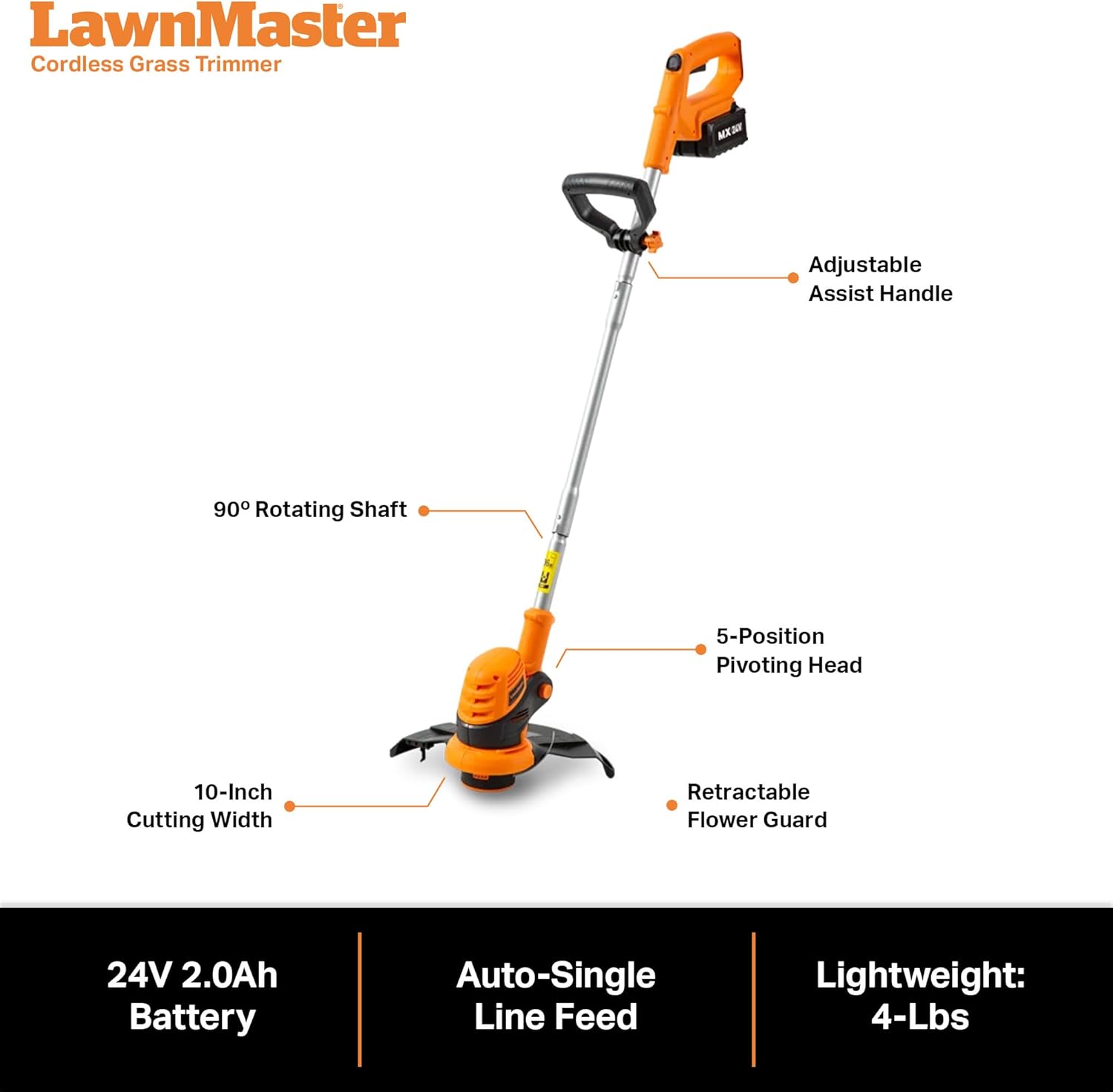
Figure 3: Cordless Grass Trimmer components and features.
4. സജ്ജീകരണം
4.1 പ്രാരംഭ ബാറ്ററി ചാർജിംഗ്
Before first use, fully charge both 24V MAX batteries using the provided 24V battery charger. Insert the battery into the charger until it clicks into place. The indicator light on the charger will show charging status.
4.2 Robot Mower Placement and Boundary Setup
The OcuMow™ robot mower is designed for perimeter wire-free operation. For best results, a clearly defined edge around the full perimeter of your lawn is required to prevent the mower from leaving the grass. This can be a paving, gravel, or a raised edge at least 2.3 inches high.

Figure 4: Robot mower operating on a lawn with a clear boundary.
4.3 No-Go Function (Optional)
Use the included 33-feet of magnetic wire and pegs to create virtual fences within your yard. This is useful for preventing the robot mower from entering specific forbidden areas like flower beds or ponds. No power source or digging is required for this setup.

Figure 5: Implementing the No-Go Function with magnetic wire.
5. പ്രവർത്തന നിർദ്ദേശങ്ങൾ
5.1 Robot Mower Operation (Drop and Mow)
The OcuMow™ features a "Drop and Mow" function, eliminating the need for an outdoor power socket, boundary wire, or app setup. Simply place the robot mower on an appropriately sized lawn, push the start button, and let it begin mowing.

Figure 6: Robot mower utilizing random pattern cutting.
5.2 Optical Navigation and Obstacle Avoidance
The robot mower uses optical navigation technology with sensors and a wide-angle, high dynamic range camera to identify grass and navigate efficiently. Two ultrasonic sensors detect obstacles as small as 6 inches, automatically redirecting the mower to avoid them.

ചിത്രം 7: പ്രവർത്തനത്തിലെ തടസ്സ ഒഴിവാക്കൽ.
5.3 കട്ടിംഗ് ഉയരം ക്രമീകരണം
Adjust the cutting height from 1-inch to 2.5-inches using the dial on top of the mower. There are 4 cutting height positions available.

Figure 8: Adjusting the cutting height.
5.4 Cordless Grass Trimmer Operation
The 10-inch cordless grass trimmer features an auto line feed, 5-position pivoting head, and a 90° rotating shaft for manicuring edges or tight areas with precision. It also includes an adjustable assist handle for user comfort and a retractable guard for trimming around plants.

Figure 9: Trimming edges with the cordless grass trimmer.
5.5 ഔദ്യോഗിക ഉൽപ്പന്ന വീഡിയോ
വീഡിയോ 1: കഴിഞ്ഞുview of the LawnMaster Robot Lawn Mower Grass Trimmer Combo Kit. This video demonstrates the key features and benefits of the product, including its wire-free operation and the versatility of the grass trimmer.
6. പരിപാലനം
6.1 ബ്ലേഡ് മാറ്റിസ്ഥാപിക്കൽ
Regularly inspect the mower blades for wear and damage. Replace dull or damaged blades with the included extra blades to ensure optimal cutting performance. Refer to the detailed instructions in the full product manual for blade replacement procedures.
6.2 വൃത്തിയാക്കൽ
Keep the robot mower and grass trimmer clean from grass clippings and debris. Use a soft brush or cloth to clean the exterior. Do not use water jets or high-pressure cleaners directly on the units.
7. പ്രശ്നപരിഹാരം
This section addresses common issues you might encounter. For more complex problems, please refer to the full product manual or contact customer support.
| പ്രശ്നം | സാധ്യമായ കാരണം | പരിഹാരം |
|---|---|---|
| Mower gets stuck in pits or uneven spots. | Uneven lawn surface. | Fill holes or level uneven spots in your lawn. The OcuMow works best on even lawns. |
| Mower leaves patchy areas or stripes. | Grass height too high; initial use. | Ensure grass height is below 2.5 inches. Stripes are normal initially but will reduce with continued use. |
| Mower is not charging. | Improper battery insertion; charger issue. | Ensure battery is correctly inserted into the charger. Check charger connection and power outlet. |
| Mower is too loud. | അസാധാരണമായ ശബ്ദം. | The OcuMow is designed to be quiet (approx. 68dB). If unusual noise occurs, check for debris around blades or contact support. |
8 സ്പെസിഫിക്കേഷനുകൾ
- ബ്രാൻഡ്: ലോൺമാസ്റ്റർ
- മോഡൽ: VBRMGT601YCM2-01
- ഊർജ്ജ സ്രോതസ്സ്: Battery (2 x MX 24V MAX Lithium Ion)
- മെറ്റീരിയൽ: പ്ലാസ്റ്റിക്
- നിറം: ഓറഞ്ച്
- ഇനത്തിൻ്റെ ഭാരം: 25 പൗണ്ട്
- Mower Cutting Width: 6.3 ഇഞ്ച്
- Mower Cutting Heights: 4 സ്ഥാനങ്ങൾ (1-ഇഞ്ച് മുതൽ 2.5-ഇഞ്ച് വരെ)
- Trimmer Cutting Width: 10 ഇഞ്ച്
- പ്രവർത്തന രീതി: Manual (for starting)
- Product Dimensions (Mower): 22"D x 14.5"W x 10"H
- പരമാവധി ചരിവ്: 35% വരെ (19°)
- ശബ്ദ നില: ഏകദേശം 68dB
- ശുപാർശ ചെയ്യുന്ന പുൽത്തകിടി വലുപ്പം: Up to 4000 square feet (with 2 batteries and additional charging)
9. വാറൻ്റിയും പിന്തുണയും
LawnMaster products are backed by a manufacturer's warranty. For specific warranty details, registration, or technical support, please refer to the warranty card included with your product or visit the official LawnMaster webസൈറ്റ്. വാറൻ്റി ക്ലെയിമുകൾക്കായി നിങ്ങളുടെ വാങ്ങൽ രസീത് സൂക്ഷിക്കുക.
For further assistance, you may also contact LawnMaster customer service directly.