ആമുഖം
This manual provides comprehensive instructions for the setup, operation, and maintenance of your Nuroum C10 All-in-One Conference Webcam Speakerphone. Please read this manual thoroughly before using the device to ensure optimal performance and longevity.
ഉൽപ്പന്നം കഴിഞ്ഞുview
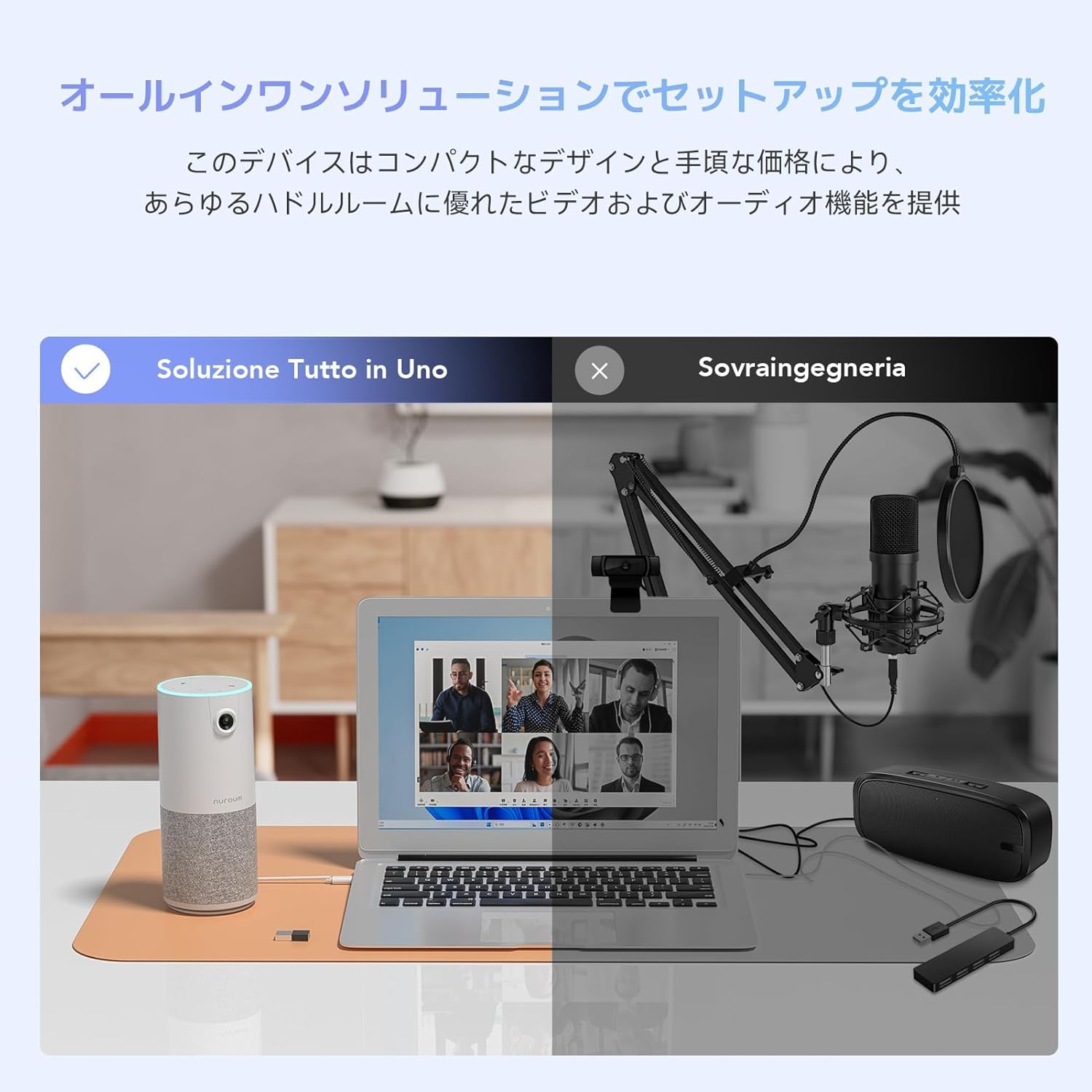
The Nuroum C10 is a compact, integrated device designed to streamline your video conferencing and online communication experience. It combines a high-definition webcam, a multi-microphone array, and a powerful speaker into a single, portable unit. This all-in-one solution eliminates the need for multiple separate devices, simplifying your setup.

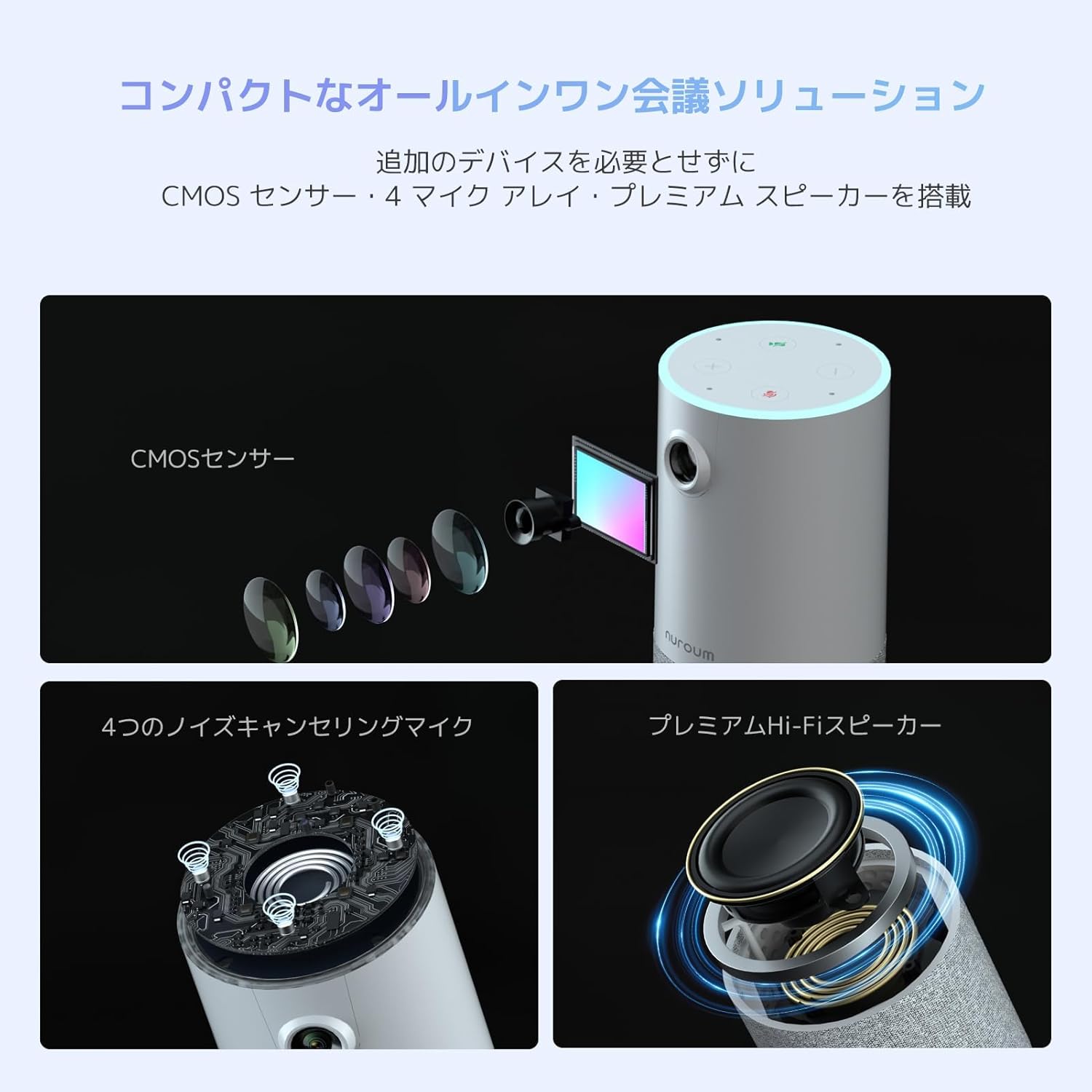
The Nuroum C10 integrates a CMOS sensor for video, a four-microphone array for audio input, and a premium speaker for audio output, providing a complete conference solution.

The Nuroum C10 simplifies your workspace by combining camera, microphone, and speaker functions into one device, contrasting with traditional setups requiring separate components.
പ്രധാന സവിശേഷതകൾ:
- ഹൈ-ഡെഫനിഷൻ Webക്യാം: 1080P@60fps with HDR functionality and a 90° ultra-wide-angle lens.
- Omnidirectional Microphones: Four built-in microphones with a 3-meter (approx. 10 feet) pickup radius, ensuring clear voice capture from all directions.
- വിപുലമായ ഓഡിയോ പ്രോസസ്സിംഗ്: Features proprietary Properclean™ AI noise cancellation, echo cancellation, and automatic gain control for clear, natural sound.
- ഇന്റഗ്രേറ്റഡ് സ്പീക്കർ: Provides clear audio output for all participants.
- പ്ലഗ്-ആൻഡ്-പ്ലേ കണക്റ്റിവിറ്റി: Simple USB connection with no driver installation required.
- അവബോധജന്യമായ ടച്ച് നിയന്ത്രണങ്ങൾ: Easy access to microphone mute, camera on/off, and volume adjustments.
- Automatic HD Light Correction: Adjusts video output for optimal brightness in various lighting conditions.
- ഒതുക്കമുള്ളതും പോർട്ടബിൾ ഡിസൈൻ: Lightweight and easy to transport for use in various locations.
പാക്കേജ് ഉള്ളടക്കം
- Nuroum C10 Camera Unit
- USB-C മുതൽ USB-A അഡാപ്റ്റർ വരെ
- USB 2.0 ടൈപ്പ്-സി കേബിൾ
സജ്ജമാക്കുക
The Nuroum C10 is designed for quick and easy setup, offering plug-and-play functionality.
- USB കേബിൾ ബന്ധിപ്പിക്കുക: Locate the USB Type-C port on the Nuroum C10 and connect one end of the provided USB cable.
- കമ്പ്യൂട്ടറുമായി ബന്ധിപ്പിക്കുക: Plug the other end of the USB cable into an available USB port on your desktop or laptop computer. If your computer only has USB-A ports, use the included USB-C to USB-A adapter.
- യാന്ത്രിക തിരിച്ചറിയൽ: Your operating system (Windows, macOS, Linux, ChromeOS, Android) will automatically detect and install the necessary drivers for the Nuroum C10. No manual driver installation is typically required.
- Select Device in Application: Open your preferred video conferencing application (e.g., Zoom, Skype, Google Meet) and navigate to its audio and video settings. Select "Nuroum C10" as your camera, microphone, and speaker device.
Connect the Nuroum C10 to your computer using the provided USB cable for instant setup and use in video conferencing applications.
പ്രവർത്തന നിർദ്ദേശങ്ങൾ
The Nuroum C10 features a user-friendly touch panel on its top surface for convenient control during meetings.
- മൈക്രോഫോൺ നിശബ്ദമാക്കുക/അൺമ്യൂട്ടുചെയ്യുക:
- Locate the microphone icon on the top panel.
- Tap the icon to toggle the microphone on or off.
- An indicator light will change color to show the microphone's status (e.g., blue for active, red for muted).
- ക്യാമറ ഓൺ/ഓഫ്:
- Locate the camera icon on the top panel.
- Tap the icon to toggle the camera on or off.
- An indicator light will show the camera's status.
- വോളിയം നിയന്ത്രണം:
- Use the '+' and '-' icons on the top panel to adjust the speaker volume.
- Tap '+' to increase volume, and '-' to decrease volume.
The top panel of the Nuroum C10 provides easy-to-use touch controls for managing microphone, camera, and speaker volume during calls.
അനുയോജ്യത
The Nuroum C10 is designed for broad compatibility with various operating systems and popular video conferencing platforms.
ഓപ്പറേറ്റിംഗ് സിസ്റ്റങ്ങൾ:
- വിൻഡോസ്
- macOS
- ലിനക്സ്
- ChromeOS
- Android (functionality may vary by device)
Video Conferencing Platforms:
- സൂം ചെയ്യുക
- സ്കൈപ്പ്
- സ്ലാക്ക്
- Google Hangouts/Classroom
- GoToMeeting
- ബ്ലൂജീൻസ്
- Twitch/Facebook Live/xsplit/OBS
If you intend to use the device with software or systems not listed above, please contact our support center for compatibility verification.
മെയിൻ്റനൻസ്
Proper maintenance ensures the longevity and optimal performance of your Nuroum C10.
- വൃത്തിയാക്കൽ:
- മൃദുവായ, ഉണങ്ങിയ തുണി ഉപയോഗിച്ച് ഉപകരണം തുടയ്ക്കുക.
- Do not use liquid cleaners, solvents, or abrasive materials, as these can damage the device.
- സംഭരണം:
- നേരിട്ടുള്ള സൂര്യപ്രകാശത്തിൽ നിന്നും കടുത്ത താപനിലയിൽ നിന്നും മാറി തണുത്തതും വരണ്ടതുമായ സ്ഥലത്ത് ഉപകരണം സൂക്ഷിക്കുക.
- കേബിൾ കെയർ:
- യുഎസ്ബി കേബിൾ അമിതമായി വളയ്ക്കുകയോ വളച്ചൊടിക്കുകയോ ചെയ്യുന്നത് ഒഴിവാക്കുക.
- Ensure the cable is not pinched or placed under heavy objects.
- ഫേംവെയർ അപ്ഡേറ്റുകൾ:
- Periodically check the official Nuroum website for available firmware updates. Updates can improve performance and add new features.
ട്രബിൾഷൂട്ടിംഗ്
If you encounter issues with your Nuroum C10, refer to the following common solutions.
- No Video or Audio Output:
- യുഎസ്ബി കണക്ഷൻ പരിശോധിക്കുക: Ensure the USB cable is securely connected to both the Nuroum C10 and your computer. Try a different USB port.
- Verify Device Selection: In your video conferencing application's settings, confirm that "Nuroum C10" is selected as the primary camera, microphone, and speaker device.
- Check Device Controls: Ensure the microphone and camera are not muted or turned off using the touch controls on the device's top panel.
- പുനരാരംഭിക്കുക: Restart your computer and the Nuroum C10.
- Poor Audio Quality (Echo or Background Noise):
- ഉപകരണം സ്ഥാപിക്കൽ: Position the Nuroum C10 centrally in your meeting area, away from walls or other reflective surfaces that might cause echoes.
- ഫേംവെയർ അപ്ഡേറ്റ്: Check the official Nuroum website for the latest firmware updates, which often include audio performance improvements.
- പരിസ്ഥിതി: Minimize background noise in your environment. The device's noise cancellation feature works best with consistent background sounds.
- Video Image Too Dark or Bright:
- The Nuroum C10 features automatic HD light correction. Ensure there is adequate and balanced ambient lighting in your meeting space. Avoid strong backlighting.
- കമ്പ്യൂട്ടർ ഉപകരണം തിരിച്ചറിയുന്നില്ല:
- Try Another USB Port/Cable: Test with a different USB port on your computer or a different USB cable if available.
- ഓപ്പറേറ്റിംഗ് സിസ്റ്റം അപ്ഡേറ്റുകൾ: Ensure your computer's operating system is fully updated.
- പിന്തുണയുമായി ബന്ധപ്പെടുക: If the issue persists, contact Nuroum customer support.
സ്പെസിഫിക്കേഷനുകൾ
Detailed technical specifications for the Nuroum C10 All-in-One Conference Webcam Speakerphone.
| ഫീച്ചർ | സ്പെസിഫിക്കേഷൻ |
|---|---|
| ബ്രാൻഡ് | ന്യൂറോം |
| ഉൽപ്പന്ന മോഡൽ നമ്പർ | C10-JP |
| Focal Length (Wide-angle) | 2.74 |
| ഫോക്കൽ ലെങ്ത് (ടെലിഫോട്ടോ) | 2.95 |
| ലെൻസ് കോൺഫിഗറേഷൻ | വൈഡ് ആംഗിൾ |
| ആക്സസറികൾ ഉൾപ്പെടുത്തിയിട്ടുണ്ട് | Camera unit, USB-C to A adapter, USB 2.0 Type-C cable |
| ഷൂട്ടിംഗ് ഫംഗ്ഷൻ | ഓട്ടോ |
| മോട്ടോർ തരം | ഡിജിറ്റൽ |
| നിറം | ഓഫ് വൈറ്റ് |
| അനുയോജ്യമായ ഉപകരണങ്ങൾ | നോട്ട്ബുക്ക് പി.സി |
| പാക്കേജ് വലിപ്പം | 22.9 x 12.9 x 10.9 സെ.മീ; 500 ഗ്രാം |
| ASIN | B0D2L7GR5L |
| ഫോട്ടോ സെൻസർ ടെക്നോളജി | CMOS |
| വീഡിയോ ക്യാപ്ചർ റെസല്യൂഷൻ | 1080p |
| പരമാവധി ഫോക്കൽ ദൂരം | 2.95 |
| ഫ്ലാഷ് മെമ്മറി തരം | ബിൽറ്റ്-ഇൻ ഫ്ലാഷ് മെമ്മറി |
| വീഡിയോ ക്യാപ്ചർ ഫോർമാറ്റ് | എംജെപിഇജി |
| പിന്തുണയ്ക്കുന്ന ഓഡിയോ ഫോർമാറ്റ് | പി.സി.എം |
| കണക്റ്റിവിറ്റി ടെക്നോളജി | USB |
| പ്രത്യേക സവിശേഷതകൾ | നിശബ്ദ പ്രവർത്തനം |
വാറൻ്റിയും പിന്തുണയും
Nuroum is committed to providing high-quality products and excellent customer service.
- ഗുണനിലവാര വാറൻ്റി: The Nuroum C10 comes with a one-year quality warranty from the date of purchase.
- ഫേംവെയർ അപ്ഡേറ്റുകൾ: Regular firmware updates are released to improve device performance (e.g., audio pickup, speaker EQ) and introduce new functionalities. These updates are available on the official Nuroum webസൈറ്റ്.
- സോഫ്റ്റ്വെയർ ആപ്ലിക്കേഷൻ: A dedicated application for Windows and macOS is available for download from the official Nuroum website, offering additional control and settings.
- ഉപഭോക്തൃ പിന്തുണ: For any inquiries, technical assistance, or warranty claims, please contact our 7*24 hour service team. Contact details can be found on the official Nuroum webസൈറ്റ് അല്ലെങ്കിൽ നിങ്ങളുടെ വാങ്ങൽ ഡോക്യുമെന്റേഷൻ.