1. ആമുഖം
The iDiskk Timed Lockbox is a secure, programmable container designed to assist users in developing healthier habits by temporarily restricting access to items such as mobile phones, gaming controllers, snacks, and other distractions. It serves as a tool for self-control, helping to manage screen time, reduce consumption of certain items, and improve focus and well-being.
The device features a timer mechanism that locks the contents for a set duration, promoting intentional breaks from digital devices and other habits. It is suitable for use in various environments, including homes, offices, and educational settings.
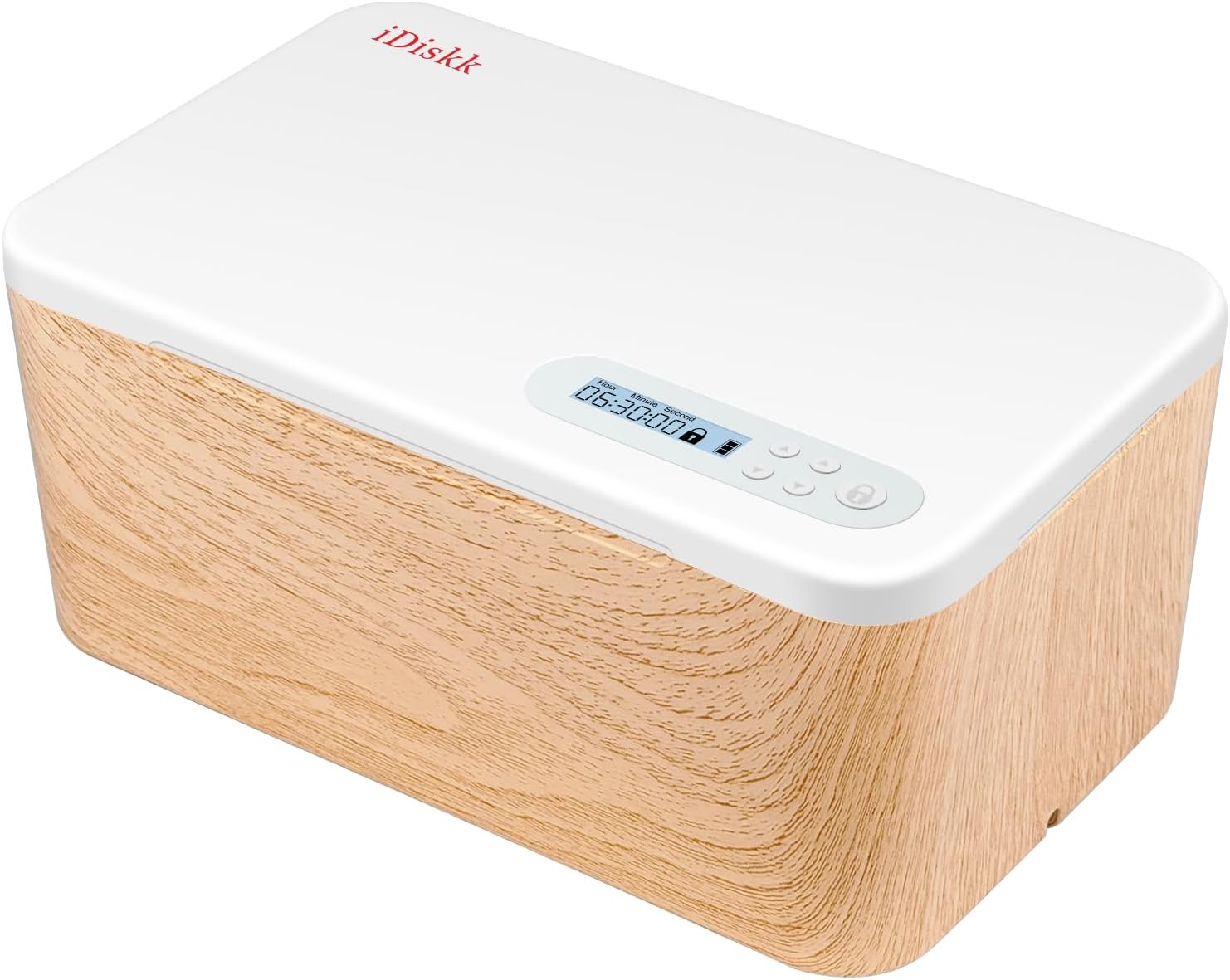
Image 1.1: The iDiskk Timed Lockbox, showcasing its design and digital display.
2. പാക്കേജ് ഉള്ളടക്കം
പാക്കേജിൽ എല്ലാ ഘടകങ്ങളും ഉണ്ടെന്ന് ദയവായി പരിശോധിക്കുക:
- iDiskk Timed Lockbox
- USB-C ചാർജിംഗ് കേബിൾ
3. സജ്ജീകരണവും പ്രാരംഭ ഉപയോഗവും
3.1 പ്രാരംഭ ചാർജിംഗ്
Before first use, fully charge the iDiskk Timed Lockbox. Connect the provided USB-C cable to the charging port on the device and to a 5V 1A charger (not included). Allow 10 to 20 minutes for activation if the device has been off for an extended period. For optimal battery health, charge the product every 2 to 3 months.
3.2 ഉപകരണം കഴിഞ്ഞുview

ചിത്രം 3.1: കഴിഞ്ഞുview of the iDiskk Timed Lockbox, highlighting outer and inner dimensions, and dual charging slots.
The lockbox features two charging cord slots, allowing devices placed inside to be charged simultaneously while locked.
4. പ്രവർത്തന നിർദ്ദേശങ്ങൾ
The iDiskk Timed Lockbox offers two primary modes of operation: Self-Control Mode (with timer) and Lockbox Mode (no timer).
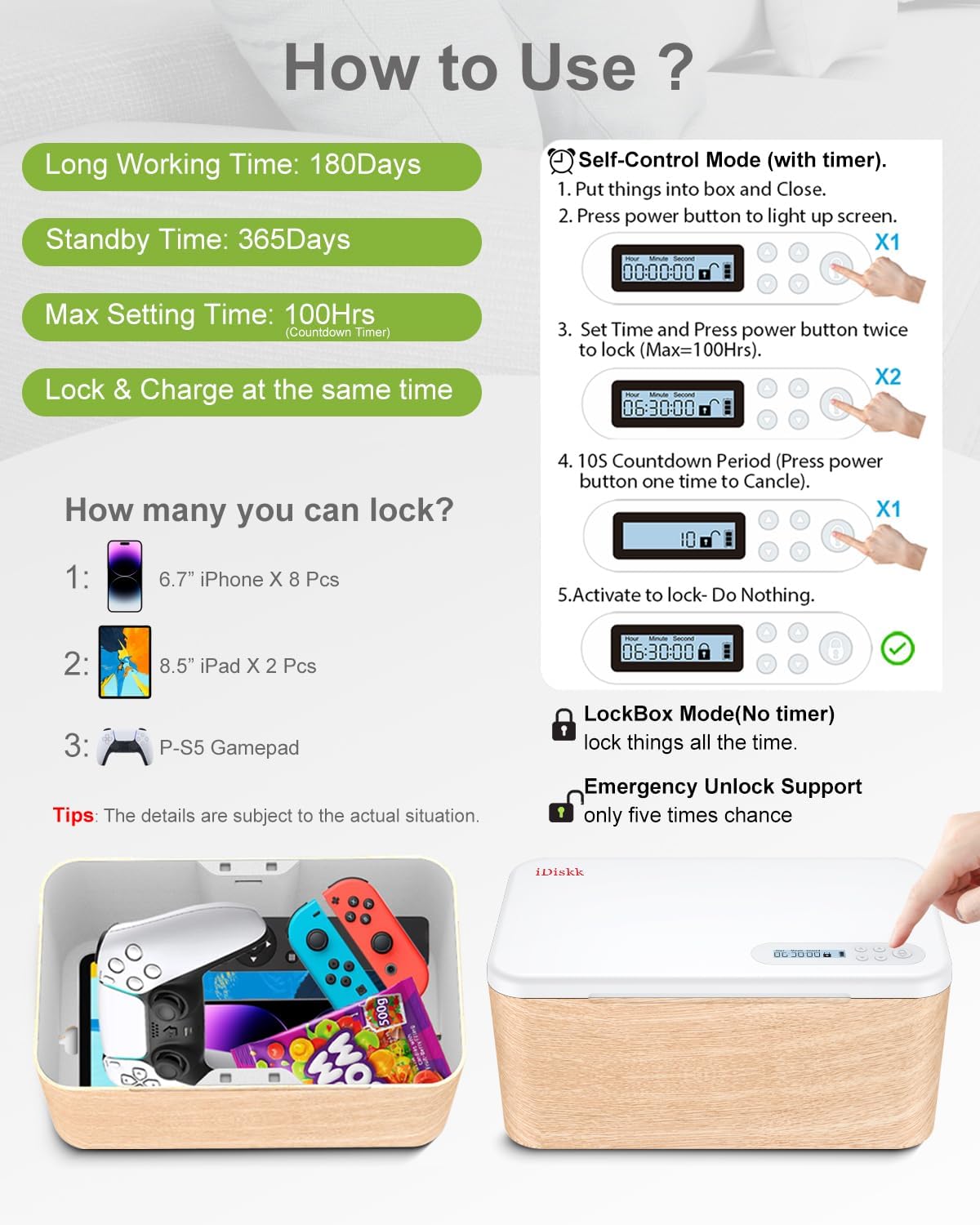
Image 4.1: Visual guide for operating the iDiskk Timed Lockbox.
4.1 Self-Control Mode (with Timer)
This mode is used to lock items for a specific duration, up to a maximum of 99 hours.
- Place the items you wish to lock inside the box and close the lid.
- Press the power button once to activate the screen.
- Use the control buttons to set the desired lock duration (hours and minutes).
- Double-press the power button to initiate the locking sequence. A 10-second countdown will appear.
- During the 10-second countdown, you can press the power button once to cancel the lock. If no action is taken, the lockbox will activate, and the items will remain secured until the timer expires.
4.2 Lockbox Mode (No Timer)
This mode allows you to secure items without a specific timer, functioning as a general lockbox for up to 365 days. This mode is suitable for private or important items that require secure storage without a timed release.
- Place the items inside the box and close the lid.
- Press the power button once to wake the screen.
- Press and hold the power button for 5 seconds to engage the lock.
Unlocking in Lockbox Mode:
To unlock the device in Lockbox Mode, follow this specific sequence using the directional pad buttons:
- Press the 'Hours Up' button twice (↑↑).
- Press the 'Minutes Up' button once (↑).
- Press the 'Hours Down' button twice (↓↓).
- Press the 'Minutes Down' button once (↓).
The speed of pressing the buttons is important; if the unlock is unsuccessful, please try again. Refer to the manual located under the safe for detailed instructions.
4.3 Emergency Unlock
The iDiskk Timed Lockbox includes an emergency unlock feature, which can be used a limited number of times (five times over its lifetime). If an emergency unlock is required, please contact customer support for assistance and detailed instructions. Using this feature should be done with caution.
5. പരിപാലനവും പരിചരണവും
5.1 ബാറ്ററി മാനേജ്മെൻ്റ്
The lockbox is equipped with a rechargeable Lithium-ion battery. To ensure longevity and proper function:
- Charge the device fully before its first use.
- Recharge the device every 2 to 3 months, especially if not in regular use.
- If the battery is depleted while a timer is active, the lockbox will still unlock once the set time has elapsed due to an internal reserve power supply.
- If the battery is depleted in Lockbox Mode (no timer), the device will unlock once it is recharged.
The battery provides approximately 180 working days of operation and up to 365 days of standby time, depending on usage.
5.2 വൃത്തിയാക്കൽ
Wipe the exterior of the lockbox with a soft, dry cloth. Avoid using abrasive cleaners or solvents.
6. പ്രശ്നപരിഹാരം
6.1 ഉപകരണം ഓണാക്കുന്നില്ല
Ensure the device is fully charged. If it has been off for a long time, connect it to a 5V 1A charger for 10-20 minutes to activate it.
6.2 Timer Not Activating
Verify that you have double-pressed the power button after setting the time. Ensure the 10-second countdown completes without interruption.
6.3 Difficulty with Lockbox Mode Unlock Sequence
The unlock sequence requires precise timing. If unsuccessful, repeat the sequence carefully. Refer to the detailed instructions in the manual provided with the product or contact customer support.
6.4 Emergency Unlock Issues
The emergency unlock feature is limited. If you encounter issues or require assistance with this function, please contact iDiskk customer support directly.
7 സ്പെസിഫിക്കേഷനുകൾ
| ഫീച്ചർ | വിശദാംശങ്ങൾ |
|---|---|
| മോഡൽ നമ്പർ | ലോക്ക് 04 |
| ബ്രാൻഡ് | iDiskk |
| നിറം | Woodwhite |
| മെറ്റീരിയൽ | പ്ലാസ്റ്റിക് |
| Outer Dimensions (L x W x H) | 9.5 x 4.3 x 5.8 ഇഞ്ച് (24.2 x 10.9 x 14.7 സെ.മീ) |
| Inner Dimensions (L x W x H) | 9 x 3.2 x 5.1 ഇഞ്ച് (22.8 x 8.1 x 12.9 സെ.മീ) |
| ശേഷി | 2 ലിറ്റർ |
| ഭാരം | 600 ഗ്രാം |
| ലോക്ക് തരം | ഇലക്ട്രോണിക് കോമ്പിനേഷൻ ലോക്ക് |
| ബാറ്ററി തരം | റീചാർജ് ചെയ്യാവുന്ന ലിഥിയം-അയോൺ |
| Max Timer Setting | 99 മണിക്കൂർ |
| Max Lockbox Mode Duration | 365 ദിവസം |
| പ്രത്യേക സവിശേഷതകൾ | Compact, Rechargeable, Capable of charging devices while locked inside |
8. വാറൻ്റിയും പിന്തുണയും
8.1 വാറൻ്റി വിവരങ്ങൾ
For details regarding the product warranty, please refer to the documentation included with your purchase or contact iDiskk customer service directly. Warranty terms may vary by region and retailer.
8.2 ഉപഭോക്തൃ പിന്തുണ
If you have any questions, require technical assistance, or need to utilize the emergency unlock feature, please contact iDiskk customer support. Contact information can typically be found on the product packaging or the official iDiskk webസൈറ്റ്.


