ആമുഖം
This manual provides detailed instructions for the setup, operation, and maintenance of your taopodo T60-SBPE Smartwatch. Please read this manual thoroughly before using the device to ensure proper function and longevity.
പാക്കേജ് ഉള്ളടക്കം
പാക്കേജിൽ എല്ലാ ഇനങ്ങളും ഉണ്ടെന്ന് ഉറപ്പാക്കുക:
- taopodo T60-SBPE Smartwatch
- ചാർജിംഗ് കേബിൾ
- ഉപയോക്തൃ മാനുവൽ (ഈ പ്രമാണം)
സജ്ജമാക്കുക
1. സ്മാർട്ട് വാച്ച് ചാർജ് ചെയ്യുന്നു
Before initial use, fully charge the smartwatch. Connect the charging cable to the charging port on the back of the watch and to a USB power source. The watch display will indicate charging status.
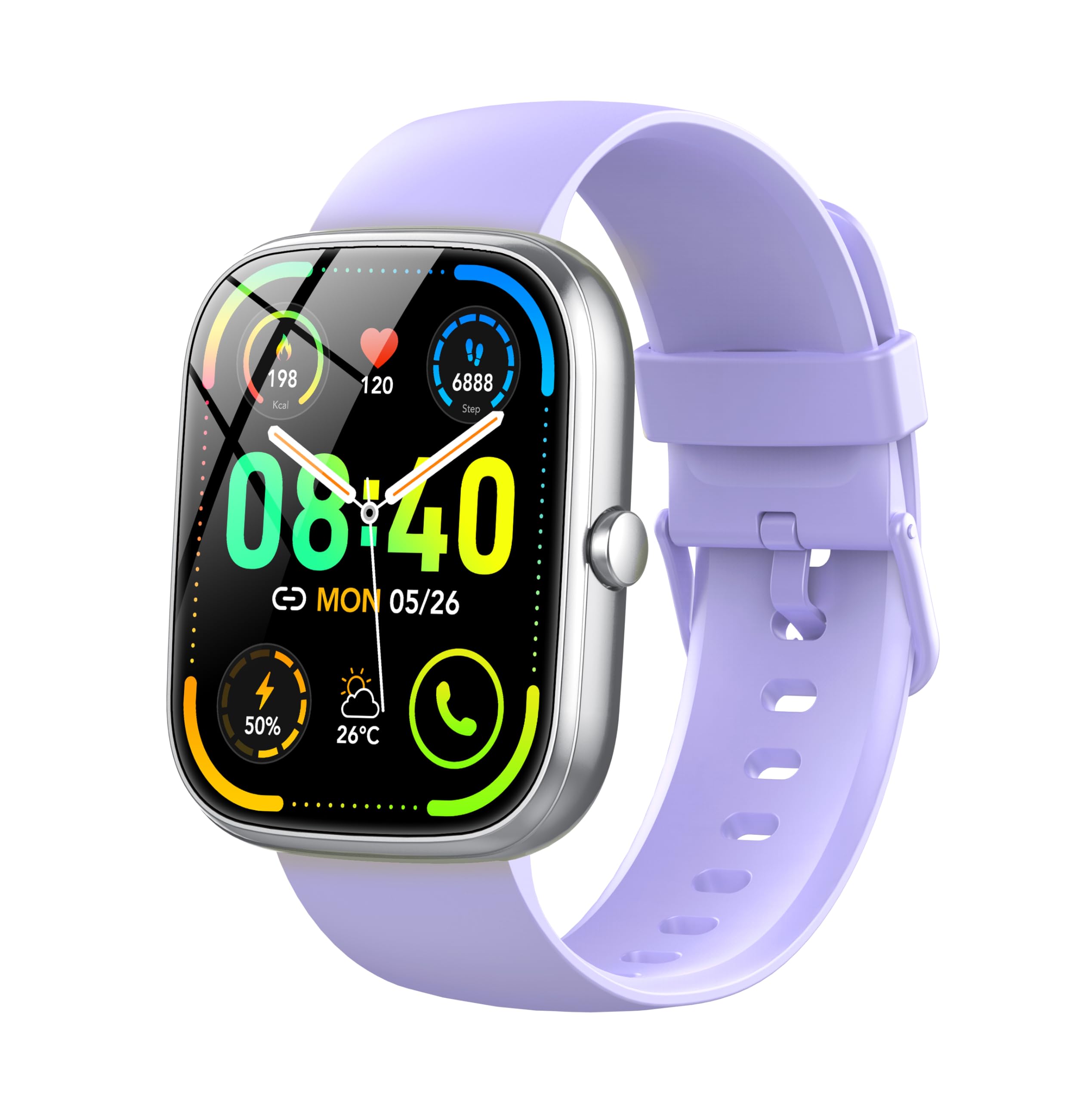
Image: The taopodo T60-SBPE Smartwatch. Ensure the charging cable's magnetic pins align correctly with the watch's charging contacts.
2. ആപ്പ് ഇൻസ്റ്റാളേഷനും ജോടിയാക്കലും
To unlock full functionality, download the official companion app on your smartphone. ഇതിനായി തിരയുക the app in your device's app store (Android or iOS). Follow the in-app instructions to pair your smartwatch via Bluetooth.
- Scan the QR code in the watch manual or on the watch screen to download the app.
- ആപ്പ് തുറന്ന് ഒരു അക്കൗണ്ട് സൃഷ്ടിക്കുക അല്ലെങ്കിൽ ലോഗിൻ ചെയ്യുക.
- നിങ്ങളുടെ സ്മാർട്ട്ഫോണിൽ ബ്ലൂടൂത്ത് പ്രവർത്തനക്ഷമമാക്കുക.
- In the app, select "Add Device" and choose your taopodo T60-SBPE from the list of available devices.
- Confirm the pairing request on both your phone and smartwatch.
പ്രവർത്തന നിർദ്ദേശങ്ങൾ
അടിസ്ഥാന നാവിഗേഷൻ
- പവർ ഓൺ/ഓഫ്: സൈഡ് ബട്ടൺ 3 സെക്കൻഡ് അമർത്തിപ്പിടിക്കുക.
- വേക്ക് സ്ക്രീൻ: Raise your wrist or press the side button.
- മുകളിലേക്ക് നീക്കുക: അറിയിപ്പുകൾ ആക്സസ് ചെയ്യുക.
- താഴേക്ക് സ്വൈപ്പ് ചെയ്യുക: Access quick settings (e.g., brightness, DND).
- ഇടത്തേക്ക്/വലത്തേക്ക് സ്വൈപ്പ് ചെയ്യുക: Navigate through widgets (e.g., heart rate, activity, weather).
- ടാപ്പ് ചെയ്യുക: ഒരു ഇനം തിരഞ്ഞെടുക്കുകയോ ഒരു ആപ്ലിക്കേഷൻ തുറക്കുകയോ ചെയ്യുക.
- സൈഡ് ബട്ടൺ: Return to the home screen or open the app menu.
കോളുകൾ ചെയ്യലും സ്വീകരിക്കലും
The smartwatch supports Bluetooth calling. Ensure your watch is connected to your smartphone via Bluetooth.
- ഒരു കോൾ ചെയ്യാൻ: Access the dial pad or contacts list on your watch. Select a contact or dial a number directly.
- ഒരു കോൾ സ്വീകരിക്കുന്നതിന്: ഒരു കോൾ വരുമ്പോൾ, വാച്ച് കോളർ ഐഡി പ്രദർശിപ്പിക്കും. മറുപടി നൽകാൻ പച്ച ഐക്കണിൽ ടാപ്പ് ചെയ്യുക അല്ലെങ്കിൽ നിരസിക്കാൻ ചുവപ്പ് ഐക്കണിൽ ടാപ്പ് ചെയ്യുക.
ആരോഗ്യ നിരീക്ഷണം
- ഹൃദയമിടിപ്പ് നിരീക്ഷണം: Access the heart rate application on the watch. Ensure the watch is snug on your wrist for accurate readings.
- സ്ലീപ്പ് മോണിറ്റർ: Wear the watch to bed. It will automatically track your sleep patterns. View detailed data in the companion app.
- സ്റ്റെപ്പ് കൗണ്ടർ: The watch automatically tracks your daily steps, distance, and calories burned.
സ്പോർട്സ് മോഡുകൾ
The watch offers over 110 sports modes. Select the desired activity from the sports menu to track your workout data.
- Open the "Sports" app on your watch.
- Scroll through the list and tap on your chosen activity (e.g., running, cycling, swimming).
- Tap "Start" to begin tracking.
- Tap "Pause" or "End" to stop the activity.
മെയിൻ്റനൻസ്
വൃത്തിയാക്കൽ
- മൃദുവായ, ലിന്റ് രഹിത തുണി ഉപയോഗിച്ച് വാച്ച് സ്ക്രീനും ബോഡിയും തുടയ്ക്കുക.
- കഠിനമായ അഴുക്കിന്, ചെറുതായി dampതുണിയിൽ വെള്ളം ഒഴിക്കുക. കഠിനമായ രാസവസ്തുക്കളോ ഉരച്ചിലുകളോ ഉള്ള വസ്തുക്കൾ ഉപയോഗിക്കുന്നത് ഒഴിവാക്കുക.
- കാര്യക്ഷമമായ ചാർജിംഗ് ഉറപ്പാക്കാൻ ചാർജിംഗ് കോൺടാക്റ്റുകൾ പതിവായി വൃത്തിയാക്കുക.
ജല പ്രതിരോധം (IP68)
The taopodo T60-SBPE Smartwatch is IP68 rated, meaning it is resistant to dust and can withstand immersion in water up to 1.5 meters for up to 30 minutes. It is suitable for daily use, hand washing, and light rain. However, it is not recommended for hot showers, saunas, or diving, as steam and high water pressure can compromise the seal.
ബാറ്ററി കെയർ
- ബാറ്ററി ഇടയ്ക്കിടെ പൂർണ്ണമായും ഡിസ്ചാർജ് ചെയ്യുന്നത് ഒഴിവാക്കുക.
- ബാറ്ററിയുടെ ആരോഗ്യം നിലനിർത്താൻ, ഉപയോഗത്തിലില്ലെങ്കിൽ പോലും, വാച്ച് പതിവായി ചാർജ് ചെയ്യുക.
- ദീർഘനേരം ഉപയോഗിക്കാത്തപ്പോൾ വാച്ച് തണുത്തതും വരണ്ടതുമായ സ്ഥലത്ത് സൂക്ഷിക്കുക.
ട്രബിൾഷൂട്ടിംഗ്
| പ്രശ്നം | പരിഹാരം |
|---|---|
| വാച്ച് ഓണാക്കുന്നില്ല. | വാച്ച് പൂർണ്ണമായും ചാർജ് ചെയ്തിട്ടുണ്ടെന്ന് ഉറപ്പാക്കുക. കുറഞ്ഞത് 30 മിനിറ്റെങ്കിലും ചാർജറുമായി ബന്ധിപ്പിക്കുക. |
| സ്മാർട്ട്ഫോണുമായി ജോടിയാക്കാൻ കഴിയില്ല. |
|
| Inaccurate heart rate/step count. |
|
| അറിയിപ്പുകൾ ലഭിച്ചില്ല. |
|
സ്പെസിഫിക്കേഷനുകൾ
| ഫീച്ചർ | വിശദാംശങ്ങൾ |
|---|---|
| മോഡലിൻ്റെ പേര് | T60-SBPE |
| ബ്രാൻഡ് | taopodo |
| സ്ക്രീൻ വലിപ്പം | 1.91 ഇഞ്ച് |
| കണക്റ്റിവിറ്റി ടെക്നോളജി | ബ്ലൂടൂത്ത് |
| വയർലെസ് കമ്മ്യൂണിക്കേഷൻ സ്റ്റാൻഡേർഡ് | ബ്ലൂടൂത്ത് |
| പ്രത്യേക സവിശേഷതകൾ | Heart Rate Monitor, Sleep Monitor, Step Counter, Call Answering/Dialing, 110+ Sports Modes |
| അനുയോജ്യമായ ഉപകരണങ്ങൾ | സ്മാർട്ട്ഫോൺ (ആൻഡ്രോയിഡ്, iOS) |
| ബാറ്ററി കോമ്പോസിഷൻ | ലിഥിയം-അയൺ |
| ജല പ്രതിരോധ നില | IP68 |
| മെമ്മറി സ്റ്റോറേജ് കപ്പാസിറ്റി | 1 ജിബി |
വാറൻ്റിയും പിന്തുണയും
For warranty information and technical support, please refer to the official taopodo webസൈറ്റിൽ ബന്ധപ്പെടുക അല്ലെങ്കിൽ അവരുടെ ഉപഭോക്തൃ സേവനവുമായി ബന്ധപ്പെടുക. വാങ്ങിയതിന്റെ തെളിവായി നിങ്ങളുടെ വാങ്ങൽ രസീത് സൂക്ഷിക്കുക.
ബന്ധപ്പെടാനുള്ള വിവരങ്ങൾ: ദയവായി നിർമ്മാതാവിന്റെ ഉദ്യോഗസ്ഥനെ സന്ദർശിക്കുക. webഏറ്റവും കാലികമായ പിന്തുണാ കോൺടാക്റ്റ് വിശദാംശങ്ങൾക്കായി സൈറ്റ്.


