ആമുഖം
Thank you for choosing the Tracer M45 Portable Bluetooth Speaker. This manual provides essential information for the safe and efficient use of your device. Please read it thoroughly before operating the speaker and keep it for future reference.
The Tracer M45 is a versatile 45W portable Bluetooth speaker designed for high-quality audio playback from various sources, including Bluetooth-enabled devices, FM radio, and other audio inputs. It features a robust design and intuitive controls for an enhanced listening experience.
സുരക്ഷാ വിവരങ്ങൾ
- സ്പീക്കറിനെ വെള്ളം, ഈർപ്പം അല്ലെങ്കിൽ തീവ്രമായ താപനില എന്നിവയിൽ തുറന്നുകാട്ടരുത്.
- സ്പീക്കറെ ശക്തമായ ആഘാതങ്ങൾക്ക് വിധേയമാക്കുകയോ താഴെയിടുകയോ ചെയ്യുന്നത് ഒഴിവാക്കുക.
- സ്പീക്കർ സ്വയം ഡിസ്അസംബ്ലിംഗ് ചെയ്യുകയോ നന്നാക്കുകയോ പരിഷ്കരിക്കുകയോ ചെയ്യരുത്. എല്ലാ സേവനങ്ങളും യോഗ്യതയുള്ള ഉദ്യോഗസ്ഥർക്ക് റഫർ ചെയ്യുക.
- Keep the speaker away from heat sources and direct sunlight.
- നിർദ്ദിഷ്ട ചാർജിംഗ് കേബിളും പവർ അഡാപ്റ്ററും മാത്രം ഉപയോഗിക്കുക.
- മൃദുവായതും ഉണങ്ങിയതുമായ തുണി ഉപയോഗിച്ച് സ്പീക്കർ വൃത്തിയാക്കുക. അബ്രസീവ് ക്ലീനറുകളോ ലായകങ്ങളോ ഉപയോഗിക്കരുത്.
- സ്പീക്കർ പ്രവർത്തിപ്പിക്കുമ്പോൾ ശരിയായ വായുസഞ്ചാരം ഉറപ്പാക്കുക.
പാക്കേജ് ഉള്ളടക്കം
പാക്കേജിൽ എല്ലാ ഇനങ്ങളും ഉണ്ടോ എന്ന് ദയവായി പരിശോധിക്കുക:
- Tracer M45 Portable Bluetooth Speaker
- ചാർജിംഗ് കേബിൾ
- റിമോട്ട് കൺട്രോൾ
- ഉപയോക്തൃ മാനുവൽ (ഈ പ്രമാണം)
ഉൽപ്പന്നം കഴിഞ്ഞുview
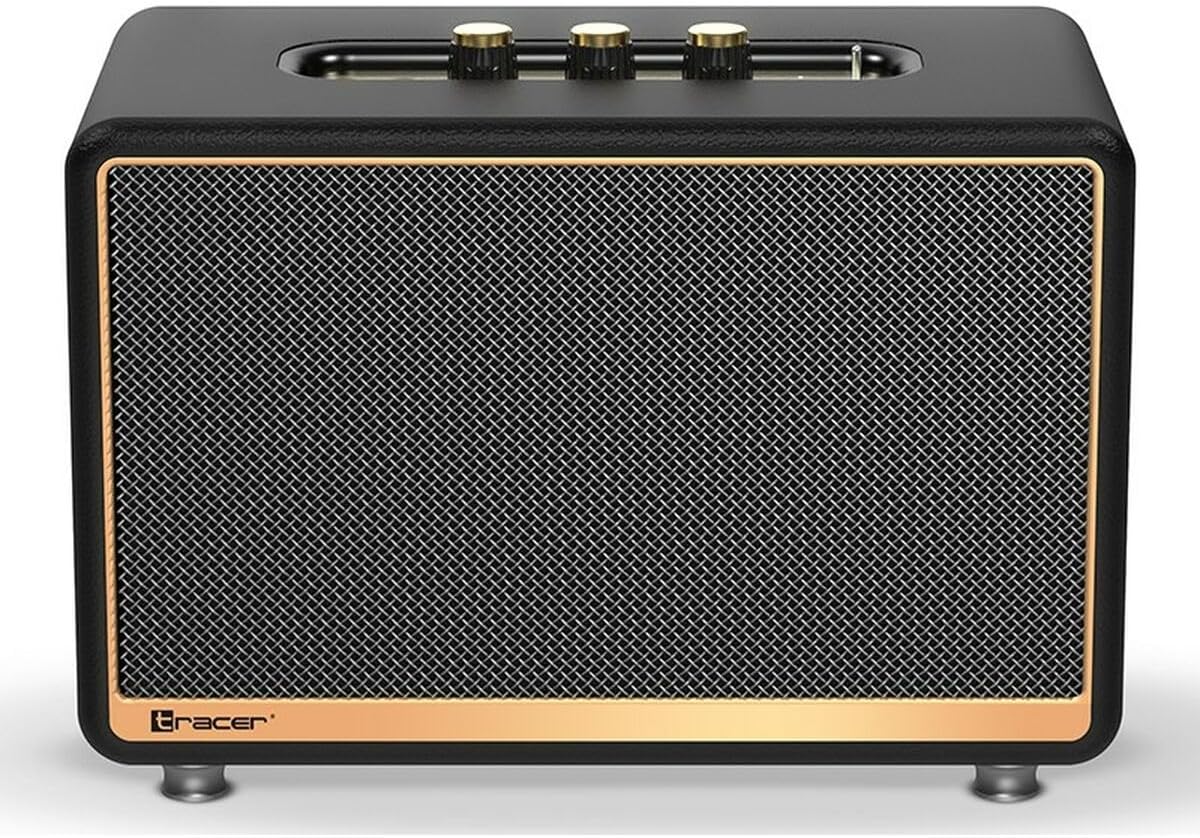
ചിത്രം 1: മുൻഭാഗം view of the Tracer M45 Portable Bluetooth Speaker. The speaker features a black mesh grille with a gold-colored trim, and three gold-colored control knobs are visible on the top panel. The Tracer logo is located at the bottom left of the grille.
നിയന്ത്രണങ്ങളും തുറമുഖങ്ങളും
Familiarize yourself with the various controls and ports on your Tracer M45 speaker:
- പവർ ബട്ടൺ/സ്വിച്ച്: Located on the rear or top panel, used to turn the speaker ON/OFF.
- വോളിയം നോബുകൾ: Three gold-colored knobs on the top panel for adjusting volume, bass, and treble.
- മോഡ് ബട്ടൺ: To switch between Bluetooth, FM Radio, and other input modes.
- പ്ലേ/താൽക്കാലികമായി നിർത്തുക ബട്ടൺ: For controlling audio playback.
- മുമ്പത്തെ/അടുത്ത ട്രാക്ക് ബട്ടണുകൾ: For navigating through tracks or FM radio stations.
- ചാർജിംഗ് പോർട്ട്: ചാർജിംഗ് കേബിൾ ബന്ധിപ്പിക്കുന്നതിന്.
- ഓക്സ്-ഇൻ പോർട്ട്: 3.5mm ഓഡിയോ കേബിൾ വഴി ബാഹ്യ ഓഡിയോ ഉപകരണങ്ങൾ ബന്ധിപ്പിക്കുന്നതിന്.
- USB പോർട്ട്: (If present) For playing music from a USB drive.
- LED സൂചകം: പവർ സ്റ്റാറ്റസ്, ചാർജിംഗ് സ്റ്റാറ്റസ്, ബ്ലൂടൂത്ത് പെയറിംഗ് സ്റ്റാറ്റസ് എന്നിവ കാണിക്കുന്നു.
സജ്ജമാക്കുക
1. സ്പീക്കറിൽ നിന്ന് നിരക്ക് ഈടാക്കുന്നു
Before first use, fully charge the speaker. Connect the charging cable to the speaker's charging port and the other end to a suitable USB power adapter (not included) or a computer's USB port. The LED indicator will show the charging status and turn off or change color when fully charged.
2. പവർ ഓൺ/ഓഫ്
To turn the speaker ON, locate the power switch/button and slide it to the "ON" position or press and hold it for a few seconds. The LED indicator will light up. To turn OFF, repeat the process.
3. ബ്ലൂടൂത്ത് ജോടിയാക്കൽ
- Ensure the speaker is ON and in Bluetooth mode. If not, press the Mode button until you hear a Bluetooth pairing prompt or see the LED indicator flashing rapidly.
- On your smartphone, tablet, or other Bluetooth device, enable Bluetooth.
- ഇതിനായി തിരയുക available devices. You should see "Tracer M45" or a similar name in the list.
- Select "Tracer M45" to connect. Once paired, the speaker will indicate a successful connection (e.g., a sound prompt or steady LED light).
- The speaker will automatically reconnect to the last paired device when in range and Bluetooth is enabled.
4. Connecting via Aux-in
For devices without Bluetooth, connect a 3.5mm audio cable (not included) from your device's headphone jack to the speaker's Aux-in port. The speaker should automatically switch to Aux mode, or you may need to press the Mode button.
5. FM Radio Setup
To use the FM Radio function, switch the speaker to FM mode using the Mode button. For best reception, ensure the speaker is in an open area. Press and hold the Play/Pause button to auto-scan and save available FM stations. Use the Previous/Next Track buttons to navigate between saved stations.
പ്രവർത്തിക്കുന്നു
അടിസ്ഥാന പ്ലേബാക്ക്
- പ്ലേ/താൽക്കാലികമായി നിർത്തുക: ഓഡിയോ പ്ലേ ചെയ്യാനോ താൽക്കാലികമായി നിർത്താനോ പ്ലേ/താൽക്കാലികമായി നിർത്തുക ബട്ടൺ ഒരിക്കൽ അമർത്തുക.
- വോളിയം നിയന്ത്രണം: Rotate the main volume knob on the top panel to increase or decrease the volume. Use the bass and treble knobs to adjust sound equalization.
- അടുത്തത് / മുമ്പത്തെ ട്രാക്ക്: Press the Next or Previous track buttons to skip to the next or previous song/station.
റിമോട്ട് കൺട്രോൾ ഉപയോഗിക്കുന്നു
The Tracer M45 comes with a remote control for convenient operation. Ensure the remote has working batteries. The remote allows you to control power, mode, volume, track navigation, and FM radio functions from a distance.
മെയിൻ്റനൻസ്
- വൃത്തിയാക്കൽ: Wipe the speaker's surface with a soft, dry, lint-free cloth. Do not use liquid cleaners, sprays, or solvents.
- സംഭരണം: ദീർഘനേരം ഉപയോഗിക്കാത്തപ്പോൾ, സ്പീക്കർ തണുത്തതും വരണ്ടതുമായ സ്ഥലത്ത് സൂക്ഷിക്കുക, നേരിട്ടുള്ള സൂര്യപ്രകാശത്തിൽ നിന്നും കടുത്ത താപനിലയിൽ നിന്നും അകറ്റി നിർത്തുക.
- ബാറ്ററി കെയർ: ബാറ്ററി ലൈഫ് വർദ്ധിപ്പിക്കാൻ, ബാറ്ററി ഇടയ്ക്കിടെ പൂർണ്ണമായും ഡിസ്ചാർജ് ചെയ്യുന്നത് ഒഴിവാക്കുക. ഉപയോഗത്തിലില്ലെങ്കിൽ പോലും സ്പീക്കർ പതിവായി ചാർജ് ചെയ്യുക.
ട്രബിൾഷൂട്ടിംഗ്
| പ്രശ്നം | സാധ്യമായ കാരണം | പരിഹാരം |
|---|---|---|
| സ്പീക്കർ ഓണാക്കുന്നില്ല. | ബാറ്ററി കുറവാണ് അല്ലെങ്കിൽ തീർന്നു. | സ്പീക്കർ പൂർണ്ണമായും ചാർജ് ചെയ്യുക. |
| ബ്ലൂടൂത്ത് വഴി ജോടിയാക്കാൻ കഴിയില്ല. | സ്പീക്കർ ജോടിയാക്കൽ മോഡിലല്ല; ഉപകരണത്തിൽ ബ്ലൂടൂത്ത് ഓഫാണ്; ഉപകരണം വളരെ ദൂരെയാണ്. | Ensure speaker is in Bluetooth pairing mode. Turn on Bluetooth on your device. Move device closer to speaker (within 10 meters). |
| ശബ്ദമില്ല. | Volume is too low; incorrect input mode; device not playing. | Increase speaker and device volume. Check if the correct input mode (Bluetooth, Aux) is selected. Ensure audio is playing on the connected device. |
| മോശം എഫ്എം റേഡിയോ സ്വീകരണം. | ദുർബലമായ സിഗ്നൽ; തടസ്സം. | Relocate the speaker to an area with better signal. Perform auto-scan again. |
സ്പെസിഫിക്കേഷനുകൾ
| ഫീച്ചർ | വിശദാംശങ്ങൾ |
|---|---|
| മോഡൽ നമ്പർ | എസ് 9174238 |
| ബ്രാൻഡ് | ട്രേസർ |
| കണക്റ്റിവിറ്റി ടെക്നോളജി | ബ്ലൂടൂത്ത് 5.0 |
| പരമാവധി ഔട്ട്പുട്ട് പവർ | 45 വാട്ട്സ് |
| സ്പീക്കർ തരം | Portable Bluetooth Speaker (with Subwoofer component) |
| ഓഡിയോ put ട്ട്പുട്ട് മോഡ് | അടിസ്ഥാനം |
| മൗണ്ടിംഗ് തരം | ടാബ്ലെറ്റ് സ്റ്റാൻഡ് |
| പ്രത്യേക സവിശേഷതകൾ | Wireless, LED Indicator, ON/OFF Switch, FM Radio |
| ശുപാർശ ചെയ്യുന്ന ഉപയോഗങ്ങൾ | For computer, For smartphone or tablet |
| കൺട്രോളർ തരം | റിമോട്ട് കൺട്രോൾ |
| നിറം | കറുപ്പ് |
| ഉൽപ്പന്ന അളവുകൾ (L x W x H) | 22 x 20 x 32 സെ.മീ (8.66 x 7.87 x 12.6 ഇഞ്ച്) |
| ഭാരം | 4.04 കി.ഗ്രാം (8.9 പൗണ്ട്) |
വാറൻ്റിയും പിന്തുണയും
Tracer products are designed and manufactured to the highest quality standards. For information regarding warranty coverage, please refer to the warranty card included with your product or visit the official Tracer webസൈറ്റ്. വാങ്ങിയതിന്റെ തെളിവായി നിങ്ങളുടെ വാങ്ങൽ രസീത് സൂക്ഷിക്കുക.
For technical support, troubleshooting assistance, or service inquiries, please contact Tracer customer support through their official channels. Contact information can typically be found on the product packaging or the manufacturer's webസൈറ്റ്.
കുറിപ്പ്: വാറന്റി നിബന്ധനകളും വ്യവസ്ഥകളും പ്രദേശത്തിനനുസരിച്ച് വ്യത്യാസപ്പെടാം.


