Fanvil CA400 All-in-One Video Conference Solution User Manual
മോഡൽ: CA400
1. ആമുഖം
This user manual provides detailed instructions for the setup, operation, and maintenance of your Fanvil CA400 All-in-One Video Conference Solution. Please read this manual thoroughly before using the device to ensure proper functionality and to prevent damage.
2 സുരക്ഷാ വിവരങ്ങൾ
ഉപകരണത്തിന് കേടുപാടുകൾ സംഭവിക്കാതിരിക്കാനോ സ്വയം പരിക്കേൽക്കാതിരിക്കാനോ ഇനിപ്പറയുന്ന സുരക്ഷാ മുൻകരുതലുകൾ പാലിക്കുക:
- വെള്ളം അല്ലെങ്കിൽ ഈർപ്പം ഉപകരണം തുറന്നുകാട്ടരുത്.
- ഉപകരണം ഡിസ്അസംബ്ലിംഗ് ചെയ്യുകയോ പരിഷ്കരിക്കുകയോ ചെയ്യരുത്. എല്ലാ സേവനങ്ങളും യോഗ്യതയുള്ള ഉദ്യോഗസ്ഥരെ ഏൽപ്പിക്കുക.
- ഉപകരണത്തിനൊപ്പം നൽകിയിട്ടുള്ള പവർ അഡാപ്റ്റർ മാത്രം ഉപയോഗിക്കുക.
- താപ സ്രോതസ്സുകളിൽ നിന്നും നേരിട്ടുള്ള സൂര്യപ്രകാശത്തിൽ നിന്നും ഉപകരണം അകറ്റി നിർത്തുക.
- പ്രവർത്തന സമയത്ത് ഉപകരണത്തിന് ചുറ്റും ശരിയായ വായുസഞ്ചാരം ഉറപ്പാക്കുക.
3. പാക്കേജ് ഉള്ളടക്കം
നിങ്ങളുടെ പാക്കേജിൽ എല്ലാ ഇനങ്ങളും ഉണ്ടെന്ന് ഉറപ്പാക്കുക:
- Fanvil CA400 All-in-One Video Conference Solution (CM70 Camera, MS10 Speakerphone, RC10 Receiver Hub)
- USB കേബിൾ
- പവർ അഡാപ്റ്റർ
- ദ്രുത ആരംഭ ഗൈഡ്
4. ഉൽപ്പന്നം കഴിഞ്ഞുview
Familiarize yourself with the components of the Fanvil CA400 system.

ചിത്രം 4.1: ഓവർview of the Fanvil CA400 system, showing the CM70 4K UHD camera, MS10 screen-sharing speakerphone, and RC10 receiver hub.
4.1 CM70 4K UHD Camera

Figure 4.2: The CM70 4K UHD camera, featuring a 1/2.8-inch 4K Sony sensor for high-resolution video capture.
- ലെൻസ്: High-quality optical lens for clear video.
- മൗണ്ടിംഗ് ക്ലിപ്പ്: Adjustable clip for secure placement on monitors or flat surfaces.
- സ്റ്റാറ്റസ് ഇൻഡിക്കേറ്റർ: LED light indicating camera activity.
4.2 MS10 Screen-Sharing Speakerphone

Figure 4.3: The MS10 screen-sharing speakerphone, equipped with 8 array microphones and a 3W vocal enhanced speaker.
- മൈക്രോഫോൺ അറേ: 8 array mics for 360-degree voice pickup.
- സ്പീക്കർ: Integrated 3W vocal enhanced speaker for clear audio output.
- നിയന്ത്രണ ബട്ടണുകൾ: Buttons for volume, mute, and screen sharing.
- USB പോർട്ട്: For connection to the RC10 Receiver Hub or a computer.
4.3 RC10 Receiver Hub
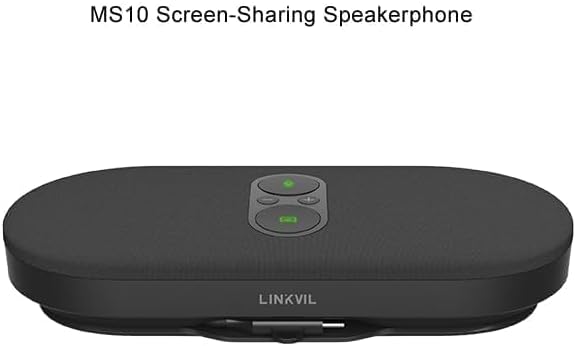
Figure 4.4: The RC10 receiver hub, facilitating wireless 4K UHD screen sharing and BYOD device connectivity.
- USB പോർട്ടുകൾ: For connecting the CM70 camera and MS10 speakerphone.
- HDMI ഔട്ട്പുട്ട്: ഒരു ഡിസ്പ്ലേയിലേക്ക് ബന്ധിപ്പിക്കുന്നതിന്.
- പവർ പോർട്ട്: പവർ അഡാപ്റ്റർ ബന്ധിപ്പിക്കുന്നതിന്.
- സ്റ്റാറ്റസ് ഇൻഡിക്കേറ്റർ: LED light indicating connection status.
5. സജ്ജീകരണം
Follow these steps to set up your Fanvil CA400 system:
- Connect the RC10 Receiver Hub:
- Connect the power adapter to the RC10 Receiver Hub and plug it into a power outlet.
- Connect the RC10 Receiver Hub to your display (monitor, TV, or projector) using an HDMI cable (not included).
- Connect the CM70 Camera:
- Mount the CM70 camera on top of your display or a stable surface.
- Connect the CM70 camera to one of the USB ports on the RC10 Receiver Hub using the provided USB cable.
- Connect the MS10 Speakerphone:
- Place the MS10 speakerphone on a flat surface in the center of your meeting area.
- Connect the MS10 speakerphone to another USB port on the RC10 Receiver Hub using the provided USB cable.
- പവർ ഓൺ:
- Ensure all connections are secure. The system will power on automatically.
- The status indicators on the devices will light up, indicating they are ready for use.
6. പ്രവർത്തന നിർദ്ദേശങ്ങൾ
6.1 അടിസ്ഥാന പ്രവർത്തനം
- പവർ ഓൺ/ഓഫ്: The system powers on automatically when connected to power. Disconnect power to turn off.
- വോളിയം നിയന്ത്രണം: Use the volume buttons on the MS10 speakerphone to adjust audio output.
- മൈക്രോഫോൺ നിശബ്ദമാക്കുക: Press the mute button on the MS10 speakerphone to mute/unmute the microphones.
6.2 Wireless Screen Sharing (4K UHD)
The Fanvil CA400 supports wireless 4K UHD screen sharing via the RC10 Receiver Hub.
- Ensure your device (laptop, tablet) is connected to the same network as the Fanvil CA400 system.
- On your device, select the screen sharing option (e.g., Miracast, AirPlay, or a dedicated application if provided by Fanvil).
- Select the Fanvil CA400 system from the list of available devices.
- Your screen will now be mirrored on the connected display.
6.3 Video Conferencing (BYOD)
The Fanvil CA400 acts as a BYOD (Bring Your Own Device) solution, allowing you to use your preferred video conferencing software.
- Connect your laptop or computer to the RC10 Receiver Hub via a USB cable (if not already connected for screen sharing). The system will be recognized as a USB camera and speakerphone.
- Open your desired video conferencing application (e.g., Zoom, Microsoft Teams, Google Meet).
- In the application's audio and video settings, select the "Fanvil CA400 Camera" or "UVC Camera" as your video input.
- Select the "Fanvil CA400 Speakerphone" or "USB Audio Device" as your microphone and speaker.
- Start or join your video conference.
7. പരിപാലനം
To ensure the longevity and optimal performance of your Fanvil CA400 system, follow these maintenance guidelines:
- വൃത്തിയാക്കൽ: Use a soft, dry cloth to clean the surfaces of the devices. Do not use liquid cleaners or aerosols.
- സംഭരണം: ദീർഘനേരം ഉപയോഗിക്കാത്തപ്പോൾ, നേരിട്ട് സൂര്യപ്രകാശം ഏൽക്കാത്ത ഒരു തണുത്തതും വരണ്ടതുമായ സ്ഥലത്ത് ഉപകരണം സൂക്ഷിക്കുക.
- കേബിൾ മാനേജുമെന്റ്: കേടുപാടുകൾ ഒഴിവാക്കാൻ കേബിളുകൾ വളയുകയോ പിഞ്ച് ചെയ്യുകയോ ചെയ്തിട്ടില്ലെന്ന് ഉറപ്പാക്കുക.
8. പ്രശ്നപരിഹാരം
If you encounter issues with your Fanvil CA400, refer to the following common problems and solutions:
| പ്രശ്നം | സാധ്യമായ കാരണം | പരിഹാരം |
|---|---|---|
| ഡിസ്പ്ലേയിൽ വീഡിയോ ഔട്ട്പുട്ട് ഇല്ല. | Loose HDMI cable, incorrect input source on display, camera not connected. | Check HDMI connection. Select correct HDMI input on your display. Ensure CM70 camera is securely connected to RC10. |
| No audio from speakerphone. | Volume too low, speakerphone muted, incorrect audio output selected in software. | Increase volume on MS10. Unmute speakerphone. In your conferencing software, select "Fanvil CA400 Speakerphone" as audio output. |
| മൈക്രോഫോൺ ശബ്ദം കേൾക്കുന്നില്ല. | Microphone muted, incorrect audio input selected in software. | Unmute microphone on MS10. In your conferencing software, select "Fanvil CA400 Speakerphone" as audio input. |
| Wireless screen sharing not working. | Device not on same network, network interference, software issue. | Ensure both devices are on the same Wi-Fi network. Restart RC10 and your sharing device. Check for software updates. |
9 സ്പെസിഫിക്കേഷനുകൾ
Technical specifications for the Fanvil CA400 All-in-One Video Conference Solution:
- ബ്രാൻഡ്: ഫാൻവിൽ
- മോഡൽ: CA400
- ക്യാമറ സെൻസർ: 1/2.8-inch 4K Sony sensor (IMX 415)
- വീഡിയോ ക്യാപ്ചർ റെസല്യൂഷൻ: 4K, 1080p, 720p
- പരമാവധി ഫോക്കൽ ദൂരം: 118.5 മില്ലിമീറ്റർ
- പരമാവധി അപ്പെർച്ചർ: 2.5 എഫ്
- ഫ്ലാഷ് മെമ്മറി തരം: ആന്തരിക ഫ്ലാഷ് മെമ്മറി
- വീഡിയോ ക്യാപ്ചർ ഫോർമാറ്റ്: എംജെപിഇജി
- പിന്തുണയ്ക്കുന്ന ഓഡിയോ ഫോർമാറ്റ്: MP3
- Screen Size (Speakerphone): 1 Inches (referring to a small display or indicator, not main screen)
- കണക്റ്റിവിറ്റി ടെക്നോളജി: USB
- മൈക്രോഫോണുകൾ: 8 array mics (on MS10 Speakerphone)
- സ്പീക്കർ: 3W vocal enhanced speaker (on MS10 Speakerphone)
- സ്ക്രീൻ പങ്കിടൽ: Wireless 4K UHD
- ഉപകരണ തരം: BYOD (നിങ്ങളുടെ സ്വന്തം ഉപകരണം കൊണ്ടുവരിക)
10. വാറൻ്റിയും പിന്തുണയും
For warranty information and technical support, please refer to the warranty card included with your product or visit the official Fanvil webസൈറ്റ്. വാറന്റി ക്ലെയിമുകൾക്കായി നിങ്ങളുടെ വാങ്ങലിന്റെ തെളിവ് സൂക്ഷിക്കുക.
ഓൺലൈൻ ഉറവിടങ്ങൾ: For the latest drivers, firmware updates, and additional support resources, please visit www.fanvil.com.


