1. ആമുഖം
This manual provides detailed instructions for the safe and effective use of your Vanguard VEO 5 264CV14 Full-Size Carbon Fiber Tripod with VEO PV-14 Counterbalancing Spring Assist Video Head. Please read this manual thoroughly before operating the product to ensure proper setup and functionality. Retain this manual for future reference.

Image 1.1: The Vanguard VEO 5 264CV14 Carbon Fiber Tripod with the PV-14 Video Head. This image displays the complete tripod system in its upright, ready-to-use configuration, highlighting its carbon fiber legs and the integrated video head.
2 സുരക്ഷാ വിവരങ്ങൾ
- ലോഡ് കപ്പാസിറ്റി: Do not exceed the maximum load capacity of 17.6 pounds (8 kg). Overloading can cause instability and damage to the equipment.
- സ്ഥിരത: Always ensure the tripod legs are fully extended and locked before mounting any equipment. Distribute weight evenly.
- അസമമായ പ്രതലങ്ങൾ: Exercise caution on uneven or slippery surfaces. Use the integrated spikes for improved grip when necessary.
- ചലിക്കുന്ന ഭാഗങ്ങൾ: Keep fingers and clothing clear of moving parts, especially during leg extension and folding.
- പരിസ്ഥിതി വ്യവസ്ഥകൾ: Avoid using the tripod in extreme weather conditions (e.g., strong winds, heavy rain) without proper precautions.
- വൃത്തിയാക്കൽ: Use only recommended cleaning methods and materials to avoid damaging the carbon fiber or mechanical components.
3. ഘടകങ്ങൾ കഴിഞ്ഞുview
Familiarize yourself with the main components of your VEO 5 264CV14 tripod system:
- VEO PV-14 Video Head: Fluid 2-way head with counterbalancing spring assist.
- QS-71P Quick-Release Plate: Arca-compatible plate for mounting equipment.
- ലെഗ് വിഭാഗങ്ങൾ: Carbon fiber legs with twist locks for extension.
- ലെഗ് ആംഗിൾ സെലക്ടറുകൾ: Mechanisms to adjust leg spread to 23, 50, or 80 degrees.
- മധ്യ നിര: Hexagonal column for height adjustment, includes a short column for low-angle shooting.
- സ്പ്രിംഗ്-ലോഡഡ് ഹുക്ക്: Located at the bottom of the center column for adding weight for stability.
- Rubber Feet/Spikes: Convertible feet for various terrains.

ചിത്രം 3.1: വിശദമായ view of the VEO PV-14 Video Head, showing the quick-release plate, pan handle, and various adjustment knobs. This highlights the precision-machined components of the head.

Image 3.2: The hexagonal center column and its removable short column component. This illustrates how the center column can be adapted for different shooting heights, including low-angle setups.
4. സജ്ജീകരണം
4.1 പായ്ക്ക് ചെയ്യലും പ്രാരംഭ പരിശോധനയും
Carefully remove all components from the packaging. Inspect for any signs of damage. Ensure all listed components are present.
4.2 Extending and Adjusting Legs
- Release the leg angle selectors on each leg to allow them to spread.
- Extend each leg section by twisting the leg locks counter-clockwise to loosen, pulling the section out, and then twisting clockwise to tighten.
- Adjust the leg angles by pressing the leg angle selectors and moving the legs to one of the three positions (23°, 50°, or 80°). Ensure the selectors click into place.

Image 4.1: An illustration demonstrating the three adjustable leg angles of the tripod. This visual guide shows how the legs can be positioned for various stability and height requirements.
4.3 Adjusting the Center Column
- To raise or lower the center column, loosen the center column lock knob.
- Adjust the column to the desired height.
- Tighten the center column lock knob securely.
- For low-angle shooting, the main center column can be removed and replaced with the included short column.
4.4 മൗണ്ടിംഗ് ഉപകരണങ്ങൾ
- Attach the QS-71P quick-release plate to your camera or spotting scope by screwing the mounting screw into the device's tripod socket. Ensure it is tight.
- പെട്ടെന്നുള്ള റിലീസ് cl തുറക്കുകamp on the PV-14 video head.
- Slide the quick-release plate with your equipment into the clamp.
- Securely close the quick-release clamp. Verify that the equipment is firmly attached before releasinനിങ്ങളുടെ പിടി പിടിക്കൂ.

Image 4.2: The Vanguard tripod with a spotting scope securely mounted on the PV-14 video head. This demonstrates a typical setup for observation or photography with larger optics.
5. പ്രവർത്തിക്കുന്നു
5.1 Using the VEO PV-14 Video Head
The PV-14 video head offers smooth 2-way (pan and tilt) movement with a counterbalancing spring assist:
- പാൻ ചലനം: Loosen the pan lock knob to rotate the head horizontally. Tighten to secure.
- ചരിഞ്ഞ ചലനം: Loosen the tilt lock knob to adjust the vertical angle. The counterbalancing spring assist helps prevent sudden drops of heavier equipment. Tighten to secure.
- പാൻ ഹാൻഡിൽ: Use the pan handle for precise and smooth control during panning and tilting movements.
5.2 Converting Rubber Feet to Spikes
For enhanced stability on soft ground, ice, or uneven terrain, the rubber feet can be converted to spikes:
- Grip the rubber foot firmly.
- Twist the rubber foot counter-clockwise to retract it, revealing the metal spike.
- To revert to rubber feet, twist clockwise until the spike is fully covered.
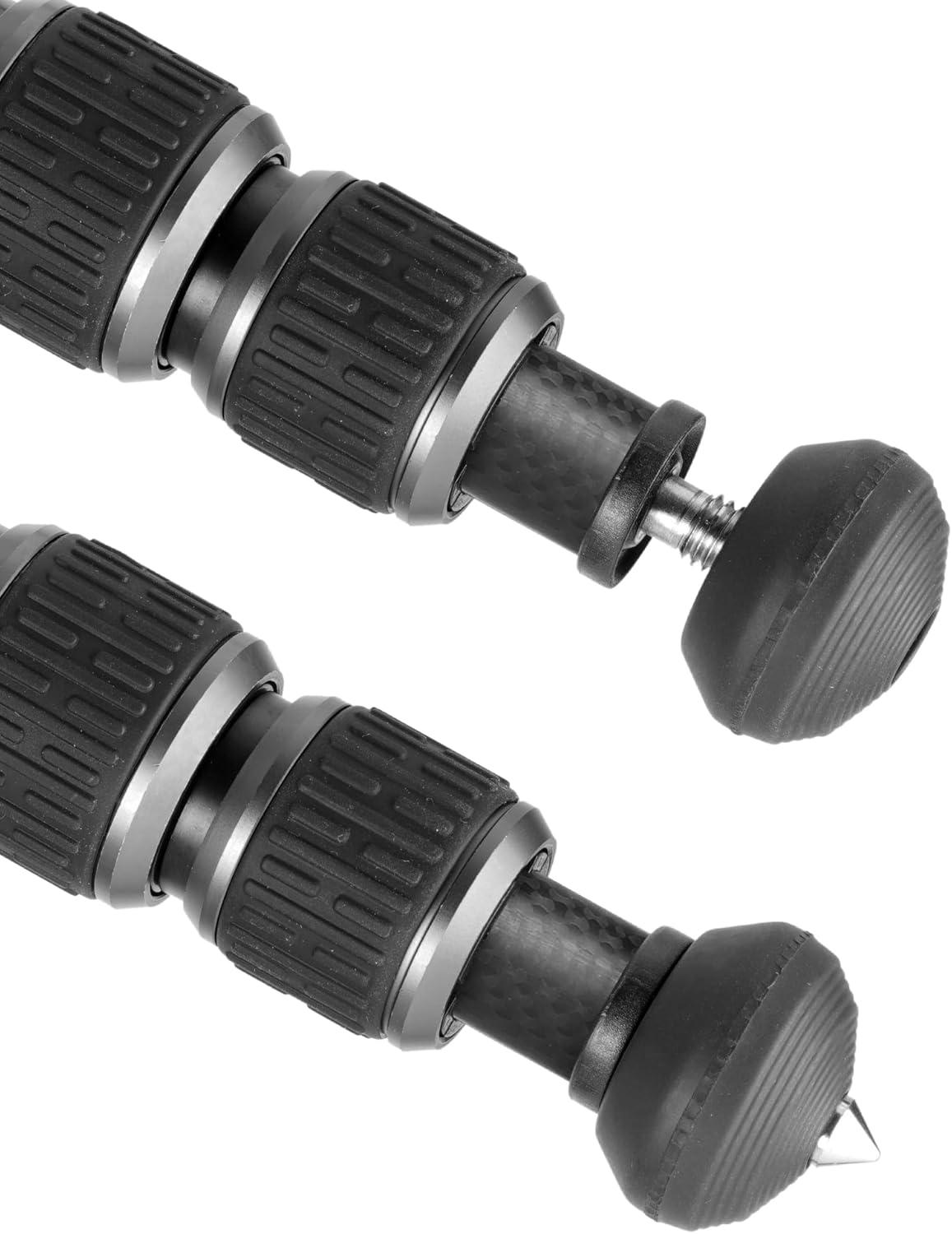
ചിത്രം 5.1: ഒരു ക്ലോസപ്പ് view illustrating the convertible rubber feet that can be twisted to reveal integrated metal spikes. This feature allows for adaptability to various ground conditions.
5.3 Using the Spring-Loaded Hook
A spring-loaded hook is located at the bottom of the center column. This can be used to attach additional weight (e.g., a camera bag) to increase the tripod's stability, especially in windy conditions or when using heavy equipment.

Image 5.2: The base of the tripod's center column, showing the spring-loaded hook. This hook is designed for attaching additional weight to enhance stability.
6. പരിപാലനം
- വൃത്തിയാക്കൽ: Wipe down the carbon fiber legs and metal parts with a soft, damp cloth after each use, especially if used in dusty, sandy, or wet environments. Avoid harsh chemicals.
- ലെഗ് ലോക്കുകൾ: Periodically clean the twist leg locks. They can be taken apart for thorough cleaning if sand or debris accumulates, affecting smooth operation. Refer to the manufacturer's website for detailed disassembly instructions if needed.
- Video Head: Keep the fluid head clean and free of dust. Do not attempt to disassemble the fluid head, as this may void the warranty and damage the internal mechanisms.
- സംഭരണം: Store the tripod in its deluxe bag in a dry, cool place away from direct sunlight and extreme temperatures.
7. പ്രശ്നപരിഹാരം
- ട്രൈപോഡ് അസ്ഥിരത: Ensure all leg sections are fully extended and twist locks are securely tightened. Verify leg angle selectors are properly engaged. Add weight to the spring-loaded hook if necessary.
- കടുപ്പമുള്ള ലെഗ് ലോക്കുകൾ: If leg locks become stiff or gritty, they may require cleaning. Disassemble carefully, clean with a soft brush and mild soap, rinse, dry thoroughly, and reassemble.
- Video Head Movement Not Smooth: Check that all pan and tilt lock knobs are sufficiently loosened. If movement remains rough, ensure no debris is obstructing the head's mechanism. Do not force movement.
- Quick-Release Plate Not Securing: Ensure the QS-71P plate is correctly seated in the clamp കൂടാതെ clamp lever is fully closed. Check for any obstructions in the clamp മെക്കാനിസം.
8 സ്പെസിഫിക്കേഷനുകൾ
| ഫീച്ചർ | സ്പെസിഫിക്കേഷൻ |
|---|---|
| മോഡലിൻ്റെ പേര് | VEO 5 264CV14 |
| മെറ്റീരിയൽ | കാർബൺ ഫൈബർ |
| ട്രൈപോഡ് ഹെഡ് തരം | Video Head (VEO PV-14) |
| പരമാവധി ലോഡ് കപ്പാസിറ്റി | 17.6 പൗണ്ട് (8 കി.ഗ്രാം) |
| ഇനത്തിൻ്റെ ഭാരം | 4 പൗണ്ട് (1.81 കി.ഗ്രാം) |
| മടക്കിയ ഉയരം | 22.6 ഇഞ്ച് (57.4 സെ.മീ) |
| വിപുലീകരിച്ച ഉയരം | 66.1 ഇഞ്ച് (167.9 സെ.മീ) |
| Low Angle Height | 8.5 ഇഞ്ച് (21.6 സെ.മീ) |
| കാലിന്റെ വ്യാസം | 26 മി.മീ |
| ലെഗ് ആംഗിളുകൾ | 23°, 50°, 80° |
| ദ്രുത റിലീസ് പ്ലേറ്റ് | Arca-compatible QS-71P |
| പ്രത്യേക സവിശേഷതകൾ | Counterbalancing Spring Assist, Convertible Rubber Feet/Spikes, Hexagonal Center Column, Spring-Loaded Hook |
9. വാറൻ്റിയും പിന്തുണയും
Vanguard products are designed for durability and performance. For specific warranty information, please refer to the warranty card included with your product or visit the official Vanguard website. For technical support, spare parts, or service inquiries, please contact Vanguard customer service through their official channels.
ഓൺലൈൻ ഉറവിടങ്ങൾ: www.vanguardworld.com


