1. ആമുഖം
This manual provides instructions for the Hi-Spec 20-piece tool bundle, which includes two distinct kits: the 11pc Pink Compact Crafts & Home DIY Repair Hand Tool Kit and the 9pc Network Cable Tester Tool Kit. This document covers the components, setup, operation, maintenance, and troubleshooting for both kits to ensure proper and safe use.

ചിത്രം 1: ഓവർview of the Hi-Spec 20pc Tool Bundle, featuring both the pink home repair kit and the red network cable tester kit.
2. Hi-Spec 11pc Pink Compact Crafts & Home DIY Repair Hand Tool Kit
2.1. ഉൽപ്പന്നം കഴിഞ്ഞുview ഘടകങ്ങളും
This compact 11-piece kit is designed for household repairs, crafting projects, and fine work. It is housed in a book-sized case for convenient storage and portability.

Figure 2: The Hi-Spec 11pc Pink Hand Tool Kit, with screwdrivers and pliers organized within its compact case.
The kit includes the following tools:
- Pliers and Cutters (4.5 inches):
- Needle/Long Nose Pliers
- ഡയഗണൽ കട്ടറുകൾ
- കോമ്പിനേഷൻ പ്ലയർ
- Bent Nose Pliers
- Precision Screwdrivers: Various sizes for intricate tasks.
- ട്വീസറുകൾ: For handling small components.
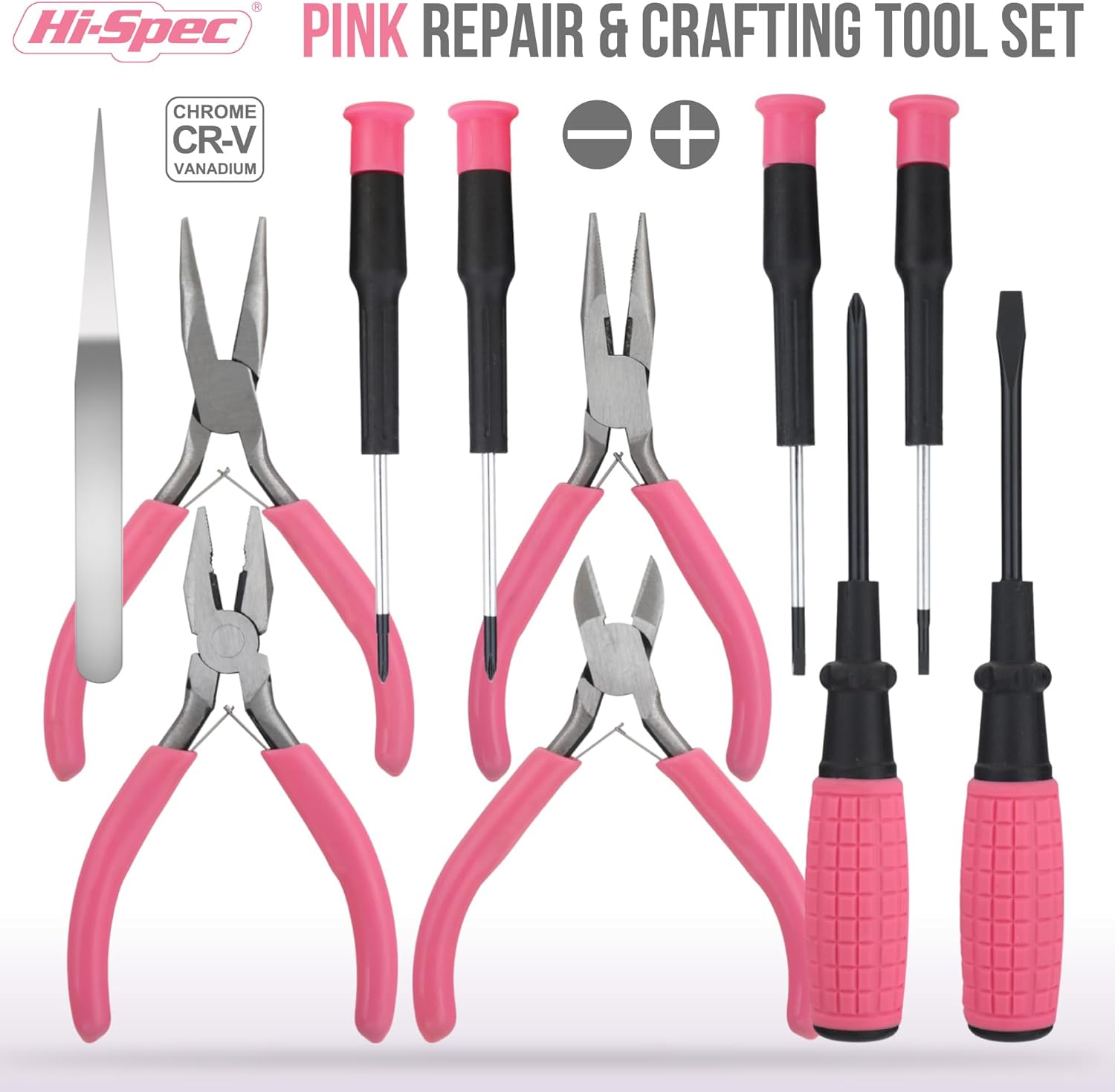
Figure 3: All 11 components of the Pink Hand Tool Kit displayed, showcasing the range of pliers, screwdrivers, and tweezers.
2.2. പ്രവർത്തന നിർദ്ദേശങ്ങൾ
These tools are designed for precision and delicate tasks. Always select the appropriate tool for the job to prevent damage to the item or injury.
- Pliers and Cutters: Use for gripping, bending, and cutting small wires or components. Ensure the correct type of pliers is used for the specific task (e.g., diagonal cutters for cutting, long nose pliers for reaching tight spaces).
- Precision Screwdrivers: Select the screwdriver tip that perfectly matches the screw head to avoid stripping the screw. Apply gentle, even pressure while turning.
- ട്വീസറുകൾ: Ideal for handling very small parts, picking up delicate items, or positioning components in tight areas.
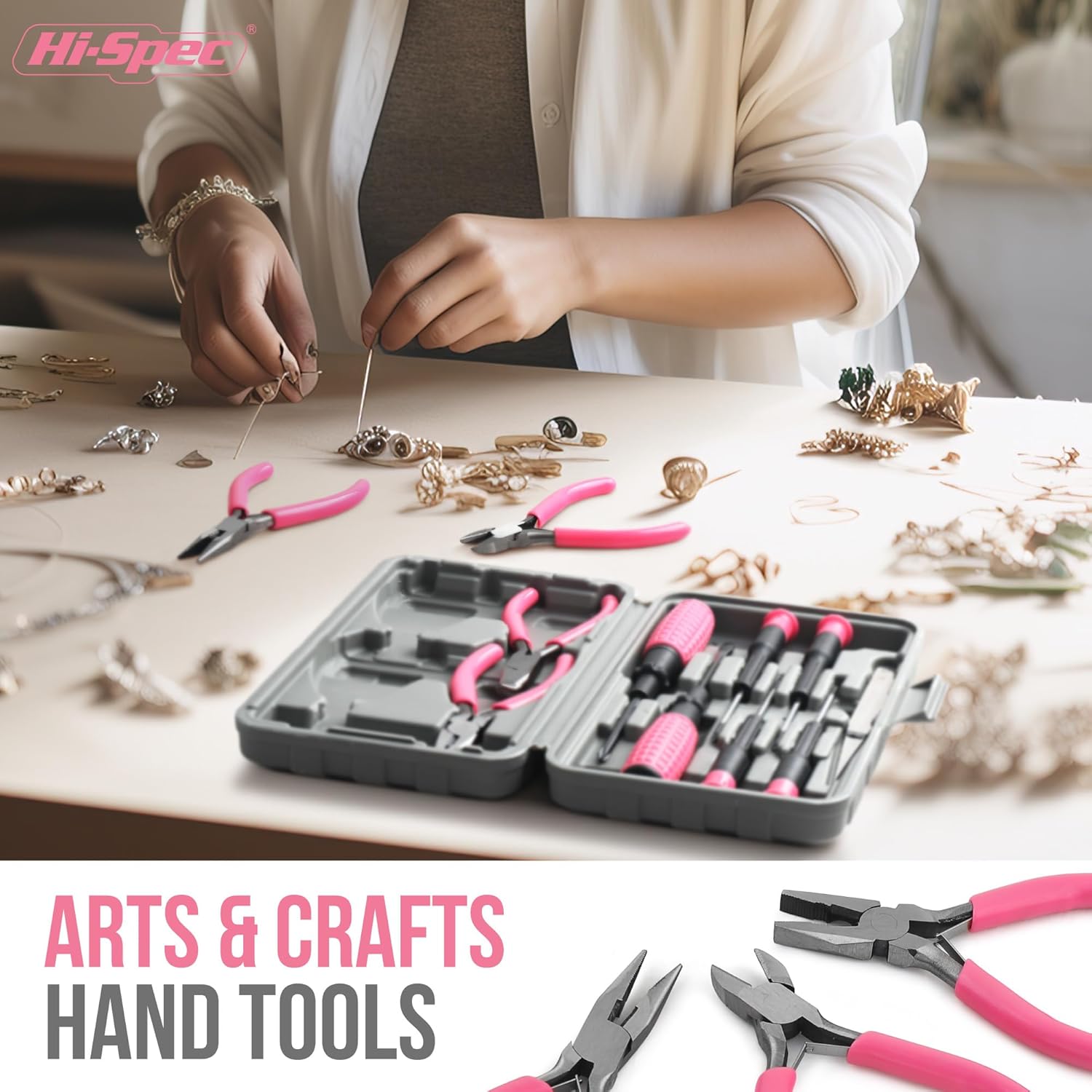
ചിത്രം 4: ഉദാample of the pink hand tools being used for a crafting project, highlighting their suitability for delicate and intricate tasks.
3. Hi-Spec 9pc Network Cable Tester Tool Kit
3.1. ഉൽപ്പന്നം കഴിഞ്ഞുview ഘടകങ്ങളും
This 9-piece kit is designed for testing, crimping, and repairing network and telephone cables, including CAT5, CAT6, RJ11, and RJ45. It comes in a zippered case for organization.

Figure 5: The Hi-Spec 9pc Network Cable Tester Tool Kit, with its components organized within the zippered case.
The kit includes the following tools and accessories:
- Network Cable Tester (Master & Remote Unit): For testing CAT5, CAT6, RJ11, RJ45 cables.
- Crimping/Cutting/Stripping Tool (200mm): For RJ45, RJ11, RJ12 connectors.
- Punch Down Krone Insertion Tool: For terminating wires and cutting excess.
- Universal Stripper: Strips various cable types.
- Co-axial Stripper (100mm): For stripping coaxial cables.
- Slotted and Phillips Screwdrivers: പൊതുവായ ഉപയോഗത്തിന്.
- 6 x 8P Modular Plugs: Commonly used for Ethernet cables.
- 6 x 6P Modular Plugs: For telephone lines.

ചിത്രം 6: വിശദമായി view of the Network Cable Tester Tool Kit components, with labels indicating each tool's function.

Figure 7: Close-up of key tools from the network kit, including the cable tester, punch down tool, and screwdrivers.
3.2. Setup: Network Cable Tester
The Network Cable Tester requires a 9V battery (not included) for operation. Locate the battery compartment on the Master unit, insert a fresh 9V battery, and secure the cover.
3.3. പ്രവർത്തന നിർദ്ദേശങ്ങൾ
Follow these steps for using the network tools:
- നെറ്റ്വർക്ക് കേബിൾ ടെസ്റ്റർ:
- Connect one end of the network cable to the RJ45 or RJ11 port on the Master unit.
- Connect the other end of the cable to the corresponding port on the Remote unit.
- Turn on the Master unit. The LEDs (1-8, G, Shield) will illuminate in sequence, indicating the continuity of each wire.
- Observe the LED pattern:
- സാധാരണ: LEDs illuminate in sequential order (1-8, G).
- ഓപ്പൺ സർക്യൂട്ട്: An LED fails to illuminate, indicating a broken wire.
- ഷോർട്ട് സർക്യൂട്ട്: Two or more LEDs illuminate simultaneously, indicating a short between wires.
- ക്രോസ്ഡ് വയറുകൾ: LEDs illuminate in a non-sequential or incorrect order.
- The tester supports dual-speed scan modes for different testing requirements.
- Crimping Tool:
- Strip the cable jacket using the appropriate stripping tool.
- Arrange the individual wires according to the desired wiring standard (e.g., T568A or T568B).
- Insert the prepared wires into an RJ45 or RJ11/12 connector.
- Place the connector into the crimping tool's designated slot and squeeze the handles firmly until the connector is fully crimped.
- Punch Down Krone Insertion Tool:
- Place the wire into the slot of the terminal block.
- Position the punch down tool over the wire and press down firmly. The tool will seat the wire and trim any excess.
- Stripping Tools (Universal & Co-axial):
- Insert the cable into the appropriate stripping slot.
- Rotate the tool around the cable or squeeze the handles (depending on tool type) to cut and remove the outer jacket without damaging the inner conductors.

Figure 8: Demonstrations of key operations with the network tool kit: crimping a connector, stripping a wire, cutting a wire, and testing a connection.
4. പൊതു പരിപാലനം
Proper maintenance ensures the longevity and performance of your tools:
- വൃത്തിയാക്കൽ: After each use, wipe tools clean with a dry cloth to remove dirt, dust, or debris. For stubborn grime, a slightly damp തുണി ഉപയോഗിക്കാം, തുടർന്ന് നന്നായി ഉണക്കാം.
- സംഭരണം: Store all tools in their respective cases in a dry environment to prevent rust and damage. Keep them away from direct sunlight and extreme temperatures.
- പരിശോധന: Periodically inspect tools for signs of wear, damage, or corrosion. Replace or repair damaged tools as necessary.
- ലൂബ്രിക്കേഷൻ: For hinged tools like pliers and crimpers, apply a small amount of light machine oil to the pivot points occasionally to ensure smooth operation.
5. Troubleshooting (Network Cable Tester)
If you encounter issues with the Network Cable Tester, consider the following:
| പ്രശ്നം | സാധ്യമായ കാരണം | പരിഹാരം |
|---|---|---|
| ടെസ്റ്റർ പവർ ഓൺ ചെയ്യുന്നില്ല. | Dead or incorrectly installed 9V battery. | Replace the 9V battery with a fresh one, ensuring correct polarity. |
| No LEDs illuminate during test. | Cable not properly connected; severe cable damage. | Ensure both ends of the cable are fully inserted into the Master and Remote units. Inspect the cable for visible damage. |
| Incorrect LED sequence or missing lights. | Open circuit, short circuit, or crossed wires in the cable. | Refer to the "Operating Instructions" for interpreting LED patterns. Re-terminate the cable ends if necessary. |
| Remote unit not responding. | Poor connection to the cable; remote unit malfunction. | Ensure the cable is securely connected to the remote unit. If issues persist, the remote unit may be faulty. |
6 സ്പെസിഫിക്കേഷനുകൾ
Key specifications for the Hi-Spec 20pc Tool Bundle:
- ഉൽപ്പന്നത്തിൻ്റെ പേര്: Hi-Spec 20pc Home DIY Repair Hand Tool Set Bundle With Network Cable Tester Tool Kit
- മോഡൽ: 20pc Home DIY Repair Hand Tool Set & Network Cable Tester Tool Kit
- ബ്രാൻഡ്: ഹൈ-സ്പെക്
- ASIN: B0D3GRNR5C
- Hand Tool Kit Components: 4.5in Pliers (Needle/Long Nose, Diagonal, Combination, Bent Nose), Precision Screwdrivers, Tweezers.
- Network Tool Kit Components: Network Cable Tester (Master & Remote), Crimping Tool, Punch Down Tool, Universal Stripper, Co-axial Stripper, Screwdrivers, Modular Plugs (8P, 6P).
- Network Tester Compatibility: CAT5, CAT5e, CAT6, CAT6a, RJ11 (6P), RJ45 (8P).
- Network Tester Power: 9V Battery (not included).
- Network Tester Range: 300 മീറ്റർ/1000 അടി വരെ.
7. വാറൻ്റിയും പിന്തുണയും
For warranty information, technical support, or assistance with your Hi-Spec tool bundle, please refer to the contact information provided with your purchase or visit the official Hi-Spec webസൈറ്റ്. വാറന്റി ക്ലെയിമുകൾക്കായി നിങ്ങളുടെ വാങ്ങലിന്റെ തെളിവ് സൂക്ഷിക്കുക.


