1. ആമുഖവും അവസാനവുംview
Thank you for choosing the SENGBIRCH Keyboard Case for your Lenovo Tab P12 12.7" tablet. This product combines a protective case with a detachable Bluetooth keyboard, enhancing your tablet's functionality for typing, work, and entertainment. This manual provides detailed instructions for setup, operation, maintenance, and troubleshooting to ensure optimal use of your new accessory.
പ്രധാന സവിശേഷതകൾ:
- Detachable Bluetooth 5.0 keyboard for stable and fast connection.
- Durable protective case with precise cutouts.
- ക്രമീകരിക്കാവുന്ന viewസുഖപ്രദമായ ഉപയോഗത്തിനായി കോണുകൾ.
- Integrated stylus holder.
- ദീർഘകാലം റീചാർജ് ചെയ്യാൻ കഴിയുന്ന ബാറ്ററി.
അനുയോജ്യത: This keyboard case is specifically designed for the Lenovo Tab P12 12.7" (2023) model TB370FU. Please verify your tablet's model number before use to ensure proper fit and functionality.

Image 1.1: Compatibility guide for the keyboard case. Ensure your tablet is the Lenovo Tab P12 12.7" (TB370FU).
2. സജ്ജീകരണ നിർദ്ദേശങ്ങൾ
2.1 കീബോർഡ് ചാർജ് ചെയ്യുന്നു
Before first use, fully charge the keyboard. Connect the provided USB-C charging cable to the keyboard's charging port and a USB power adapter (not included). The charging indicator light will illuminate during charging and turn off when fully charged.
- ചാർജിംഗ് സമയം: ഏകദേശം 2-3 മണിക്കൂർ.
- Continuous Use: Up to 48 hours.
- Standby Time: Over 2 months.

Image 2.1: Keyboard charging port (Type-C) and battery indicators.
2.2 Inserting the Tablet into the Case
- Gently align your Lenovo Tab P12 12.7" tablet with the case's frame.
- Press the tablet firmly into the soft inner shell, ensuring all edges are securely seated and cutouts align with ports and buttons.
2.3 ബ്ലൂടൂത്ത് കീബോർഡ് ജോടിയാക്കൽ
- Turn on the keyboard by sliding the 'ON/OFF' switch to the 'ON' position. The power indicator light will briefly illuminate.
- Press the 'Connect' button on the keyboard. The Bluetooth indicator light will start blinking, indicating it is in pairing mode.
- On your Lenovo Tab P12, go to ക്രമീകരണങ്ങൾ > ബ്ലൂടൂത്ത്.
- ബ്ലൂടൂത്ത് ഓണാക്കി ലഭ്യമായ ഉപകരണങ്ങൾക്കായി തിരയുക.
- Select "Bluetooth Keyboard" (or a similar name) from the list of devices.
- Follow any on-screen prompts to complete the pairing process. The Bluetooth indicator light on the keyboard will stop blinking once successfully paired.
3. പ്രവർത്തന നിർദ്ദേശങ്ങൾ
3.1 കീബോർഡ് ഘടിപ്പിക്കലും വേർപെടുത്തലും
The keyboard is magnetically attached to the case. To attach, simply place the keyboard onto the designated area within the case. To detach, gently pull the keyboard away from the magnetic surface.

Image 3.1: The keyboard can be magnetically detached from the case.
3.2 ക്രമീകരിക്കുന്നു Viewing കോണുകൾ
The case features an adjustable stand that supports three different viewing angles (130°, 125°, 120°). Simply fold the case cover to create a stable triangular stand and adjust it to your preferred angle for typing, viewing, അല്ലെങ്കിൽ ഡ്രോയിംഗ്.

Image 3.2: Adjustable stand angles for versatile use.
3.3 കീബോർഡ് പ്രവർത്തനങ്ങൾ
- ഓപ്പറേറ്റിംഗ് സിസ്റ്റം സ്വിച്ചിംഗ്: The keyboard supports different operating systems. Use Fn + Q iOS-ന്, Fn + W ആൻഡ്രോയിഡിനും, Fn + E വിൻഡോസിനായി.
- ബാക്ക്ലൈറ്റ് ക്രമീകരണം: അമർത്തുക Fn + ലൈറ്റ് ബൾബ് ഐക്കൺ to cycle through 3 backlight brightness levels. Press Fn + RGB icon to change between 7 backlight colors.
- Special Characters: ഉപയോഗിക്കുക Fn key in combination with other keys to access special characters, such as the Euro symbol (€) or accent marks (ñ).
- ഓട്ടോമാറ്റിക് സ്ലീപ്പ് മോഡ്: To conserve battery, the keyboard will automatically enter sleep mode after approximately 8 minutes of inactivity. Press any key to wake it up.
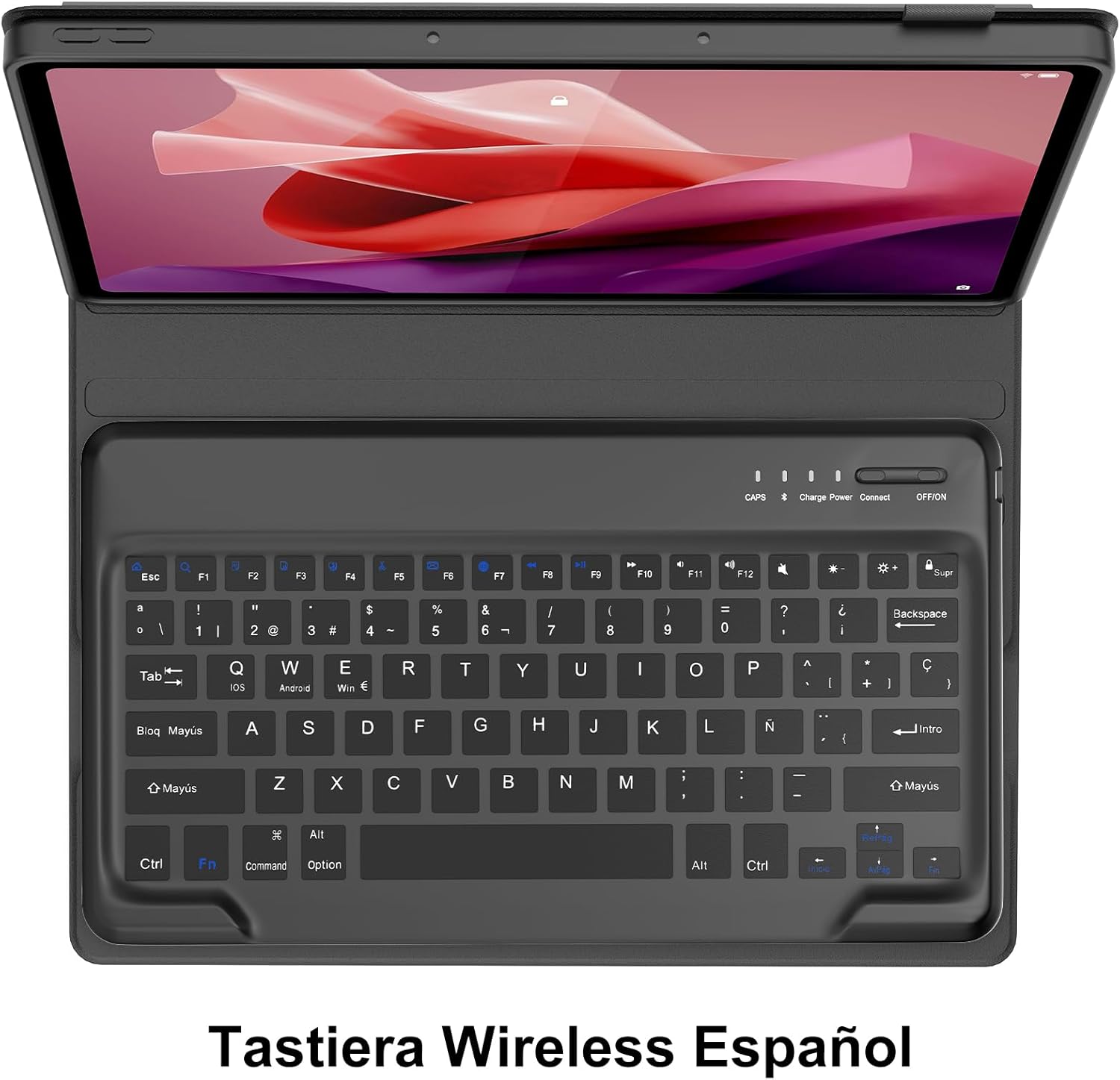
Image 3.3: Keyboard layout with function key combinations for various settings.
3.4 Stylus Holder
The case includes a dedicated slot for your stylus, ensuring it is securely stored and easily accessible.

Image 3.4: Integrated stylus holder for convenience.
4. പരിപാലനം
4.1 കേസും കീബോർഡും വൃത്തിയാക്കൽ
- കേസിന്റെ പുറംഭാഗം മൃദുവായ, ഡി-ടൈപ്പ് ഉപയോഗിച്ച് തുടയ്ക്കുക.amp തുണി. കഠിനമായ രാസവസ്തുക്കളോ ഉരച്ചിലുകളുള്ള ക്ലീനറുകളോ ഒഴിവാക്കുക.
- For the keyboard, use a soft, dry cloth or a can of compressed air to remove dust and debris from between the keys.
- Ensure the keyboard is turned off before cleaning.
4.2 ബാറ്ററി കെയർ
- Recharge the keyboard when the low battery indicator appears or when performance degrades.
- ബാറ്ററിയുടെ ആയുസ്സ് വർദ്ധിപ്പിക്കുന്നതിന് ഇടയ്ക്കിടെ പൂർണ്ണമായും ഡിസ്ചാർജ് ചെയ്യുന്നത് ഒഴിവാക്കുക.
- കീബോർഡ് ദീർഘനേരം സൂക്ഷിക്കുകയാണെങ്കിൽ, ഏകദേശം 50% വരെ ചാർജ് ചെയ്ത് തണുത്തതും വരണ്ടതുമായ സ്ഥലത്ത് സൂക്ഷിക്കുക.
5. പ്രശ്നപരിഹാരം
If you encounter issues with your SENGBIRCH Keyboard Case, please refer to the following troubleshooting steps:
5.1 Keyboard Not Connecting/Frequent Disconnections
- ബാറ്ററി പരിശോധിക്കുക: Ensure the keyboard is sufficiently charged. Low battery can cause connection issues.
- Re-pair Keyboard: Delete the "Bluetooth Keyboard" from your tablet's Bluetooth device list and repeat the pairing steps (Section 2.3).
- ഉപകരണങ്ങൾ പുനരാരംഭിക്കുക: Turn off and on both your tablet and the keyboard.
- ഇടപെടൽ: തടസ്സം സൃഷ്ടിച്ചേക്കാവുന്ന മറ്റ് വയർലെസ് ഉപകരണങ്ങളിൽ നിന്ന് മാറുക.
5.2 Keys Not Responding or Sticky Keys
- ബാറ്ററി പരിശോധിക്കുക: Ensure the keyboard has enough power.
- Clean Keyboard: Dust or debris under the keys can cause them to stick. Refer to Section 4.1 for cleaning instructions.
- കീബോർഡ് പുനരാരംഭിക്കുക: കീബോർഡ് ഓഫാക്കി വീണ്ടും ഓണാക്കുക.
5.3 Tablet Not Fitting Correctly
- Verify Model: Double-check that your tablet is indeed the Lenovo Tab P12 12.7" (2023) model TB370FU. This case is not compatible with other models.
- ശരിയായ ഉൾപ്പെടുത്തൽ: Ensure the tablet is aligned correctly and gently pressed into all corners of the soft inner shell.
6 സ്പെസിഫിക്കേഷനുകൾ
| ബ്രാൻഡ് | സെൻജിർച്ച് |
| Compatible Tablet Model | Lenovo Tab P12 12.7" (2023) TB370FU |
| കണക്റ്റിവിറ്റി ടെക്നോളജി | ബ്ലൂടൂത്ത് 5.0 |
| കീബോർഡ് ലേഔട്ട് | Spanish (QWERTY) |
| ബാറ്ററി തരം | റീചാർജ് ചെയ്യാവുന്ന ലിഥിയം പോളിമർ |
| ചാർജിംഗ് സമയം | 2-3 മണിക്കൂർ |
| തുടർച്ചയായ ഉപയോഗ സമയം | 48 മണിക്കൂർ വരെ |
| സ്റ്റാൻഡ്ബൈ സമയം | 2 മാസത്തിലധികം |
| മെറ്റീരിയൽ | Plastic (keyboard), Faux Leather (case exterior) |
| നിറം | കറുപ്പ് |
| അളവുകൾ (പാക്കേജ്) | 31.2 x 25.1 x 4.1 സെ.മീ |
| ഭാരം (ഉൽപ്പന്നം) | 970 ഗ്രാം |
7. വാറൻ്റിയും പിന്തുണയും
SENGBIRCH products are designed for reliability and performance. For any questions, technical support, or warranty claims, please contact SENGBIRCH customer service through the retailer where you purchased the product or visit the official SENGBIRCH webബന്ധപ്പെടാനുള്ള വിവരങ്ങൾക്കുള്ള സൈറ്റ്.
വാറന്റി ആവശ്യങ്ങൾക്കായി നിങ്ങളുടെ വാങ്ങിയതിന്റെ തെളിവ് സൂക്ഷിക്കുക.


