1. Introduction to the Samsung Galaxy Ring
The Samsung Galaxy Ring is an advanced AI smart ring designed to provide a deeper understanding of your body's health and activity. It offers seamless tracking of fitness, sleep, and various biometric data in a comfortable and stylish form factor. This manual will guide you through setting up, operating, and maintaining your Galaxy Ring.

Image: The Samsung Galaxy Ring in Titanium Black, showcasing അതിന്റെ മിനുസമാർന്ന ഡിസൈൻ.
2. ആരംഭിക്കൽ: വലുപ്പവും സജ്ജീകരണവും
2.1. Important Sizing Information
Galaxy Ring sizes may differ from standard ring sizes. It is highly recommended to use the official Samsung Galaxy Ring Sizing Kit to determine your correct size before purchasing the actual ring. The sizing kit includes sample rings from size 5 to 15. Wear a sample ring for at least 24 hours to ensure a comfortable fit, as finger sizes can change throughout the day and night.

Image: The Samsung Galaxy Ring Sizing Kit, displaying various ring sizes for accurate measurement.
Video: A guide on how to properly size your Samsung Galaxy Ring using the sizing kit to ensure optimal comfort and tracking accuracy.
2.2. പ്രാരംഭ സജ്ജീകരണവും ജോടിയാക്കലും
The Galaxy Ring is compatible with Android smartphones. To set up your ring:
- Ensure your Android smartphone is running a compatible version of Android.
- ഡൗൺലോഡ് ചെയ്ത് ഇൻസ്റ്റാൾ ചെയ്യുക Samsung Wearable app ഗൂഗിൾ പ്ലേ സ്റ്റോറിൽ നിന്ന്.
- Place your Galaxy Ring into its charging case and connect the charging cable to a power source.
- Open the Samsung Wearable app on your smartphone.
- Follow the on-screen instructions to pair your Galaxy Ring. You may need to press and hold the button on the charging case for 3 seconds to enter pairing mode.
- Once paired, the app will guide you through any necessary software updates and initial health profile സജ്ജമാക്കുക.
3. Operating Your Galaxy Ring
3.1. Wearing the Ring
For accurate tracking, wear the Galaxy Ring on any finger where it feels comfortable. Ensure the three sensors on the inner part of the ring are facing towards your palm, and the indicator on the outer surface is also on the palm side. The lightweight titanium design ensures comfort for all-day wear, including during sleep.

Image: The Samsung Galaxy Ring in Titanium Black, worn on a finger, highlighting its comfortable and unobtrusive design.
3.2. Health and Activity Tracking
The Galaxy Ring continuously monitors various health metrics:
- ഉറക്ക ട്രാക്കിംഗ്: Provides personalized sleep insights, including deep sleep duration, REM cycles, and heart rate variability. For accurate sleep data, wear the device for at least 7 nights during a 30-night period.
- ഹൃദയമിടിപ്പ് ട്രാക്കിംഗ്: Improved optical heart rate sensor filters out body movements for precise readings.
- പ്രവർത്തന നിരീക്ഷണം: Features Auto Workout Detection for walking and running, automatically tracking your exercise without manual input.
- Energy Score & Wellness Tips: Gain insights into your daily readiness and receive personalized wellness tips through the Samsung Health app, requiring a compatible Samsung Galaxy AI phone and Samsung account.
- സൈക്കിൾ ട്രാക്കിംഗ്: Helps track menstruation cycles by sensing slight changes in body temperature. Note: This feature is not intended for contraception or medical use and may be affected by hormonal birth control or treatments.
വീഡിയോ: ഒരു ഓവർview of the Samsung Galaxy Ring's key features, including its health and activity tracking capabilities.
Video: An introduction to the Energy Score feature, explaining how it provides personalized insights into your daily readiness based on tracked data.
4. ചാർജിംഗും ബാറ്ററിയും
The Galaxy Ring offers up to 7 days of battery life on a single charge, depending on usage. It comes with a convenient charging case and a USB-C charging cable.
- To charge, place the ring into the charging case.
- USB-C കേബിൾ ചാർജിംഗ് കേസിലേക്കും ഒരു പവർ സ്രോതസ്സിലേക്കും ബന്ധിപ്പിക്കുക.
- The charging case features an indicator light to show charging status.
- A short press on the case button checks the battery level, while a long press (3 seconds) initiates pairing mode.

Image: The Samsung Galaxy Ring, its transparent charging case, and the included USB-C charging cable.
5. പരിചരണവും പരിപാലനവും
The Galaxy Ring is built for everyday durability with a concave titanium design that minimizes scratches. It is also water-resistant with a 10ATM water-resistance classification (up to 100m of fresh water for up to 10 minutes) and an IP68 rating (up to 6 feet of water for up to 30 minutes).
- Rinse any residue and dry the ring thoroughly after exposure to water.
- Avoid exposing the ring to extreme temperatures or harsh chemicals.
- Clean the ring regularly with a soft, dry cloth to maintain its appearance and sensor accuracy.
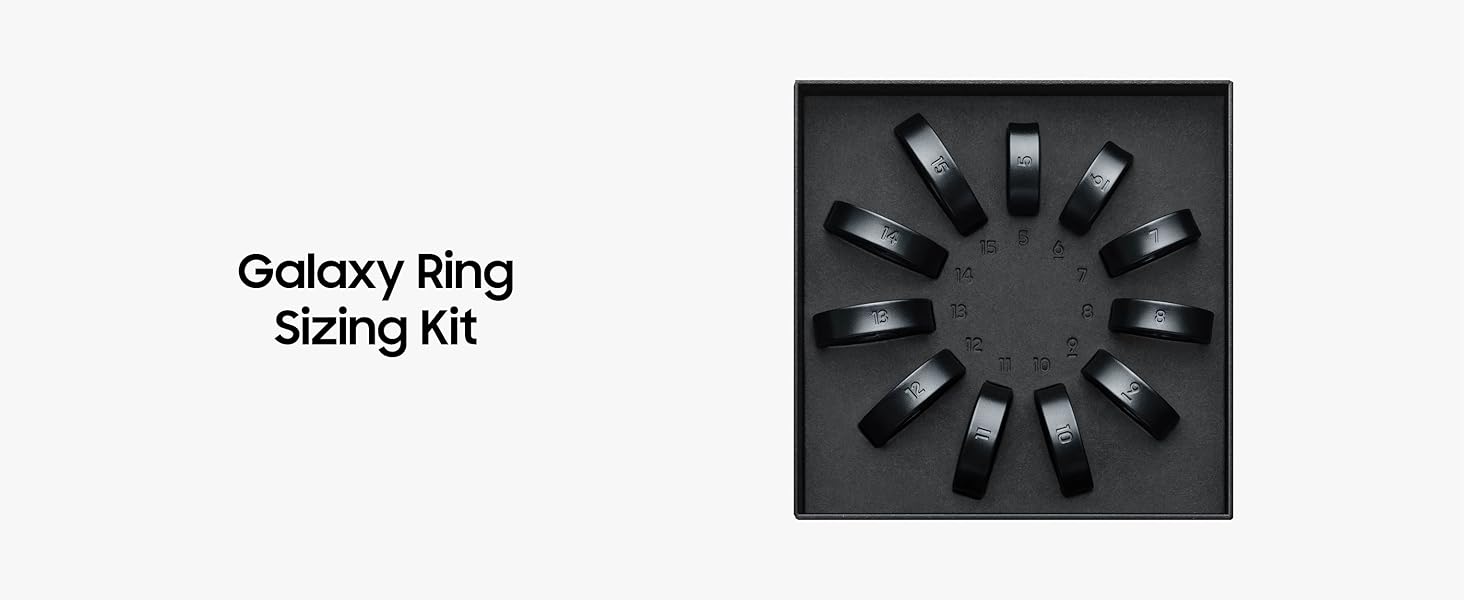
Image: A hand wearing the Samsung Galaxy Ring, shown under running water, demonstrating its water-resistant capabilities.
6. പ്രശ്നപരിഹാരം
If you encounter issues with your Galaxy Ring, try the following:
- കണക്ഷൻ പ്രശ്നങ്ങൾ: Ensure Bluetooth is enabled on your smartphone and the ring is within range. Restart both your phone and the ring (by placing it in the charging case and closing/opening).
- കൃത്യമല്ലാത്ത വായനകൾ: Verify the ring is worn correctly with sensors facing the palm. Ensure the ring is clean and free of debris.
- ബാറ്ററി ഡ്രെയിൻ: Check for any background apps on your phone that might be excessively using Bluetooth. Ensure the ring's software is up to date.
- ആപ്പ് സമന്വയിപ്പിക്കുന്നില്ല: Confirm your Samsung Health app and Samsung Wearable app are updated to the latest versions. Check your phone's internet connection.
കൂടുതൽ സഹായത്തിന്, സാംസങ് പിന്തുണ പരിശോധിക്കുക. webസൈറ്റ് അല്ലെങ്കിൽ ഉപഭോക്തൃ സേവനവുമായി ബന്ധപ്പെടുക.
7 സ്പെസിഫിക്കേഷനുകൾ
| ഫീച്ചർ | വിശദാംശങ്ങൾ |
|---|---|
| മോഡൽ നമ്പർ | SM-Q500NZKAXAR |
| ഓപ്പറേറ്റിംഗ് സിസ്റ്റം അനുയോജ്യത | ആൻഡ്രോയിഡ് |
| മെമ്മറി സ്റ്റോറേജ് കപ്പാസിറ്റി | 8 MB |
| പ്രത്യേക സവിശേഷതകൾ | Heart Rate Monitor, Sleep Monitor |
| ബാറ്ററി ശേഷി | 18.5 മില്ലിamp മണിക്കൂറുകൾ |
| ബാറ്ററി ശരാശരി ആയുസ്സ് | 7 ദിവസം |
| കണക്റ്റിവിറ്റി ടെക്നോളജി | ബ്ലൂടൂത്ത് |
| Case Material Type | ടൈറ്റാനിയം |
| ജല പ്രതിരോധ നില | Water Resistant (IP68, 10ATM) |
| അളന്ന അളവുകൾ | ഒപ്റ്റിക്കൽ ഹാർട്ട് റേറ്റ് സെൻസർ |
| ഇനത്തിൻ്റെ ഭാരം | 0.1 ഔൺസ് |
| ഇനത്തിൻ്റെ അളവുകൾ | 2.07 x 0.98 x 0.78 ഇഞ്ച് |
8. ബോക്സിൽ എന്താണുള്ളത്?
Your Samsung Galaxy Ring package includes:
- Samsung Galaxy Ring
- ചാർജിംഗ് കേസ്
- ചാർജിംഗ് കേബിൾ (USB-C)
Image: The Samsung Galaxy Ring, its charging case, and the USB-C charging cable, as included in the product packaging.
9. വാറൻ്റിയും പിന്തുണയും
The Samsung Galaxy Ring comes with a 1-Year Manufacturer Limited Warranty. For warranty claims, technical support, or additional information, please visit the official Samsung support webസൈറ്റ് അല്ലെങ്കിൽ അവരുടെ ഉപഭോക്തൃ സേവനവുമായി ബന്ധപ്പെടുക.
Each item has a unique code that Samsung verifies for authenticity.


