1. ആമുഖം
വാങ്ങിയതിന് നന്ദി.asing the TOPTECH Audio Blade-4 Portable Bluetooth Speaker. This device is designed to provide high-quality audio with versatile connectivity options and dynamic LED lighting. Please read this manual carefully to ensure proper use and to maximize your listening experience.
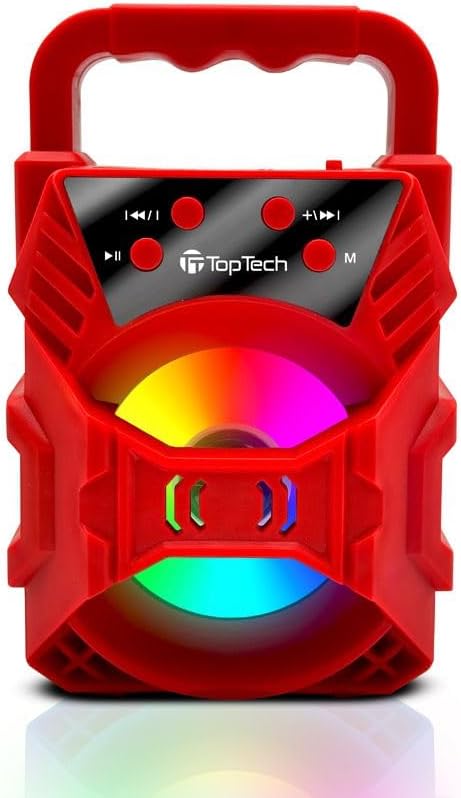
Image 1.1: The TOPTECH Audio Blade-4 speaker, showcasing its portable design and front-facing LED light panel.
2 സുരക്ഷാ വിവരങ്ങൾ
- സ്പീക്കറിനെ തീവ്രമായ താപനിലയിലോ, നേരിട്ടുള്ള സൂര്യപ്രകാശത്തിലോ, ഉയർന്ന ആർദ്രതയിലോ തുറന്നുകാട്ടരുത്.
- This product is not water resistant. Avoid contact with water or other liquids.
- ഉപകരണം ഡിസ്അസംബ്ലിംഗ് ചെയ്യുകയോ നന്നാക്കുകയോ പരിഷ്കരിക്കുകയോ ചെയ്യരുത്. ഇത് വാറന്റി അസാധുവാക്കും.
- മെഡിക്കൽ ഉപകരണങ്ങളുടെ പ്രവർത്തനത്തെ തടസ്സപ്പെടുത്തിയേക്കാവുന്നതിനാൽ സ്പീക്കർ അവയിൽ നിന്ന് അകറ്റി നിർത്തുക.
- നൽകിയിരിക്കുന്ന ചാർജിംഗ് കേബിളോ സാക്ഷ്യപ്പെടുത്തിയ തത്തുല്യമായതോ മാത്രം ഉപയോഗിക്കുക.
- കേൾവിക്ക് കേടുപാടുകൾ സംഭവിക്കുന്നത് തടയാൻ ദീർഘനേരം ഉയർന്ന ശബ്ദത്തിൽ കേൾക്കുന്നത് ഒഴിവാക്കുക.
3. പാക്കേജ് ഉള്ളടക്കം
പാക്കേജിൽ ഇനിപ്പറയുന്ന ഇനങ്ങൾ ഉണ്ടോ എന്ന് പരിശോധിക്കുക:
- TOPTECH Audio Blade-4 Bluetooth Speaker
- ചാർജിംഗ് കേബിൾ
- ഉപയോക്തൃ മാനുവൽ (ഈ പ്രമാണം)
4. ഉൽപ്പന്നം കഴിഞ്ഞുview
4.1 നിയന്ത്രണ പാനൽ

ചിത്രം 4.1: വിശദമായത് view of the speaker's control buttons, including mode, play/pause, and track/volume controls.
The control panel is located on the top of the speaker and features several buttons for managing playback, volume, and modes.
- M (Mode) Button: Press to switch between Bluetooth, FM Radio, AUX, USB, and TF Card modes.
- പ്ലേ/താൽക്കാലികമായി നിർത്തുക ബട്ടൺ: Press to play or pause audio. In FM mode, press and hold to auto-scan for stations.
- മുമ്പത്തെ ട്രാക്ക് / വോളിയം ഡൗൺ ബട്ടൺ: Press to go to the previous track. Press and hold to decrease volume.
- അടുത്ത ട്രാക്ക് / വോളിയം അപ്പ് ബട്ടൺ: Press to go to the next track. Press and hold to increase volume.
4.2 തുറമുഖങ്ങളും സൂചകങ്ങളും
The speaker includes various ports for connectivity and a charging indicator.
- USB പോർട്ട്: യുഎസ്ബി ഡ്രൈവ് പ്ലേബാക്കിനായി.
- ടിഎഫ് കാർഡ് സ്ലോട്ട്: TF (മൈക്രോ SD) കാർഡ് പ്ലേബാക്കിനായി.
- AUX ഇൻപുട്ട്: 3.5mm ഓഡിയോ കേബിൾ വഴി ബാഹ്യ ഓഡിയോ ഉപകരണങ്ങൾ ബന്ധിപ്പിക്കുന്നതിന്.
- ചാർജിംഗ് പോർട്ട്: ചാർജിംഗ് കേബിൾ ബന്ധിപ്പിക്കുന്നതിന്.
- LED സൂചകം: ചാർജിംഗ് സ്റ്റാറ്റസും ബ്ലൂടൂത്ത് ജോടിയാക്കൽ സ്റ്റാറ്റസും കാണിക്കുന്നു.
5. സജ്ജീകരണം
5.1 സ്പീക്കർ ചാർജ് ചെയ്യുന്നു
Before first use, fully charge the speaker. Connect the provided charging cable to the speaker's charging port and a suitable USB power adapter (not included). The LED indicator will show charging status and turn off or change color when fully charged. A full charge provides up to 6 hours of playtime.

Image 5.1: Visual representation of the speaker's rechargeable battery and charging process.
5.2 പവർ ഓൺ/ഓഫ്
Locate the power switch on the speaker. Slide the switch to the "ON" position to power on the device. You will hear an audible prompt, and the LED lights will activate. To power off, slide the switch to the "OFF" position.
6. പ്രവർത്തന നിർദ്ദേശങ്ങൾ
6.1 ബ്ലൂടൂത്ത് ജോടിയാക്കൽ
- Power on the speaker. It will automatically enter Bluetooth pairing mode, indicated by a flashing LED light and an audible prompt.
- നിങ്ങളുടെ മൊബൈൽ ഉപകരണത്തിൽ (സ്മാർട്ട്ഫോൺ, ടാബ്ലെറ്റ് മുതലായവ), ബ്ലൂടൂത്ത് പ്രവർത്തനക്ഷമമാക്കി ലഭ്യമായ ഉപകരണങ്ങൾക്കായി തിരയുക.
- Select "Blade-4" from the list of devices.
- Once paired, the LED light will stop flashing, and you will hear a confirmation sound.
- ഇപ്പോൾ നിങ്ങളുടെ ഉപകരണത്തിൽ നിന്ന് സ്പീക്കർ വഴി ഓഡിയോ പ്ലേ ചെയ്യാൻ കഴിയും. ബ്ലൂടൂത്ത് ശ്രേണി ഏകദേശം 100 അടി (30 മീറ്റർ) ആണ്.

Image 6.1: The Blade-4 speaker wirelessly connected to a smartphone, demonstrating Bluetooth audio streaming.
6.2 ട്രൂ വയർലെസ് സ്റ്റീരിയോ (TWS) ഫംഗ്ഷൻ
The TWS function allows you to pair two Blade-4 speakers together for a stereo sound experience.
- Ensure both Blade-4 speakers are powered on and in Bluetooth mode, but not yet paired to any device.
- സ്പീക്കറുകളിലൊന്നിൽ (ഇതായിരിക്കും പ്രാഥമിക സ്പീക്കർ), അമർത്തിപ്പിടിക്കുക M (Mode) button for a few seconds until you hear a pairing tone.
- രണ്ട് സ്പീക്കറുകളും പരസ്പരം യാന്ത്രികമായി ബന്ധിപ്പിക്കും. കണക്റ്റ് ചെയ്തുകഴിഞ്ഞാൽ, നിങ്ങൾക്ക് ഒരു സ്ഥിരീകരണ ശബ്ദം കേൾക്കാനാകും.
- Now, connect your mobile device to the primary speaker via Bluetooth as described in Section 6.1. The audio will play in stereo through both speakers.

Image 6.2: Two Blade-4 speakers wirelessly linked, illustrating the True Wireless Stereo (TWS) functionality for enhanced audio.
6.3 USB Drive / TF Card Playback
Insert a USB drive or TF (Micro SD) card into the corresponding port. The speaker will automatically switch to USB/TF mode and begin playing audio files (MP3, WAV formats supported). Use the മുമ്പത്തെ/അടുത്ത ട്രാക്ക് buttons to navigate songs.
6.4 AUX ഇൻപുട്ട്
Connect an external audio device (e.g., MP3 player, laptop) to the speaker's AUX port using a 3.5mm audio cable (not included). Press the M (Mode) button until you select AUX mode. Audio will then be played through the speaker from your connected device.
6.5 എഫ്എം റേഡിയോ
അമർത്തുക M (Mode) button to switch to FM Radio mode. To auto-scan and save available stations, press and hold the പ്ലേ/താൽക്കാലികമായി നിർത്തുക ബട്ടൺ. ഉപയോഗിക്കുക മുമ്പത്തെ/അടുത്ത ട്രാക്ക് സംരക്ഷിച്ച സ്റ്റേഷനുകൾക്കിടയിൽ മാറാനുള്ള ബട്ടണുകൾ.
6.6 Karaoke Mode
The Blade-4 speaker supports karaoke functionality. Connect a compatible microphone (not included) to the designated microphone input port (if available on your specific unit, refer to physical ports). Adjust microphone volume as needed. Play music from any source (Bluetooth, USB, TF, AUX) and sing along.

Image 6.3: The Blade-4 speaker shown with a microphone, indicating its karaoke feature.
6.7 LED ലൈറ്റ് കൺട്രോൾ
The speaker features dynamic LED lights that sync with the music. The lights activate automatically when the speaker is powered on. There is no specific button mentioned for controlling the LED lights, suggesting they operate automatically or cycle through patterns.
7. പരിപാലനം
- മൃദുവായതും ഉണങ്ങിയതുമായ തുണി ഉപയോഗിച്ച് സ്പീക്കർ വൃത്തിയാക്കുക. അബ്രസീവ് ക്ലീനറുകളോ ലായകങ്ങളോ ഉപയോഗിക്കരുത്.
- തുറമുഖങ്ങൾ പൊടിയിൽ നിന്നും അവശിഷ്ടങ്ങളിൽ നിന്നും മുക്തമായി സൂക്ഷിക്കുക.
- ദീർഘനേരം ഉപയോഗിക്കാത്തപ്പോൾ സ്പീക്കർ തണുത്തതും വരണ്ടതുമായ സ്ഥലത്ത് സൂക്ഷിക്കുക.
- Charge the battery at least once every three months to maintain its lifespan if not used regularly.
8. പ്രശ്നപരിഹാരം
| പ്രശ്നം | സാധ്യമായ കാരണം | പരിഹാരം |
|---|---|---|
| സ്പീക്കർ പവർ ഓൺ ചെയ്യുന്നില്ല. | ബാറ്ററി തീർന്നു. | Charge the speaker using the provided charging cable. |
| ശബ്ദമില്ല. | ശബ്ദം വളരെ കുറവാണ്; തെറ്റായ മോഡ് തിരഞ്ഞെടുത്തു; ഉപകരണം ജോടിയാക്കിയിട്ടില്ല. | Increase volume on both speaker and connected device. Ensure correct mode (Bluetooth, AUX, USB, TF) is selected. Re-pair Bluetooth device. |
| ബ്ലൂടൂത്ത് ജോടിയാക്കൽ പരാജയപ്പെട്ടു. | Speaker is too far from device; speaker already paired to another device; Bluetooth not enabled on device. | Ensure speaker and device are within 100 feet. Disconnect from other devices. Enable Bluetooth on your device and try pairing again. |
| എഫ്എം റേഡിയോ റിസപ്ഷൻ മോശമാണ്. | ദുർബലമായ സിഗ്നൽ; പരിസ്ഥിതി ഇടപെടൽ. | Move the speaker to a location with better reception. Re-scan for stations. |
| Distorted sound or unexpected noises. | Volume too high; audio source issue; interference. | Reduce volume. Check audio source for quality. Move speaker away from other electronic devices. |
9 സ്പെസിഫിക്കേഷനുകൾ
| മോഡലിൻ്റെ പേര് | Blade-4 |
| ബ്രാൻഡ് | TOPTECH |
| സ്പീക്കർ തരം | ബിൽറ്റ്-ഇൻ |
| സ്പീക്കർ വലിപ്പം | 3 ഇഞ്ച് |
| സ്പീക്കർ പരമാവധി ഔട്ട്പുട്ട് പവർ | 10 വാട്ട്സ് |
| വയർലെസ് കമ്മ്യൂണിക്കേഷൻ ടെക്നോളജി | ബ്ലൂടൂത്ത് |
| ബ്ലൂടൂത്ത് ശ്രേണി | 100 അടി (30 മീറ്റർ) |
| കണക്റ്റിവിറ്റി ടെക്നോളജി | Bluetooth, Micro SD Card, USB, AUX |
| ഓഡിയോ put ട്ട്പുട്ട് മോഡ് | സ്റ്റീരിയോ (TWS ഉള്ളത്) |
| പവർ ഉറവിടം | ബാറ്ററി പവർ (റീചാർജ് ചെയ്യാവുന്നത്) |
| ബാറ്ററി ലൈഫ് | 6 മണിക്കൂർ വരെ (മിതമായ അളവിൽ) |
| പ്രത്യേക സവിശേഷതകൾ | LED Light, Lightweight, Portable, TWS Functionality, Karaoke Mode, FM Radio |
| നിയന്ത്രണ രീതി | ടച്ച് ബട്ടണുകൾ |
| ഉൽപ്പന്ന അളവുകൾ (L x W x H) | 3.5"D x 3.5"W x 6.5"H (approximate, based on 3-inch speaker size and typical portable speaker form factor) |
| ഇനത്തിൻ്റെ ഭാരം | 12.8 ഔൺസ് (ഏകദേശം 0.36 കിലോഗ്രാം) |
| ജല പ്രതിരോധ നില | വാട്ടർ റെസിസ്റ്റൻ്റ് അല്ല |
| യു.പി.സി | 752574407913 |
10. വാറൻ്റിയും പിന്തുണയും
10.1 ലിമിറ്റഡ് വാറൻ്റി
The TOPTECH Audio Blade-4 speaker comes with a limited warranty. Please refer to the warranty card included in your package or contact TOPTECH customer support for details regarding warranty coverage and terms.
10.2 ഉപഭോക്തൃ പിന്തുണ
For technical assistance, troubleshooting, or any questions regarding your TOPTECH Audio Blade-4 speaker, please contact TOPTECH customer support. Contact information can typically be found on the product packaging or the official TOPTECH webസൈറ്റ്.
Please have your model number (Blade-4) and purchase information ready when contacting support.


