1. ആമുഖം
Thank you for choosing the Baseus 240W Smart Charging Station. This 5-in-1 desktop USB-C charger features a digital LED display and supports PD 3.1 for fast charging of multiple devices, including laptops and smartphones. This manual provides detailed instructions for setup, operation, and maintenance to ensure optimal performance and safety.
2. എന്താണ് ഉൾപ്പെടുത്തിയിരിക്കുന്നത്
നിങ്ങളുടെ പാക്കേജിൽ എല്ലാ ഇനങ്ങളും ഉണ്ടെന്ന് ദയവായി പരിശോധിക്കുക:
- 1 x Baseus 240W 5-Port Intelligent Fast Charger
- 1 x 240W USB-C ചാർജിംഗ് കേബിൾ
- 1 x സ്ക്വയർ ടിപ്പ് ഡിസി അഡാപ്റ്റർ
- 2 x റൗണ്ട് ടിപ്പ് ഡിസി അഡാപ്റ്ററുകൾ
- 1 x ഉപയോക്തൃ മാനുവൽ
Video: Unboxing and contents of the Baseus 240W Smart Charging Station.
3. ഉൽപ്പന്നം കഴിഞ്ഞുview
The Baseus 240W Smart Charging Station is designed for efficiency and versatility, featuring multiple ports and smart functionalities.
3.1 പോർട്ട് കോൺഫിഗറേഷൻ

ചിത്രം: മുൻഭാഗം view of the Baseus 240W Smart Charging Station, highlighting its 1 DC port, 3 USB-C ports, and 1 USB-A port.
The charging station includes 1 DC port, 3 USB-C ports, and 1 USB-A port, allowing for simultaneous charging of up to 5 devices.
3.2 Intelligent Display and App Control
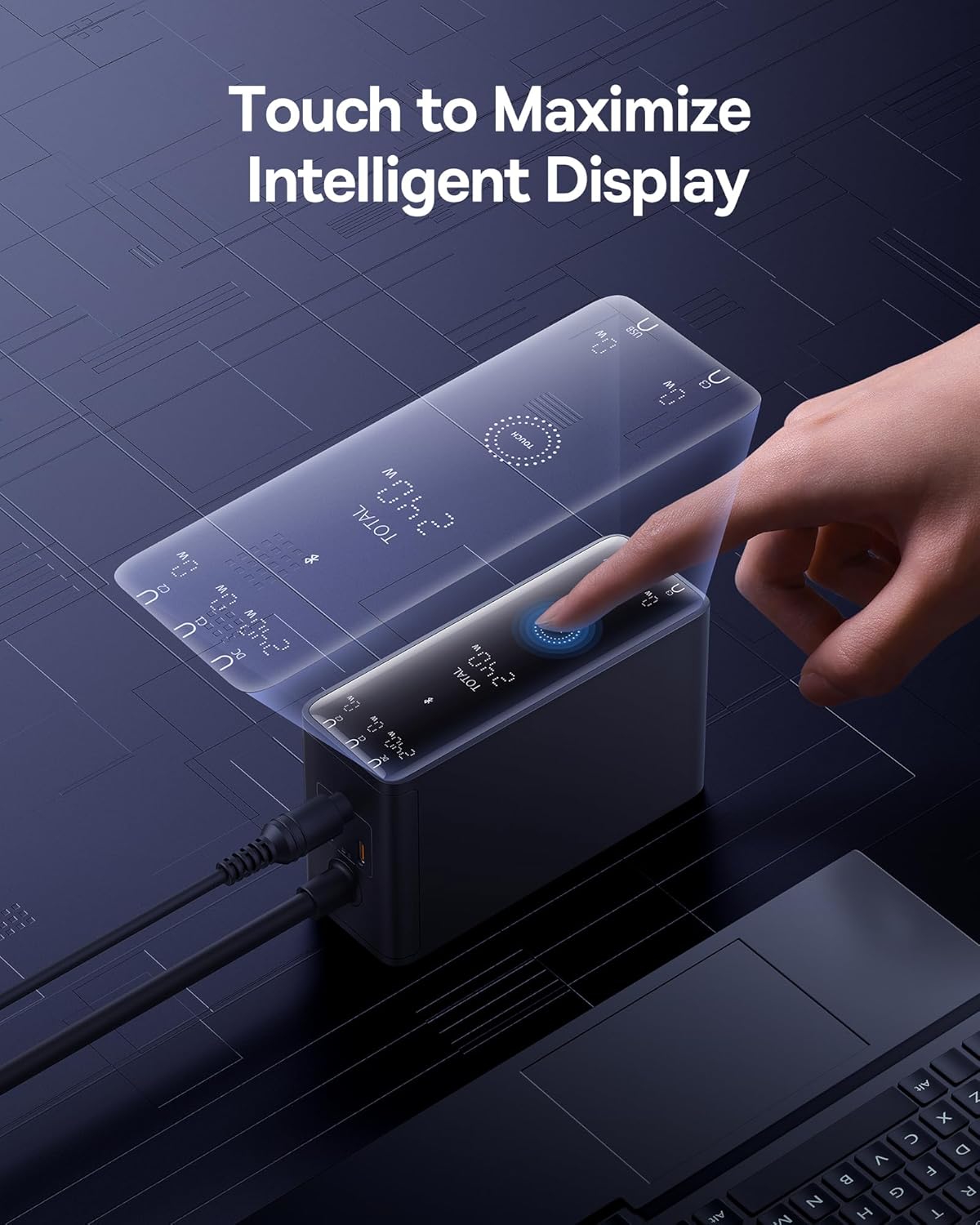
Image: A hand touching the intelligent display of the charging station, showing real-time charging information.
The integrated digital LED display provides real-time charging status. Additionally, the Baseus smart app allows for remote control and monitoring of charging options.

Image: A smartphone displaying the Baseus app interface, demonstrating features like temperature surveillance, maximum output power regulation, charging safety surveillance, and remote control.
3.3 Advanced Cooling Technology

ചിത്രം: പൊട്ടിത്തെറിച്ച ഒരു view diagram showing the internal cooling technologies: Graphene Cooling Technology, Glue-Fill Technology, and Baseus Cooling Technology (BCT).
The charger incorporates Graphene Cooling Technology, Glue-Fill Technology, and Baseus Cooling Technology (BCT) to ensure efficient heat dissipation and stable performance.
4. സജ്ജീകരണ നിർദ്ദേശങ്ങൾ
Follow these steps to set up your Baseus 240W Smart Charging Station:
- പവറിലേക്ക് ബന്ധിപ്പിക്കുക: Plug the charging station into a wall outlet using the provided power cable. The digital display will illuminate.
- ഉപകരണങ്ങൾ ബന്ധിപ്പിക്കുക:
- For USB-C devices (laptops, smartphones, tablets): Use the provided 240W USB-C charging cable or other compatible USB-C cables to connect your devices to the USB-C ports.
- For DC-powered laptops: Connect the DC power cord to the charging station. Attach the appropriate square tip or round tip DC adapter to the DC connector, then plug it into your laptop's DC port.
- For USB-A devices: Connect your device using a compatible USB-A cable to the USB-A port.
- മോണിറ്റർ ചാർജിംഗ്: The digital LED display will show the real-time power output for each port and the total power consumption.
Video: Demonstrates connecting a laptop via USB-C, connecting a laptop via DC port using an adapter, and connecting multiple devices simultaneously.
5. പ്രവർത്തന നിർദ്ദേശങ്ങൾ
5.1 App Connection and Control
The Baseus Smart Charging Station can be controlled via the Baseus app for enhanced functionality.
- ആപ്പ് ഇൻസ്റ്റാൾ ചെയ്യുക: ഇതിനായി തിരയുക and install the "Baseus" app from your device's App Store. Alternatively, scan the QR code provided in the physical user manual.
- ഉപകരണം ജോടിയാക്കുക: Ensure Bluetooth is enabled on your phone. Open the Baseus app, click "Add Device," and select the "BS-GaN240" model. Once successfully added, navigate to "My Devices" on the homepage to access the device page.
- ആപ്പ് പ്രവർത്തനങ്ങൾ: The app allows you to:
- View current total power and device temperature.
- Set countdown timers for power on/off (up to 11 hours and 59 minutes).
- Toggle individual port interfaces on/off. When an interface is turned off, the charger panel will display "OFF."
- Enable "Priority Output" for specific ports to prioritize charging.
- View power and temperature change curves for safety monitoring.
5.2 Device Settings (via App or Touch Button)
You can adjust various settings through the app or directly on the device:
- പവർ ഓൺ/ഓഫ്: In the app, click the power switch button in the top right corner of "My Devices." Alternatively, long-press the Touch button on the charger for 1 second.
- സ്ക്രീൻ ഓൺ/ഓഫ്: In the app, go to "My Devices" and click on the "Device Screen" button. Alternatively, double-click the Touch button on the charger.
- ചൈൽഡ് ലോക്ക്: In the app, access the settings page (via "My Devices"). Click the button to enable/disable child lock. Alternatively, long-press the Touch button for 5 seconds to disable it.
- ഫാക്ടറി പുന et സജ്ജമാക്കുക: In the app, go to the settings page. Click "Factory Reset" and select "Confirm." Alternatively, long-press the Touch button for 5 seconds.
- Device Unbinding: In the app, go to the settings page. Click "Unbind Device" and select "Confirm."
Video: Demonstrates app connection, setting countdown tasks, enabling priority output, viewing power/temperature curves, toggling screen on/off, enabling/disabling child lock, performing a factory reset, and unbinding the device.
6. ചാർജിംഗ് സാഹചര്യങ്ങളും വൈദ്യുതി വിതരണവും
The Baseus 240W Smart Charging Station intelligently distributes power based on the number and type of connected devices. Below is a general guide to power distribution:

Image: A visual guide illustrating the maximum power output for various charging configurations (single, two, three, four, and five devices) across DC, USB-C, and USB-A ports.
| രംഗം | ഉപയോഗിച്ച തുറമുഖങ്ങൾ | പരമാവധി ഔട്ട്പുട്ട് |
|---|---|---|
| സിംഗിൾ-പോർട്ട് ചാർജിംഗ് | ഡിസി put ട്ട്പുട്ട് | 240W പരമാവധി |
| USB-C1/C2/C3 Output | 140W പരമാവധി | |
| യുഎസ്ബി-എ put ട്ട്പുട്ട് | 30W പരമാവധി | |
| രണ്ട്-പോർട്ട് ചാർജിംഗ് | DC + USB-C1/C2/C3 | 140W + 100W പരമാവധി |
| DC + USB-A | 140W + 30W പരമാവധി | |
| USB-C1/C2 + USB-C2/C3 | 140W + 100W പരമാവധി | |
| USB-C1/C2/C3 + USB-A | 140W + 30W പരമാവധി | |
| ത്രീ-പോർട്ട് ചാർജിംഗ് | DC + USB-C1/C2 + USB-C2/C3 | 140W + 65W + 30W Max |
| DC + USB-C1/C2/C3 + USB-A | 140W + 65W + 30W Max | |
| USB-C1/C2/C3 + USB-C2/C3 + USB-A | 140W + 65W + 30W Max | |
| നാല്-പോർട്ട് ചാർജിംഗ് | DC + USB-C1 + USB-C2 + USB-C3 | 140W + 60W + 20W + 18W Max |
| DC + USB-C1 + USB-C2 + USB-A | 140W + 60W + 20W + 18W Max | |
| യുഎസ്ബി-സി1 + യുഎസ്ബി-സി2 + യുഎസ്ബി-സി3 + യുഎസ്ബി-എ | 140W + 60W + 20W + 18W Max | |
| Five-Port Charging | DC + USB-C1 + USB-C2 + USB-C3 + USB-A | 140W + 45W + 18W + 18W Max |
7 സുരക്ഷാ വിവരങ്ങൾ
The Baseus 240W Smart Charging Station is equipped with 9 protective charging protocols to ensure the safety of your devices and the charger:
- ഓവർ-വോളിയംtagഇ സംരക്ഷണം
- ഓവർ-കറൻ്റ് പ്രൊട്ടക്ഷൻ
- ഓവർ-പവർ പരിരക്ഷണം
- ഇലക്ട്രോസ്റ്റാറ്റിക് സംരക്ഷണം
- ഷോർട്ട് സർക്യൂട്ട് സംരക്ഷണം
- താപനില സംരക്ഷണം
- വോളിയത്തിന് കീഴിൽtagഇ സംരക്ഷണം
- Anti-Interference Protection
- Flame-Retardant Housing
Always use the charger in a well-ventilated area and avoid exposing it to extreme temperatures or moisture. Do not attempt to disassemble or repair the device yourself.
8 സ്പെസിഫിക്കേഷനുകൾ
| ഫീച്ചർ | വിശദാംശങ്ങൾ |
|---|---|
| മോഡൽ നമ്പർ | CCGAN240CS |
| മൊത്തം USB പോർട്ടുകൾ | 5 (3x USB-C, 1x USB-A, 1x DC) |
| വാട്ട്tage | 240 വാട്ട്സ് |
| കണക്റ്റർ തരം | യുഎസ്ബി ടൈപ്പ് സി |
| അനുയോജ്യമായ ഉപകരണങ്ങൾ | Laptops, Smartphones (e.g., MacBook Pro, Dell XPS, Lenovo, iPhone 16, Galaxy S24) |
| പ്രത്യേക സവിശേഷതകൾ | 140W PD3.1 Fast Charging, Remote App Control, Smart LCD Display |
| മെറ്റീരിയൽ | പ്ലാസ്റ്റിക് |
| ഇനത്തിൻ്റെ ഭാരം | 2.2 പൗണ്ട് |
| പാക്കേജ് അളവുകൾ | 7.4 x 7.13 x 2.13 ഇഞ്ച് |
9. പ്രശ്നപരിഹാരം
If you encounter issues with your charging station, please refer to the following common solutions:
- പവർ ഇല്ല/ഡിസ്പ്ലേ ഓഫാണ്: Ensure the power cable is securely connected to both the charging station and the wall outlet. Check if the wall outlet is functional. If using the app, ensure the interface switch is not turned off.
- സ്ലോ ചാർജിംഗ്: Verify that your device and cable support fast charging protocols (e.g., PD 3.1). Ensure the total power draw does not exceed the charger's maximum output. Use the app to check individual port outputs and enable "Priority Output" if needed.
- ഉപകരണം തിരിച്ചറിഞ്ഞിട്ടില്ല: Try reconnecting the cable. Ensure the cable is not damaged. Test with a different cable or port.
- ആപ്പ് കണക്ഷൻ പ്രശ്നങ്ങൾ: Ensure Bluetooth is enabled on your phone and the charger is within range. Try restarting the app or your phone. If issues persist, try unbinding and re-pairing the device in the app.
- അമിത ചൂടാക്കൽ: The charger has advanced cooling. If it feels excessively hot, disconnect all devices and allow it to cool down. Ensure it is in a well-ventilated area.
For further assistance, please contact Baseus customer support.
10. വാറൻ്റിയും പിന്തുണയും
The Baseus 240W Smart Charging Station comes with a standard manufacturer's warranty. Please refer to the warranty card included in your package for specific terms and conditions. For technical support, warranty claims, or general inquiries, please visit the official Baseus webസൈറ്റ് അല്ലെങ്കിൽ അവരുടെ ഉപഭോക്തൃ സേവന വിഭാഗവുമായി ബന്ധപ്പെടുക.
ഓൺലൈൻ പിന്തുണ: www.baseus.com


