1. ഉൽപ്പന്നം കഴിഞ്ഞുview
The Pknight DR & PB MINI is a compact DMX recorder and playback controller designed for efficient management of DMX lighting programs. It offers robust recording capabilities, flexible playback options, and essential tools for DMX system verification.

Figure 1: Pknight DR & PB MINI DMX Recorder and Playback Controller.
പ്രധാന സവിശേഷതകൾ:
- Effortless Recording and Playback: Record up to 255 DMX programs and play them back using intuitive Record ID assignments.
- Flexible Playback Options: Seamlessly play recorded DMX programs manually or via External Device Control, allowing real-time management through DMX consoles, computer software, or mobile applications.
- ഉപയോക്തൃ-സൗഹൃദ ഇൻ്റർഫേസ്: Simple button controls and an OLED screen facilitate quick DMX recording and playback.
- Removable Micro SD Card: Equipped with a default 32GB Micro-SD card, easily removable for quick storage and capable of holding hours of playback programs.
- Secure and Easy Storage: Programs are safely recorded as files on the SD card, ensuring easy backup and transfer, preventing loss of playback programs.
- Packet Loss Detection Mode: Ensure signal stability with Packet Loss Detection Mode, which tests and verifies the reliability of your DMX system.
2. പാക്കേജ് ഉള്ളടക്കം
പാക്കേജിൽ എല്ലാ ഇനങ്ങളും ഉണ്ടെന്ന് ഉറപ്പാക്കുക:
- Pknight DMX Recorder and Playback Controller DR & PB MINI
- 32GB മൈക്രോ-എസ്ഡി കാർഡ് (മുൻകൂട്ടി ഇൻസ്റ്റാൾ ചെയ്തത്)
- യുഎസ്ബി ടൈപ്പ്-സി പവർ കേബിൾ
- ഉപയോക്തൃ മാനുവൽ (ഈ പ്രമാണം)
3. സജ്ജീകരണ ഗൈഡ്
3.1. ഡിവൈസ് ഓവർview കണക്ഷനുകളും

Figure 2: Device layout with labeled buttons and ports.
- DMX IN: Connect your DMX console or signal source here.
- DMX U ട്ട്: Connect to your DMX lighting fixtures.
- യുഎസ്ബി ടൈപ്പ്-സി: Power input (DC 5V).
- മൈക്രോ എസ്ഡി സ്ലോട്ട്: Insert/remove Micro SD card for program storage.
- മെനു ബട്ടൺ: മെനു ഓപ്ഷനുകളിലൂടെ നാവിഗേറ്റ് ചെയ്യുക.
- മുകളിലേക്ക്/താഴ്ന്ന ബട്ടണുകൾ: Adjust values or scroll through options.
- എന്റർ ബട്ടൺ: Confirm selection or start/stop actions.
3.2. പ്രാരംഭ പവർ-അപ്പ്
- Ensure the Micro SD card is properly inserted into the slot.
- Connect the USB Type-C cable to the device and a 5V DC power source.
- The OLED screen will power on, displaying the current status.
4. പ്രവർത്തന നിർദ്ദേശങ്ങൾ
4.1. DMX Recording Mode
The device allows recording of up to 255 DMX programs. Each program is assigned a unique Record ID from 1 to 255.

Figure 3: OLED screen displaying DMX Recording Mode with Record ID and status.
- Connect your DMX console or signal source to the DMX IN തുറമുഖം.
- അമർത്തുക മെനു button to navigate to the '2. Record Show' option.
- ഉപയോഗിക്കുക മുകളിലേക്ക് / താഴേക്ക് buttons to select an empty Record ID (e.g., 001). The screen will show 'Empty Program' and 'Ready to record'.
- അമർത്തുക പ്രവേശിക്കുക button to start recording. The screen will display the recording duration.
- Operate your DMX console to create the desired lighting sequence.
- അമർത്തുക പ്രവേശിക്കുക button again to stop recording. The program will be saved to the Micro SD card.
4.2. DMX Playback Mode
Recorded DMX programs can be played back manually or triggered by external devices.
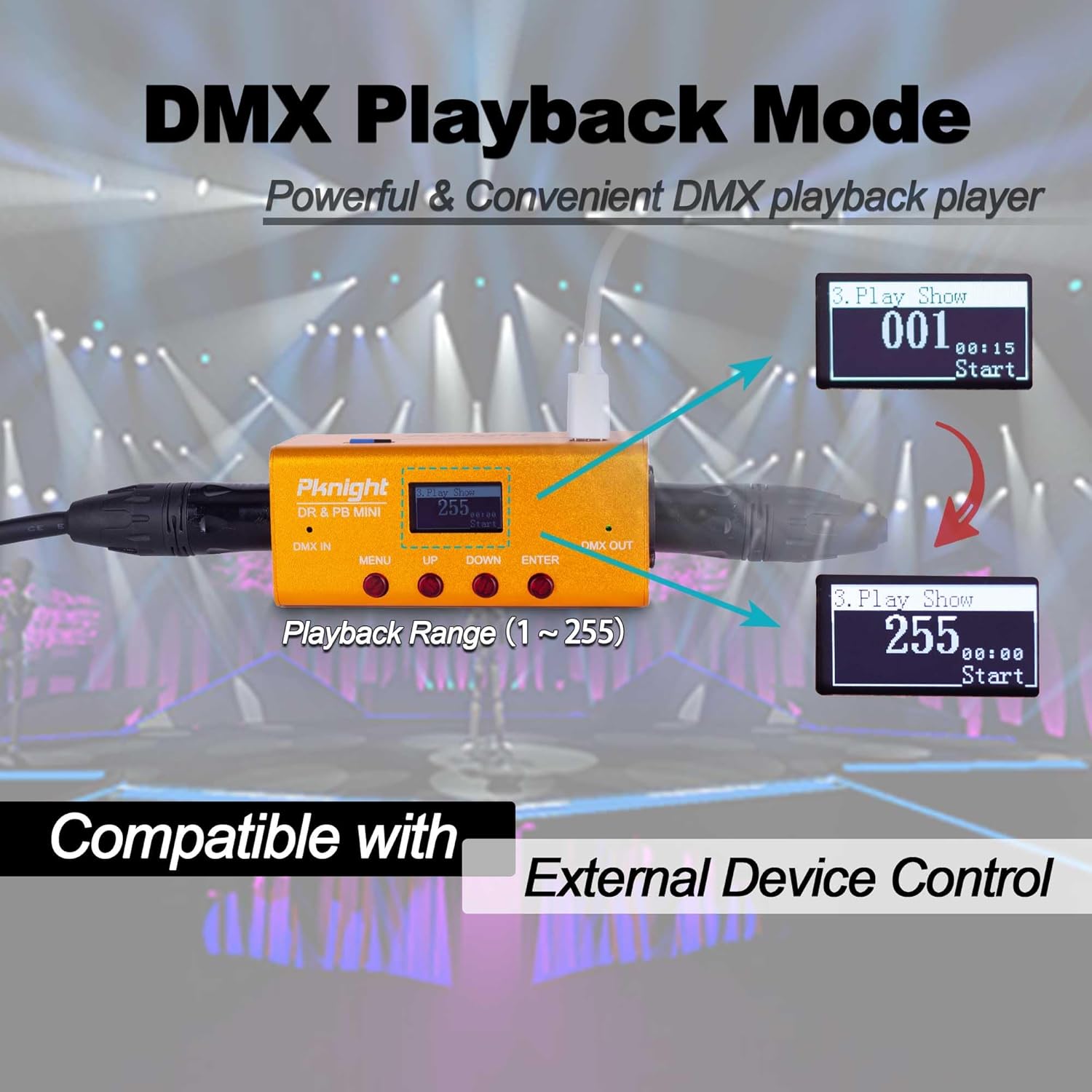
Figure 4: OLED screen displaying DMX Playback Mode with Playback Range.
- ബന്ധിപ്പിക്കുക DMX ഔട്ട് port to your DMX lighting fixtures.
- അമർത്തുക മെനു button to navigate to the '3. Play Show' option.
- ഉപയോഗിക്കുക മുകളിലേക്ക് / താഴേക്ക് buttons to select the desired Record ID (1-255) for playback.
- അമർത്തുക പ്രവേശിക്കുക button to start playback. The screen will display the playback duration.
- അമർത്തുക പ്രവേശിക്കുക പ്ലേബാക്ക് നിർത്താൻ വീണ്ടും ബട്ടൺ.
4.3. External Device Control
The DR & PB MINI supports external device control for flexible playback integration.
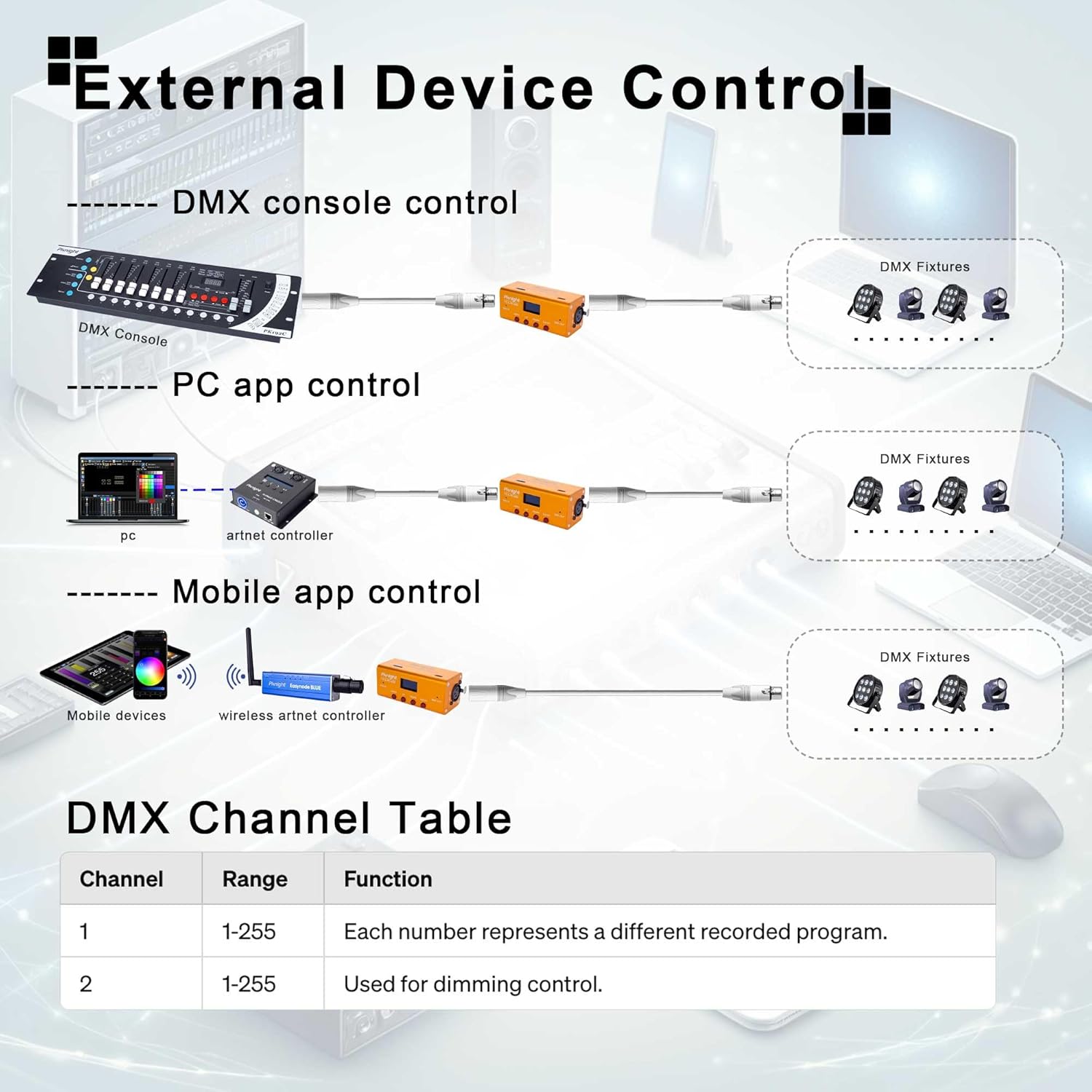
Figure 5: Various methods for external device control, including DMX consoles, PC applications, and mobile applications.
The device utilizes two DMX channels for external control:
- ചാനൽ 1: Range 1-255, each number represents a different recorded program to be triggered.
- ചാനൽ 2: Range 1-255, used for dimming control of the output.
4.4. Packet Loss Detection Mode
This mode helps verify the reliability of your DMX system by detecting packet loss.
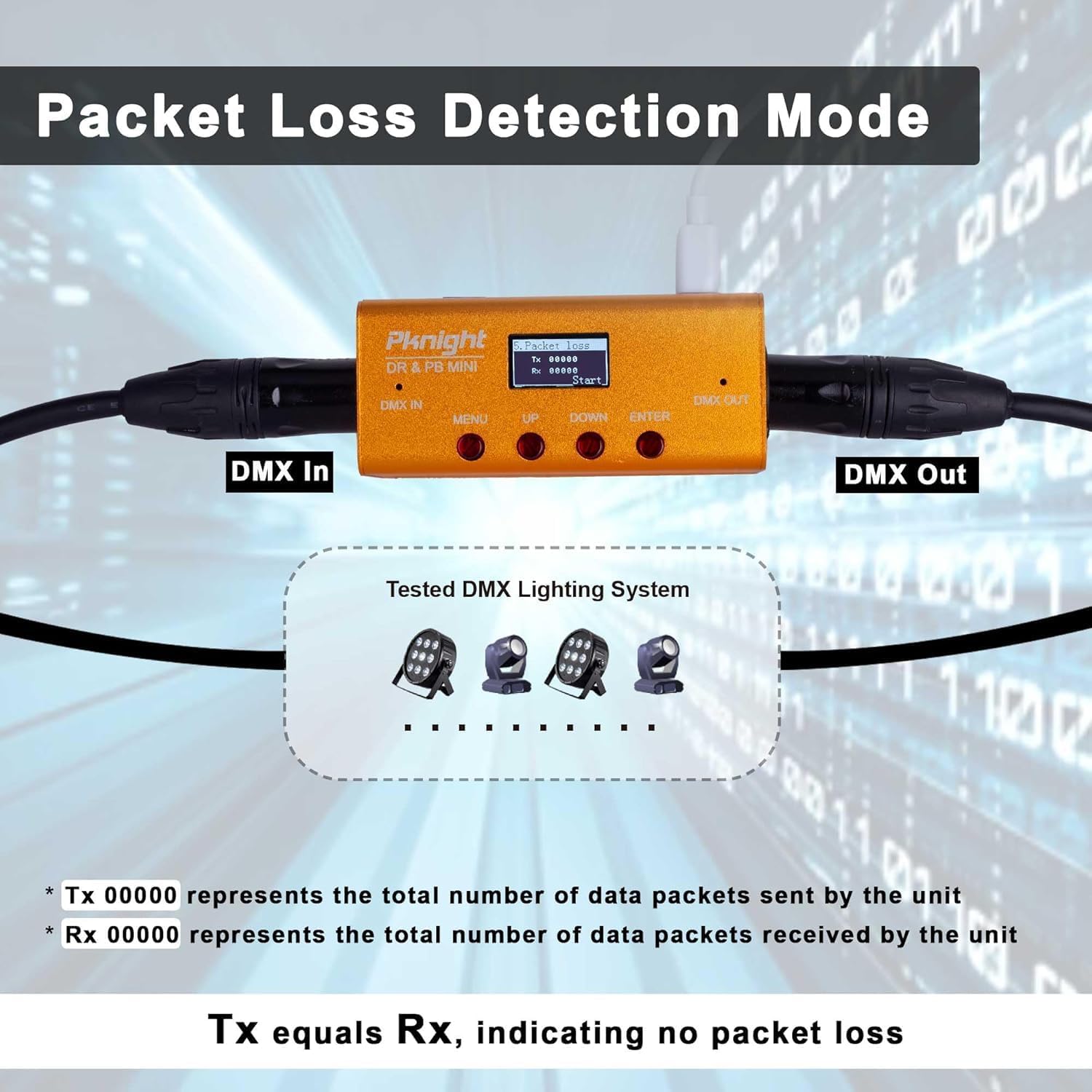
Figure 6: OLED screen displaying Packet Loss Detection Mode with Tx and Rx counts.
- ബന്ധിപ്പിക്കുക DMX IN ഒപ്പം DMX ഔട്ട് ports to your DMX system.
- അമർത്തുക മെനു button to navigate to the '5. Packet Loss' option.
- അമർത്തുക പ്രവേശിക്കുക button to start the test. The screen will display 'Tx' (transmitted packets) and 'Rx' (received packets).
- If 'Tx' equals 'Rx', it indicates no packet loss and a stable DMX signal.
- If there is a discrepancy, it suggests potential issues with your DMX cabling or devices.
5. പരിപാലനം
5.1. മൈക്രോ എസ്ഡി കാർഡ് മാനേജ്മെന്റ്
The Micro SD card stores all recorded DMX programs. Regular backup is recommended.
- To remove the Micro SD card, gently push it inward until it clicks, then release. The card will eject.
- Connect the Micro SD card to a computer to back up your program files.
- Ensure the card is properly formatted (FAT32) if replacing or re-using.

Figure 7: Removable Micro SD card for program storage and backup.
5.2. ജനറൽ കെയർ
- ഉപകരണം വൃത്തിയായും പൊടിയില്ലാതെയും സൂക്ഷിക്കുക. വൃത്തിയാക്കാൻ മൃദുവായതും ഉണങ്ങിയതുമായ തുണി ഉപയോഗിക്കുക.
- ഉപകരണത്തെ തീവ്രമായ താപനില, ഈർപ്പം അല്ലെങ്കിൽ നേരിട്ടുള്ള സൂര്യപ്രകാശം എന്നിവയിൽ ഏൽപ്പിക്കുന്നത് ഒഴിവാക്കുക.
- ഉപകരണം സ്വയം തുറക്കാനോ നന്നാക്കാനോ ശ്രമിക്കരുത്, കാരണം ഇത് വാറന്റി അസാധുവാക്കും.
6. പ്രശ്നപരിഹാരം
6.1. പൊതുവായ പ്രശ്നങ്ങൾ
- ഉപകരണം ഓണാക്കുന്നില്ല: Ensure the USB Type-C cable is securely connected to a 5V DC power source.
- No DMX output during playback: Verify that the DMX OUT cable is correctly connected to your fixtures. Check the selected Record ID for playback.
- റെക്കോർഡിംഗ് പ്രശ്നങ്ങൾ: Ensure the DMX IN cable is properly connected to your console. Check for 'Empty Program' status before starting a new recording.
- Packet Loss Detection shows discrepancies: Inspect DMX cables for damage, ensure proper termination, and check all DMX devices in the chain.
- Playback not in sync with music: This device is primarily for DMX signal recording and playback. Precise musical synchronization may require external MIDI or timecode integration, which is beyond the scope of this device's direct functionality.
7 സാങ്കേതിക സവിശേഷതകൾ
| സ്പെസിഫിക്കേഷൻ | മൂല്യം |
|---|---|
| മോഡൽ നമ്പർ | DR & PB MINI |
| ബ്രാൻഡ് | Pknight |
| ഇനത്തിൻ്റെ ഭാരം | 10.5 ഔൺസ് (0.3 കിലോഗ്രാം) |
| പാക്കേജ് അളവുകൾ | 7.01 x 4.37 x 2.2 ഇഞ്ച് |
| കണക്റ്റിവിറ്റി ടെക്നോളജി | USB |
| ചാനലുകളുടെ എണ്ണം | 512 (1 പ്രപഞ്ചം) |
| സംഭരണം | 32GB Micro-SD card (default) |
| പ്രോഗ്രാം ശേഷി | 255 പ്രോഗ്രാമുകൾ വരെ |
| അനുയോജ്യമായ ഉപകരണങ്ങൾ | DMX consoles, PC, Laptop, Tablet, Smartphone (for external control) |
8. ഔദ്യോഗിക ഉൽപ്പന്ന വീഡിയോകൾ
8.1. DMX Recorder and Playback Controller Tutorial
This video provides a detailed tutorial on how to use the Pknight DMX Recorder and Playback Controller, covering its various functions and modes of operation.
8.2. DMX Recorder Tips: Remember to Backup Your Micro SD to Prevent Data Loss!
Learn essential tips for managing your DMX recordings, including the importance of backing up your Micro SD card to prevent data loss.
8.3. Pknight DMX Recorder Tutorial & How to Use
An instructional video demonstrating the basic functions and usage of the Pknight DMX Recorder.
9. വാറൻ്റിയും പിന്തുണയും
Pknight products are designed for reliability and performance. For warranty information and technical support, please refer to the official Pknight website or contact Pknight tech directly through your purchase platform.
കൂടുതൽ സഹായത്തിന്, ദയവായി സന്ദർശിക്കുക Pknight Store on Amazon.


