1. ആമുഖം
Welcome to the user manual for your new ZTE nubia V60 smartphone. This guide provides essential information to help you set up, operate, maintain, and troubleshoot your device. Please read this manual thoroughly to ensure optimal performance and longevity of your smartphone.
The nubia V60 features a 6.72-inch FHD+ display, a powerful 50MP AI rear camera, a 32MP front camera, 8GB RAM (expandable with 12GB Dynamic RAM), 256GB ROM, a 5000mAh battery with 22.5W fast charging, NFC, fingerprint recognition, and DTS sound effects.
2. പ്രാരംഭ സജ്ജീകരണം
2.1. അൺബോക്സിംഗും പാക്കേജ് ഉള്ളടക്കങ്ങളും
ആരംഭിക്കുന്നതിന് മുമ്പ്, പാക്കേജിൽ എല്ലാ ഇനങ്ങളും ഉണ്ടെന്ന് ഉറപ്പാക്കുക:
- ZTE nubia V60 Smartphone
- പവർ അഡാപ്റ്റർ
- USB കേബിൾ
- സിം എജക്ടർ ടൂൾ (പ്രദേശത്തിനനുസരിച്ച് വ്യത്യാസപ്പെടാം)
- ദ്രുത ആരംഭ ഗൈഡ് (ഈ പ്രമാണം ഒരു സമഗ്ര ഗൈഡായി പ്രവർത്തിക്കുന്നു)
2.2. സിം കാർഡും മൈക്രോ എസ്ഡി കാർഡും ചേർക്കുന്നു
- നിങ്ങളുടെ ഉപകരണത്തിന്റെ വശത്ത് സിം കാർഡ് ട്രേ കണ്ടെത്തുക.
- ട്രേയുടെ അടുത്തുള്ള ചെറിയ ദ്വാരത്തിലേക്ക് സിം എജക്റ്റർ ഉപകരണം തിരുകുക, ട്രേ പുറത്തേക്ക് വരുന്നത് വരെ ദൃഢമായി അമർത്തുക.
- Place your Nano-SIM card(s) and/or microSD card (if applicable) into the tray with the gold contacts facing down, ensuring they are correctly aligned.
- ട്രേ അതിന്റെ സ്ഥാനത്ത് ക്ലിക്ക് ആകുന്നതുവരെ സ്ലോട്ടിലേക്ക് പതുക്കെ തിരികെ തള്ളുക.

ചിത്രം: വശം view of the nubia V60, illustrating the location of the SIM card tray and physical buttons.
2.3 ബാറ്ററി ചാർജ് ചെയ്യുന്നു
Before first use, fully charge your device. Connect the USB cable to the power adapter and then to the phone's charging port. Plug the power adapter into a wall outlet. The device supports 22.5W fast charging.
2.4. പവർ ഓൺ, പ്രാരംഭ കോൺഫിഗറേഷൻ
- Press and hold the Power button (located on the right side) until the screen lights up.
- Follow the on-screen instructions to select your language, connect to Wi-Fi, set up your Google account, and configure security features like fingerprint recognition.
3. നിങ്ങളുടെ ഉപകരണം പ്രവർത്തിപ്പിക്കുന്നു
3.1. അടിസ്ഥാന നാവിഗേഷൻ
The nubia V60 operates on Android 13.0. Use touch gestures such as tap, swipe, pinch-to-zoom, and long-press to navigate the interface. The power button and volume buttons are located on the right side of the device.

ചിത്രം: മുൻഭാഗം view of the nubia V60, showcasing its 6.72-inch FHD+ display.
3.2. ക്യാമറ സവിശേഷതകൾ
Your device is equipped with a 50MP AI Rear Camera and a 32MP Front Camera.
- ക്യാമറ സമാരംഭിക്കുന്നു: നിങ്ങളുടെ ഹോം സ്ക്രീനിലോ ലോക്ക് സ്ക്രീനിലോ ക്യാമറ ഐക്കണിൽ ടാപ്പ് ചെയ്യുക.
- ഫോട്ടോകൾ/വീഡിയോകൾ എടുക്കൽ: Tap the shutter button to capture an image or switch to video mode to record.
- AI Enhancements: The AI features automatically optimize settings for various scenes and subjects.
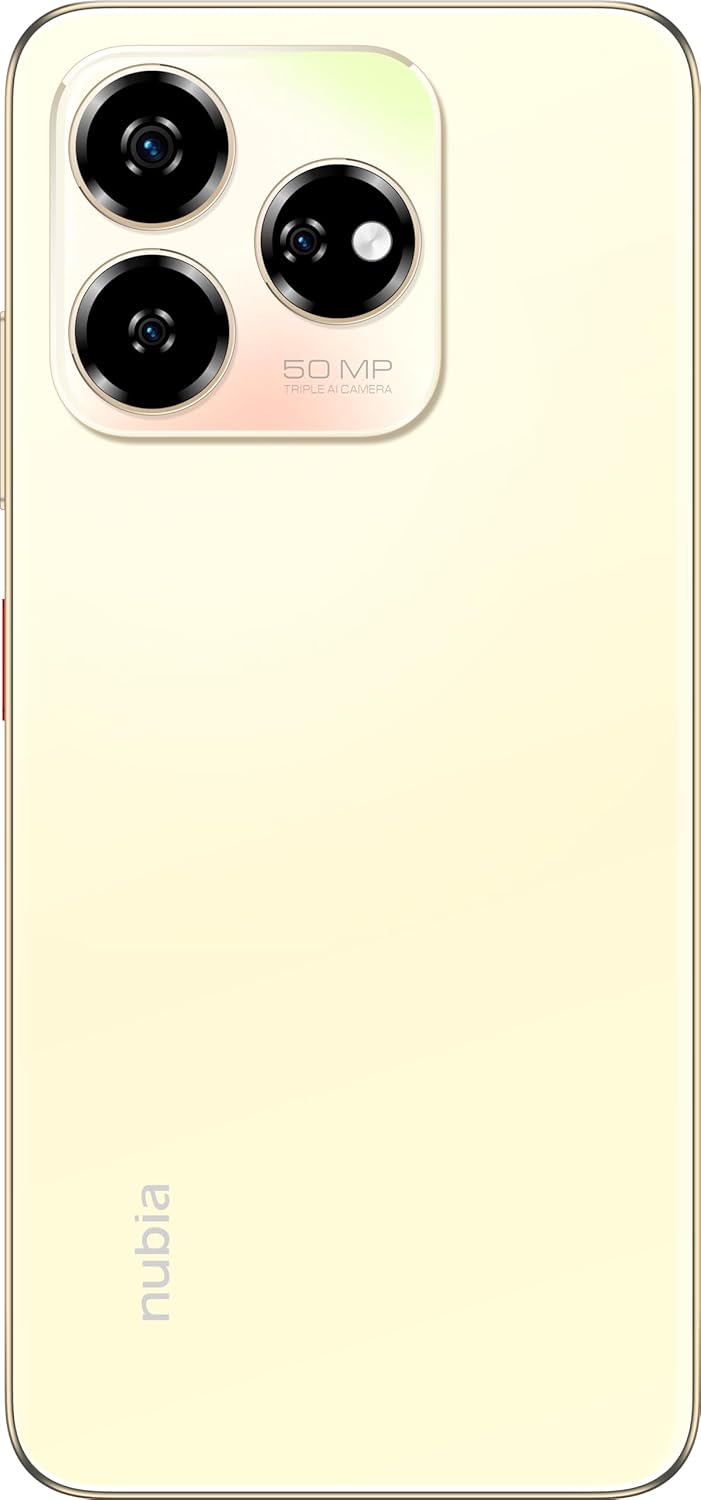
ചിത്രം: പിൻഭാഗം view of the nubia V60, highlighting the 50MP triple AI camera module.
3.3. ഫിംഗർപ്രിന്റ് തിരിച്ചറിയൽ
The device features a side-mounted fingerprint sensor for secure and quick unlocking. To set up:
- പോകുക ക്രമീകരണം > സുരക്ഷ > ഫിംഗർപ്രിന്റ്.
- Follow the on-screen prompts to register your fingerprint(s).
3.4. എൻഎഫ്സി പ്രവർത്തനം
NFC (Near Field Communication) allows for quick data exchange and contactless payments. To use NFC:
- Ensure NFC is enabled in Settings > Connected devices > Connection preferences > NFC.
- Tap your phone to another NFC-enabled device or payment terminal to initiate a connection or transaction.
3.5. DTS Sound Effect
Experience enhanced audio quality with DTS sound effects. This feature can be configured in your device's sound settings to optimize audio for various media types.
3.6. Live Island
The Live Island feature provides dynamic notifications and quick access to certain functions around the front camera cutout. Explore its functionalities through your device's display settings or by interacting with notifications.
4. പരിപാലനവും പരിചരണവും
4.1. നിങ്ങളുടെ ഉപകരണം വൃത്തിയാക്കൽ
നിങ്ങളുടെ ഫോണിന്റെ സ്ക്രീനും ബോഡിയും വൃത്തിയാക്കാൻ മൃദുവായ, ലിന്റ് രഹിത തുണി ഉപയോഗിക്കുക. ഫിനിഷിനോ സ്ക്രീൻ കോട്ടിംഗിനോ കേടുവരുത്തുന്ന കഠിനമായ രാസവസ്തുക്കളോ ഉരച്ചിലുകളോ ഉള്ള വസ്തുക്കൾ ഉപയോഗിക്കുന്നത് ഒഴിവാക്കുക.
4.2. സോഫ്റ്റ്വെയർ അപ്ഡേറ്റുകൾ
നിങ്ങളുടെ ഉപകരണത്തിൽ ഏറ്റവും പുതിയ ഫീച്ചറുകൾ, സുരക്ഷാ പാച്ചുകൾ, പ്രകടന മെച്ചപ്പെടുത്തലുകൾ എന്നിവ ഉണ്ടെന്ന് ഉറപ്പാക്കാൻ സോഫ്റ്റ്വെയർ അപ്ഡേറ്റുകൾ പതിവായി പരിശോധിച്ച് ഇൻസ്റ്റാൾ ചെയ്യുക. ഇതിലേക്ക് പോകുക ക്രമീകരണങ്ങൾ > സിസ്റ്റം > സിസ്റ്റം അപ്ഡേറ്റ്.
4.3. ബാറ്ററി പരിചരണം
- ബാറ്ററിയുടെ ആയുസ്സ് കുറയ്ക്കുമെന്നതിനാൽ തീവ്രമായ താപനില ഒഴിവാക്കുക.
- ഒറിജിനൽ അല്ലെങ്കിൽ സാക്ഷ്യപ്പെടുത്തിയ ചാർജിംഗ് ആക്സസറികൾ മാത്രം ഉപയോഗിക്കുക.
- ബാറ്ററിയുടെ മികച്ച ആരോഗ്യത്തിന്, ഇടയ്ക്കിടെ ബാറ്ററി പൂർണ്ണമായും ഡിസ്ചാർജ് ചെയ്യുന്നത് ഒഴിവാക്കുക അല്ലെങ്കിൽ ദീർഘനേരം 100% ചാർജ് നിലനിർത്തുന്നത് ഒഴിവാക്കുക.
4.4. സ്റ്റോറേജ് മാനേജ്മെൻ്റ്
ആനുകാലികമായി റീview your device's storage (256GB ROM) and clear unnecessary files, apps, or media to maintain optimal performance. You can check storage usage in ക്രമീകരണങ്ങൾ > സംഭരണം.
5. പ്രശ്നപരിഹാരം
This section addresses common issues you might encounter with your nubia V60.
5.1. ഉപകരണം ഓണാക്കുന്നില്ല
- ബാറ്ററി ചാർജ്ജ് ചെയ്തിട്ടുണ്ടെന്ന് ഉറപ്പാക്കുക. ചാർജർ കണക്റ്റ് ചെയ്ത് പവർ ഓൺ ചെയ്യാൻ ശ്രമിക്കുന്നതിന് മുമ്പ് കുറച്ച് മിനിറ്റ് കാത്തിരിക്കുക.
- പുനരാരംഭിക്കാൻ നിർബന്ധിക്കുന്നതിന് പവർ ബട്ടൺ കുറഞ്ഞത് 10-15 സെക്കൻഡ് അമർത്തിപ്പിടിക്കുക.
5.2. ചാർജിംഗ് പ്രശ്നങ്ങൾ
- ചാർജിംഗ് കേബിളും അഡാപ്റ്ററും സുരക്ഷിതമായി ബന്ധിപ്പിച്ചിട്ടുണ്ടെന്നും കേടുപാടുകൾ സംഭവിച്ചിട്ടില്ലെന്നും ഉറപ്പാക്കുക.
- Try using a different power outlet or charging accessory.
- ചാർജിംഗ് പോർട്ട് മൃദുവായതും ഉണങ്ങിയതുമായ ഒരു ബ്രഷ് ഉപയോഗിച്ച് സൌമ്യമായി വൃത്തിയാക്കി, അതിലെ അവശിഷ്ടങ്ങൾ നീക്കം ചെയ്യുക.
5.3. നെറ്റ്വർക്ക് കണക്റ്റിവിറ്റി പ്രശ്നങ്ങൾ
- നിങ്ങളുടെ സിം കാർഡ് ശരിയായി ഇട്ടിട്ടുണ്ടോ എന്നും ആക്ടിവേറ്റ് ചെയ്തിട്ടുണ്ടോ എന്നും പരിശോധിക്കുക.
- വിമാന മോഡ് ഓണും ഓഫും ആക്കുക.
- നിങ്ങളുടെ ഉപകരണം പുനരാരംഭിക്കുക.
- പോകുക ക്രമീകരണം > നെറ്റ്വർക്കും ഇന്റർനെറ്റും > മൊബൈൽ നെറ്റ്വർക്ക് നിങ്ങളുടെ ഇഷ്ടപ്പെട്ട നെറ്റ്വർക്ക് തരം തിരഞ്ഞെടുത്തിട്ടുണ്ടെന്ന് ഉറപ്പാക്കുക.
5.4. ആപ്പുകൾ ക്രാഷാകുകയോ മരവിപ്പിക്കുകയോ ചെയ്യുന്നു
- ആപ്പ് അടച്ച് വീണ്ടും തുറക്കുക.
- ആപ്പിന്റെ കാഷെയും ഡാറ്റയും മായ്ക്കുക ക്രമീകരണങ്ങൾ > ആപ്പുകൾ > [ആപ്പ് നാമം] > സംഭരണവും കാഷെയും.
- ആപ്പ് അതിന്റെ ഏറ്റവും പുതിയ പതിപ്പിലേക്ക് അപ്ഡേറ്റ് ചെയ്തിട്ടുണ്ടെന്ന് ഉറപ്പാക്കുക.
- നിങ്ങളുടെ ഉപകരണം പുനരാരംഭിക്കുക.
5.5. ഫാക്ടറി റീസെറ്റ് (അവസാന ആശ്രയം)
മുന്നറിയിപ്പ്: ഫാക്ടറി റീസെറ്റ് നിങ്ങളുടെ ഫോണിലെ എല്ലാ ഡാറ്റയും മായ്ക്കും. തുടരുന്നതിന് മുമ്പ് പ്രധാനപ്പെട്ട ഡാറ്റയുടെ ബാക്കപ്പ് എടുക്കുക.
ഫാക്ടറി റീസെറ്റ് നടത്താൻ, ഇതിലേക്ക് പോകുക ക്രമീകരണങ്ങൾ > സിസ്റ്റം > റീസെറ്റ് ഓപ്ഷനുകൾ > എല്ലാ ഡാറ്റയും മായ്ക്കുക (ഫാക്ടറി റീസെറ്റ്) നിർദ്ദേശങ്ങൾ പാലിക്കുക.
6 സാങ്കേതിക സവിശേഷതകൾ
| ഫീച്ചർ | സ്പെസിഫിക്കേഷൻ |
|---|---|
| മോഡലിൻ്റെ പേര് | V60 |
| ഇനം മോഡൽ നമ്പർ | 123439101056 |
| ബ്രാൻഡ് | നുബിയ |
| ഓപ്പറേറ്റിംഗ് സിസ്റ്റം | ആൻഡ്രോയിഡ് 13.0 |
| സ്ക്രീൻ വലിപ്പം | 6.72 ഇഞ്ച് |
| ഇൻസ്റ്റാൾ ചെയ്ത RAM മെമ്മറി വലുപ്പം | 8 GB (Additional 12GB Dynamic RAM) |
| മെമ്മറി സ്റ്റോറേജ് കപ്പാസിറ്റി | 256 ജിബി |
| സിപിയു വേഗത | 1.8 GHz |
| പിൻ ക്യാമറ | 50MP AI ക്യാമറ |
| മുൻ ക്യാമറ | 32എംപി |
| ബാറ്ററി പവർ റേറ്റിംഗ് | 5000 mAh |
| ഫാസ്റ്റ് ചാർജിംഗ് | 22.5W |
| വയർലെസ് കമ്മ്യൂണിക്കേഷൻ ടെക്നോളജീസ് | എൻഎഫ്സി |
| കണക്റ്റിവിറ്റി ടെക്നോളജികൾ | എൻഎഫ്സി |
| സെല്ലുലാർ ടെക്നോളജി | 4G |
| ജിപിഎസ് | ഗ്ലോനാസ് |
| ഓഡിയോ ജാക്ക് | ഹെഡ്ഫോൺ ജാക്ക് ഇല്ല |
| ഫോം ഫാക്ടർ | ബാർ |
| നിറം | Sunlit Gold |
| ഇനത്തിൻ്റെ ഭാരം | 510 ഗ്രാം |
| പാക്കേജ് അളവുകൾ | 18 x 8.6 x 5.6 സെ.മീ |
| ബോക്സിൽ എന്താണുള്ളത് | പവർ അഡാപ്റ്റർ, യുഎസ്ബി കേബിൾ |
7. വാറൻ്റി വിവരങ്ങൾ
Your ZTE nubia V60 smartphone comes with a standard manufacturer's warranty, covering defects in materials and workmanship under normal use. The duration and terms of this warranty may vary by region. Please refer to the warranty card included in your product packaging for specific details.
Additionally, extended warranty and accidental damage protection plans may be available for purchase. For example, options such as a 1-Year Extended Warranty Plan, 2-Years Extended Warranty Plan, and 1-Year Accidental Damage Protection Plan might be offered by authorized retailers.
ഏതെങ്കിലും വാറന്റി ക്ലെയിമുകൾക്ക് നിങ്ങളുടെ വാങ്ങലിന്റെ തെളിവ് സൂക്ഷിക്കുക.
8. ഉപഭോക്തൃ പിന്തുണ
For further assistance, technical support, or service inquiries regarding your ZTE nubia V60, please contact nubia customer service through their official webസൈറ്റ് അല്ലെങ്കിൽ നിങ്ങളുടെ ഉൽപ്പന്ന ഡോക്യുമെന്റേഷനിൽ നൽകിയിരിക്കുന്ന ബന്ധപ്പെടാനുള്ള വിവരങ്ങൾ.
You can often find FAQs, troubleshooting guides, and software downloads on the official nubia support website. When contacting support, please have your device model number (V60) and item model number (123439101056) ready.