1. ആമുഖം
Thank you for choosing the SANOTO Y30 Open Ear Bluetooth 5.3 Wireless Sport Earbuds. These earbuds are designed to provide a comfortable listening experience while maintaining awareness of your surroundings. Featuring directional sound transmission, IPX6 water resistance, and intuitive touch controls, they are ideal for various activities including work, sports, and exercise.
2. പാക്കേജ് ഉള്ളടക്കം
എല്ലാ ഇനങ്ങളും ഉണ്ടെന്ന് ഉറപ്പാക്കാൻ പാക്കേജ് പരിശോധിക്കുക:
- SANOTO Y30 Open Ear Bluetooth Earbuds x 1
- ചാർജിംഗ് കേസ് x 1
- യുഎസ്ബി ചാർജിംഗ് കേബിൾ x 1
- ഇൻസ്ട്രക്ഷൻ മാനുവൽ x 1

Image: The SANOTO Y30 Open Ear Bluetooth Earbuds shown with their charging case.
3. സജ്ജീകരണം
3.1 ഇയർബഡുകളും കേസും ചാർജ് ചെയ്യുന്നു
Before first use, fully charge the earbuds and charging case. Connect the provided USB charging cable to the charging port on the case and a power source. The indicator lights on the case will show the charging status.
- ചാർജിംഗ് സമയം: ഫുൾ ചാർജിനായി ഏകദേശം 1.5 മണിക്കൂർ.
- ബാറ്ററി ലൈഫ്: Up to 6 hours of playtime per earbud, and up to 30 hours total with the charging case.

Image: Visual representation of the earbuds' battery life and charging time.
3.2 ഒരു ഉപകരണവുമായി ജോടിയാക്കൽ
- ഇയർബഡുകൾ ചാർജ്ജ് ചെയ്തിട്ടുണ്ടെന്ന് ഉറപ്പാക്കുക.
- Open the charging case. The earbuds will automatically enter pairing mode, indicated by a flashing light.
- നിങ്ങളുടെ ഉപകരണത്തിൽ (സ്മാർട്ട്ഫോൺ, ടാബ്ലെറ്റ്, ലാപ്ടോപ്പ്), ബ്ലൂടൂത്ത് പ്രവർത്തനക്ഷമമാക്കി ലഭ്യമായ ഉപകരണങ്ങൾക്കായി തിരയുക.
- Select "SANOTO Y30" from the list of devices.
- കണക്റ്റ് ചെയ്തുകഴിഞ്ഞാൽ, ഇയർബഡ് ഇൻഡിക്കേറ്റർ ലൈറ്റുകൾ മിന്നുന്നത് നിർത്തും.
The earbuds use Bluetooth 5.3 technology for a fast and stable connection.
4. പ്രവർത്തന നിർദ്ദേശങ്ങൾ
4.1 ഇയർബഡുകൾ ധരിക്കൽ
The SANOTO Y30 earbuds feature an ergonomic earhook design for a secure and comfortable fit. Gently place the earhook over your ear, ensuring the speaker is positioned correctly near your ear canal for optimal sound transmission without blocking your ear.
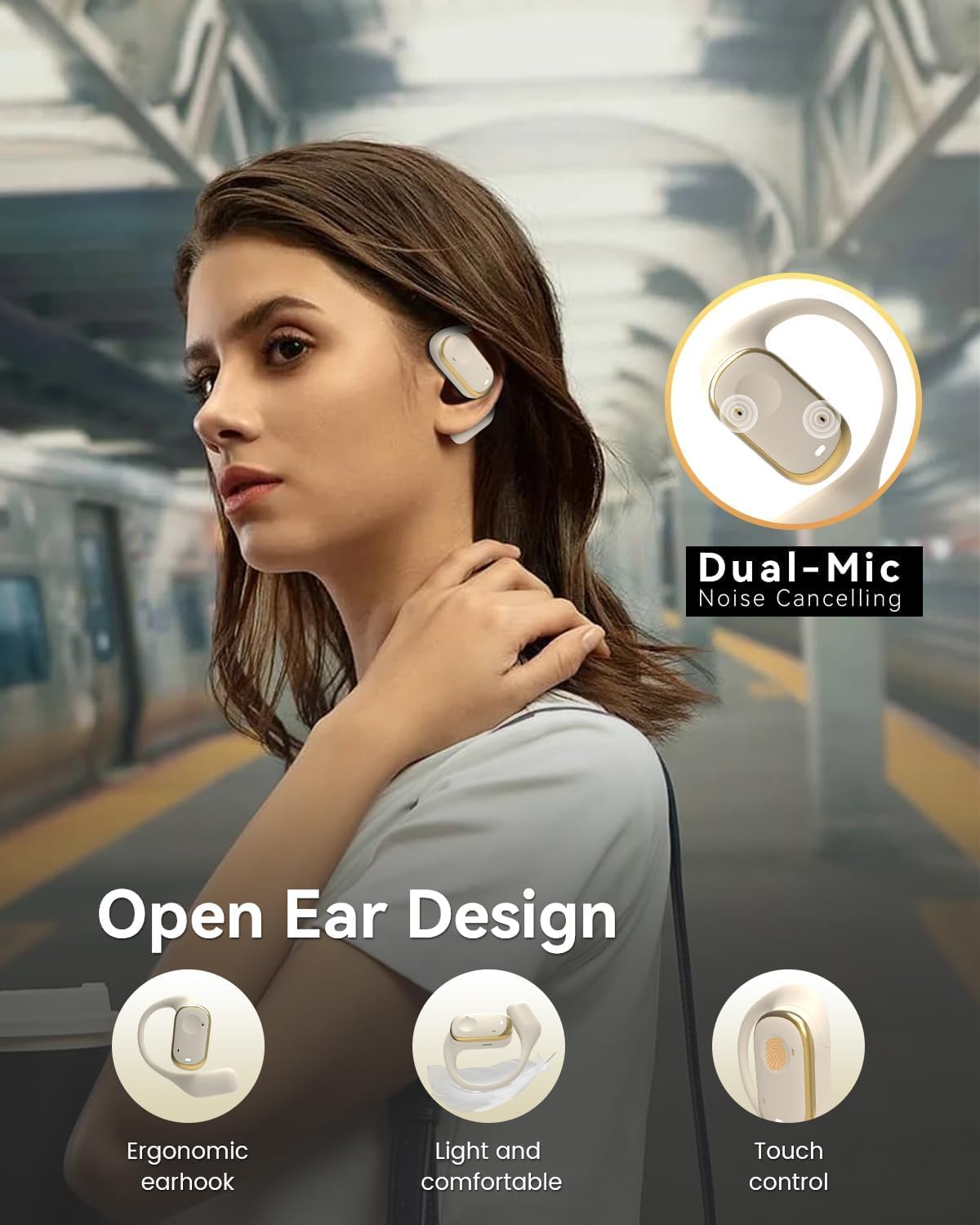
Image: A person wearing the SANOTO Y30 earbuds, highlighting the open-ear design and ergonomic fit.
4.2 ടച്ച് നിയന്ത്രണങ്ങൾ
The earbuds are equipped with multi-functional touch buttons for easy control of music, calls, and voice assistant. The touch area is located on the outer surface of each earbud.
| ഫംഗ്ഷൻ | ആക്ഷൻ | ഇയർബഡ് |
|---|---|---|
| പവർ ഓൺ | x3 ടാപ്പുചെയ്യുക | Either side |
| ഷട്ട് ഡൗൺ | x5 ടാപ്പുചെയ്യുക | Either side |
| പ്ലേ/താൽക്കാലികമായി നിർത്തുക | x1 ടാപ്പുചെയ്യുക | Either side |
| മുൻ ഗാനം | x2 ടാപ്പുചെയ്യുക | ഇടത് ഇയർബഡ് |
| അടുത്ത ഗാനം | x2 ടാപ്പുചെയ്യുക | വലത് ഇയർബഡ് |
| വോളിയം കൂട്ടുക | x3 ടാപ്പുചെയ്യുക | ഇടത് ഇയർബഡ് |
| വോളിയം ഡൗൺ | x3 ടാപ്പുചെയ്യുക | വലത് ഇയർബഡ് |
| കോളിന് ഉത്തരം നൽകുക/ഹാംഗ് അപ്പ് ചെയ്യുക | x1 ടാപ്പുചെയ്യുക | Either side |
| കോൾ നിരസിക്കുക | x2 ടാപ്പുചെയ്യുക | Either side |
| വോയ്സ് അസിസ്റ്റൻ്റ് | x2 ടാപ്പുചെയ്യുക | Either side |

Image: A diagram illustrating the touch control functions for the SANOTO Y30 earbuds.
5. പരിപാലനം
5.1 വൃത്തിയാക്കൽ
Regularly clean your earbuds and charging case to ensure optimal performance and hygiene. Use a soft, dry, lint-free cloth. Do not use abrasive cleaners, alcohol, or chemical solvents.
5.2 ജല പ്രതിരോധം (IPX6)
The SANOTO Y30 earbuds are IPX6 water-resistant, meaning they are protected against high-pressure water jets from any direction. This makes them suitable for sports and outdoor use, including protection against sweat and rain. കുറിപ്പ്: The charging case is not water-resistant. Do not submerge the earbuds or expose them to saltwater or other liquids.

Image: The SANOTO Y30 earbuds with water droplets, demonstrating their IPX6 water resistance.
5.3 സംഭരണം
ഉപയോഗത്തിലില്ലാത്തപ്പോൾ, പൊടിയിൽ നിന്നും കേടുപാടുകളിൽ നിന്നും സംരക്ഷിക്കാൻ ഇയർബഡുകൾ അവയുടെ ചാർജിംഗ് കേസിൽ സൂക്ഷിക്കുക. കടുത്ത താപനിലയിൽ നിന്ന് മാറി തണുത്തതും വരണ്ടതുമായ സ്ഥലത്ത് സൂക്ഷിക്കുക.
6. പ്രശ്നപരിഹാരം
If you encounter any issues with your SANOTO Y30 earbuds, please refer to the following common solutions:
- ഇയർബഡുകൾ ജോടിയാക്കുന്നില്ല:
- രണ്ട് ഇയർബഡുകളും ചാർജ്ജ് ചെയ്തിട്ടുണ്ടെന്ന് ഉറപ്പാക്കുക.
- നിങ്ങളുടെ ഉപകരണത്തിലെ ബ്ലൂടൂത്ത് ഓഫാക്കി വീണ്ടും ഓണാക്കുക.
- Delete "SANOTO Y30" from your device's Bluetooth list and try pairing again.
- Place earbuds back in the case, close it, wait a few seconds, then open to re-enter pairing mode.
- ശബ്ദമില്ല അല്ലെങ്കിൽ ഇടയ്ക്കിടെയുള്ള ശബ്ദം:
- നിങ്ങളുടെ ഉപകരണത്തിലെയും ഇയർബഡുകളിലെയും വോളിയം ലെവൽ പരിശോധിക്കുക.
- Ensure the earbuds are within the Bluetooth range of your device (typically 10 meters/33 feet).
- Try reconnecting the earbuds to your device.
- ഇയർബഡുകൾ ചാർജ് ചെയ്യുന്നില്ല:
- ചാർജിംഗ് കേബിൾ കേസിലേക്കും പവർ സ്രോതസ്സിലേക്കും സുരക്ഷിതമായി ബന്ധിപ്പിച്ചിട്ടുണ്ടെന്ന് ഉറപ്പാക്കുക.
- ചാർജിംഗ് പോർട്ട് വൃത്തിയുള്ളതാണോ എന്നും അവശിഷ്ടങ്ങളില്ലാത്തതാണോ എന്നും പരിശോധിക്കുക.
- വ്യത്യസ്തമായ ഒരു USB ചാർജിംഗ് കേബിളോ പവർ അഡാപ്റ്ററോ ഉപയോഗിക്കാൻ ശ്രമിക്കുക.
- മൈക്രോഫോൺ പ്രശ്നങ്ങൾ:
- മൈക്രോഫോൺ തടസ്സപ്പെട്ടിട്ടില്ലെന്ന് ഉറപ്പാക്കുക.
- Check your device's settings to ensure the earbuds are selected as the input device for calls.
- The earbuds feature dual-mic noise cancellation for clearer calls.
7 സ്പെസിഫിക്കേഷനുകൾ
| ഫീച്ചർ | വിശദാംശങ്ങൾ |
|---|---|
| മോഡൽ നമ്പർ | Y30 |
| വയർലെസ് ടെക്നോളജി | ബ്ലൂടൂത്ത് 5.3 |
| ഡ്രൈവർ വലിപ്പം | 14.2 മി.മീ |
| ജല പ്രതിരോധം | IPX6 (ഇയർബഡുകൾ മാത്രം) |
| ഇയർബഡ് പ്ലേടൈം | 6 മണിക്കൂർ വരെ |
| ആകെ പ്ലേടൈം (കേസിനൊപ്പം) | 30 മണിക്കൂർ വരെ |
| ചാർജിംഗ് സമയം | ഏകദേശം 1.5 മണിക്കൂർ |
| നിയന്ത്രണ തരം | ടച്ച് നിയന്ത്രണം |
| മൈക്രോഫോൺ | Built-in, with dual-mic noise cancellation |
| ഫ്രീക്വൻസി റേഞ്ച് | 20 ഹെർട്സ് - 20 കിലോ ഹെർട്സ് |
| പ്രതിരോധം | 14.2 ഓം |
| അനുയോജ്യമായ ഉപകരണങ്ങൾ | Smartphones, tablets, laptops, smartwatches |
| മെറ്റീരിയൽ | അക്രിലോണിട്രൈൽ ബ്യൂട്ടാഡീൻ സ്റ്റൈറൈൻ (എബിഎസ്) |
8. വാറൻ്റിയും പിന്തുണയും
The SANOTO Y30 Open Ear Bluetooth Earbuds come with a 2 വർഷത്തെ നിർമ്മാതാവിന്റെ വാറന്റി. സാധാരണ ഉപയോഗത്തിലുള്ള മെറ്റീരിയലുകളിലെയും ജോലികളിലെയും വൈകല്യങ്ങൾ ഈ വാറന്റി ഉൾക്കൊള്ളുന്നു.
For technical support, warranty claims, or further assistance, please contact SANOTO customer service through the retailer where you purchased the product or visit the official SANOTO website. Please have your proof of purchase and product model number (Y30) ready when contacting support.
Note: Information regarding spare parts availability and software updates is not available at this time.


