1. ആമുഖം
The Letshuoer S08 In-Ear Monitor Earphones are designed to deliver high-fidelity audio reproduction. These earphones feature a fourth-generation dual-coil 13mm planar magnetic driver, engineered for enhanced sound performance and diaphragm stability. The S08 incorporates advanced technologies such as nanoscopic magnetron sputtering and PTR elastic film surrounds to optimize sound clarity, bass response, and overall audio transient speed. This manual provides essential information for the proper setup, operation, maintenance, and troubleshooting of your Letshuoer S08 earphones.

Figure 1: Letshuoer S08 In-Ear Monitor Earphones (Silver)
2. സജ്ജീകരണം
2.1 പാക്കേജ് ഉള്ളടക്കം
തുടരുന്നതിന് മുമ്പ്, പാക്കേജിൽ എല്ലാ ഇനങ്ങളും ഉണ്ടെന്ന് ഉറപ്പാക്കുക:
- Letshuoer S08 Earphones (Left and Right units)
- Detachable 2-pin Silver-plated Copper Cable
- Modular 3.5mm and 4.4mm Plugs
- സംരക്ഷണ കേസ്
- ഉപയോക്തൃ മാനുവൽ (ഈ പ്രമാണം)
- Multiple Ear Tips (various sizes)
2.2 കേബിൾ ബന്ധിപ്പിക്കുന്നു
The S08 earphones feature a detachable 2-pin cable for easy replacement and maintenance. Follow these steps to connect the cable:
- Identify the left (L) and right (R) earphone units and the corresponding connectors on the cable. Ensure the pins are correctly oriented.
- Align the 2-pin connector on the cable with the receptacle on the earphone unit. Gently push the connector into the earphone receptacle until it is securely seated. Do not force the connection.
- Repeat for the other earphone unit.
- Attach the desired modular plug (3.5mm or 4.4mm) to the cable's main connector. The twist-lock design ensures a secure connection.

Figure 2: Detachable Modular Cable with Interchangeable Plugs
2.3 Choosing and Installing Ear Tips
Selecting the correct ear tips is crucial for optimal sound quality and comfort. Experiment with the included ear tips to find the best fit for your ears:
- Gently remove the pre-installed ear tips from the earphone nozzles.
- Select a pair of ear tips that feel comfortable and provide a good seal in your ear canal. A proper seal enhances bass response and passive noise isolation.
- Carefully push the chosen ear tips onto the earphone nozzles until they are firmly attached.
2.4 ഇയർഫോണുകൾ ധരിക്കൽ
The S08 earphones are designed to be worn with the cable over your ear for a secure and comfortable fit:
- Insert the earphone unit into your ear canal.
- Loop the cable over the top of your ear, guiding it downwards behind your ear. The pre-formed ear hooks on the cable help secure the fit.
- Adjust the earphones until they feel snug and comfortable, ensuring a good seal.

Figure 3: Proper Wearing of Letshuoer S08 Earphones
3. ഓപ്പറേഷൻ
3.1 ഓഡിയോ പ്ലേബാക്ക്
Connect the 3.5mm or 4.4mm plug to your audio source (e.g., smartphone, digital audio player, amplifier). Begin audio playback from your device. Adjust the volume on your audio source to a comfortable listening level.
3.2 മീഡിയ നിയന്ത്രണം
The S08 earphones support media control via the remote on the cable. Specific functions may vary slightly depending on your connected device and operating system:
- സിംഗിൾ പ്രസ്സ്: ഓഡിയോ പ്ലേ ചെയ്യുക/താൽക്കാലികമായി നിർത്തുക, കോൾ സ്വീകരിക്കുക/അവസാനിപ്പിക്കുക.
- ഇരട്ട പ്രസ്സ്: അടുത്ത ട്രാക്കിലേക്ക് പോകുക.
- ട്രിപ്പിൾ പ്രസ്സ്: മുമ്പത്തെ ട്രാക്കിലേക്ക് പോകുക.
- ലോംഗ് പ്രസ്സ്: വോയ്സ് അസിസ്റ്റന്റ് സജീവമാക്കുക (ഉപകരണം പിന്തുണയ്ക്കുന്നുണ്ടെങ്കിൽ).
വീഡിയോ 1: കഴിഞ്ഞുview of Letshuoer S08 In-Ear Monitor Earphones features and design.
4. പരിപാലനം
4.1 Cleaning the Earphones
പതിവായി വൃത്തിയാക്കുന്നത് ശബ്ദ നിലവാരവും ശുചിത്വവും നിലനിർത്താൻ സഹായിക്കുന്നു:
- ചെവി ടിപ്പുകൾ: Remove ear tips and clean them with mild soap and water. Rinse thoroughly and allow them to dry completely before reattaching.
- Earphone Nozzles: Gently wipe the earphone nozzles with a dry, soft cloth. Use a small brush or cleaning tool to carefully remove any earwax or debris from the mesh filters. Avoid using liquids directly on the nozzles.
- Earphone Shells: Wipe the metallic shells with a soft, dry cloth.
4.2 കേബിൾ കെയർ
To prolong the life of your cable:
- പെട്ടെന്നുള്ള വളവുകളോ കേബിളിൽ അമിതമായി വലിക്കലോ ഒഴിവാക്കുക.
- When disconnecting, always grasp the plug or connector, not the cable itself.
- Store the cable neatly, preferably coiled, to prevent tangling.
4.3 സംഭരണം
When not in use, store your S08 earphones in the provided protective case to prevent damage from dust, impacts, or tangling.
5. പ്രശ്നപരിഹാരം
| പ്രശ്നം | സാധ്യമായ കാരണം | പരിഹാരം |
|---|---|---|
| ശബ്ദമോ കുറഞ്ഞ വോളിയമോ ഇല്ല |
|
|
| Sound imbalance (one side louder/softer) |
|
|
| വികലമായ ശബ്ദം |
|
|
6 സ്പെസിഫിക്കേഷനുകൾ
The Letshuoer S08 In-Ear Monitor Earphones feature advanced components for superior audio performance:
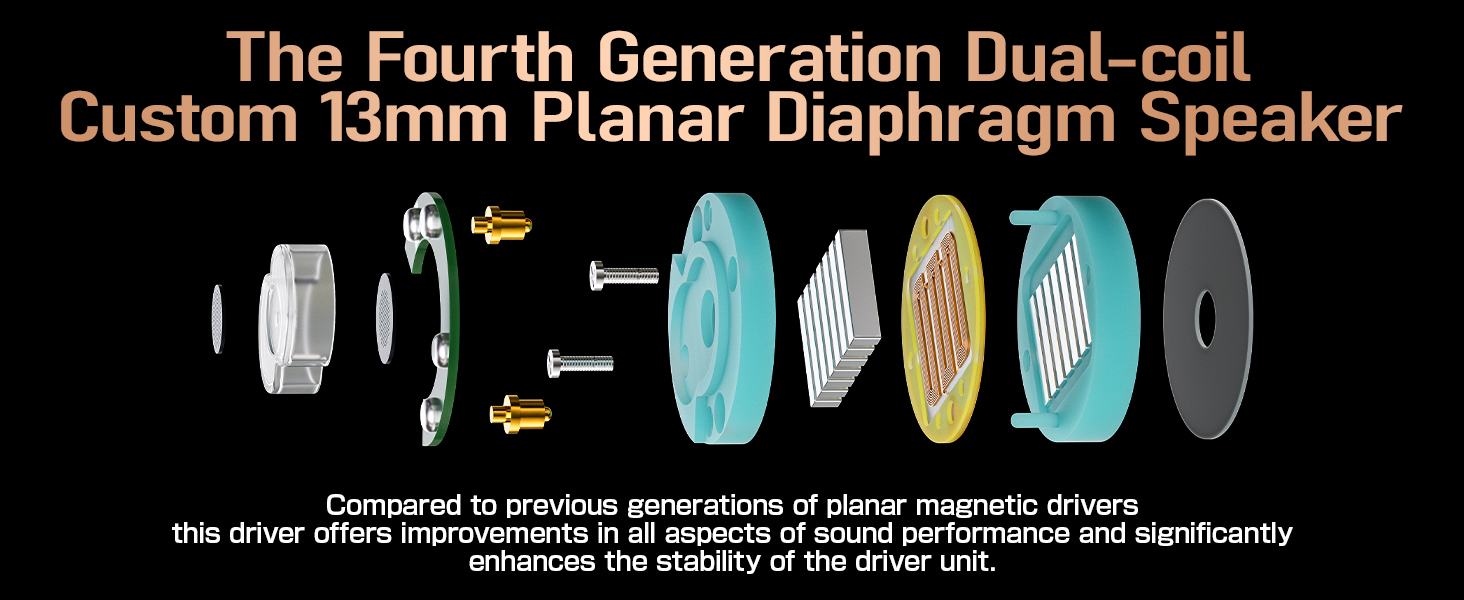
ചിത്രം 4: പൊട്ടിത്തെറിച്ചു View of S08 Planar Magnetic Driver
| ഫീച്ചർ | വിശദാംശങ്ങൾ |
|---|---|
| മോഡലിൻ്റെ പേര് | Letshuoer S08 |
| ഓഡിയോ ഡ്രൈവർ തരം | Fourth Generation 13mm Planar Magnetic Driver (Dual-coil) |
| കണക്റ്റിവിറ്റി ടെക്നോളജി | വയർഡ് |
| ഹെഡ്ഫോണുകൾ ജാക്ക് | 3.5 mm Jack (Modular with 4.4mm option) |
| കേബിൾ | 4 cores of 30-strands 0.05mm silver-plated copper, Detachable 2-pin |
| ഷെൽ മെറ്റീരിയൽ | CNC anodized aluminum |
| പ്രത്യേക സവിശേഷതകൾ | Nanoscopic magnetron sputtering technology, PTR elastic film surrounds |
| ഇനത്തിൻ്റെ ഭാരം | 8.4 ഔൺസ് (ഏകദേശം 0.24 കിലോഗ്രാം) |
| ജല പ്രതിരോധ നില | വാട്ടർ റെസിസ്റ്റൻ്റ് അല്ല |
7. വാറണ്ടിയും പിന്തുണയും
7.1 വാറൻ്റി വിവരങ്ങൾ
Letshuoer products are typically covered by a manufacturer's warranty against defects in materials and workmanship. Please refer to the warranty card included in your product packaging or visit the official Letshuoer website for detailed warranty terms and conditions. Proof of purchase is required for all warranty claims.
7.2 ഉപഭോക്തൃ പിന്തുണ
For technical assistance, troubleshooting, or warranty inquiries, please contact Letshuoer customer support through their official channels. You can usually find contact information on the Letshuoer webസൈറ്റ് അല്ലെങ്കിൽ നിങ്ങളുടെ ഉൽപ്പന്ന ഡോക്യുമെന്റേഷനിൽ.


