1. ആമുഖം
Thank you for choosing the Mibro Earbuds AC1 Wireless Earbuds. These earbuds combine an elegant design with exceptional audio performance, offering clear, immersive sound for your favorite music. With stable Bluetooth connectivity and a comfortable ergonomic fit, they are designed for convenience and quality audio on the go. This manual provides detailed instructions to help you get the most out of your new earbuds.
2 സുരക്ഷാ വിവരങ്ങൾ
Please read all safety instructions before using this product.
- ഇയർബഡുകളോ ചാർജിംഗ് കേസോ ഉയർന്ന താപനിലയിലോ ഈർപ്പത്തിലോ ദ്രാവകങ്ങളിലോ തുറന്നുകാട്ടരുത്.
- ഉപകരണം താഴെയിടുകയോ, അടിക്കുകയോ, വേർപെടുത്തുകയോ ചെയ്യുന്നത് ഒഴിവാക്കുക.
- കുട്ടികളിൽ നിന്നും വളർത്തുമൃഗങ്ങളിൽ നിന്നും അകന്നു നിൽക്കുക.
- നൽകിയിരിക്കുന്നതോ സാക്ഷ്യപ്പെടുത്തിയതോ ആയ ചാർജിംഗ് കേബിൾ മാത്രം ഉപയോഗിക്കുക.
- ഉയർന്ന ശബ്ദത്തിൽ ദീർഘനേരം കേൾക്കുന്നത് കേൾവിക്ക് തകരാറുണ്ടാക്കാം.
3. പാക്കേജ് ഉള്ളടക്കം
നിങ്ങളുടെ പാക്കേജിൽ എല്ലാ ഇനങ്ങളും ഉണ്ടെന്ന് ഉറപ്പാക്കുക:
- Mibro Earbuds AC1 (Left and Right)
- ചാർജിംഗ് കേസ്
- ചാർജിംഗ് കേബിൾ
- ഉപയോക്തൃ മാനുവൽ (ഈ പ്രമാണം)
4. ഉൽപ്പന്നം കഴിഞ്ഞുview
Familiarize yourself with the components of your Mibro Earbuds AC1.

ചിത്രം 4.1: Mibro Earbuds AC1 removed from their open charging case, displaying the earbuds and the case.
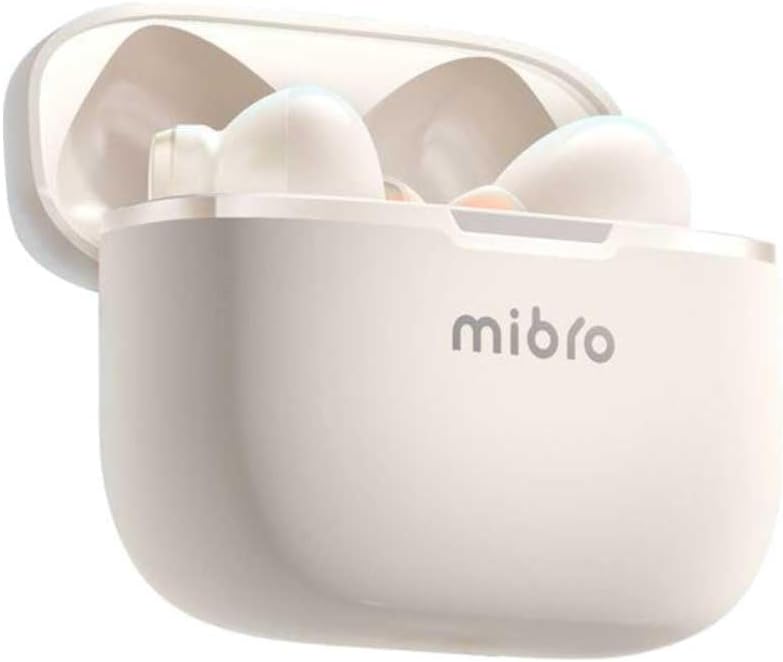
ചിത്രം 4.2: Mibro Earbuds AC1 placed inside their open charging case, showing the compact design.
The earbuds feature an ergonomic design for a secure and comfortable fit. The charging case protects the earbuds and recharges them on the go.
5. സജ്ജീകരണം
5.1 ഇയർബഡുകളും കേസും ചാർജ് ചെയ്യുന്നു
ആദ്യമായി ഉപയോഗിക്കുന്നതിന് മുമ്പ്, ഇയർബഡുകളും ചാർജിംഗ് കേസും പൂർണ്ണമായും ചാർജ് ചെയ്യുക.
- ചാർജിംഗ് കെയ്സിലേക്ക് ഇയർബഡുകൾ സ്ഥാപിക്കുക.
- ചാർജിംഗ് കേബിൾ കേസിലെ ചാർജിംഗ് പോർട്ടിലേക്കും ഒരു USB പവർ സ്രോതസ്സിലേക്കും ബന്ധിപ്പിക്കുക.
- The indicator light on the case will show charging status. A full charge may take up to 1 day (Note: This is an unusual specification, typically measured in hours. Please refer to product packaging for precise charging time).
- പൂർണ്ണമായി ചാർജ് ചെയ്തുകഴിഞ്ഞാൽ, കേബിൾ വിച്ഛേദിക്കുക.
5.2 ഒരു ബ്ലൂടൂത്ത് ഉപകരണവുമായി ജോടിയാക്കൽ
To connect your Mibro Earbuds AC1 to your smartphone or other Bluetooth-enabled device:
- ഇയർബഡുകൾ ചാർജ് ചെയ്തിട്ടുണ്ടെന്നും ചാർജിംഗ് കെയ്സിൽ വച്ചിട്ടുണ്ടെന്നും ഉറപ്പാക്കുക.
- Open the charging case lid. The earbuds will automatically enter pairing mode (indicator lights will flash).
- നിങ്ങളുടെ ഉപകരണത്തിൽ, Bluetooth ക്രമീകരണങ്ങളിലേക്ക് പോയി Bluetooth ഓണാക്കുക.
- ഇതിനായി തിരയുക available devices and select "Mibro AC1" from the list.
- കണക്റ്റ് ചെയ്തുകഴിഞ്ഞാൽ, ഇയർബഡുകളിലെ ഇൻഡിക്കേറ്റർ ലൈറ്റുകൾ മിന്നുന്നത് നിർത്തും.
- ഉപകരണത്തിൽ ബ്ലൂടൂത്ത് പ്രവർത്തനക്ഷമമാക്കിയിട്ടുണ്ടെങ്കിൽ, കേസിൽ നിന്ന് നീക്കം ചെയ്യുമ്പോൾ ഇയർബഡുകൾ അവസാനമായി ജോടിയാക്കിയ ഉപകരണവുമായി യാന്ത്രികമായി വീണ്ടും കണക്റ്റുചെയ്യും.
6. പ്രവർത്തന നിർദ്ദേശങ്ങൾ
6.1 പവർ ഓൺ/ഓഫ്
- പവർ ഓൺ: ചാർജിംഗ് കെയ്സിന്റെ ലിഡ് തുറക്കുക, അല്ലെങ്കിൽ ഇയർബഡുകൾ കെയ്സിൽ നിന്ന് പുറത്തെടുക്കുക. അവ സ്വയമേവ പവർ ചെയ്യും.
- പവർ ഓഫ്: ഇയർബഡുകൾ തിരികെ ചാർജിംഗ് കെയ്സിലേക്ക് വയ്ക്കുക, ലിഡ് അടയ്ക്കുക. അവ യാന്ത്രികമായി ഓഫാകുകയും ചാർജ് ചെയ്യാൻ തുടങ്ങുകയും ചെയ്യും.
6.2 മ്യൂസിക് പ്ലേബാക്ക്
Use the touch controls on the earbuds to manage music:
- പ്ലേ/താൽക്കാലികമായി നിർത്തുക: ഇയർബഡുകളിൽ ഏതെങ്കിലുമൊന്നിൽ ഒറ്റ ടാപ്പ് ചെയ്യുക.
- അടുത്ത ട്രാക്ക്: വലതുവശത്തെ ഇയർബഡിൽ രണ്ടുതവണ ടാപ്പ് ചെയ്യുക.
- മുമ്പത്തെ ട്രാക്ക്: ഇടതുവശത്തെ ഇയർബഡിൽ രണ്ടുതവണ ടാപ്പ് ചെയ്യുക.
6.3 കോൾ മാനേജ്മെന്റ്
Manage phone calls with the touch controls:
- ഉത്തരം/അവസാന കോൾ: ഇയർബഡുകളിൽ ഏതെങ്കിലുമൊന്നിൽ ഒറ്റ ടാപ്പ് ചെയ്യുക.
- കോൾ നിരസിക്കുക: ഏതെങ്കിലും ഇയർബഡിൽ 2 സെക്കൻഡ് അമർത്തിപ്പിടിക്കുക.
6.4 നോയ്സ് റദ്ദാക്കൽ
The Mibro AC1 Earbuds feature noise cancellation. Specific controls for activating or deactivating this feature are typically managed via a long press or a specific tap sequence. Refer to the quick start guide included in your package for precise instructions, as these can vary.
7. പരിപാലനം
7.1 വൃത്തിയാക്കൽ
- ഇയർബഡുകളും ചാർജിംഗ് കെയ്സും മൃദുവായതും ഉണങ്ങിയതും ലിന്റ് രഹിതവുമായ തുണി ഉപയോഗിച്ച് തുടയ്ക്കുക.
- അബ്രാസീവ് ക്ലീനറുകൾ, ആൽക്കഹോൾ, കെമിക്കൽ ലായകങ്ങൾ എന്നിവ ഉപയോഗിക്കരുത്.
- ചാർജിംഗ് കോൺടാക്റ്റുകൾ വൃത്തിയുള്ളതും വരണ്ടതുമാണെന്ന് ഉറപ്പാക്കുക.
7.2 സംഭരണം
When not in use, store the earbuds in their charging case to protect them and keep them charged. Store in a cool, dry place away from direct sunlight.
8. പ്രശ്നപരിഹാരം
If you encounter issues with your Mibro Earbuds AC1, try the following solutions:
| പ്രശ്നം | പരിഹാരം |
|---|---|
| ഇയർബഡുകൾ ജോടിയാക്കുന്നില്ല |
|
| ഇയർബഡുകളിൽ നിന്ന് ശബ്ദമില്ല |
|
| ഇയർബഡുകൾ ചാർജ് ചെയ്യുന്നില്ല |
|
9 സ്പെസിഫിക്കേഷനുകൾ
| ഫീച്ചർ | വിശദാംശങ്ങൾ |
|---|---|
| മോഡലിൻ്റെ പേര് | XPEJ010WW (AC1) |
| ബ്രാൻഡ് | മിബ്രോ |
| കണക്റ്റിവിറ്റി ടെക്നോളജി | വയർലെസ് (ബ്ലൂടൂത്ത്) |
| പ്രത്യേക സവിശേഷതകൾ | നോയ്സ് റദ്ദാക്കൽ |
| നിറം | ചൂടുള്ള വെള്ള |
| ഫോം ഫാക്ടർ | ഇൻ-ഇയർ |
| മെറ്റീരിയൽ | പ്ലാസ്റ്റിക് |
| ജല പ്രതിരോധ നില | വാട്ടർപ്രൂഫ് അല്ല |
| ചാർജിംഗ് സമയം | Up to 1 day (Note: This is an unusual specification, typically measured in hours. Please refer to product packaging for precise charging time.) |
10. വാറൻ്റിയും പിന്തുണയും
Mibro products are designed and manufactured to the highest quality standards. For detailed warranty information, please refer to the warranty card included with your purchase or visit the official Mibro webസൈറ്റ്.
For further assistance, technical support, or to explore other Mibro products, please visit the Mibro Store on Amazon.


