1. ആമുഖം
This manual provides comprehensive instructions for the installation, operation, and maintenance of your AERMEC AER503IR built-in thermostat. Please read this manual carefully before installation and use to ensure proper function and safety.
The AERMEC AER503IR is designed for built-in installation in a 503 box and features a touchpad control with a backlit display, specifically for air conditioning systems.
2 സുരക്ഷാ വിവരങ്ങൾ
- Always disconnect power before installing or servicing the thermostat.
- എല്ലാ പ്രാദേശിക, ദേശീയ ഇലക്ട്രിക്കൽ കോഡുകൾക്കും അനുസൃതമായി യോഗ്യതയുള്ള ഒരു ഇലക്ട്രീഷ്യനാണ് ഇൻസ്റ്റാളേഷൻ നടത്തേണ്ടത്.
- Do not touch the electronic board with bare hands to avoid damage from electrostatic discharge.
- Ensure all wiring connections are secure and correct to prevent fire or electric shock.
- Do not overtighten the fixing screws during installation.
- ഈ ഉപകരണം ഇൻഡോർ ഉപയോഗത്തിനായി മാത്രം രൂപകൽപ്പന ചെയ്തിട്ടുള്ളതാണ്.
3. ഉൽപ്പന്നം കഴിഞ്ഞുview
The AERMEC AER503IR thermostat features a clear digital display and intuitive touchpad controls for managing your air conditioning system.

ചിത്രം 3.1: മുൻഭാഗം view of the AERMEC AER503IR thermostat, showing the digital display and touchpad controls.
പ്രധാന സവിശേഷതകൾ:
- Touchpad control for easy operation.
- വ്യത്യസ്ത ലൈറ്റിംഗ് സാഹചര്യങ്ങളിൽ ദൃശ്യപരതയ്ക്കായി ബാക്ക്ലിറ്റ് ഡിസ്പ്ലേ.
- Designed for air conditioner specific use.
- Manual control type.
4. ഇൻസ്റ്റലേഷൻ
The AERMEC AER503IR is designed for built-in installation in standard 502 (2-module) and 503 (3-module) flush-mounted boxes. Follow these steps for proper installation:
- ഇൻസ്റ്റാളേഷൻ ആരംഭിക്കുന്നതിന് മുമ്പ് പ്രധാന സർക്യൂട്ട് ബ്രേക്കറിൽ വൈദ്യുതി വിച്ഛേദിക്കപ്പെട്ടിട്ടുണ്ടെന്ന് ഉറപ്പാക്കുക.
- Open the AER503IR accessory using a flat-head screwdriver as shown in the diagram.
- Carefully remove the protective film from the display after installation is complete.
- Mount the thermostat into the chosen flush-mounted box (502, 503, or round 2-module box) using the provided screws. Ensure the "ALTO-UP" indicator is facing upwards.
- Connect the wiring according to the wiring diagram in Section 5.
- Secure the thermostat firmly but do not overtighten the fixing screws.

Figure 4.1: Installation steps for the AERMEC AER503IR thermostat into various flush-mounted boxes (502, 503, and round 2-module). Note the "ALTO-UP" orientation and the use of a screwdriver to open the unit.
5. വയറിംഗ് ഡയഗ്രം
Refer to the following diagram for electrical connections (I/O characteristics). Ensure all connections are made correctly before restoring power.
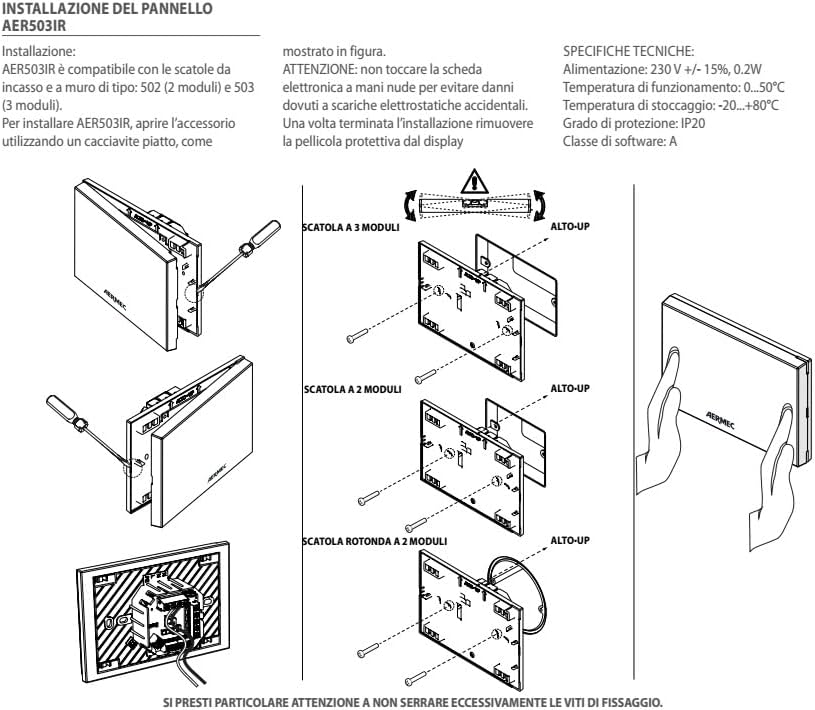
Figure 5.1: Electrical wiring diagram for the AERMEC AER503IR thermostat, detailing input/output connections for fan speed control, valve control, power supply, and sensor inputs.
കണക്ഷൻ പോയിൻ്റുകൾ:
- N: Neutral input for power supply and valves.
- L: Line input for power supply.
- PE: Power supply ground.
- Y2, Y1, V1, V2, V3: Outputs for fan speed control (minimum, medium, maximum) and valve control (2-pipe, 4-pipe, resistance/Coldplasma).
- DC1, DC2: Analog outputs (0-10Vdc) for inverter fan control and modulating valve control.
- SA: Additional ambient probe input.
- GND: Ground for additional ambient probe and water probe.
- SW: Water probe input.
- CE1, CE2: Multifunction input (refer to dedicated chapter for functions).
6. പ്രാരംഭ സജ്ജീകരണം
After successful installation and power restoration, the thermostat will power on. The backlit display will illuminate. Follow the on-screen prompts or refer to the full product manual for detailed initial configuration steps, including setting the current time, day, and desired temperature range.
- പവർ ഓൺ: Once wired correctly and power is supplied, the thermostat display should light up.
- അടിസ്ഥാന ക്രമീകരണങ്ങൾ: Use the touchpad controls to navigate through the menu. Typically, you will need to set the current time, day of the week, and desired temperature setpoints for heating and cooling modes.
- മോഡ് തിരഞ്ഞെടുക്കൽ: Select the operating mode (e.g., Cool, Heat, Auto, Fan Only) as required for your air conditioning system.
7. ഓപ്പറേഷൻ
The AERMEC AER503IR thermostat is operated via its integrated touchpad. The backlit display provides clear feedback on current settings and status.
അടിസ്ഥാന നിയന്ത്രണങ്ങൾ:
- താപനില ക്രമീകരണം: Use the up/down arrows on the touchpad to adjust the desired temperature setpoint.
- മോഡ് തിരഞ്ഞെടുക്കൽ: Press the mode button to cycle through available operating modes (e.g., Cooling, Heating, Fan, Auto).
- ഫാൻ വേഗത: If applicable, use the fan button to select desired fan speed (e.g., Low, Medium, High, Auto).
- ബാക്ക്ലൈറ്റ് പ്രദർശിപ്പിക്കുക: The display is backlit for easy viewing.
For advanced programming features, such as scheduling or specific fan operations, please consult the detailed product manual provided with your thermostat.
8. പരിപാലനം
The AERMEC AER503IR thermostat requires minimal maintenance to ensure optimal performance and longevity.
- വൃത്തിയാക്കൽ: Gently wipe the display and touchpad with a soft, dry, or slightly damp cloth. Do not use abrasive cleaners, solvents, or chemical sprays, as these can damage the surface or internal components.
- പൊടി നീക്കം: Periodically, gently dust the vents (if any) to ensure proper airflow and temperature sensing.
- ബാറ്ററി മാറ്റിസ്ഥാപിക്കൽ: If your model is battery-powered, replace batteries when the low battery indicator appears on the display. Use the specified battery type.
- പ്രൊഫഷണൽ പരിശോധന: It is recommended to have your HVAC system and thermostat inspected by a qualified technician annually to ensure efficient operation.
9. പ്രശ്നപരിഹാരം
If you encounter issues with your AERMEC AER503IR thermostat, refer to the following common problems and solutions. For more complex issues, contact customer support.
| പ്രശ്നം | സാധ്യമായ കാരണം | പരിഹാരം |
|---|---|---|
| തെർമോസ്റ്റാറ്റ് ഡിസ്പ്ലേ ശൂന്യമാണ്. | വൈദ്യുതി ഇല്ല; വയറിംഗ് അയഞ്ഞിരിക്കുന്നു; ബാറ്ററികൾ നശിച്ചു (ബാധകമെങ്കിൽ). | Check circuit breaker. Verify wiring connections. Replace batteries. |
| തെർമോസ്റ്റാറ്റ് ക്രമീകരണങ്ങളോട് സിസ്റ്റം പ്രതികരിക്കുന്നില്ല. | Incorrect mode selected; wiring issue; system malfunction. | Ensure correct mode (Cool/Heat/Auto). Check wiring. Consult HVAC technician. |
| താപനില വായന തെറ്റാണെന്ന് തോന്നുന്നു. | Thermostat located near heat source/draft; sensor issue. | Ensure thermostat is not exposed to direct sunlight or drafts. Contact support if issue persists. |
| Touchpad unresponsive. | Temporary glitch; physical damage. | Try cycling power to the thermostat. If damaged, contact support for replacement. |
10 സ്പെസിഫിക്കേഷനുകൾ
| ഫീച്ചർ | വിശദാംശങ്ങൾ |
|---|---|
| ബ്രാൻഡ് | AERMEC |
| മോഡലിൻ്റെ പേര് | Termostato AER503IR |
| ഇനം മോഡൽ നമ്പർ | TX |
| നിറം | വെള്ള |
| വാല്യംtage | 230 വോൾട്ട് |
| പ്രത്യേക ഫീച്ചർ | ബാക്ക്ലിറ്റ് |
| ഇനത്തിൻ്റെ ഭാരം | 1 കിലോഗ്രാം |
| കൺട്രോളർ തരം | മാനുവൽ നിയന്ത്രണം |
| നിർദ്ദിഷ്ട ഉൽപ്പന്ന ഉപയോഗങ്ങൾ | എയർ കണ്ടീഷണർ |
| താപനില നിയന്ത്രണ തരം | ഡിജിറ്റൽ |
| ഉൾപ്പെടുത്തിയ ഘടകങ്ങൾ | മൗണ്ടിംഗ് ബോക്സ് |
| പവർ ഉറവിടം | ബാറ്ററി പവർ |
| പാക്കേജ് അളവുകൾ | 20 x 10 x 10 സെ.മീ |
കുറിപ്പ്: അറിയിപ്പുകൾ കൂടാതെ സവിശേഷതകൾ മാറ്റത്തിന് വിധേയമാണ്.
11. വാറൻ്റിയും പിന്തുണയും
For warranty information and technical support, please refer to the documentation included with your purchase or visit the official AERMEC webസൈറ്റ്. വാറന്റി ക്ലെയിമുകൾക്കായി നിങ്ങളുടെ വാങ്ങലിന്റെ തെളിവ് സൂക്ഷിക്കുക.
ബന്ധപ്പെടാനുള്ള വിവരങ്ങൾ: നിർമ്മാതാവിന്റെ ഉദ്യോഗസ്ഥനെ കാണുക. website or your local distributor for contact details regarding customer service and technical assistance.