1. ആമുഖം
The LAUNCH X431 PRO3 ACE 2025 is an advanced automotive diagnostic scan tool designed for comprehensive vehicle analysis and maintenance. This device offers a wide range of functions including OE-level full system diagnostics, advanced ECU coding, bi-directional control, and over 55 reset services. It supports modern vehicle communication protocols such as CAN FD and DoIP, and features an intuitive topology mapping display for efficient fault identification. This manual provides essential information for setting up, operating, and maintaining your LAUNCH X431 PRO3 ACE.

Image 1.1: The LAUNCH X431 PRO3 ACE 2025 diagnostic tablet and DBSCar VII connector.
2. സജ്ജീകരണം
2.1. അൺബോക്സിംഗും പ്രാരംഭ പരിശോധനയും
Upon receiving your LAUNCH X431 PRO3 ACE, carefully unpack all components and inspect for any signs of damage. The package should include:
- LAUNCH X431 PRO3 ACE Display tablet
- DBSCAR VII connector
- US/UK/EU Plug (power adapter)
- HD15M മുതൽ OBDII 16 അഡാപ്റ്റർ വരെ
- ഫ്യൂസ്
- Password envelope (containing serial number and activation code)
- ദ്രുത ആരംഭ ഗൈഡ്
- ഉപയോക്തൃ മാനുവൽ
- HDB15F മുതൽ HDB15F വരെയുള്ള ഡാറ്റ കേബിൾ
- ടൈപ്പ്-എ മുതൽ ടൈപ്പ്-സി വരെയുള്ള യുഎസ്ബി കേബിൾ
- സിഗരറ്റ് ലൈറ്റർ കേബിൾ
- ബാറ്ററി clamps cable
2.2. Powering On and Registration
- Connect the power adapter to the tablet and charge it fully before first use.
- ഉപകരണം ഓണാക്കാൻ പവർ ബട്ടൺ അമർത്തിപ്പിടിക്കുക.
- Follow the on-screen instructions to complete the initial setup, including Wi-Fi connection.
- Register your device using the serial number and activation code found in the password envelope. This is crucial for software updates and warranty support.
2.3. സോഫ്റ്റ്വെയർ അപ്ഡേറ്റുകൾ
After registration, connect the device to a stable internet connection via Wi-Fi and perform all available software updates. Regular updates ensure compatibility with the latest vehicle models and diagnostic protocols.

ചിത്രം 2.1: പിൻഭാഗം view of the LAUNCH X431 PRO3 ACE tablet and the DBSCar VII Vehicle Communication Interface (VCI).
3. പ്രവർത്തന നിർദ്ദേശങ്ങൾ
3.1. ഒരു വാഹനവുമായി ബന്ധിപ്പിക്കുന്നു
- Locate the vehicle's OBD-II port (typically under the dashboard).
- Connect the DBSCar VII connector to the OBD-II port.
- Ensure the DBSCar VII connector is paired with the X431 PRO3 ACE tablet via Bluetooth.
- Turn the vehicle's ignition to the ON position (engine off).
3.2. Intelligent Diagnostics (AutoVIN Scan)
The Intelligent Diagnostics feature allows for quick vehicle identification and system scanning.
- From the main menu, select "Intelligent Diagnose".
- The tool will attempt to automatically detect the vehicle's VIN and initiate a full system scan.
- Alternatively, you can manually input the VIN or select the vehicle make, model, and year.
3.3. OE-ലെവൽ ഓൾ സിസ്റ്റം ഡയഗ്നോസ്റ്റിക്സ്
This function provides comprehensive access to all available vehicle systems, including Engine, Transmission, ABS, SRS, BCM, BMS, TPMS, SAS, Fuel System, Lighting System, and A/C System.
- കോഡുകൾ വായിക്കുക/മായ്ക്കുക: Retrieve and erase Diagnostic Trouble Codes (DTCs).
- View തത്സമയ ഡാറ്റ: Display real-time data streams from various sensors and components. This can be viewed in text, graph, or merged graph formats for detailed analysis.
- Retrieve ECU Version Information: Access control unit details.
- ഫ്രീസ് ഫ്രെയിം: View a snapshot of sensor data at the moment a DTC was set.
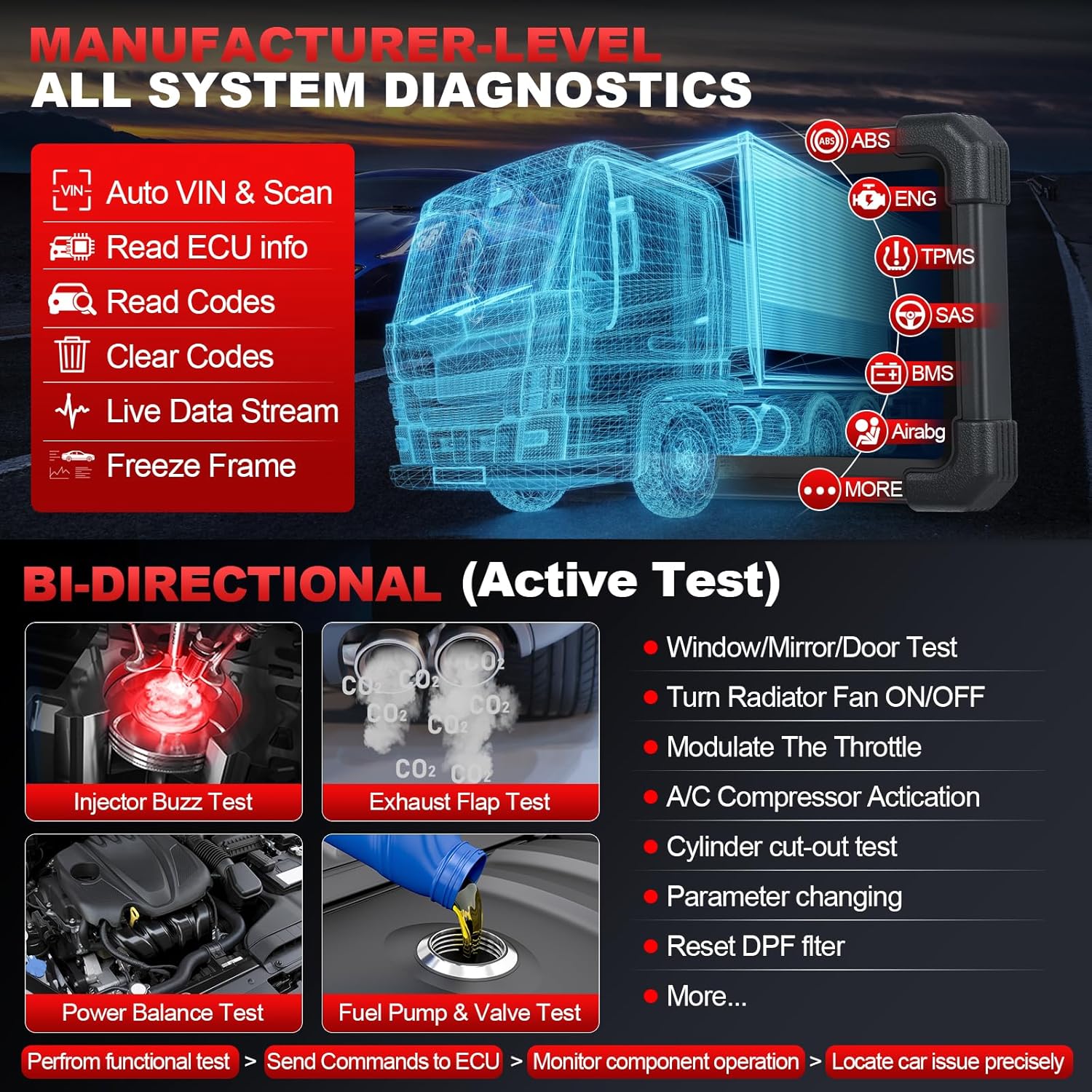
ചിത്രം 3.1: കഴിഞ്ഞുview of all system diagnostics and bi-directional control capabilities.
4. വിപുലമായ പ്രവർത്തനങ്ങൾ
4.1. Advanced ECU Coding
ECU Coding allows for modification, initialization, adaptation, matching, customization, and personalization of vehicle settings. This function can:
- Recode and relearn new or replaced ECUs.
- Activate high-end features.
- Alter configurations.
- Refresh hidden functions (e.g., disable auto start-stop, seat belt chime).
- Code adaptive data for components after repairs or replacements.
- Perform Component Matching, Relearn, Calibration, or Initialization (e.g., suspension calibration, seat matching, gearbox matching).
Note: Always back up the original module's code before performing any coding operations.
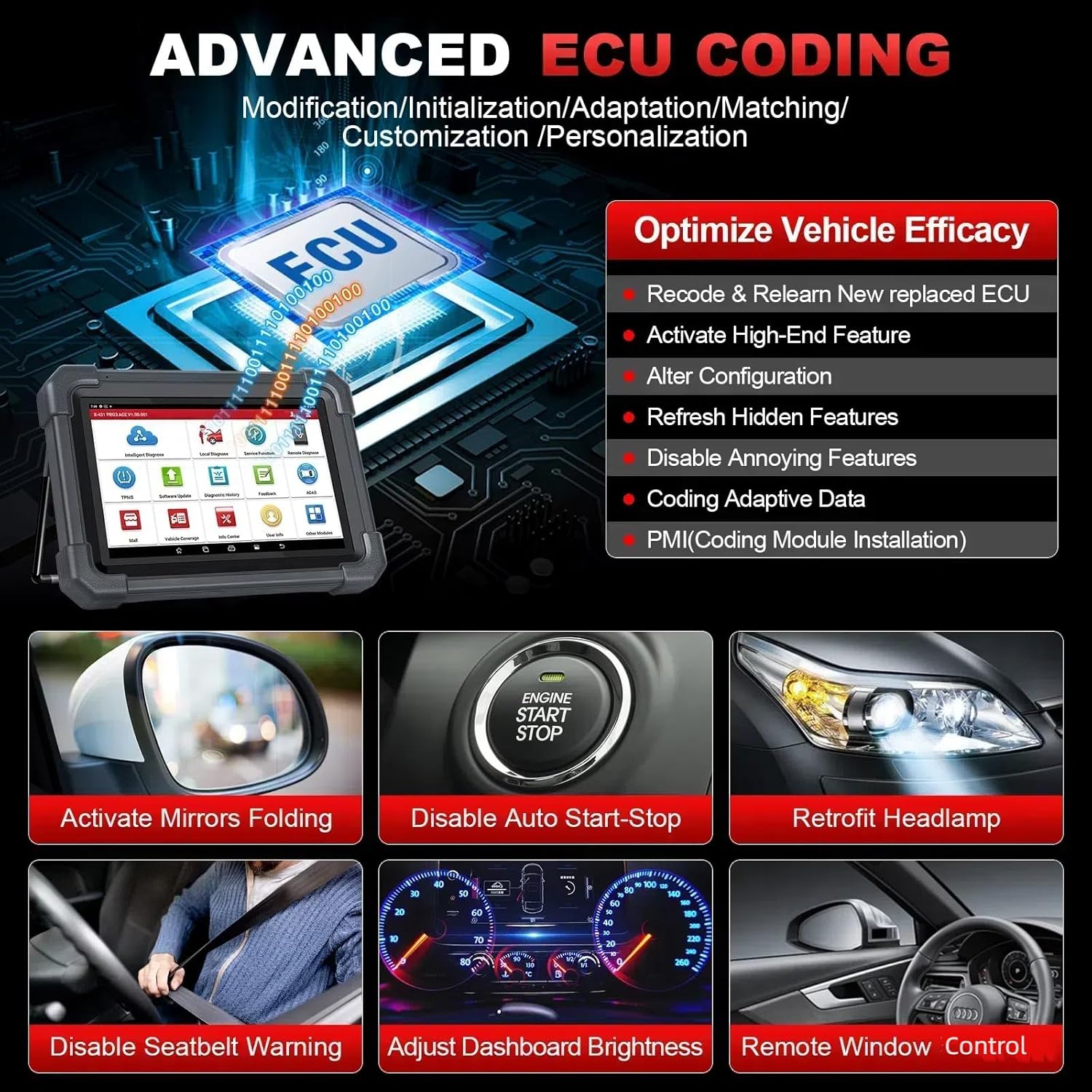
ചിത്രം 4.1: ഉദാamples of advanced ECU coding capabilities, such as activating mirror folding and disabling auto start-stop.
4.2. Bi-directional Control (Active Test)
Bi-directional control allows the scan tool to send commands to vehicle ECUs and monitor the operation of actuators. This helps in quickly identifying whether a specific system, component, or subsystem is functioning correctly.
Exampസജീവ പരിശോധനകളിൽ ഇവ ഉൾപ്പെടുന്നു:
- Turning on the radiator fan.
- Modulating the throttle.
- Operating windows and mirrors.
- Testing injector buzz.
- Turning on interior/exterior lights and horn.
- Cylinder cut-out tests.
4.3. OEM Topology Mapping
The topology mapping feature provides a visual representation of the vehicle's electrical system, showing all components and their connections. This helps in quickly pinpointing faults and troubleshooting with improved efficiency.

Image 4.2: The topology mapping interface, displaying vehicle modules and their status (normal, abnormal, scanned, not scanned, not equipped).
4.4. V.A.G Guided Functions
For Audi, Volkswagen, Skoda, and Seat vehicles, the tool provides on-screen, step-by-step instructions for diagnostics and service procedures, simplifying complex tasks.
5. Special Reset Functions (55+)
The LAUNCH X431 PRO3 ACE offers over 55 special reset and service functions to address common vehicle maintenance needs. These functions vary by vehicle make, model, and year.

Image 5.1: Visual representation of various reset functions including Oil Reset, ABS Bleeding, and DPF Regeneration.
Key functions include, but are not limited to:
- ഓയിൽ റീസെറ്റ്: ഓയിൽ മാറ്റത്തിനു ശേഷം എഞ്ചിൻ ഓയിൽ ലൈഫ് സിസ്റ്റം പുനഃസജ്ജമാക്കുന്നു.
- EPB റീസെറ്റ്: മാറ്റിസ്ഥാപിച്ചതിന് ശേഷം ഇലക്ട്രോണിക് പാർക്കിംഗ് ബ്രേക്ക് പാഡുകൾ പുനഃസജ്ജമാക്കുന്നു.
- BMS Reset (Battery Register/Maintenance): Registers a new battery and performs battery matching.
- ഡിപിഎഫ് പുനരുജ്ജീവനം: Initiates the regeneration process for the Diesel Particulate Filter.
- SAS സ്റ്റിയറിംഗ് ആംഗിൾ സെൻസർ റീസെറ്റ്: സ്റ്റിയറിംഗ് ആംഗിൾ സെൻസർ കാലിബ്രേറ്റ് ചെയ്യുന്നു.
- എബിഎസ് രക്തസ്രാവം: Bleeds air from the ABS system.
- Fuel Injector Coding: Writes new injector codes into the ECU.
- TPMS Service: Displays sensor IDs, inputs new sensor IDs, and tests sensors.
- ത്രോട്ടിൽ അഡാപ്റ്റേഷൻ: ത്രോട്ടിൽ ആക്യുവേറ്ററുകളെ അവയുടെ ഡിഫോൾട്ട് അവസ്ഥയിലേക്ക് ഇനീഷ്യലൈസ് ചെയ്യുന്നു.
- AFS Headlamp പുന et സജ്ജമാക്കുക: Initializes the adaptive headlamp സിസ്റ്റം.
- Sunroof Initialization: Resets the sunroof control unit.
- Air Suspension Reset: Adjusts vehicle body height sensors for level calibration.
- Gearbox Reset: Completes gearbox self-learning.
- ഗിയർ ലേണിംഗ്: Monitors camshaft position sensor signals.
- Tire Reset: Sets tire size parameters.
- A/F Reset: Sets or learns Air/Fuel ratio parameters.
- Adblue Reset: Resets urea values after diesel exhaust fluid replacement.
- Coolant Bleeding: Activates the electronic water pump.
- ഭാഷാ മാറ്റം: Changes vehicle system language.
- Nox Sensor Reset: Resets catalytic converter learned values.
- നിർത്തുക/ആരംഭിക്കുക പുനഃസജ്ജമാക്കുക: Configures the automatic start-stop function.
- Seat Calibration: Calibrates memory in replaced or repaired seats.
- Delete Transport Mode: Deactivates transport mode.
- വിൻഡോസ് കാലിബ്രേഷൻ: Performs door window matching.
- AC System Relearn/Initialization: Relearns or initializes the AC system.
- EGR Reset: Resets the Exhaust Gas Recirculation system.
- Fuel Alcohol Level Reset: Resets fuel alcohol level parameters.
- Fuel Trim Reset: Resets fuel trim values.
- ഉയർന്ന വോളിയംtage Battery Diagnostics: Diagnoses high voltagഇ ബാറ്ററി സംവിധാനങ്ങൾ.
- GPF Regeneration: Initiates regeneration for Gasoline Particulate Filters.
- Camshaft/Crankshaft Sensor Relearn: Relearns sensor positions.
- Interactive Vehicle Dynamics (IVD) Initialization Sequence: Initializes IVD systems.
- Fuel Economy Test: Performs fuel economy tests.
- Halt/Resume Transmission Adaptive Learning: Controls transmission adaptive learning.
- Passive System (PATS) Functions: Manages Passive Anti-Theft System functions.
- Relearn Vehicle Data: Relearns vehicle-specific data.
- Initialization Of Automatic Tailgate: Initializes automatic tailgate systems.
- Initialize Power Window Regulators: Initializes power window regulators.
- Seat Standardization: Standardizes seat positions.
- Normalize Slide/Tilt Sunroof: Normalizes sunroof operation.
- Zero-Point Calibration: Performs zero-point calibration for various sensors.
- BSI Solenoid Test: Tests BSI solenoids.
- Clutch System Learn: Learns clutch system parameters.
- VGT Relearn: Relearns Variable Geometry Turbocharger settings.
- Transmission Service Fast Relearn: Performs fast relearn for transmission services.
- SWS Initialization: Initializes Steering Wheel Sensor.
- VIN Registration (Write): Registers or writes VIN.
- Injector Fuel Rate Coding: Codes injector fuel rates.
- Fuel Injector Balance: Balances fuel injectors.
6. Vehicle Coverage and Protocols
The LAUNCH X431 PRO3 ACE supports a broad range of vehicles, covering over 200 brands and 200,000 models from 1984 to 2025, including passenger cars, SUVs, minivans, and light-duty trucks.

ചിത്രം 6.1: കഴിഞ്ഞുview of extensive vehicle coverage across American, European, and Asian markets.
6.1. Supported Regions and Brands
- അമേരിക്ക: Ford, Lincoln, GM, Buick, Cadillac, Chevrolet, Chrysler, Dodge, Jeep, HM, Tesla.
- യൂറോപ്പ്: Benz, Smart, Sprinter, BMW, VW, Skoda, Audi, Opel, Lamborghini, Porsche, Maybach, Euroford, Land Rover, Bentley, Rolls Royce, Rover, Mini, Vauxhall, Ferrari, Fiat, Abarth, Lancia, Alfa Romeo, Maserati, Bugatti, Peugeot, Citroen, Renault, Saab, Volvo, Dacia, Seat.
- ഏഷ്യ: Samsung, Daewoo, Ssangyong, Hyundai, Kia, Honda, Acura, Toyota, Scion, Lexus, Mazda, Nissan, Infiniti, JPISUZU, TLISUZU, Daihatsu, Suzuki, Mitsubishi, Subaru, Changcheng, Huachen, Zhongxing, Jacty, Qirui_TY, Isuzu, Jinlong, Changan, Liuwei_TY, Xinkai, Zhongshun, Haoqing, Hafei, Xiali, Changhe, Zhongtai, Kowloon, Brilliance, Lifan, Weili, Flyer, Ssangyong, Jiao, Luxgen, BYD, Chery, Zotye.
- മറ്റ് പ്രദേശങ്ങൾ: Perodua, Proton (Malaysia); IKCO, MVM, SAIPA (Iran); Austford, Holden (Australia); TATA, Maruti, Mahindra, India HM (India); GAZ, VAZ (Russia); FIAT, GM (Brazil).
6.2. Advanced Protocols
- FD ചെയ്യാൻ കഴിയും: Supports higher data transfer rates (up to 4 Mbit/s) for newer GM models (2020-2025) and Chrysler models (2021-2025).
- DoIP (Diagnostic over Internet Protocol): Enables ultra-faster data transfer rates for compatible vehicles (e.g., BMW F&G chassis, Volvo 2018+, Land Rover & Jaguar 2017+). A separate adapter may be required.
- FCA SGW-യ്ക്കുള്ള ഓട്ടോഓത്ത്: Allows communication with the FCA SGW Authentication System for diagnostics and bi-directional controls on FCA vehicles without a bypass cable. Registration with AutoAuth is required.
7. Connectivity and Updates
7.1. Wi-Fi and Bluetooth
The device features 2.4 & 5 GHz Wi-Fi for internet connectivity and Bluetooth for wireless communication with the DBSCar VII VCI.
7.2. One-Click Online Update
Software updates are performed via Wi-Fi with a single click, ensuring the tool remains current with the latest vehicle models and diagnostic functions. The device includes 2 years of free software updates.
7.3. Remote Diagnosis and Feedback
For complex issues, the remote diagnosis feature allows connection with an expert for assistance. Users can also send feedback messages to LAUNCH technicians for support or bug reporting.
7.4. Diagnostic Report Print & Share
Generate full system diagnostic reports with one click. Reports can be emailed, printed via Wi-Fi, or shared for record-keeping or client communication.

Image 7.1: Key user-friendly features such as Auto VIN scan, 12-in-1 live data stream, and diagnostic report sharing.
8. Expandable Modules
The LAUNCH X431 PRO3 ACE can be expanded with various optional modules (sold separately) to enhance its diagnostic capabilities:

Image 8.1: Various optional modules such as BST360, X431 TSGUN, X-PROG3, and SmartLink HD.
- X-PROG3 Box: For engine and gearbox programming.
- ADAS ToolKit: For calibrating Advanced Driver-Assistance Systems (ADAS).
- Scopebox (O2-1): For quickly acquiring and analyzing circuit signals.
- S2-2 Sensorbox: Diagnoses and simulates vehicle sensor faults.
- S2-2 Multimeter: Measures physical parameters like voltagഇ, പ്രതിരോധം, ആവൃത്തി.
- BST360 (Battery Tester): For faster and easier battery detection.
- TSGUN TPMS Device: Activates, relearns, and programs TPMS sensors.
- VideoScope VSP-600: For inspecting unseen parts of the engine, fuel tank, and braking system.
- X431 WIFI Printer: For direct printing of diagnostic reports.
- EM 101N Oscilloscope Multimeter: അളവുകൾ വോളിയംtage signals and analyzes electronic signal waveforms, particularly useful for hybrid vehicles.
- X431 SmartlinkC HD module: Enables full comprehensive HD truck diagnostic functions for 12V to 24V light, medium, and heavy-duty vehicles.
9 സ്പെസിഫിക്കേഷനുകൾ
| ഫീച്ചർ | സ്പെസിഫിക്കേഷൻ |
|---|---|
| ബ്രാൻഡ് | ലോഞ്ച് |
| മോഡൽ നമ്പർ | OADD-PO1005A |
| ഓപ്പറേറ്റിംഗ് സിസ്റ്റം | ആൻഡ്രോയിഡ് 10.0 |
| പ്രോസസ്സർ | 2.0GHz 4-core |
| പ്രദർശിപ്പിക്കുക | 10.1 inch 1280*800 Touch Screen |
| മെമ്മറി | 4 ജിബി റാം + 64 ജിബി റോം |
| ക്യാമറ | 8.0 എം.പി |
| ബാറ്ററി | 6300mAh/7.6V (equivalent to 12600mAh/3.7V) Lithium Ion |
| കണക്റ്റിവിറ്റി | 2.4 & 5 GHz Wi-Fi, Bluetooth |
| ഇനത്തിൻ്റെ ഭാരം | 20.9 പൗണ്ട് |
| പാക്കേജ് അളവുകൾ | 18.15 x 16.4 x 13.19 ഇഞ്ച് |
10. ബോക്സിൽ എന്താണുള്ളത്?
The standard package for the LAUNCH X431 PRO3 ACE includes:
- LAUNCH X431 PRO3 ACE Display tablet
- DBSCAR VII connector
- US/UK/EU Plug (power adapter)
- HD15M മുതൽ OBDII 16 അഡാപ്റ്റർ വരെ
- ഫ്യൂസ്
- Password envelope
- ദ്രുത ആരംഭ ഗൈഡ്
- ഉപയോക്തൃ മാനുവൽ
- HDB15F മുതൽ HDB15F വരെയുള്ള ഡാറ്റ കേബിൾ
- ടൈപ്പ്-എ മുതൽ ടൈപ്പ്-സി വരെയുള്ള യുഎസ്ബി കേബിൾ
- സിഗരറ്റ് ലൈറ്റർ കേബിൾ
- ബാറ്ററി clamps cable
11. പ്രശ്നപരിഹാരം
This section provides general guidance for common issues. For specific problems, refer to the device's built-in information center or contact support.
11.1. ഉപകരണം ഓണാക്കുന്നില്ല
- ബാറ്ററി ചാർജ്ജ് ചെയ്തിട്ടുണ്ടെന്ന് ഉറപ്പാക്കുക. ഉപകരണം പവർ അഡാപ്റ്ററുമായി ബന്ധിപ്പിച്ച് വീണ്ടും പവർ ഓൺ ചെയ്യാൻ ശ്രമിക്കുന്നതിന് മുമ്പ് കുറഞ്ഞത് 30 മിനിറ്റെങ്കിലും ചാർജ് ചെയ്യാൻ അനുവദിക്കുക.
- Verify the power adapter and cable are securely connected and functional.
11.2. VCI Connection Issues
- Confirm the DBSCar VII connector is properly plugged into the vehicle's OBD-II port.
- Check Bluetooth settings on the tablet to ensure the VCI is paired and connected.
- Restart both the tablet and the vehicle's ignition.
11.3. Software Update Failures
- Ensure a stable and strong Wi-Fi connection.
- Verify sufficient storage space on the device.
- Attempt the update again after restarting the device.
11.4. Incompatible Functions
- Not all functions are compatible with all vehicles. Compatibility depends on the specific car model, year, and system.
- For compatibility inquiries, provide your car's make, year, model, VIN, and the specific function needed to LAUNCH technical support.
12. പരിപാലനം
12.1. വൃത്തിയാക്കൽ
- Regularly clean the tablet screen with a soft, lint-free cloth. Avoid abrasive cleaners.
- Keep the DBSCar VII connector and cables free from dirt, oil, and moisture.
12.2. സംഭരണം
- Store the device in its protective case when not in use to prevent damage.
- Avoid storing the device in extreme temperatures or high humidity.
12.3. സോഫ്റ്റ്വെയർ അപ്ഡേറ്റുകൾ
Perform software updates regularly to ensure optimal performance, access to new features, and compatibility with the latest vehicle models.
13. വാറൻ്റിയും പിന്തുണയും
The LAUNCH X431 PRO3 ACE is backed by comprehensive support and warranty services:
- സോഫ്റ്റ്വെയർ അപ്ഡേറ്റുകൾ: 2 years of free software updates. After this period, the device will continue to function with the last updated software version, but new updates will require renewal.
- Product Quality Backup: 5 years of product quality backup.
- തിരികെ നൽകൽ നയം: 90-day no-reason return and replacement policy.
- സാങ്കേതിക സഹായം: Lifetime free 24/7/365 technical support and in-app live tech support.
For technical assistance or compatibility checks, please contact LAUNCH support via the in-app feedback feature or the provided contact information in your quick start guide.


