1. ആമുഖം
വാങ്ങിയതിന് നന്ദി.asing the KATO 22-050 ECS-1 Driving Stand Type Controller AC Adapter Set. This controller is designed to provide a realistic and immersive operating experience for your model railway. This manual will guide you through the setup, operation, and maintenance of your new controller to ensure safe and enjoyable use.
2 സുരക്ഷാ വിവരങ്ങൾ
- ഏതെങ്കിലും അറ്റകുറ്റപ്പണികൾ അല്ലെങ്കിൽ വൃത്തിയാക്കൽ നടത്തുന്നതിന് മുമ്പ് എല്ലായ്പ്പോഴും വൈദ്യുതി വിതരണം വിച്ഛേദിക്കുക.
- കൺട്രോളർ വെള്ളത്തിലോ അമിതമായ ഈർപ്പത്തിലോ തുറന്നുകാട്ടരുത്.
- Use only the provided KATO AC adapter or a compatible power supply specified by the manufacturer.
- നേരിട്ട് സൂര്യപ്രകാശത്തിൽ നിന്നും താപ സ്രോതസ്സുകളിൽ നിന്നും ഉപകരണം അകറ്റി നിർത്തുക.
- This product is not a toy. It is intended for use by individuals aged 14 and older.
- പ്രവർത്തന സമയത്ത് യൂണിറ്റിന് ചുറ്റും ശരിയായ വായുസഞ്ചാരം ഉറപ്പാക്കുക.
3. പാക്കേജ് ഉള്ളടക്കം
താഴെ പറയുന്ന എല്ലാ ഇനങ്ങളും നിങ്ങളുടെ പാക്കേജിൽ ഉൾപ്പെടുത്തിയിട്ടുണ്ടോ എന്ന് ദയവായി പരിശോധിക്കുക:
- KATO 22-050 ECS-1 Driving Stand Type Controller
- എസി അഡാപ്റ്റർ
- നിർദ്ദേശ മാനുവൽ (ഈ പ്രമാണം)
4. ഉൽപ്പന്നം കഴിഞ്ഞുview
Familiarize yourself with the various parts of your KATO 22-050 ECS-1 controller.

Figure 4.1: Front-Side View
This image displays the primary operating side of the controller, featuring the main control lever on the right, three circular gauges (likely for speed, pressure, and current) on the angled panel, and a row of indicator lights below the gauges.

Figure 4.2: Opposite Front-Side View
Another perspective of the controller's front, highlighting the ergonomic design of the control lever and the clear visibility of the gauges and status indicators.

ചിത്രം 4.3: പിൻഭാഗം View
The rear panel of the controller, showing the power input jack, ventilation grilles, and output terminals for connecting to the model railway track. An AC adapter cable is visible.
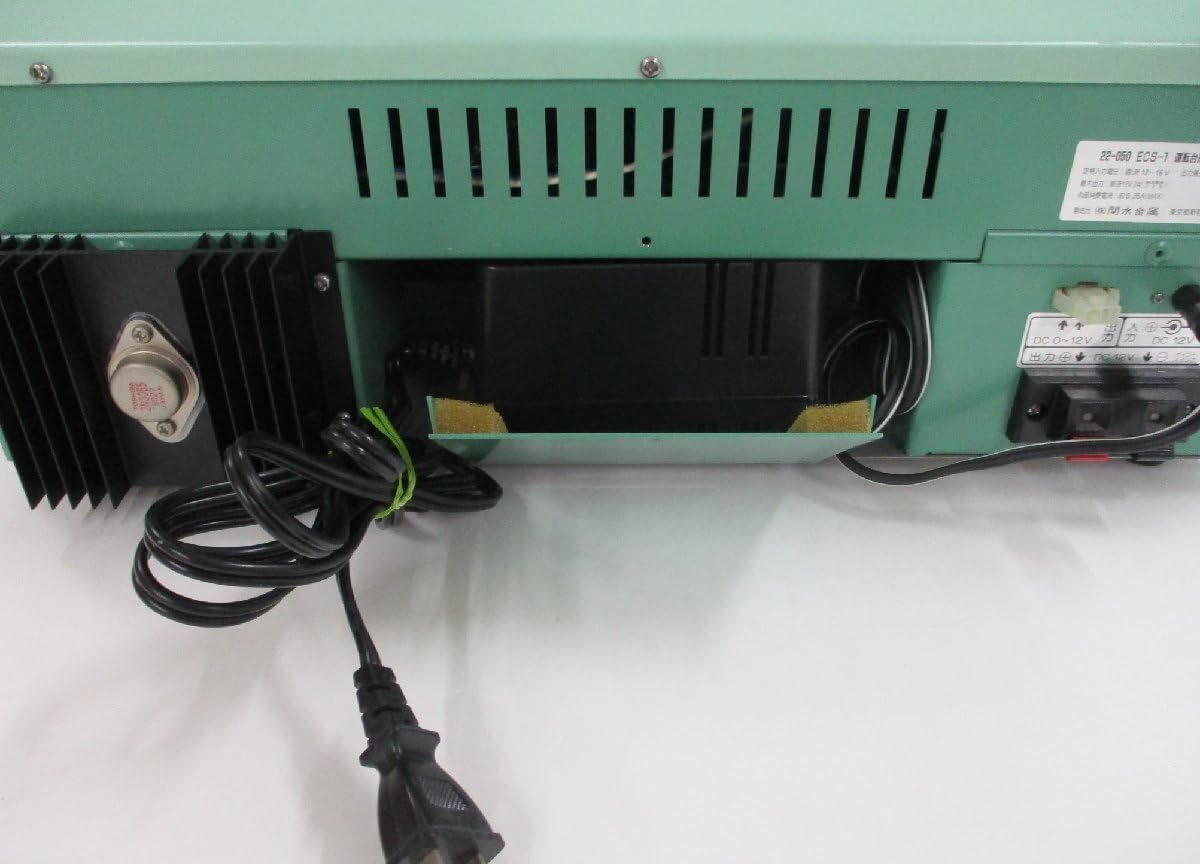
Figure 4.4: Rear Panel Detail
A closer look at the rear connections, including the AC adapter input and the DC output terminals for track power. Labels indicate DC 0-12V output.

Figure 4.5: Gauges and Indicators
ഈ വിശദമായ view shows one of the gauges indicating speed in km/h, ranging up to 160 km/h. Below the gauges are several indicator lights with labels such as 'Overcurrent', 'Speed Control', 'Direct Current', 'Electric Brake', and 'Emergency'.

Figure 4.6: Indicator Lights Detail
A close-up of the indicator lights. From left to right, the labels are: 'Overcurrent' (過電流), 'Speed Control' (抑速), 'Direct Current' (直通), 'Electric Brake' (電制), and 'Emergency' (非常). In this image, 'Overcurrent' and 'Direct Current' appear to be illuminated.

Figure 4.7: Control Lever Base
എ വിശദമായി view of the mounting mechanism for the main control lever, showing its robust construction.

ചിത്രം 4.8: താഴെ View
The underside of the controller, revealing rubber feet for stability and additional ventilation slots.
5. സജ്ജീകരണം
- പ്ലേസ്മെൻ്റ്: Place the KATO 22-050 ECS-1 controller on a stable, flat surface, ensuring adequate ventilation around the unit.
- എസി അഡാപ്റ്റർ ബന്ധിപ്പിക്കുക: Insert the plug of the supplied AC adapter into the 'AC IN' jack on the rear of the controller (refer to Figure 4.3 and 4.4). Then, plug the AC adapter into a standard wall outlet.
- Connect to Track: Connect the track feeder wires from your model railway layout to the 'DC 0-12V' output terminals on the rear of the controller. Ensure correct polarity (+ and -) as indicated on the terminals and your track system.
- പ്രാരംഭ പരിശോധന: Before operating, ensure all connections are secure and there are no loose wires.
6. പ്രവർത്തന നിർദ്ദേശങ്ങൾ
The KATO 22-050 ECS-1 controller simulates a real train cab experience. Follow these steps for operation:
6.1 പവർ ഓൺ/ഓഫ്
- To power on, ensure the AC adapter is connected and plugged into a live outlet. The controller should illuminate its internal indicators.
- To power off, simply unplug the AC adapter from the wall outlet.
6.2 Main Control Lever
The large lever on the right side of the controller is your primary control for speed and braking.
- ത്വരണം: Push the lever forward to increase the train's speed. The speed gauge (km/h) will indicate the simulated speed.
- Braking/Deceleration: Pull the lever backward to decrease the train's speed or apply brakes.
- ന്യൂട്രൽ: Position the lever in the center for a neutral state where no power is supplied to the track.
6.3 Gauges
The three circular gauges provide visual feedback on the train's status:
- Speed Gauge (km/h): Indicates the simulated speed of the train.
- Other Gauges: These may represent parameters such as brake pressure, current draw, or other operational metrics. Refer to specific KATO documentation for detailed interpretation if available.
6.4 ഇൻഡിക്കേറ്റർ ലൈറ്റുകൾ
The row of indicator lights provides important status information (refer to Figure 4.5 and 4.6):
- Overcurrent (過電流): Illuminates if the current draw exceeds safe limits, indicating a short circuit or overload on the track. Immediately reduce power or investigate the cause.
- Speed Control (抑速): May indicate an active speed control function or mode.
- Direct Current (直通): Likely indicates that direct current power is being supplied to the track.
- Electric Brake (電制): Illuminates when the electric braking system is active.
- Emergency (非常): Illuminates during an emergency stop condition. There may be an associated emergency stop button (red button visible in Figure 4.5) that activates this.
7. പരിപാലനം
- വൃത്തിയാക്കൽ: Use a soft, dry cloth to wipe the exterior of the controller. Do not use abrasive cleaners or solvents.
- സംഭരണം: When not in use, store the controller in a clean, dry place, away from dust and extreme temperatures.
- പരിശോധന: Periodically check the power cord and adapter for any signs of damage. If damaged, discontinue use and replace with an authorized KATO part.
8. പ്രശ്നപരിഹാരം
| പ്രശ്നം | സാധ്യമായ കാരണം | പരിഹാരം |
|---|---|---|
| കൺട്രോളർ പവർ ഓണാക്കുന്നില്ല. | AC adapter not connected or faulty. No power from outlet. | Ensure AC adapter is securely connected to the controller and plugged into a working outlet. Test the outlet with another device. |
| ട്രെയിൻ നീങ്ങുന്നില്ല. | Track connections loose. Overcurrent detected. Control lever in neutral. | Check track feeder connections. If 'Overcurrent' light is on, check for short circuits on the track or locomotive. Move the control lever forward. |
| തീവണ്ടി ക്രമരഹിതമായി നീങ്ങുന്നു. | Dirty track or locomotive wheels. Loose connections. | Clean track and locomotive wheels. Ensure all connections are tight. |
| 'Overcurrent' light illuminates frequently. | Short circuit on track. Locomotive drawing too much current. | Inspect track for foreign objects or derailments causing a short. Check locomotive for issues. Reduce the number of locomotives if multiple are used. |
9 സ്പെസിഫിക്കേഷനുകൾ
- മോഡൽ: KATO 22-050 ECS-1
- ഇൻപുട്ട് പവർ: AC (via dedicated AC adapter)
- ഔട്ട്പുട്ട് പവർ: DC 0-12V (for track)
- നിയന്ത്രണ തരം: Driving Stand Type (Lever control)
- സൂചകങ്ങൾ: Speed gauge (km/h), Overcurrent, Speed Control, Direct Current, Electric Brake, Emergency lights.
10. വാറൻ്റിയും പിന്തുണയും
For warranty information and customer support, please refer to the documentation provided at the time of purchase or contact your retailer. KATO provides support for its products, and details can typically be found on their official webസൈറ്റ് അല്ലെങ്കിൽ അംഗീകൃത വിതരണക്കാർ വഴി.


