1. ആമുഖം
This manual provides detailed instructions for the safe and efficient use of your Linkind Plug Remote. This device is designed to offer convenient control over Linkind/AiDot Smart Plugs, enabling easy management of your smart home devices.
2 സുരക്ഷാ വിവരങ്ങൾ
Please read all safety instructions before using the product. Failure to follow these instructions may result in electric shock, fire, or other hazards.
- വെള്ളം, ഉയർന്ന ആർദ്രത എന്നിവയിൽ നിന്ന് ഉപകരണം അകറ്റി നിർത്തുക.
- ഉപകരണം ഡിസ്അസംബ്ലിംഗ് ചെയ്യാനോ നന്നാക്കാനോ ശ്രമിക്കരുത്.
- Use only the specified battery type (CR2032).
- ബാറ്ററികൾ കുട്ടികൾക്ക് ലഭ്യമാകാതെ സൂക്ഷിക്കുക.
3. പാക്കേജ് ഉള്ളടക്കം
പാക്കേജിൽ എല്ലാ ഇനങ്ങളും ഉണ്ടെന്ന് ഉറപ്പാക്കുക:
- Linkind Plug Remote
- വാൾ പ്ലേറ്റ്
- CR2032 ബാറ്ററി (മുൻകൂട്ടി ഇൻസ്റ്റാൾ ചെയ്തതോ പ്രത്യേകം ഉൾപ്പെടുത്തിയതോ)
- Mounting Screws and Adhesive
- Icon Stickers for Customization
4. സജ്ജീകരണം
4.1. ബാറ്ററി ഇൻസ്റ്റാളേഷൻ
The Linkind Plug Remote uses one CR2032 button battery. If not pre-installed, open the battery compartment on the back of the remote and insert the battery with the positive (+) side facing up. Close the compartment securely.
Video: Demonstrates the unboxing and battery installation process for the Linkind Smart Plug Remote.
4.2. Pairing the Remote with Smart Plugs
Follow these steps to pair your Linkind Plug Remote with compatible smart plugs:
- Press any button on the remote control three times. The red light on the remote will start blinking, indicating pairing mode.
- Plug in the smart plug you wish to pair.
- Press and hold the button on the smart plug for 5 seconds. The green and yellow lights on the plug will flash.
- Once successfully paired, the green light on the plug will flash twice.

Image: Visual guide for pairing the Linkind Plug Remote with a smart plug.
4.3. ആപ്പ് അനുയോജ്യത
The Linkind Plug Remote is exclusively compatible with the Linkind Official App, AiDot. Ensure you have the AiDot app installed on your smartphone for advanced control and customization. Other smart home platforms like Alexa, Google Home, and SmartThings are not directly supported by the remote itself, but Linkind/AiDot smart plugs may have broader compatibility.

Image: Illustrates the exclusive compatibility of the remote with the AiDot app.
5. പ്രവർത്തന നിർദ്ദേശങ്ങൾ
The Linkind Plug Remote offers versatile control options for your smart plugs.
5.1. Basic On/Off Control
Each key on the remote can be configured to turn a specific smart plug or group of plugs on or off. Simply press the assigned button to toggle the power state of your connected devices.
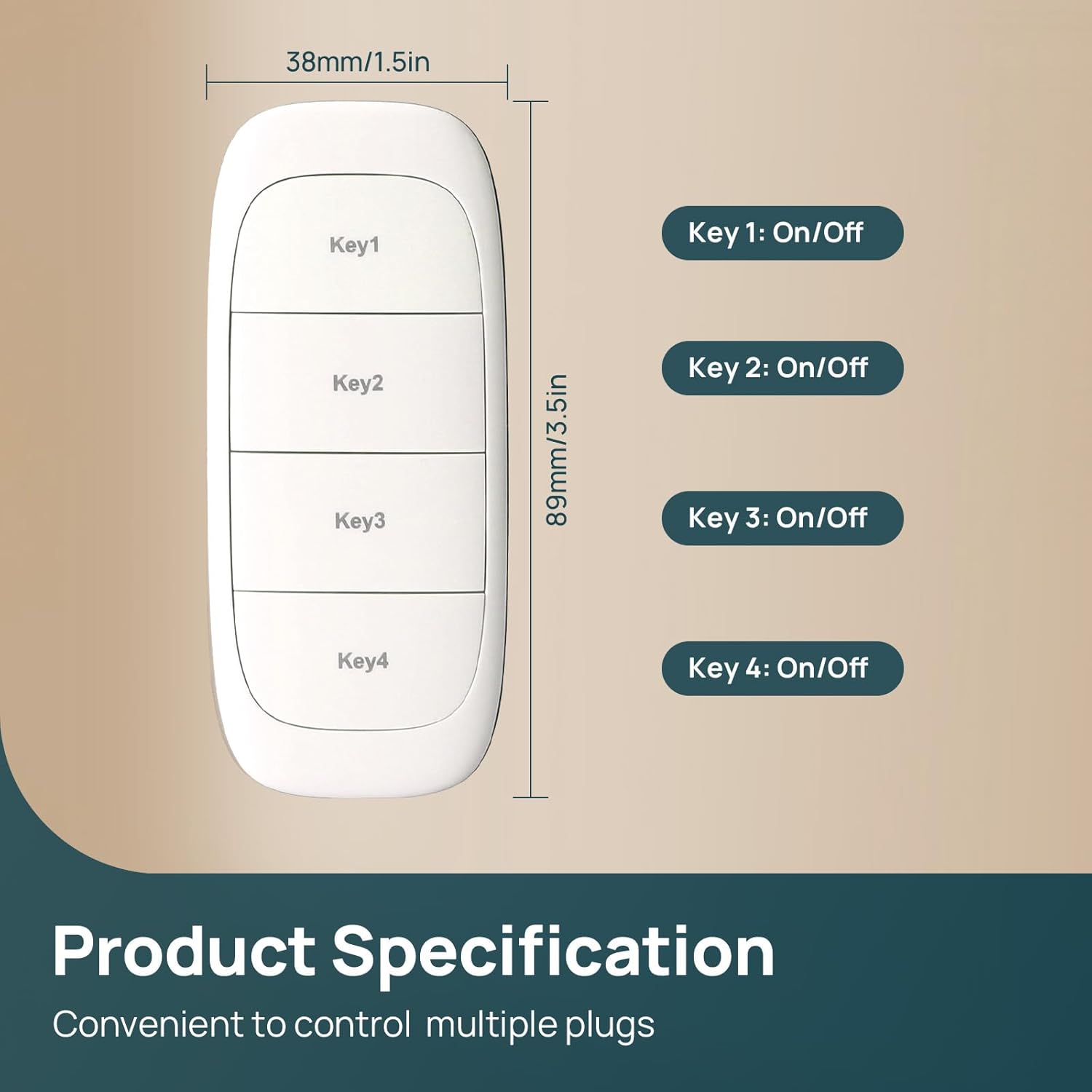
ചിത്രം: കഴിഞ്ഞുview of the remote's keys and their basic On/Off function.
5.2. ഗ്രൂപ്പ് നിയന്ത്രണം
You can configure the remote to control multiple smart plugs simultaneously with a single press. This allows for customized control of various devices in a room or area.

Image: Demonstrates how one remote can control multiple smart outlets for group control.
5.3. Separate Control
Each button can also be assigned to control individual smart plugs, allowing for precise management of specific devices. This is useful for controlling a lamp, humidifier, or Christmas lights independently.

ചിത്രം: ഉദാamples of separate control for various household items using smart plugs.
5.4. Wide Range Control
The Linkind Plug Remote offers an impressive RF range of up to 98 feet (approximately 30 meters), ensuring reliable control even from distant rooms or outdoor spaces within your home.

Image: Visual representation of the remote's wide wireless range within a home environment.
Video: Showcases the Linkind smart plugs and remote in a festive Christmas setting, demonstrating ease of use.
6. പരിപാലനം
6.1. ബാറ്ററി മാറ്റിസ്ഥാപിക്കൽ
The CR2032 battery is designed to last up to one year under normal usage. When the remote's indicator light no longer illuminates or the remote becomes unresponsive, it's time to replace the battery. Carefully open the battery compartment on the back of the remote and replace the old battery with a new CR2032 battery, ensuring correct polarity.
7. പ്രശ്നപരിഹാരം
If you encounter issues with your Linkind Plug Remote, refer to the following common solutions:
- റിമോട്ട് പ്രതികരിക്കുന്നില്ല: Check the battery. Replace the CR2032 battery if necessary.
- പ്ലഗ് പ്രതികരിക്കുന്നില്ല: Ensure the smart plug is powered on and within the remote's 98ft RF range. Re-pair the remote with the smart plug if the issue persists.
- Buttons Sticking: Occasionally, buttons may stick due to manufacturing tolerances. Ensure you press the buttons directly and firmly.
- Delayed Response: While generally quick, occasional short delays may occur depending on environmental factors or network conditions.
- ആപ്പ് കണക്ഷൻ പ്രശ്നങ്ങൾ: Ensure your smartphone has a stable internet connection and the AiDot app is up to date.
8 സ്പെസിഫിക്കേഷനുകൾ
| ഫീച്ചർ | സ്പെസിഫിക്കേഷൻ |
|---|---|
| ഉൽപ്പന്ന അളവുകൾ | 2.4 x 2.4 x 2.4 ഇഞ്ച് |
| ഇനത്തിൻ്റെ ഭാരം | 1.44 ഔൺസ് |
| ഇനം മോഡൽ നമ്പർ | LC2300284 |
| ബാറ്ററികൾ | 1 CR2032 ബാറ്ററികൾ ആവശ്യമാണ് (ഉൾപ്പെടുന്നു) |
| പ്രത്യേക ഫീച്ചർ | Group Control, Remote Control, Separate Control |
| നിറം | വെള്ള |
| പിന്തുണയ്ക്കുന്ന ഉപകരണങ്ങളുടെ പരമാവധി എണ്ണം | 1 (per button, multiple plugs can be grouped) |
| അനുയോജ്യമായ ഉപകരണങ്ങൾ | Linkind/AiDot Smart Plug |
9. വാറൻ്റിയും പിന്തുണയും
For warranty information and technical support, please refer to the official Linkind webസൈറ്റിൽ ബന്ധപ്പെടുക അല്ലെങ്കിൽ അവരുടെ ഉപഭോക്തൃ സേവനവുമായി ബന്ധപ്പെടുക. വാറന്റി ക്ലെയിമുകൾക്കായി നിങ്ങളുടെ വാങ്ങൽ രസീത് സൂക്ഷിക്കുക.


