1. ആമുഖം
Thank you for choosing the Asani Indoor Air Quality Monitor. This device is designed to provide real-time, comprehensive monitoring of various air pollutants and environmental factors in your indoor spaces. With its advanced sensors, it detects 8 major air pollutants including Carbon Dioxide (CO2), Volatile Organic Compounds (VOCs), Formaldehyde (HCHO), Air Quality Index (AQI), Particulate Matter (PM2.5, PM10), as well as humidity and temperature. This manual provides essential information for the proper setup, operation, and maintenance of your monitor to ensure accurate readings and long-lasting performance.
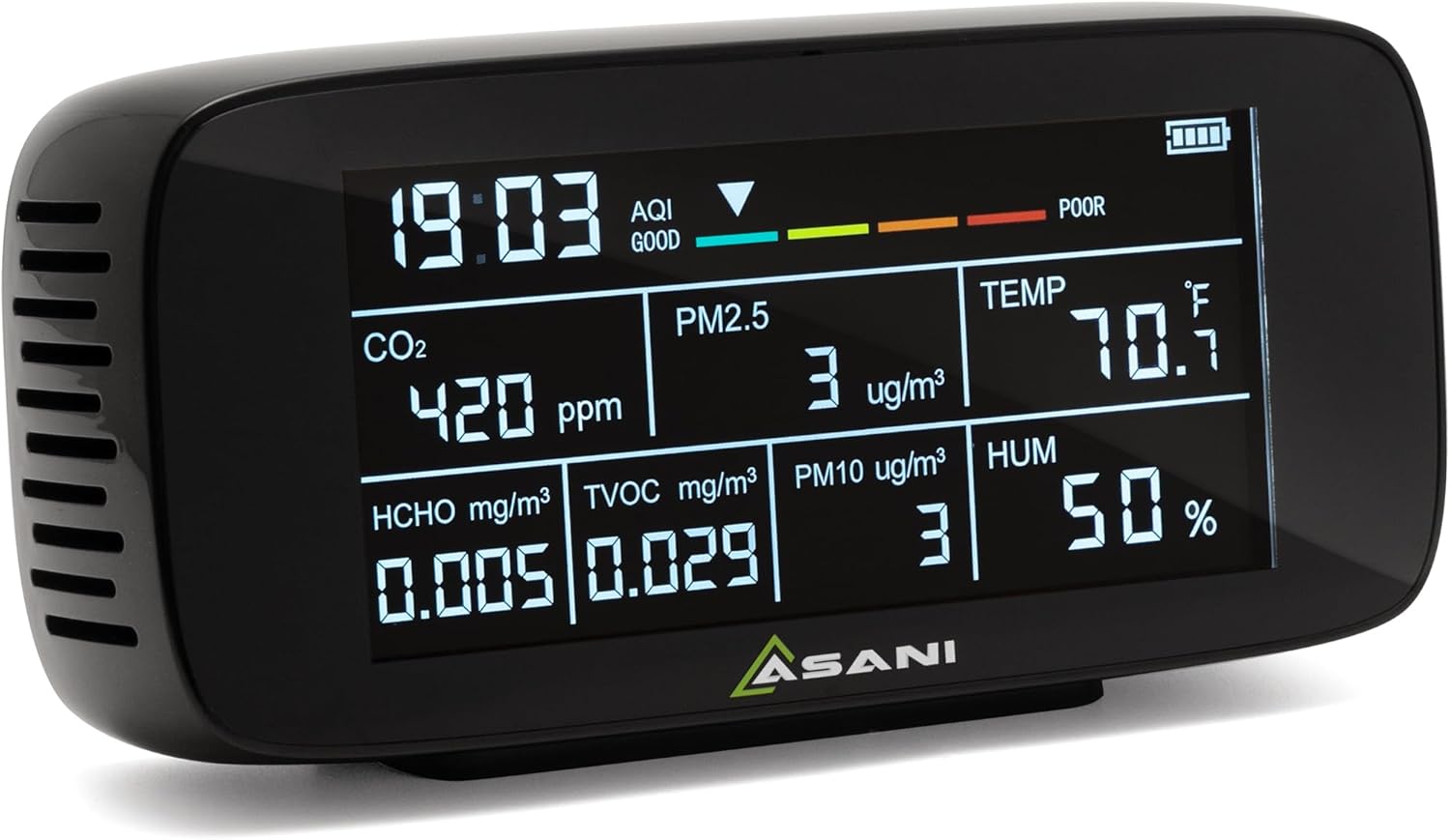
Image: Asani Indoor Air Quality Monitor, front view showing the display with time, AQI, CO2, PM2.5, PM10, HCHO, TVOC, temperature, and humidity readings.
2. ഉൽപ്പന്ന സവിശേഷതകൾ
- സമഗ്രമായ നിരീക്ഷണം: Equipped with ultra-precise sensors to detect CO2, VOCs, formaldehyde, AQI, PM2.5, PM10, humidity, and temperature.
- പോർട്ടബിൾ, ബഹുമുഖം: Designed for easy portability, suitable for monitoring air quality in homes, offices, vehicles, and areas affected by environmental factors like wildfires.
- ഉപയോക്തൃ-സൗഹൃദ ഇൻ്റർഫേസ്: Features a clear, easy-to-read display for stress-free setup and operation, without the need for Wi-Fi or app-based controls.
- വിപുലീകരിച്ച ബാറ്ററി ലൈഫ്: Powered by a 3000 mAh rechargeable lithium polymer battery, offering up to 11 hours of continuous operation.
- യാന്ത്രിക ഷട്ട്ഡൗൺ: Includes an "Auto-Shutdown" feature that powers down the device after 11 hours to extend its lifespan and maintain performance.
- തത്സമയ ഡാറ്റ: Provides instant readings for all detected parameters, allowing for immediate assessment of air quality.

Image: A visual representation of the 9-in-1 functionality, listing pollutant types (CO2, PM2.5, PM10, HCHO, TVOC) with common sources, and additional functions (AQI, Time, Temperature, Humidity).
3. ഉപകരണ ഘടകങ്ങൾ
Familiarize yourself with the key components and display indicators of your Asani Air Quality Monitor:

ചിത്രം: മുന്നിലും മുകളിലും view of the Asani Air Quality Monitor with labels pointing to: Time, AQI (Air Quality Index), Battery Level, CO2 (Carbon Dioxide), HCHO (Formaldehyde), TVOC (Total Volatile Organic Compounds), PM2.5, PM10, Temperature, Humidity, and USB-C Rechargeable port.
- ഡിസ്പ്ലേ സ്ക്രീൻ: Shows all real-time readings and indicators.
- പവർ ബട്ടൺ: Located on the back/side for turning the device on/off.
- USB-C ചാർജിംഗ് പോർട്ട്: ആന്തരിക ബാറ്ററി റീചാർജ് ചെയ്യുന്നതിന്.
- എയർ വെൻ്റുകൾ: Located on the sides and back for air circulation to the sensors.
- സൂചകങ്ങൾ:
- സമയം: നിലവിലെ സമയ പ്രദർശനം.
- AQI (എയർ ക്വാളിറ്റി ഇൻഡക്സ്): Overall air quality indicator (Good, Moderate, Caution, Unhealthy).
- ബാറ്ററി നില: ശേഷിക്കുന്ന ബാറ്ററി ചാർജ് സൂചിപ്പിക്കുന്നു.
- CO2 (Carbon Dioxide): Measured in parts per million (ppm).
- PM2.5 / PM10: Particulate matter measured in micrograms per cubic meter (µg/m³).
- HCHO (ഫോർമാൽഡിഹൈഡ്): Measured in milligrams per cubic meter (mg/m³).
- TVOC (മൊത്തം അസ്ഥിരമായ ജൈവ സംയുക്തങ്ങൾ): Measured in milligrams per cubic meter (mg/m³).
- TEMP (Temperature): Measured in degrees Fahrenheit (°F) or Celsius (°C).
- HUM (Humidity): Measured in percentagഇ (%).
4. സജ്ജീകരണം
- അൺബോക്സിംഗ്: Carefully remove the Asani Air Quality Monitor from its packaging. Ensure all components are present: the monitor unit, USB-C charging cable, and this manual.
- പ്രാരംഭ ചാർജ്: Before first use, it is recommended to fully charge the device. Connect the provided USB-C charging cable to the monitor's USB-C port and plug the other end into a compatible USB power adapter (not included). The battery indicator on the display will show charging status.
- പവർ ഓൺ: Press and hold the power button (usually located on the back or side) for a few seconds until the display lights up.
- പ്രാരംഭ കാലിബ്രേഷൻ:
പ്രധാനപ്പെട്ടത്: For accurate readings, the device requires a calibration process upon startup and whenever it is moved to a new location. Allow the monitor to run for approximately 10 മിനിറ്റ് in the desired environment for the air to circulate through its sensors and for calibration to complete. During this time, HCHO values may initially decrease as the device stabilizes.
- പ്ലേസ്മെൻ്റ്: Place the monitor in a central location within the area you wish to monitor. Ensure air vents are not obstructed. Avoid placing it directly next to windows, air conditioners, heaters, or in direct sunlight, as this can affect temperature and humidity readings.
5. പ്രവർത്തന നിർദ്ദേശങ്ങൾ
5.1. ഡിസ്പ്ലേ മനസ്സിലാക്കൽ
The large, clear display provides real-time readings for all monitored parameters. The Air Quality Index (AQI) bar at the top offers a quick visual summary of overall air quality:

Image: Chart explaining AQI levels: Good (Green), Moderate (Yellow), Caution (Orange), Unhealthy (Red), with descriptions for each category.
- Good (Green): വായുവിൻ്റെ ഗുണനിലവാരം തൃപ്തികരമാണ്, വായു മലിനീകരണം അപകടസാധ്യത കുറവാണ് അല്ലെങ്കിൽ അപകടസാധ്യതയൊന്നും സൃഷ്ടിക്കുന്നില്ല.
- Moderate (Yellow): Air quality is acceptable. However, there may be a risk for some people, particularly those who are unusually sensitive to air pollutant.
- Caution (Orange): സെൻസിറ്റീവ് ഗ്രൂപ്പുകളിലെ അംഗങ്ങൾക്ക് ആരോഗ്യപരമായ പ്രത്യാഘാതങ്ങൾ അനുഭവപ്പെട്ടേക്കാം. പൊതുജനങ്ങളെ ബാധിക്കാനുള്ള സാധ്യത കുറവാണ്.
- Unhealthy (Red): പൊതുജനങ്ങളിൽ ചിലർക്ക് ആരോഗ്യപരമായ പ്രത്യാഘാതങ്ങൾ ഉണ്ടായേക്കാം; സെൻസിറ്റീവ് ഗ്രൂപ്പുകളിലെ അംഗങ്ങൾ കൂടുതൽ ഗുരുതരമായ ആരോഗ്യപ്രശ്നങ്ങൾ അനുഭവിച്ചേക്കാം.
5.2. Continuous Monitoring
Once powered on and calibrated, the monitor will continuously display the current air quality data. You can move the device between rooms as needed, remembering to allow for a brief recalibration period (approx. 10 minutes) after relocation for optimal accuracy.
5.3. CO2 Alarm Function
The device may include an audible alarm function for high CO2 levels. If CO2 levels exceed a preset threshold (e.g., 1000 ppm), the monitor may beep to alert you to potentially poor ventilation. Refer to the device's specific button functions (if any) for adjusting or silencing this alarm.
5.4. Automatic Shutdown Feature
To conserve battery and extend the device's lifespan, the monitor is equipped with an automatic shutdown feature. It will power down automatically after approximately 11 hours of continuous operation. To resume monitoring, simply press the power button again.
6. പരിപാലനം
- വൃത്തിയാക്കൽ: Gently wipe the device with a soft, dry cloth. Do not use abrasive cleaners, solvents, or immerse the device in water. Ensure no liquid enters the air vents.
- സെൻസർ പരിചരണം: The sensors are delicate. Avoid exposing the device to excessive dust, moisture, or extreme temperatures, which can affect sensor accuracy and lifespan. Do not attempt to clean the internal sensors.
- സംഭരണം: When not in use for extended periods, store the monitor in a cool, dry place away from direct sunlight and extreme temperatures. It is advisable to fully charge the battery before long-term storage.
- ബാറ്ററി: The device uses a built-in rechargeable lithium polymer battery. Do not attempt to replace the battery yourself. If the battery performance significantly degrades, contact customer support.
7. പ്രശ്നപരിഹാരം
| പ്രശ്നം | സാധ്യമായ കാരണം | പരിഹാരം |
|---|---|---|
| ഉപകരണം ഓണാക്കില്ല. | ബാറ്ററി തീർന്നു. | Connect the device to a power source using the USB-C cable and allow it to charge for at least 30 minutes before attempting to power on again. |
| Readings seem inaccurate or fluctuate wildly. | Device not fully calibrated or recently moved. Air vents are obstructed. Exposure to strong fumes or drafts. | Ensure the device has been running for at least 10 minutes in its current location for calibration. Check that air vents are clear. Move the device away from direct sources of pollution (e.g., cleaning products, cooking fumes) or strong air currents. |
| CO2 alarm sounds frequently. | High CO2 levels detected. | Increase ventilation in the room by opening windows or doors. Reduce the number of occupants in the space if possible. |
| ബാറ്ററി ലൈഫ് പ്രതീക്ഷിച്ചതിലും ചെറുതാണ്. | കാലക്രമേണ ബാറ്ററിയുടെ നാശത്തിന് കാരണമാകുന്നു. Continuous operation without auto-shutdown. | Ensure the auto-shutdown feature is functioning. If significant degradation occurs, contact customer support for assistance. |
8 സ്പെസിഫിക്കേഷനുകൾ
| പരാമീറ്റർ | വിശദാംശങ്ങൾ |
|---|---|
| മോഡൽ നമ്പർ | DM197 |
| ബ്രാൻഡ് | ആശാനി |
| Detected Pollutants | CO2, VOCs, Formaldehyde (HCHO), PM2.5, PM10 |
| അധിക അളവുകൾ | AQI (Air Quality Index), Temperature, Humidity |
| പവർ ഉറവിടം | ബാറ്ററി പവർ (റീചാർജ് ചെയ്യാവുന്ന ലിഥിയം അയൺ) |
| ബാറ്ററി ശേഷി | 3000 mAh |
| പ്രവർത്തന സമയം | 11 മണിക്കൂർ വരെ (തുടർച്ചയായി) |
| ചാർജിംഗ് പോർട്ട് | USB-C |
| ഇനത്തിൻ്റെ ഭാരം | 12.32 ഔൺസ് (ഏകദേശം 349 ഗ്രാം) |
| അളവുകൾ | Approx. 7.4 x 3.46 x 1.65 inches (based on image PT01) |
| സെൻസർ തരം | Ionization (for some parameters) |
| അളക്കൽ കൃത്യത | 1 ppm (for CO2, as per spec) |
9. വാറൻ്റി വിവരങ്ങൾ
Asani products are manufactured with high-quality standards. For specific warranty details, including coverage period and terms, please refer to the warranty card included with your product packaging or visit the official Asani webസൈറ്റ്. ഏതെങ്കിലും വാറന്റി ക്ലെയിമുകൾക്കായി നിങ്ങളുടെ വാങ്ങലിന്റെ തെളിവ് സൂക്ഷിക്കുക.
10. ഉപഭോക്തൃ പിന്തുണ
If you encounter any issues or have questions regarding your Asani Indoor Air Quality Monitor, please do not hesitate to contact our customer support team.
- ഓൺലൈൻ പിന്തുണ: Visit the official Asani webപതിവുചോദ്യങ്ങൾ, ട്രബിൾഷൂട്ടിംഗ് ഗൈഡുകൾ, കോൺടാക്റ്റ് ഫോമുകൾ എന്നിവയ്ക്കുള്ള സൈറ്റ്.
- ഇമെയിൽ പിന്തുണ: നിങ്ങളുടെ ഉൽപ്പന്ന പാക്കേജിംഗ് അല്ലെങ്കിൽ ഔദ്യോഗിക webഉപഭോക്തൃ സേവന ഇമെയിൽ വിലാസത്തിനായുള്ള സൈറ്റ്.
- ഫോൺ പിന്തുണ: Check the official Asani webലഭ്യമായ ഫോൺ സപ്പോർട്ട് നമ്പറുകളും പ്രവർത്തന സമയവും അറിയാൻ സൈറ്റ് സന്ദർശിക്കുക.
When contacting support, please have your product model number (DM197) and purchase details ready.
