1. ആമുഖം
നിങ്ങളുടെ ബ്ലാക്ക് ഉപകരണം സജ്ജീകരിക്കുന്നതിനും പ്രവർത്തിപ്പിക്കുന്നതിനും പരിപാലിക്കുന്നതിനും ട്രബിൾഷൂട്ട് ചെയ്യുന്നതിനും ആവശ്യമായ വിവരങ്ങൾ ഈ മാനുവൽ നൽകുന്നു.view Color 8 Android smartphone. Please read this manual thoroughly to ensure proper use and to maximize the device's capabilities.
2. ബോക്സിൽ എന്താണുള്ളത്?
നിങ്ങളുടെ ഉൽപ്പന്ന പാക്കേജിംഗിൽ എല്ലാ ഇനങ്ങളും ഉണ്ടെന്ന് ഉറപ്പാക്കുക:
- കറുപ്പ്view Color 8 Smartphone
- ഫോൺ കേസ്
- പവർ അഡാപ്റ്റർ
- സിം ട്രേ എജക്ടർ
- സ്ക്രീൻ പ്രൊട്ടക്ടർ (മുൻകൂട്ടി പ്രയോഗിച്ചതോ ഉൾപ്പെടുത്തിയതോ)

ചിത്രം: കറുപ്പ്view Color 8 smartphone shown with its standard accessories, including a clear phone case and a gift box representing other items.
3. ഡിവൈസ് ഓവർview
നിങ്ങളുടെ കറുപ്പിന്റെ ഭൗതിക ഘടകങ്ങളുമായി പരിചയപ്പെടുക.view Color 8 smartphone.

ചിത്രം: വിശദമായത് view കറുത്തവരുടെview Color 8's side, highlighting the 3-card slot for SIM and MicroSD, the 3.5mm audio jack, and the Smart-K box speaker. Icons also indicate GPS, Face ID, and Fingerprint ID features.
4. സജ്ജീകരണം
4.1 സിം കാർഡും മൈക്രോ എസ്ഡി ഇൻസ്റ്റാളേഷനും
ബ്ലാക്ക്view Color 8 supports dual Nano SIM cards and one MicroSD/TF card for expanded storage. Use the provided SIM tray ejector tool to open the tray.
- Locate the SIM tray slot on the side of your phone.
- ട്രേയുടെ അടുത്തുള്ള ചെറിയ ദ്വാരത്തിലേക്ക് സിം ട്രേ എജക്റ്റർ ഉപകരണം തിരുകുക, ട്രേ പുറത്തേക്ക് വരുന്നത് വരെ സൌമ്യമായി അമർത്തുക.
- Place your Nano SIM cards and/or MicroSD card into the designated slots on the tray, ensuring correct orientation.
- ട്രേ അതിന്റെ സ്ഥാനത്ത് ക്ലിക്കായി വരുന്നത് വരെ ശ്രദ്ധാപൂർവ്വം ഫോണിലേക്ക് വീണ്ടും തിരുകുക.

Image: Illustration of the three-card slot, demonstrating how to insert two SIM cards and one TF (MicroSD) card into the Blackview Color 8.
4.2 പ്രാരംഭ പവർ ഓണും ചാർജിംഗും
ആദ്യ ഉപയോഗത്തിന് മുമ്പ്, നിങ്ങളുടെ ഉപകരണം പൂർണ്ണമായും ചാർജ് ചെയ്യാൻ ശുപാർശ ചെയ്യുന്നു.
- Connect the provided power adapter to your phone's USB Type-C port.
- Plug the adapter into a power outlet. The charging indicator will appear on the screen.
- To power on, press and hold the Power button (located on the side) until the Blackview ലോഗോ ദൃശ്യമാകുന്നു.
- ഭാഷാ തിരഞ്ഞെടുപ്പ്, വൈ-ഫൈ കണക്ഷൻ, ഗൂഗിൾ അക്കൗണ്ട് സജ്ജീകരണം എന്നിവയുൾപ്പെടെയുള്ള പ്രാരംഭ സജ്ജീകരണം പൂർത്തിയാക്കാൻ ഓൺ-സ്ക്രീൻ നിർദ്ദേശങ്ങൾ പാലിക്കുക.

ചിത്രം: ആന്തരികം view കറുത്തവരുടെview Color 8, emphasizing the large 6000mAh battery and the 18W fast charging feature. Also shows the phone's slim profile and OTG support.
5. നിങ്ങളുടെ ഉപകരണം പ്രവർത്തിപ്പിക്കുന്നു
5.1 അടിസ്ഥാന നാവിഗേഷൻ
ബ്ലാക്ക്view Color 8 operates on Android 13 with Doke OS 4.0, offering intuitive navigation through gestures or on-screen buttons.
- ഹോം സ്ക്രീൻ: Swipe left or right to access different pages of apps and widgets.
- ആപ്പ് ഡ്രോയർ: സ്ക്രീനിന്റെ അടിയിൽ നിന്ന് മുകളിലേക്ക് സ്വൈപ്പുചെയ്യുക view ഇൻസ്റ്റാൾ ചെയ്ത എല്ലാ ആപ്ലിക്കേഷനുകളും.
- അറിയിപ്പുകളും ദ്രുത ക്രമീകരണങ്ങളും: സ്ക്രീനിന്റെ മുകളിൽ നിന്ന് താഴേക്ക് സ്വൈപ്പ് ചെയ്ത് അറിയിപ്പുകളും ക്വിക്ക് സെറ്റിംഗ്സ് ടോഗിളുകളും ആക്സസ് ചെയ്യുക.
5.2 ഡിസ്പ്ലേ സവിശേഷതകൾ
The device features a large 6.75-inch HD+ display with a 90Hz refresh rate for a smooth visual experience.
- സ്ക്രീൻ വലിപ്പം: 6.75 ഇഞ്ച്
- പുതുക്കൽ നിരക്ക്: 90Hz for fluid scrolling and animations.
- തെളിച്ചം: വ്യത്യസ്ത ലൈറ്റിംഗ് സാഹചര്യങ്ങളിൽ വ്യക്തമായ ദൃശ്യപരതയ്ക്കായി 450 നിറ്റുകൾ വരെ.
- നിറങ്ങൾ: Supports 16.7 million colors for vibrant visuals.

ചിത്രം: ദി ബ്ലാക്ക്view Color 8's display, illustrating its 6.75-inch size, 90Hz refresh rate, 450 nits brightness, and 16.7 million color support.
5.3 ക്യാമറ പ്രവർത്തനങ്ങൾ
Capture high-quality photos and videos with the 50MP main camera and 8MP front camera.
- പ്രധാന ക്യാമറ: 50MP resolution with JN1 sensor and Smart ISO for optimal color reproduction and low-light performance.
- മുൻ ക്യാമറ: 8MP for clear selfies.
- ഫോട്ടോ മോഡുകൾ: Includes 360° Panorama Capture, Beauty Mode, Night Mode, HDR, Portrait, and Pro Mode.
- വീഡിയോ റെക്കോർഡിംഗ്: Supports 1080P video recording.

ചിത്രം: കറുത്തവരുടെ ദൃശ്യ പ്രാതിനിധ്യംview Color 8's ArcSoft camera modes, including HDR for brilliance, Super Night for noise-less low-light shots, Portrait for subject focus, and Beauty for enhanced selfies.
5.4 പ്രകടനവും സംഭരണവും
ബ്ലാക്ക്view Color 8 is equipped with an Octa-core processor and ample memory for smooth operation.
- പ്രോസസ്സർ: Octa-core processor for efficient multitasking and gaming.
- റാം: 8GB RAM, expandable to 16GB with virtual memory.
- ആന്തരിക സംഭരണം: 256GB ROM.
- വികസിപ്പിക്കാവുന്ന സംഭരണം: Supports Micro SD cards up to 2TB.

Image: A visual breakdown of the Blackview Color 8's processing power, showing the Octa-core CPU, 16GB RAM (expandable from 8GB), 256GB ROM, and up to 1TB expandable storage.
5.5 Operating System Features (Android 13 & Doke OS 4.0)
Experience enhanced privacy, improved UI, and additional functionalities with Android 13 and Doke OS 4.0.
- സ്വകാര്യത പരിരക്ഷ: Enhanced features to prevent privacy leakage.
- Per-App Language Preferences: Customize language settings for individual applications.
- ഈസിഷെയർ ആപ്പ്: Faster data transfer than wireless Bluetooth.
- Call Recording: Built-in functionality for recording calls.
- Exercise Index Tracking: Monitor your physical activity.
- തത്സമയ സബ്ടൈറ്റിലുകൾ: Provides live captions for videos.
- Dynamic Live View: Quick access to alerts and ongoing activities.

ചിത്രം: കഴിഞ്ഞുview of DokeOS 4.0 features on Android 13, showcasing the Health APP, real-time subtitle function, screen attention, and various privacy controls.

Image: The EasyShare App interface on the Blackview Color 8, demonstrating its capability for quick and easy file transfer between devices without relying on network connectivity.
5.6 കണക്റ്റിവിറ്റി
The Color 8 offers robust connectivity options for communication and navigation.
- നെറ്റ്വർക്ക്: Supports 4G FDD (B1/B2/B3/B4/B5/B7/B8/B12/B17/B20/B26/B28A/B28B/B66), 3G WCDMA (B1/B2/B4/B5/B8), and 2G GSM (850/900/1800/1900).
- വൈഫൈ: വയർലെസ് ഇന്റർനെറ്റ് ആക്സസിനായി.
- നാവിഗേഷൻ: Integrated GPS, Beidou, GLONASS, and Galileo for precise location services.

Image: A map graphic illustrating the multi-system navigation support (GPS, Glonass, Galileo, Beidou) for accurate positioning on the Blackview Color 8.
5.7 സുരക്ഷാ സവിശേഷതകൾ
Unlock your phone securely and conveniently.
- ഫിംഗർപ്രിന്റ് ഐഡി: Integrated into the power button for quick and secure access.
- Face ID Unlock: Uses the front camera for facial recognition.

Image: A close-up of the Blackview Color 8's side, highlighting the power button which also functions as a fingerprint sensor for quick and secure unlocking.
6. പരിപാലനം
6.1 ബാറ്ററി മാനേജ്മെൻ്റ്
The 6000mAh battery provides extended usage. To optimize battery life:
- തീവ്രമായ താപനില ഒഴിവാക്കുക.
- Use the provided 18W fast charger for efficient charging.
- Enable battery saver modes when needed.
- ഉപയോഗിക്കാത്ത പശ്ചാത്തല ആപ്ലിക്കേഷനുകൾ അടയ്ക്കുക.
6.2 സോഫ്റ്റ്വെയർ അപ്ഡേറ്റുകൾ
Regularly check for and install software updates to ensure optimal performance, security, and access to new features. Updates are typically found in the device's Settings menu under 'System' or 'About phone'.
6.3 ശുചീകരണവും പരിചരണവും
- സ്ക്രീനും ബോഡിയും വൃത്തിയാക്കാൻ മൃദുവായ, ലിന്റ് രഹിത തുണി ഉപയോഗിക്കുക.
- കഠിനമായ രാസവസ്തുക്കളോ ഉരച്ചിലുകളോ ഉപയോഗിക്കുന്നത് ഒഴിവാക്കുക.
- Keep the device away from excessive dust and moisture.
7. പ്രശ്നപരിഹാരം
നിങ്ങളുടെ ബ്ലാക്ക് ഹാൻഡ്സെറ്റിൽ നിങ്ങൾ നേരിട്ടേക്കാവുന്ന പൊതുവായ പ്രശ്നങ്ങളെ ഈ വിഭാഗം അഭിസംബോധന ചെയ്യുന്നു.view Color 8.
7.1 ഉപകരണം ഓണാക്കുന്നില്ല
- ബാറ്ററി ചാർജ്ജ് ചെയ്തിട്ടുണ്ടെന്ന് ഉറപ്പാക്കുക. കുറഞ്ഞത് 15 മിനിറ്റെങ്കിലും ഫോൺ ചാർജറുമായി ബന്ധിപ്പിക്കുക.
- റീസ്റ്റാർട്ട് ചെയ്യാൻ പവർ ബട്ടൺ 10-15 സെക്കൻഡ് അമർത്തിപ്പിടിക്കുക.
7.2 മോശം നെറ്റ്വർക്ക് സിഗ്നൽ
- നിങ്ങളുടെ സിം കാർഡ് ശരിയായി ചേർത്തിട്ടുണ്ടോയെന്ന് പരിശോധിക്കുക.
- മികച്ച നെറ്റ്വർക്ക് കവറേജ് ഉള്ള ഒരു പ്രദേശത്തേക്ക് മാറുക.
- ഉപകരണം പുനരാരംഭിക്കുക.
- Verify that your carrier supports the phone's 4G bands (refer to specifications).
7.3 ആപ്പുകൾ ക്രാഷാകുകയോ മരവിപ്പിക്കുകയോ ചെയ്യുന്നു
- Clear the cache and data for the problematic app in Settings > Apps.
- ആപ്പ് അതിന്റെ ഏറ്റവും പുതിയ പതിപ്പിലേക്ക് അപ്ഡേറ്റ് ചെയ്തിട്ടുണ്ടെന്ന് ഉറപ്പാക്കുക.
- നിങ്ങളുടെ ഉപകരണത്തിൽ ചാർജ് കുറവാണെങ്കിൽ സംഭരണ സ്ഥലം ശൂന്യമാക്കുക.
7.4 Fingerprint/Face ID Not Working
- Ensure your finger is clean and dry for fingerprint recognition.
- Ensure your face is well-lit and unobstructed for Face ID.
- Re-register your fingerprint or face in the Security settings.
8 സ്പെസിഫിക്കേഷനുകൾ
കറുപ്പിന്റെ പ്രധാന സാങ്കേതിക സവിശേഷതകൾview Color 8 smartphone:
| മോഡൽ നമ്പർ | TB-2024 |
| ഓപ്പറേറ്റിംഗ് സിസ്റ്റം | ആൻഡ്രോയിഡ് 13 (ഡോക്ക് ഒ.എസ് 4.0) |
| പ്രോസസ്സർ | Octa-core (Unisoc T616) |
| റാം | 8GB (expandable to 16GB virtual RAM) |
| ആന്തരിക സംഭരണം | 256 ജിബി റോം |
| വികസിപ്പിക്കാവുന്ന സംഭരണം | Up to 2TB MicroSD/TF card |
| പ്രദർശിപ്പിക്കുക | 6.75-inch HD+ (1600 x 720), 90Hz Refresh Rate, 450 nits brightness |
| പിൻ ക്യാമറ | 50എംപി |
| മുൻ ക്യാമറ | 8എംപി |
| ബാറ്ററി | 6000mAh, 18W ഫാസ്റ്റ് ചാർജിംഗ് |
| സിം കാർഡ് സ്ലോട്ടുകൾ | 3 (2 Nano SIM + 1 MicroSD) |
| കണക്റ്റിവിറ്റി | 4G LTE, Wi-Fi, Bluetooth, GPS, GLONASS, Beidou, Galileo |
| സുരക്ഷ | Fingerprint ID, Face ID |
| ഓഡിയോ ജാക്ക് | 3.5 മി.മീ |
| അളവുകൾ | 9.1mm Slim |
| ഭാരം | 214 ഗ്രാം |
9. വാറൻ്റിയും പിന്തുണയും
കറുപ്പ്view offers a comprehensive warranty for its products.
- വാറൻ്റി കാലയളവ്: എല്ലാം കറുപ്പ്view cellphones are guaranteed for 2 years from the date of purchase.
- സേവനം: This includes a 24-month free repair warranty and lifetime technician support.
- ബന്ധപ്പെടുക: For any issues or support inquiries, please contact Blackview customer service or the official flagship store.
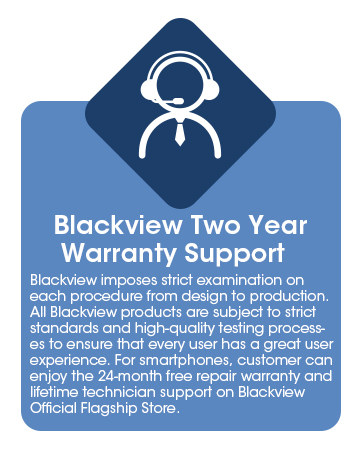
Image: Information graphic detailing Blackview's two-year warranty support, emphasizing strict quality examination and 24-month free repair service.


