1. ആമുഖം
Thank you for choosing the Geeni Smart Multi-Outlet Surge Protector. This device provides intelligent power management for your electronics, featuring four independently controlled smart AC outlets and two fast-charging USB ports (USB-A and USB-C). It includes robust surge protection and can be controlled remotely via the Geeni app or through voice commands with Amazon Alexa and Google Assistant. This manual provides essential information for setup, operation, and maintenance.

Image 1.1: Geeni Smart Multi-Outlet Surge Protector
2 സുരക്ഷാ വിവരങ്ങൾ
- Do not exceed the electrical ratings of the device (125V, 15A).
- Use indoors only. This device is not suitable for outdoor use.
- വെള്ളത്തിൽ നിന്നും ഉയർന്ന ഈർപ്പം ഉള്ള ചുറ്റുപാടുകളിൽ നിന്നും അകന്നു നിൽക്കുക.
- Do not disassemble or attempt to repair the device. Contact customer support for assistance.
- Ensure proper grounding. Plug the surge protector into a grounded 3-prong outlet.
- This device is a surge protector, but it cannot guarantee protection against all power surges.
3. പാക്കേജ് ഉള്ളടക്കം
- Geeni Smart Multi-Outlet Surge Protector (Model GN-SW010-199)
- ഉപയോക്തൃ മാനുവൽ
4. ഉൽപ്പന്ന സവിശേഷതകൾ
The Geeni Smart Multi-Outlet Surge Protector offers advanced features for convenient and safe power management:
- 4 Smart Outlets & 2 USB Ports: Independently control four AC outlets and utilize one USB-A and one USB-C port for charging.
- റിമോട്ട് കൺട്രോളും ഓട്ടോമേഷനും: Manage connected devices from any location using the Geeni app. Set schedules and timers for automated operation.
- സർജ് സംരക്ഷണം: Integrated surge protection up to 1200 joules safeguards electronics from power fluctuations.
- വ്യക്തിഗത നിയന്ത്രണം: Each AC outlet can be controlled separately for maximum flexibility.
- Voice-Activated Convenience: ഹാൻഡ്സ്-ഫ്രീ നിയന്ത്രണത്തിനായി ആമസോൺ അലക്സയുമായും ഗൂഗിൾ അസിസ്റ്റന്റുമായും പൊരുത്തപ്പെടുന്നു.
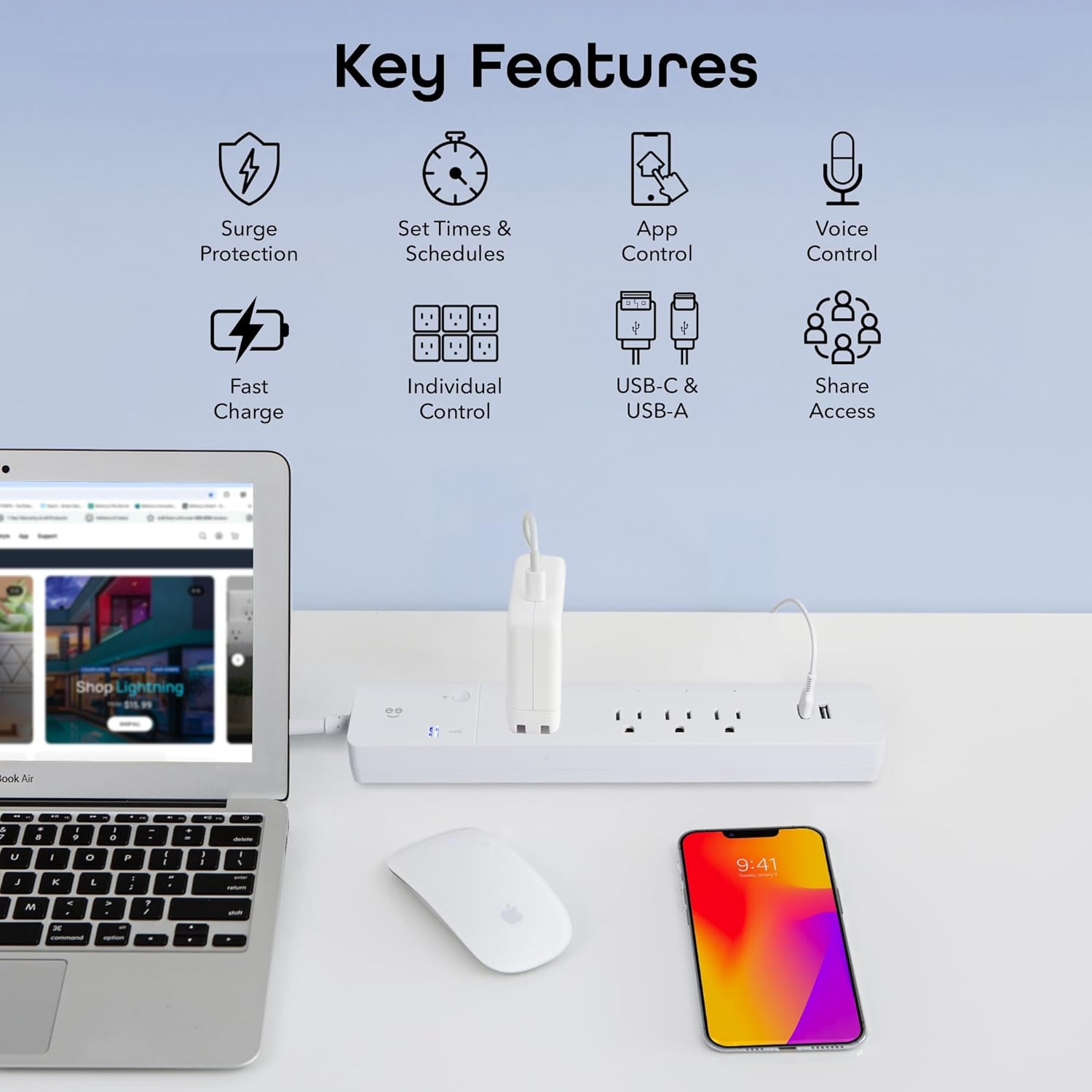
ചിത്രം 4.1: കഴിഞ്ഞുview of Key Product Features
5. സജ്ജീകരണ ഗൈഡ്
5.1 Download the Geeni App
- ഇതിനായി തിരയുക "Geeni" in the Apple App Store or Google Play Store.
- ആപ്പ് ഡൗൺലോഡ് ചെയ്ത് ഇൻസ്റ്റാൾ ചെയ്യുക.
- ഒരു പുതിയ അക്കൗണ്ടിനായി രജിസ്റ്റർ ചെയ്യുക അല്ലെങ്കിൽ നിലവിലുള്ള ഒന്ന് ഉപയോഗിച്ച് ലോഗിൻ ചെയ്യുക.
5.2 പവറിലേക്ക് ബന്ധിപ്പിക്കുക
- Plug the Geeni Smart Multi-Outlet Surge Protector into a standard 125V AC wall outlet.
- Ensure the main power switch (circuit breaker) on the surge protector is in the 'ON' position.
5.3 Wi-Fi Pairing
The device supports 2.4 GHz Wi-Fi networks only. Ensure your router is configured to allow 2.4 GHz connections.
- ഗീനി ആപ്പ് തുറന്ന് "ഉപകരണം ചേർക്കുക" അല്ലെങ്കിൽ "+" ഐക്കൺ ടാപ്പ് ചെയ്യുക.
- Select "Power Strip" from the device list.
- Press and hold the small Wi-Fi button on the surge protector for approximately 5 seconds until the Wi-Fi indicator light begins to blink rapidly. This indicates pairing mode.
- Follow the on-screen instructions in the Geeni app to connect the device to your home Wi-Fi network. You will need to enter your Wi-Fi password.
- Once connected, the Wi-Fi indicator light will become solid.

Image 5.1: Geeni App interface for device control
5.4 Voice Assistant Integration (Optional)
ആമസോൺ അലക്സ അല്ലെങ്കിൽ ഗൂഗിൾ അസിസ്റ്റന്റ് ഉപയോഗിച്ച് വോയ്സ് നിയന്ത്രണം പ്രവർത്തനക്ഷമമാക്കാൻ:
- നിങ്ങളുടെ Alexa അല്ലെങ്കിൽ Google Home ആപ്പ് തുറക്കുക.
- "Skills & Games" (Alexa) അല്ലെങ്കിൽ "Works with Google" (Google Home) വിഭാഗത്തിലേക്ക് നാവിഗേറ്റ് ചെയ്യുക.
- ഇതിനായി തിരയുക and enable the "Geeni" skill/service.
- Link your Geeni account when prompted.
- Discover devices. Your smart outlets will appear in the voice assistant app, allowing you to assign names and control them.
6. പ്രവർത്തന നിർദ്ദേശങ്ങൾ
6.1 Controlling Outlets via Geeni App
Each of the four AC outlets can be controlled individually:
- Open the Geeni app and select your Smart Multi-Outlet Surge Protector.
- You will see individual controls for each outlet (e.g., Switch 1, Switch 2, etc.).
- Tap the power icon next to an outlet to turn it ON or OFF.
- You can rename outlets within the app for easier identification (e.g., "Lamp," "Fan," "TV").

Image 6.1: Individual outlet control through the Geeni app
6.2 Setting Schedules and Timers
Automate your devices by setting schedules:
- In the Geeni app, select your Smart Multi-Outlet Surge Protector.
- "ഷെഡ്യൂൾ" അല്ലെങ്കിൽ "ടൈമർ" ഓപ്ഷൻ നോക്കുക.
- Follow the prompts to set specific ON/OFF times for individual outlets or groups of outlets.
- You can also set countdown timers for temporary operation.

Image 6.2: Setting personalized schedules for devices
6.3 വോയ്സ് കമാൻഡുകൾ
Once integrated with Alexa or Google Assistant, use simple voice commands:
- "അലക്സാ, [ഔട്ട്ലെറ്റ് നെയിം] ഓണാക്കുക."
- "ഹേ ഗൂഗിൾ, [ഔട്ട്ലെറ്റ് നെയിം] ഓഫ് ചെയ്യൂ."
- "Alexa, set [Outlet Name] to turn off in 30 minutes."

Image 6.3: Hands-free voice control with smart assistants
6.4 യുഎസ്ബി ചാർജിംഗ് പോർട്ടുകൾ
The two USB ports (USB-A and USB-C) provide fast charging for compatible devices. These ports are always active when the surge protector is powered on and cannot be controlled individually via the app or voice commands.

Image 6.4: Powering and charging multiple devices
7. പരിപാലനം
- To clean the device, unplug it from the wall outlet and wipe it with a dry, soft cloth.
- ലിക്വിഡ് ക്ലീനറുകളോ ഉരച്ചിലുകളുള്ള വസ്തുക്കളോ ഉപയോഗിക്കരുത്.
- പവർ കോർഡ് കേടായതിൻ്റെ ലക്ഷണങ്ങൾ ഉണ്ടോയെന്ന് ഇടയ്ക്കിടെ പരിശോധിക്കുക.
8. പ്രശ്നപരിഹാരം
- Device Offline / Cannot Connect to Wi-Fi:
- Ensure your Wi-Fi network is 2.4 GHz. The device does not support 5 GHz networks.
- Check your Wi-Fi signal strength. Move the surge protector closer to your router if necessary.
- Restart your Wi-Fi router and the surge protector.
- Try resetting the device by holding the Wi-Fi button for 5 seconds until the indicator blinks rapidly, then attempt pairing again.
- Outlets Not Responding:
- Verify the surge protector is plugged in and the main power switch is ON.
- Check the Geeni app to ensure the device is online.
- If using voice control, ensure your voice assistant is properly linked to your Geeni account and the outlet names are recognized.
- സർജ് പ്രൊട്ടക്ഷൻ ഇൻഡിക്കേറ്റർ:
- If the surge protection indicator light is off, the surge protection feature may be compromised. Replace the unit.
9 സ്പെസിഫിക്കേഷനുകൾ
| ഫീച്ചർ | സ്പെസിഫിക്കേഷൻ |
|---|---|
| മോഡൽ നമ്പർ | GN-SW010-199 |
| ഇൻപുട്ട് വോളിയംtage | 125 വോൾട്ട് |
| Ampഇറേജ് ശേഷി | 15 Amps |
| മൊത്തം പവർ ഔട്ട്ലെറ്റുകൾ | 4 AC Outlets + 2 USB Ports (USB-A, USB-C) |
| സർജ് സംരക്ഷണം | 1200 ജൂൾസ് |
| ചരട് നീളം | 6 അടി |
| കണക്റ്റിവിറ്റി | വൈഫൈ (2.4 GHz മാത്രം) |
| മെറ്റീരിയൽ | അക്രിലോണിട്രൈൽ ബ്യൂട്ടാഡൈൻ സ്റ്റൈറൈൻ |
| അളവുകൾ | 14 x 4.8 x 0.04 ഇഞ്ച് (ഉൽപ്പന്നം) |
| ഇനത്തിൻ്റെ ഭാരം | 1.48 പൗണ്ട് |

Image 9.1: Product Dimensions and Components
10. വാറൻ്റിയും പിന്തുണയും
This Geeni product comes with a 1-വർഷ പരിമിത വാറൻ്റി വാങ്ങിയ തീയതി മുതൽ. സാധാരണ ഉപയോഗത്തിലുള്ള മെറ്റീരിയലുകളിലെയും വർക്ക്മാൻഷിപ്പുകളിലെയും വൈകല്യങ്ങൾ ഈ വാറന്റി ഉൾക്കൊള്ളുന്നു.
For warranty claims, technical support, or further assistance, please visit the official Geeni support website or contact their customer service. Refer to the packaging or the Geeni app for the most current support contact information.


