ആമുഖം
The Keychron Q1 HE is a 75% layout (82-key) wireless QMK custom keyboard featuring Hall Effect Gateron 2.0 magnetic switches. It offers versatile connectivity options including 2.4 GHz wireless, Bluetooth, and wired USB-C, boasting a rapid 1000 Hz polling rate for optimal performance. This manual provides essential information for setting up, operating, and maintaining your keyboard, ensuring a seamless and customized experience.

ചിത്രം 1: ഓവർview of the Keychron Q1 HE keyboard, highlighting its compact 75% layout and sleek design.
സജ്ജമാക്കുക
Initial Charging and Connection
Before first use, connect the keyboard to a USB-C port on your computer using the provided USB-C to USB-C cable or the Type-A to Type-C adapter for charging. The keyboard can be used in wired mode while charging.
2.4 GHz വയർലെസ് വഴി ബന്ധിപ്പിക്കുന്നു
- Locate the 2.4 GHz receiver (USB Type-A dongle) in the package.
- Plug the 2.4 GHz receiver into an available USB-A port on your computer. For optimal signal, use the provided extension adapter.
- On the back of the keyboard, slide the connectivity switch to the 'G' (2.4 GHz) position.
- The keyboard will automatically connect to the receiver.
ബ്ലൂടൂത്ത് വഴി ബന്ധിപ്പിക്കുന്നു
- On the back of the keyboard, slide the connectivity switch to the 'BT' (Bluetooth) position.
- Press and hold 'Fn' + '1' (or '2' or '3') for 4 seconds to enter pairing mode. The key will flash rapidly.
- On your device (computer, phone, tablet), search for Bluetooth devices and select 'Keychron Q1 HE'.
- Once connected, the key will stop flashing. You can pair up to three Bluetooth devices and switch between them using 'Fn' + '1', 'Fn' + '2', or 'Fn' + '3'.
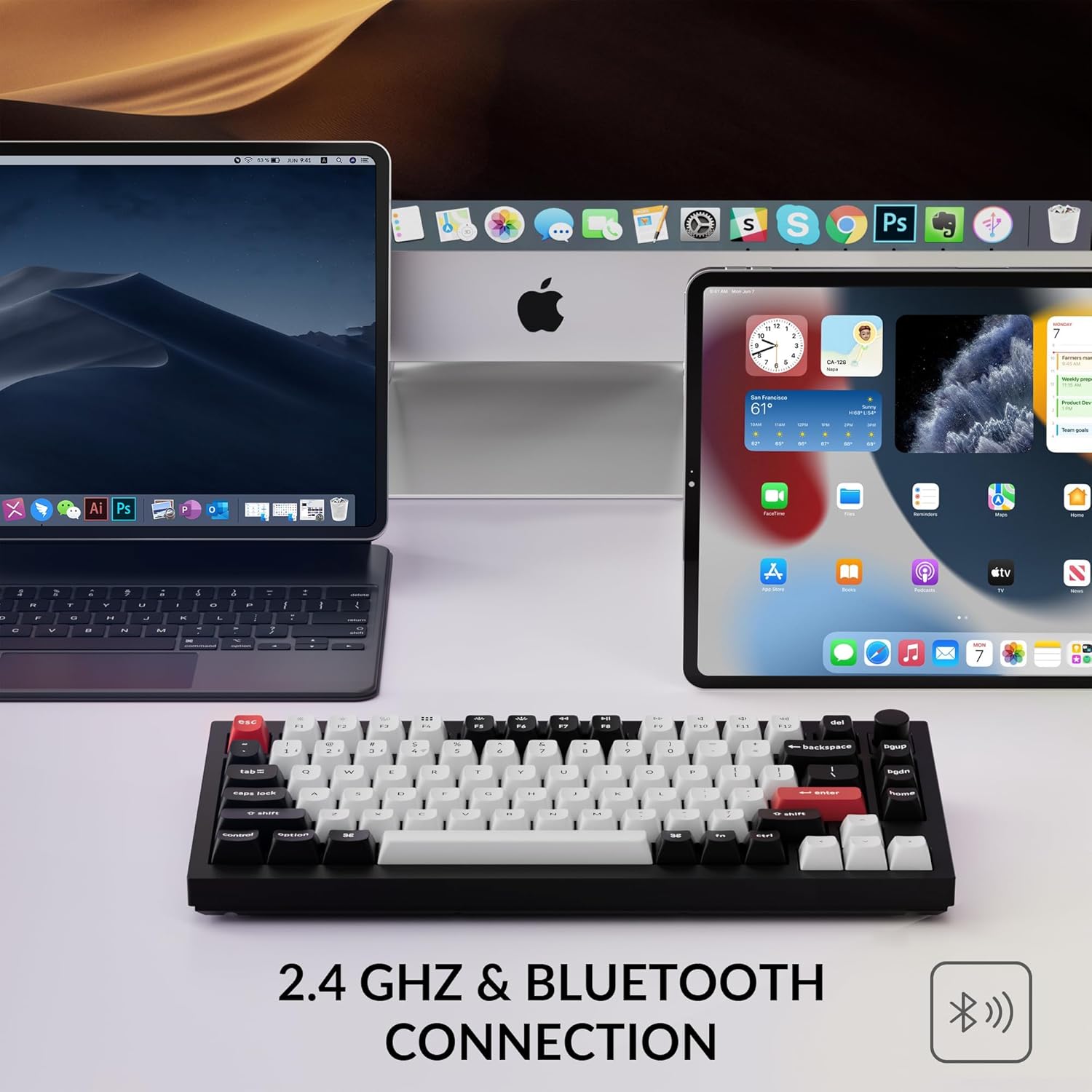
Figure 3: The Keychron Q1 HE keyboard connected wirelessly to a laptop, tablet, and smartphone, demonstrating its 2.4 GHz and Bluetooth capabilities.
Switching between Windows and Mac Layouts
The keyboard features a dedicated switch on the back to toggle between Windows and Mac operating system layouts. Ensure the switch is set to the correct operating system for optimal key mapping. Additional keycaps for Windows layout are included in the box for replacement.
നിങ്ങളുടെ കീബോർഡ് പ്രവർത്തിപ്പിക്കുന്നു
Hall Effect Gateron Magnetic Switches
The Q1 HE is equipped with Hall Effect Gateron 2.0 magnetic switches, offering a sensitivity of 0.1 mm. These switches allow for customizable actuation points ranging from 0.5 mm to 3.8 mm. This feature enables advanced functionalities like Rapid Trigger, where key presses register and reset based on travel depth, providing a competitive edge in gaming.

Figure 4: A visual comparison showing the adjustable actuation point of the Q1 HE's magnetic switches, allowing for precise customization of key sensitivity.
Customization with Keychron Launcher Web ആപ്പ്
Utilize the Keychron Launcher web app to personalize your keyboard settings. This web-based tool allows you to:
- വ്യത്യസ്ത ഫംഗ്ഷനുകളിലേക്ക് കീകൾ റീമാപ്പ് ചെയ്യുക.
- Adjust actuation points for individual keys.
- Set up Rapid Trigger for gaming.
- Create personalized macro commands, shortcuts, and key combinations.
- Assign up to four actions to a single key based on press depth (e.g., light press to walk, deep press to run in games).

Figure 5: The Keychron Launcher web app provides a comprehensive interface for customizing key functions, actuation points, and advanced gaming features.
Programmable Knob
The integrated programmable knob offers intuitive control over various functions, such as volume adjustment, media playback, or custom macros, all configurable through the Keychron Launcher web അപ്ലിക്കേഷൻ.

Figure 6: The multi-functional programmable knob allows for quick adjustments and custom controls, enhancing user convenience.
RGB ബാക്ക്ലൈറ്റിംഗ്
The keyboard features vibrant RGB backlighting with south-facing LEDs, providing excellent illumination from a typist's perspective. You can customize light effects, brightness, and speed using the Keychron Launcher web അപ്ലിക്കേഷൻ.

Figure 7: The south-facing RGB backlighting illuminates the keycaps, providing a visually appealing and functional typing experience.
Typing Experience and Build Quality
The Q1 HE features unique OSA profile double-shot PBT keycaps, known for their oil resistance and enhanced typing feel. The keyboard's full aluminum body and double-gasket design contribute to its premium feel, durability, and satisfying typing sound.
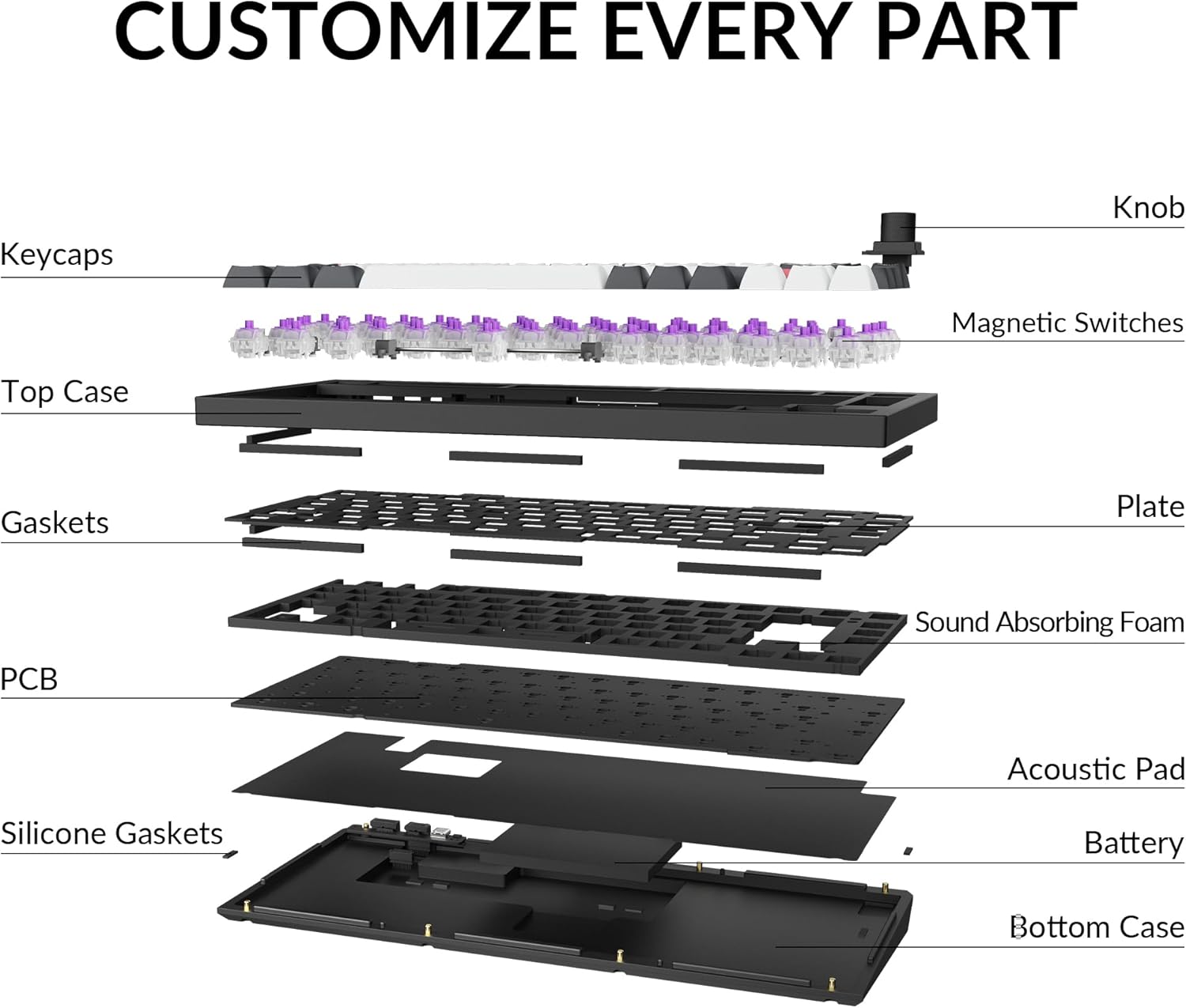
ചിത്രം 8: പൊട്ടിത്തെറിച്ച ഒരു view illustrating the internal components and double-gasket structure that contribute to the keyboard's robust build and acoustic properties.
മെയിൻ്റനൻസ്
വൃത്തിയാക്കൽ
Regularly clean your keyboard to ensure optimal performance and longevity. Use a soft, dry cloth to wipe down the keycaps and case. For deeper cleaning, you can use the provided keycap puller to remove keycaps and clean underneath with compressed air or a small brush. Avoid using harsh chemicals or abrasive materials.
സ്വിച്ചും കീക്യാപ്പ് മാറ്റിസ്ഥാപിക്കലും
The Q1 HE is hot-swappable, allowing you to easily replace magnetic switches without soldering. Use the provided switch puller to carefully remove switches. Ensure any replacement switches are compatible Gateron Double-Rail Magnetic Switches. Keycaps can also be replaced using the keycap puller.


