1. ആമുഖം
This manual provides detailed instructions for the installation, operation, and maintenance of your ATOTOZONE A6PL 7-inch 2-Din Android Car Stereo. Please read this manual thoroughly before using the product to ensure proper function and safety. Keep this manual for future reference.

Image 1.1: ATOTOZONE A6PL 7-inch 2-Din Android Car Stereo main unit.
2 സുരക്ഷാ വിവരങ്ങൾ
- ഡ്രൈവിംഗിൽ നിന്ന് ശ്രദ്ധ തിരിക്കുന്ന രീതിയിൽ ഉപകരണം പ്രവർത്തിപ്പിക്കരുത്. റോഡ് സുരക്ഷയ്ക്ക് എപ്പോഴും മുൻഗണന നൽകുക.
- ഷോർട്ട് സർക്യൂട്ടുകളോ കേടുപാടുകളോ ഒഴിവാക്കാൻ എല്ലാ വയറിംഗും ശരിയായി ബന്ധിപ്പിച്ചിട്ടുണ്ടെന്ന് ഉറപ്പാക്കുക. ഉറപ്പില്ലെങ്കിൽ ഇൻസ്റ്റാളേഷനായി ഒരു പ്രൊഫഷണലിനെ സമീപിക്കുക.
- യൂണിറ്റിന് തീവ്രമായ താപനില, ദീർഘനേരം നേരിട്ടുള്ള സൂര്യപ്രകാശം, അല്ലെങ്കിൽ അമിതമായ ഈർപ്പം എന്നിവ ഏൽക്കുന്നത് ഒഴിവാക്കുക.
- യൂണിറ്റ് വേർപെടുത്താനോ പരിഷ്ക്കരിക്കാനോ ശ്രമിക്കരുത്. ഇത് വാറന്റി അസാധുവാക്കുകയും കേടുപാടുകൾ വരുത്തുകയും ചെയ്തേക്കാം.
- പുറത്തുനിന്നുള്ള ട്രാഫിക് ശബ്ദങ്ങൾ കേൾക്കാൻ കഴിയുന്ന തരത്തിൽ വോളിയം നിലനിർത്തുക.
3. പാക്കേജ് ഉള്ളടക്കം
പാക്കേജിൽ എല്ലാ ഇനങ്ങളും ഉണ്ടെന്ന് ഉറപ്പാക്കുക:
- ATOTOZONE A6PL Main Unit
- പവർ കേബിൾ
- പിൻ ക്യാമറ ഇൻപുട്ട് കേബിൾ
- RCA Connector Cables
- USB External Storage Cable
- USB Phone Link Cable
- 4 ജി എൽടിഇ ആന്റിന
- ജിപിഎസ് ആൻ്റിന
- ബാഹ്യ മൈക്രോഫോൺ
- Double-DIN Brackets
- മൗണ്ടിംഗ് ബ്രാക്കറ്റുകൾ
- മൗണ്ടിംഗ് സ്ക്രൂകൾ
- സ്ക്രീൻ പ്രൊട്ടക്ടർ
- ഇൻസ്റ്റലേഷൻ ഫ്രെയിം
- ഉപയോക്തൃ മാനുവൽ (ഈ പ്രമാണം)
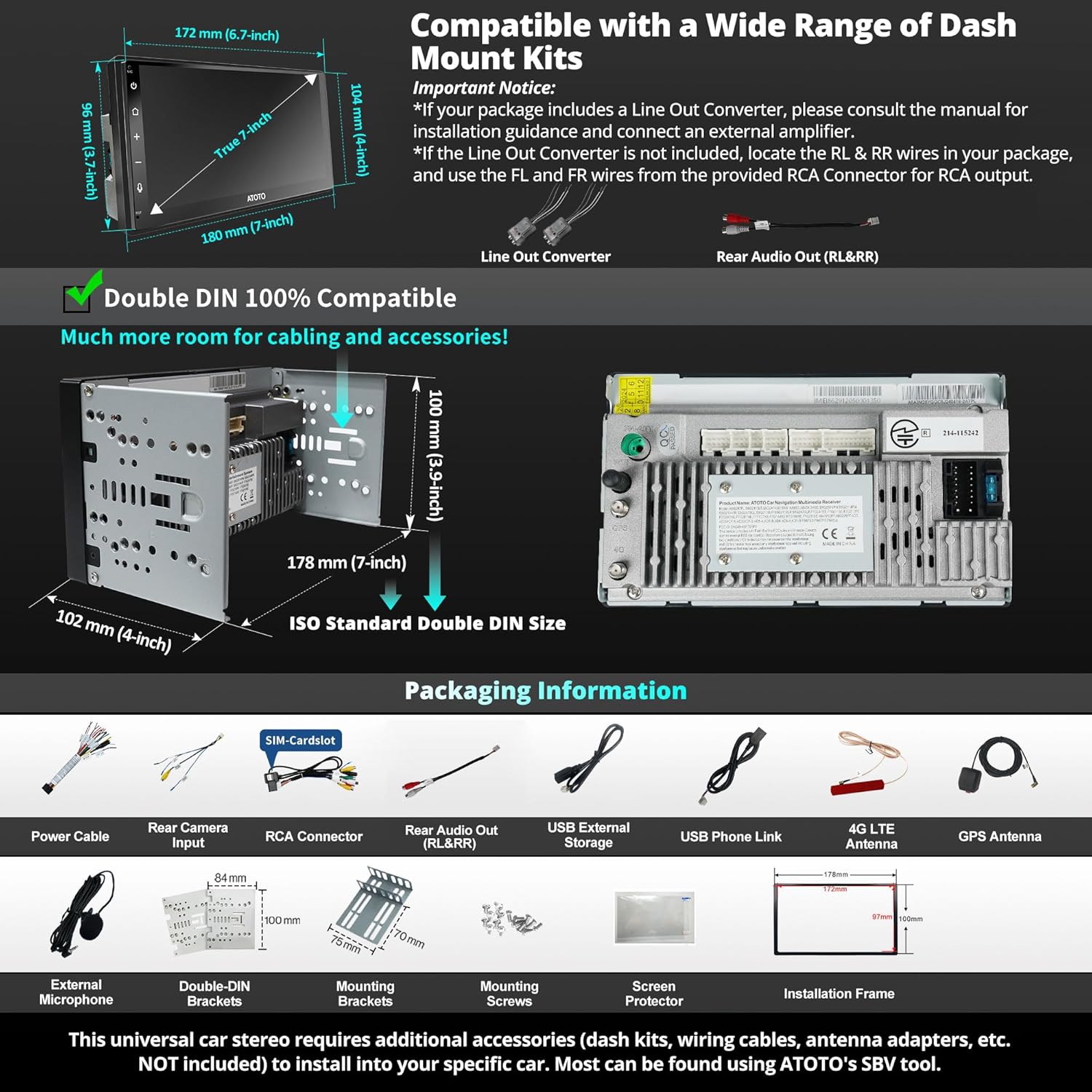
ചിത്രം 3.1: കഴിഞ്ഞുview of package contents and unit dimensions.
4. സജ്ജീകരണം
4.1. ഇൻസ്റ്റലേഷൻ പരിഗണനകൾ
The A6PL is designed for standard Double DIN openings. Ensure your vehicle has a compatible opening. Additional dash kits, wiring harnesses, or antenna adapters may be required for specific vehicle models and are not included. Use the SBV (Search By Vehicle) tool for compatibility information.

Image 4.1: ISO Standard Double DIN dimensions for compatibility.
4.2. വയറിംഗ് ഡയഗ്രം
Refer to the following diagram for proper wiring connections. Incorrect wiring can damage the unit or vehicle electrical system. If you are not experienced with car audio installation, seek professional assistance.

Image 4.2: Detailed wiring diagram for the ATOTOZONE A6PL.
- പവർ കേബിൾ: Connect to vehicle's power supply (Constant 12V, Accessory 12V, Ground).
- സ്പീക്കർ utsട്ട്പുട്ടുകൾ: Connect to vehicle speakers (Front Left/Right, Rear Left/Right).
- ആന്റിന: Connect 4G LTE, GPS, Wi-Fi, and FM/AM antennas.
- ബാഹ്യ മൈക്രോഫോൺ: Connect for improved call quality and voice commands.
- പിൻ ക്യാമറ ഇൻപുട്ട്: Connect an optional rear view camera (e.g., AC-HD02LR, sold separately).
- സ്റ്റിയറിംഗ് വീൽ നിയന്ത്രണം (SWC): Connect to vehicle's SWC wires or use a dedicated adapter (AC-44F8, not included).
5. പ്രവർത്തന നിർദ്ദേശങ്ങൾ
5.1. Power On/Off and Quick Boot
The A6PL features a quick boot function, allowing access to the system in less than 2 seconds after the initial power-on. If the unit does not quick boot, verify wiring connections.

Image 5.1: Quick Boot functionality for rapid system access.
5.2. Display and Touch Control
The unit features a 7-inch QLED HD touchscreen with 1024x600p resolution and a 178° viewing angle. It supports multi-touch gestures for intuitive operation, including split-screen functionality.

Image 5.2: QLED touchscreen with sleek touch buttons and rear camera input feature.

Image 5.3: Multi-touch gestures and split-screen display for enhanced user experience.
5.3. Connectivity (4G LTE, Wi-Fi, Bluetooth)
The A6PL offers multiple options for internet access and device connectivity:
- 4G LTE: Integrated module for independent online services and navigation. Requires a SIM card (not included).
- വൈഫൈ ഹോട്ട്സ്പോട്ട്: Connect to a Wi-Fi network or use your phone's hotspot.
- Bluetooth Tethering: Share your phone's internet connection via Bluetooth.
- USB ടെതറിംഗ്: Share your phone's internet connection via USB.
- Dual Bluetooth: BT1 for calls and audio streaming, BT2 for connecting other devices like OBD2 scanners (AC-4450, not included).
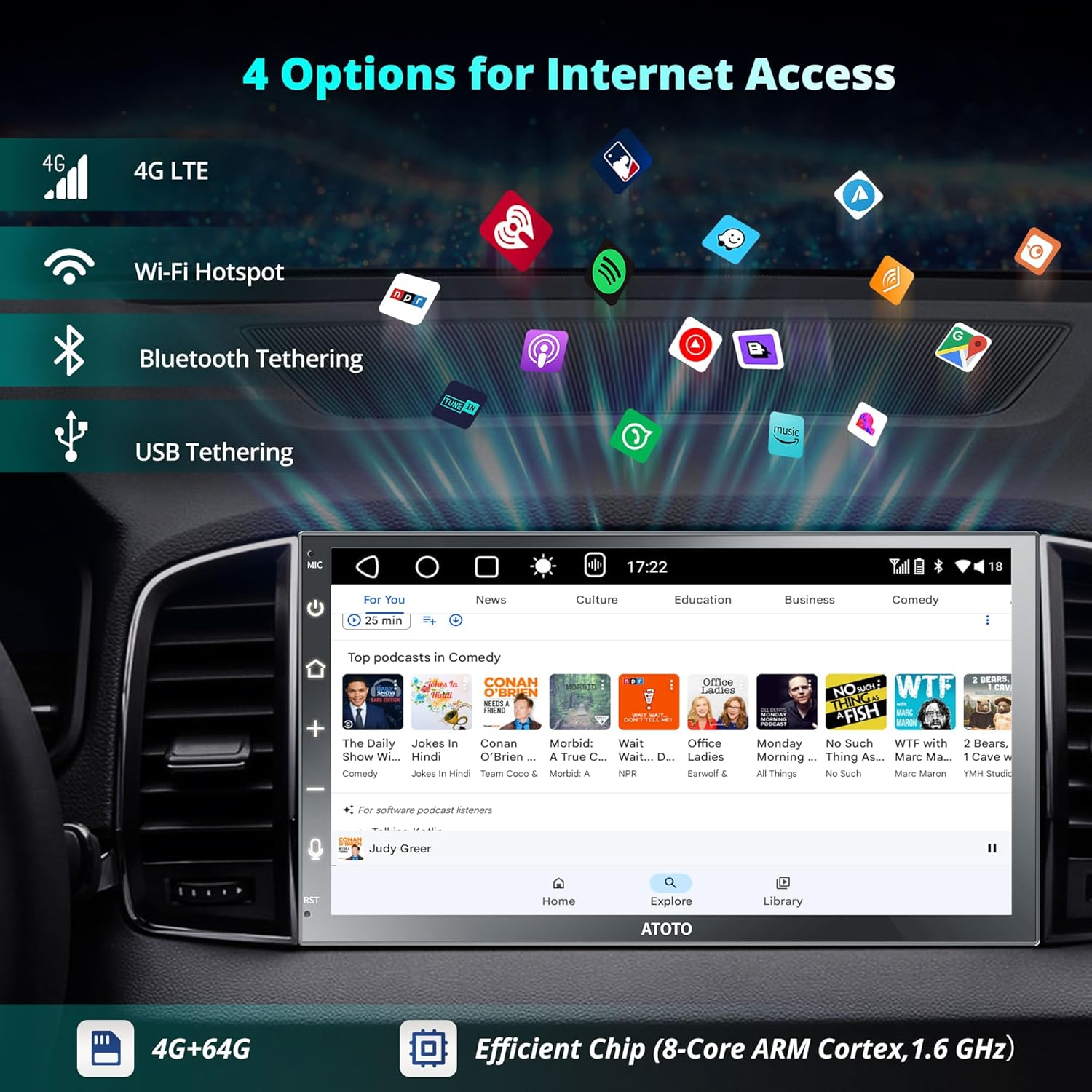
Image 5.4: Various internet access options including 4G LTE, Wi-Fi, Bluetooth, and USB tethering.

Image 5.5: Dual Bluetooth for stable connections and convenience.
5.4. വയർലെസ് കാർപ്ലേയും ആൻഡ്രോയിഡ് ഓട്ടോയും
Enjoy seamless integration with your smartphone. Connect once via Bluetooth and Wi-Fi for automatic reconnection. Access navigation, calls, messages, and music directly from the head unit.
- വയർലെസ് കാർപ്ലേ: Compatible with iPhone 5 or later running iOS 9.0 or higher.
- വയർലെസ് ആൻഡ്രോയിഡ് ഓട്ടോ: Compatible with Android 11.0+ phones, or Google/Samsung phones with Android 10.0, or Samsung Galaxy S8/S8+/Note 8 with Android 9.0.
- Wired connections are also supported for both CarPlay and Android Auto.

Image 5.6: Wireless and wired options for CarPlay and Android Auto.
5.5. മിറർലിങ്ക്
Use MirrorLink to display apps not supported by CarPlay or Android Auto directly on the A6PL's QLED screen. This feature supports both iOS and Android phones.

Image 5.7: MirrorLink for casting phone content to the A6PL screen.
5.6. Audio Settings (DSP, EQ, SCVC, Time Alignment)
Enhance your in-car audio experience with advanced sound processing features:
- Built-in DSP: Digital Signal Processor for balanced sound.
- 36-Band Customizable EQ: നിങ്ങളുടെ ഇഷ്ടത്തിനനുസരിച്ച് ഓഡിയോ ഫ്രീക്വൻസികൾ ഫൈൻ-ട്യൂൺ ചെയ്യുക.
- സമയ വിന്യാസം: Synchronizes sound from all speakers to reach your ears simultaneously.
- SCVC (Speed Compensated Volume Control): Automatically adjusts volume based on vehicle speed for consistent audio clarity.
- ക്രമീകരിക്കാവുന്ന ക്രോസ്ഓവർ: Optimize sound delivery to different speaker types.

Image 5.8: DSP and 36-band customizable EQ for superior audio quality.

Image 5.9: Time Alignment ensures clear sound from all seating positions.
5.7. Navigation and GPS Tracking
The A6PL supports both online and offline navigation. It features an integrated GPS module and the TrackHU app for real-time vehicle tracking.
- ഓൺലൈൻ നാവിഗേഷൻ: Use your preferred online map applications.
- ഓഫ്ലൈൻ നാവിഗേഷൻ: Pre-installed GPS for navigation without an internet connection.
- TrackHU App: Real-time vehicle tracking with update frequencies up to 5 seconds, 4-satellite positioning (GPS, GLONASS, Galileo, Beidou), detailed reports, and geofence alerts.

Image 5.10: TrackHU app interface for vehicle tracking and route playback.
5.8. DriveChat AI Voice Assistant
The DriveChat app enhances your driving experience with advanced voice commands. Manage the car stereo, answer calls, and control music playback hands-free. Customize wake-up words and interact with different Drivebots for tailored assistance.

Image 5.11: DriveChat AI Voice Assistant for effortless control.
5.9. പിൻഭാഗം View ക്യാമറ ഇൻപുട്ട്
The A6PL supports HD 720P rear view camera input with Live Rear-View (LRV) feature. This allows you to check live traffic conditions behind your vehicle while driving forward. The AC-HD02LR camera is recommended (sold separately).

Image 5.12: HD 720P rear view camera input with Live Rear-View (LRV) functionality.
5.10. Dual Zone Video Output
The A6PL supports dual zone video output, allowing passengers in the rear to watch videos on separate monitors while the driver uses navigation or other functions on the main unit. Adapters like AC-AHV68 (USB to HDMI) or AC-AHV48 (USB to RCA) are required and sold separately.

Image 5.13: Dual Zone Video Output for simultaneous viewആനന്ദം.
6. പരിപാലനം
6.1. യൂണിറ്റ് വൃത്തിയാക്കൽ
To clean the screen and unit, use a soft, dry cloth. For stubborn marks, slightly dampen the cloth with water. Avoid using harsh chemicals, abrasive cleaners, or solvents, as these can damage the screen and finish.
6.2. സോഫ്റ്റ്വെയർ അപ്ഡേറ്റുകൾ
Regular software updates are provided to improve performance, add new features, and fix bugs. It is recommended to keep your A6PL updated. Check the official ATOTOZONE website or contact support for the latest updates and instructions.

Image 6.1: Regular system updates ensure optimal performance.
7. പ്രശ്നപരിഹാരം
| പ്രശ്നം | സാധ്യമായ കാരണം | പരിഹാരം |
|---|---|---|
| യൂണിറ്റ് പവർ ഓണാക്കുന്നില്ല. | Incorrect power wiring; blown fuse. | Check power connections (constant 12V, accessory 12V, ground). Inspect vehicle's fuse box and the unit's fuse. |
| സ്പീക്കറുകളിൽ നിന്ന് ശബ്ദമില്ല. | സ്പീക്കർ വയറിംഗ് തെറ്റാണ്; ശബ്ദം വളരെ കുറവാണ്; മ്യൂട്ട് സജീവമാക്കി. | സ്പീക്കർ കണക്ഷനുകൾ പരിശോധിക്കുക. വോളിയം വർദ്ധിപ്പിക്കുക. മ്യൂട്ട് ഫംഗ്ഷൻ സജീവമാണോ എന്ന് പരിശോധിക്കുക. |
| ബ്ലൂടൂത്ത് കണക്ഷൻ പ്രശ്നങ്ങൾ. | Device not in pairing mode; interference; incorrect pairing process. | Ensure both devices are in pairing mode. Move closer to the unit. Delete previous pairings and re-pair. |
| CarPlay/Android Auto കണക്റ്റ് ചെയ്യുന്നില്ല. | Incorrect phone settings; incompatible phone/OS version; Wi-Fi/Bluetooth issues. | Check phone's CarPlay/Android Auto settings. Ensure Wi-Fi and Bluetooth are enabled. Verify phone OS compatibility (refer to section 5.4). |
| GPS സിഗ്നൽ നഷ്ടപ്പെട്ടു അല്ലെങ്കിൽ കൃത്യമല്ല. | GPS ആന്റിന തടസ്സപ്പെട്ടിരിക്കുന്നു അല്ലെങ്കിൽ അനുചിതമായി ഇൻസ്റ്റാൾ ചെയ്തിട്ടുണ്ട്. | ജിപിഎസ് ആന്റിനയ്ക്ക് വ്യക്തമായ ഒരു രേഖ ഉണ്ടെന്ന് ഉറപ്പാക്കുക view ആകാശത്തിന്റെ, സുരക്ഷിതമായി ബന്ധിപ്പിച്ചിരിക്കുന്നു. |
| Unit is slow or unresponsive. | Too many apps running; low storage; software issue. | Close unnecessary apps. Clear cache. Perform a factory reset (backup data first). Check for software updates. |
8 സ്പെസിഫിക്കേഷനുകൾ
| ഫീച്ചർ | വിശദാംശങ്ങൾ |
|---|---|
| ബ്രാൻഡ് | ATOTOZONE |
| മോഡൽ | A6G2B7PL |
| പ്രദർശിപ്പിക്കുക | 7-inch QLED HD Touchscreen (1024x600p) |
| പ്രോസസ്സർ | ARM Cortex A55 8-Core |
| ഓപ്പറേറ്റിംഗ് സിസ്റ്റം | ആൻഡ്രോയിഡ് 10.0 |
| റാം | 4 ജിബി |
| ആന്തരിക സംഭരണം | 64 ജിബി |
| കണക്റ്റിവിറ്റി | 4G LTE, Wi-Fi, Dual Bluetooth, USB |
| സ്മാർട്ട്ഫോൺ സംയോജനം | Wireless CarPlay, Wireless Android Auto, MirrorLink |
| ഓഡിയോ സവിശേഷതകൾ | Built-in DSP, 36-Band EQ, Time Alignment, SCVC |
| ജിപിഎസ് | Integrated GPS (4-satellite positioning), TrackHU App |
| ഔട്ട്പുട്ട് പവർ | Max 4x45W, 4x24W RMS |
| അളവുകൾ (യൂണിറ്റ്) | 178 mm (7-inch) width, 102 mm (4-inch) height (ISO Double DIN Standard) |
| ഭാരം | 1.56 കിലോഗ്രാം |
9. വാറൻ്റിയും പിന്തുണയും
ATOTOZONE provides 18 months of product support for the A6PL. For technical assistance, warranty claims, or any questions regarding your product, please contact ATOTOZONE customer service.
You can typically find contact information on the official ATOTOZONE website or through your purchase platform. Regular software updates are also provided to ensure continued performance and feature enhancements.

Image 9.1: ATOTOZONE offers 18 months of product support.