ആമുഖം
The Sandberg Survivor Radio All-in1 5000 (Model 421-03) is a versatile emergency device designed for reliability in various situations. It combines a radio receiver, a powerful flashlight, an SOS alarm, and a power bank function, all powered by multiple charging methods including solar, hand crank, and USB-C. This manual provides detailed instructions for its proper use and care.

ചിത്രം: മുൻഭാഗം view of the Sandberg Survivor Radio All-in1 5000, showcasing its flashlight, display, and solar panel.
സുരക്ഷാ വിവരങ്ങൾ
- ഉപകരണത്തെ തീവ്രമായ താപനിലയിലോ, ദീർഘനേരം നേരിട്ട് സൂര്യപ്രകാശത്തിലോ (ചാർജ് ചെയ്യുന്നതിനപ്പുറം) ഉയർന്ന ആർദ്രതയിലോ തുറന്നുകാട്ടരുത്.
- ഉപകരണം വെള്ളത്തിൽ നിന്നും മറ്റ് ദ്രാവകങ്ങളിൽ നിന്നും അകറ്റി നിർത്തുക.
- ഉപകരണം വേർപെടുത്താനോ പരിഷ്ക്കരിക്കാനോ ശ്രമിക്കരുത്. ഇത് വാറന്റി അസാധുവാക്കുകയും കേടുപാടുകൾക്ക് കാരണമാവുകയും ചെയ്തേക്കാം.
- നൽകിയിരിക്കുന്നതോ ശുപാർശ ചെയ്യുന്നതോ ആയ ചാർജിംഗ് കേബിളുകൾ മാത്രം ഉപയോഗിക്കുക.
- കുട്ടികൾക്ക് ലഭ്യമാകാതെ സൂക്ഷിക്കുക.
പാക്കേജ് ഉള്ളടക്കം
പാക്കേജിൽ ഇനിപ്പറയുന്ന ഇനങ്ങൾ ഉണ്ടോ എന്ന് പരിശോധിക്കുക:
- Sandberg Survivor Radio All-in1 5000 (Model 421-03)
- USB-C Charging Cable (Power Cord)
- ഉപയോക്തൃ മാനുവൽ (ഈ പ്രമാണം)
ഉൽപ്പന്നം കഴിഞ്ഞുview
Familiarize yourself with the various parts and controls of your Sandberg Survivor Radio.
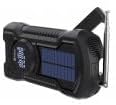
ചിത്രം: വശം view of the Sandberg Survivor Radio All-in1 5000, highlighting the hand crank and telescopic antenna.
- ഫ്ലാഷ്ലൈറ്റ്: പ്രകാശത്തിനായി സംയോജിത എൽഇഡി ലൈറ്റ്.
- സോളാർ പാനൽ: അടിയന്തര സോളാർ ചാർജിംഗിനായി.
- ഹാൻഡ് ക്രാങ്ക്: മാനുവൽ വൈദ്യുതി ഉൽപാദനത്തിനായി.
- ടെലിസ്കോപ്പിക് ആന്റിന: Extends for improved radio reception.
- LCD/LED Display: Shows frequency, battery status, and other information.
- നിയന്ത്രണ ബട്ടണുകൾ: Power, Mode, Tuning, Volume, SOS.
- യുഎസ്ബി-സി ഇൻപുട്ട്: റേഡിയോയുടെ ആന്തരിക ബാറ്ററി ചാർജ് ചെയ്യുന്നതിന്.
- USB-A putട്ട്പുട്ട്: ബാഹ്യ ഉപകരണങ്ങൾ ചാർജ് ചെയ്യുന്നതിന് (പവർ ബാങ്ക് പ്രവർത്തനം).
സജ്ജമാക്കുക
ആന്തരിക ബാറ്ററി ചാർജ് ചെയ്യുന്നു
Before first use, fully charge the radio's internal battery using the USB-C cable.
- USB-C ചാർജിംഗ്: Connect the provided USB-C cable to the radio's USB-C input port and the other end to a USB power adapter (not included) or a computer's USB port. The display will indicate charging status.
- സോളാർ ചാർജിംഗ്: Place the radio with the solar panel facing direct sunlight. This method is primarily for maintaining charge or emergency power and is slower than USB-C charging.
- ഹാൻഡ് ക്രാങ്ക് ചാർജിംഗ്: Rotate the hand crank clockwise or counter-clockwise at a steady pace (approximately 120-150 RPM) for 3-5 minutes to generate power for short-term use or to initiate USB-C charging.
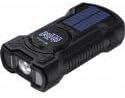
ചിത്രം: മുകളിൽ view of the Sandberg Survivor Radio All-in1 5000, clearly showing the integrated solar panel.
പ്രാരംഭ പവർ ഓൺ
Press and hold the Power button to turn on the radio. The display will illuminate, showing the current mode and battery level.
പ്രവർത്തിക്കുന്നു
Radio Functions (FM/AM/WB)
- മോഡ് തിരഞ്ഞെടുക്കുക: Press the 'Mode' button to cycle through FM, AM, and WB (Weather Band) modes.
- ആന്റിന വിപുലീകരിക്കുക: മികച്ച സ്വീകരണത്തിനായി, ടെലിസ്കോപ്പിക് ആന്റിന പൂർണ്ണമായും നീട്ടുക.
- ട്യൂൺ സ്റ്റേഷനുകൾ: Use the tuning buttons (usually labeled with arrows or +/-) to scan for stations. Some models may have an auto-scan feature (refer to specific button labels on your device).
- വോളിയം ക്രമീകരിക്കുക: Use the volume buttons (usually labeled with 'Vol' or +/-) to set the desired audio level.
ഫ്ലാഷ്ലൈറ്റ് ഓപ്പറേഷൻ
Press the dedicated flashlight button (often labeled with a light bulb icon) to turn the flashlight on or off. Some models may have multiple brightness settings or a flashing mode; press the button repeatedly to cycle through these options.
SOS അലാറം
In an emergency, press and hold the 'SOS' button. The radio will emit a loud siren sound and flash the flashlight to attract attention. Press the 'SOS' button again to deactivate the alarm.
പവർ ബാങ്കിന്റെ പ്രവർത്തനം
The radio can be used to charge external devices such as smartphones or MP3 players.
- റേഡിയോയുടെ ആന്തരിക ബാറ്ററിക്ക് മതിയായ ചാർജ് ഉണ്ടെന്ന് ഉറപ്പാക്കുക.
- Connect your external device to the radio's USB-A output port using your device's charging cable.
- Charging will begin automatically. Monitor your device's charging status.
മെയിൻ്റനൻസ്
- വൃത്തിയാക്കൽ: മൃദുവായതും ഉണങ്ങിയതുമായ തുണി ഉപയോഗിച്ച് ഉപകരണം തുടയ്ക്കുക. അബ്രസീവ് ക്ലീനറുകളോ ലായകങ്ങളോ ഉപയോഗിക്കരുത്.
- സംഭരണം: Store the radio in a cool, dry place away from direct sunlight when not in use. For long-term storage, ensure the battery is charged to at least 50% and recharge it every 3-6 months to prolong battery life.
- ആന്റിന കെയർ: വളയുകയോ പൊട്ടുകയോ ചെയ്യാതിരിക്കാൻ ടെലിസ്കോപ്പിക് ആന്റിന സൌമ്യമായി കൈകാര്യം ചെയ്യുക.
ട്രബിൾഷൂട്ടിംഗ്
| പ്രശ്നം | സാധ്യമായ കാരണം | പരിഹാരം |
|---|---|---|
| റേഡിയോ ഓൺ ആകുന്നില്ല. | കുറഞ്ഞ ബാറ്ററി. | USB-C, സോളാർ അല്ലെങ്കിൽ ഹാൻഡ് ക്രാങ്ക് ഉപയോഗിച്ച് റേഡിയോ ചാർജ് ചെയ്യുക. |
| മോശം റേഡിയോ സ്വീകരണം. | ആന്റിന നീട്ടിയിട്ടില്ല, സിഗ്നൽ ദുർബലമാണ്. | Fully extend the telescopic antenna. Try repositioning the radio. |
| ബാഹ്യ ഉപകരണം ചാർജ് ചെയ്യുന്നില്ല. | Radio battery low, incorrect cable, device not compatible. | Ensure radio has sufficient charge. Use a compatible USB cable. Check if the external device supports USB charging. |
| ഹാൻഡ് ക്രാങ്ക് കടുപ്പമുള്ളതോ ചാർജ് ചെയ്യുന്നില്ല. | Mechanism obstruction, incorrect rotation. | Ensure no debris is obstructing the crank. Rotate smoothly and consistently. |
സ്പെസിഫിക്കേഷനുകൾ
- മോഡൽ: 421-03
- ബ്രാൻഡ്: Sandberg
- ഹാർഡ്വെയർ ഇന്റർഫേസ്: യുഎസ്ബി, യുഎസ്ബി ടൈപ്പ് സി
- ട്യൂണർ സാങ്കേതികവിദ്യ: SW (Shortwave), also supports FM/AM/WB
- Compatible Devices (for charging): Laptop, MP3 Player, USB Drive
- ഡിസ്പ്ലേ തരം: എൽസിഡി അല്ലെങ്കിൽ എൽഇഡി
- പവർ സോഴ്സ് തരം: Corded Electric (USB-C), Solar, Hand Crank
- ആവൃത്തി: 180 MHz (internal clock/processing, radio bands vary by mode)
- കണക്റ്റർ തരം: USB, USB-C
- ഇനത്തിൻ്റെ ഭാരം: 400 ഗ്രാം
- ഉൾപ്പെടുത്തിയ ഘടകങ്ങൾ: Power Cord (USB-C cable)
വാറൻ്റിയും പിന്തുണയും
Sandberg products are manufactured to high-quality standards. For warranty information and technical support, please refer to the official Sandberg webസൈറ്റിൽ ബന്ധപ്പെടുക അല്ലെങ്കിൽ നിങ്ങളുടെ റീട്ടെയിലറെ ബന്ധപ്പെടുക. വാങ്ങിയതിന്റെ തെളിവായി നിങ്ങളുടെ വാങ്ങൽ രസീത് സൂക്ഷിക്കുക.


