1. ഉൽപ്പന്നം കഴിഞ്ഞുview
The Elitech Dual Temperature Probe is designed for use with the RCW-360Pro data logger, providing accurate and reliable temperature monitoring for various applications, including medical, pharmaceutical, and cold chain validation. This probe features automatic detection, a wide temperature range, and a 16.4ft cable for flexible placement.

Image: The Elitech Dual Temperature Probe, featuring two sensor tips and a 3.5mm audio jack connector.

Image: An illustration showing the Elitech RCW-360Pro device with a dual probe installed, monitoring temperatures in a warehouse setting.
2. സജ്ജീകരണവും ഇൻസ്റ്റാളേഷനും
- Unpack the Probe: Carefully remove the dual temperature probe from its packaging.
- Install SIM Card (if applicable for RCW-360Pro): If your RCW-360Pro device requires a SIM card for network connectivity, ensure it is correctly installed according to the RCW-360Pro manual.
- അന്വേഷണം ബന്ധിപ്പിക്കുക: Insert the 3.5mm audio jack connector of the dual temperature probe into the designated probe port on your Elitech RCW-360Pro device. The probe is designed for automatic detection and configuration upon connection.
- ഉപകരണത്തിൽ പവർ ചെയ്യുക: Turn on your RCW-360Pro device. The probe should be automatically recognized.
- Add Device to Cloud Platform: Follow the instructions in the RCW-360Pro manual to add your device to the Elitech iCold Cloud Platform for remote monitoring and data management. This typically involves scanning a QR code on the device.

Image: A four-step visual guide demonstrating the initial setup of the RCW-360Pro: 1) Install SIM card, 2) Insert the probe, 3) Power on the device, 4) Add devices to the cloud platform.

Image: The back of the RCW-360Pro device showing the QR code for app integration and four strong magnets for secure mounting.
3. പ്രവർത്തന നിർദ്ദേശങ്ങൾ
3.1 Automatic Probe Recognition
Upon connection, the Elitech RCW-360Pro automatically detects and configures the dual temperature probe. No manual setup is required for basic functionality.
3.2 താപനില നിരീക്ഷണം
The probe provides real-time temperature readings to the RCW-360Pro device. These readings are displayed on the device's screen and can be accessed remotely via the Elitech iCold Cloud Platform.
3.3 താപനില യൂണിറ്റുകൾ മാറൽ
To switch between Celsius (°C) and Fahrenheit (°F) on the RCW-360Pro device, refer to your RCW-360Pro user manual. This function is typically controlled directly on the main device.

Image: A visual representation of holding a button on the RCW-360Pro to switch the displayed temperature unit between Celsius and Fahrenheit.
3.4 അലാറം മോഡുകൾ
The RCW-360Pro, in conjunction with the probe, supports multiple alarm modes to alert users of temperature deviations:
- Cloud Alarm: Alerts via app, email, SMS, and the cloud platform.
- പ്രാദേശിക അലാറം: Alerts via sound (buzzer), screen display, and indicator light on the device.

Image: An illustration depicting the RCW-360Pro device and a smartphone displaying various alarm notifications, including app, email, SMS, sound, screen display, and indicator light.
3.5 iCold Cloud Platform Integration
The probe seamlessly integrates with the Elitech iCold Cloud Platform for comprehensive data management. This includes real-time monitoring, automated alarms, data history query, and FDA data analysis reports, accessible from iOS or Android devices.

Image: Screenshots of the Elitech iCold Cloud Platform website interface, showing detailed functions such as checking logger status, tracking routes, history query, multi-level alarms, and FDA data analysis reports.
4. പരിപാലനം
4.1 കാലിബ്രേഷൻ സർട്ടിഫിക്കറ്റ്
Each Elitech Dual Temperature Probe comes with an individual calibration certificate. This certificate ensures traceable accuracy and supports compliance with regulatory standards such as FDA CFR 21 Part 11. Retain this certificate for audit readiness.
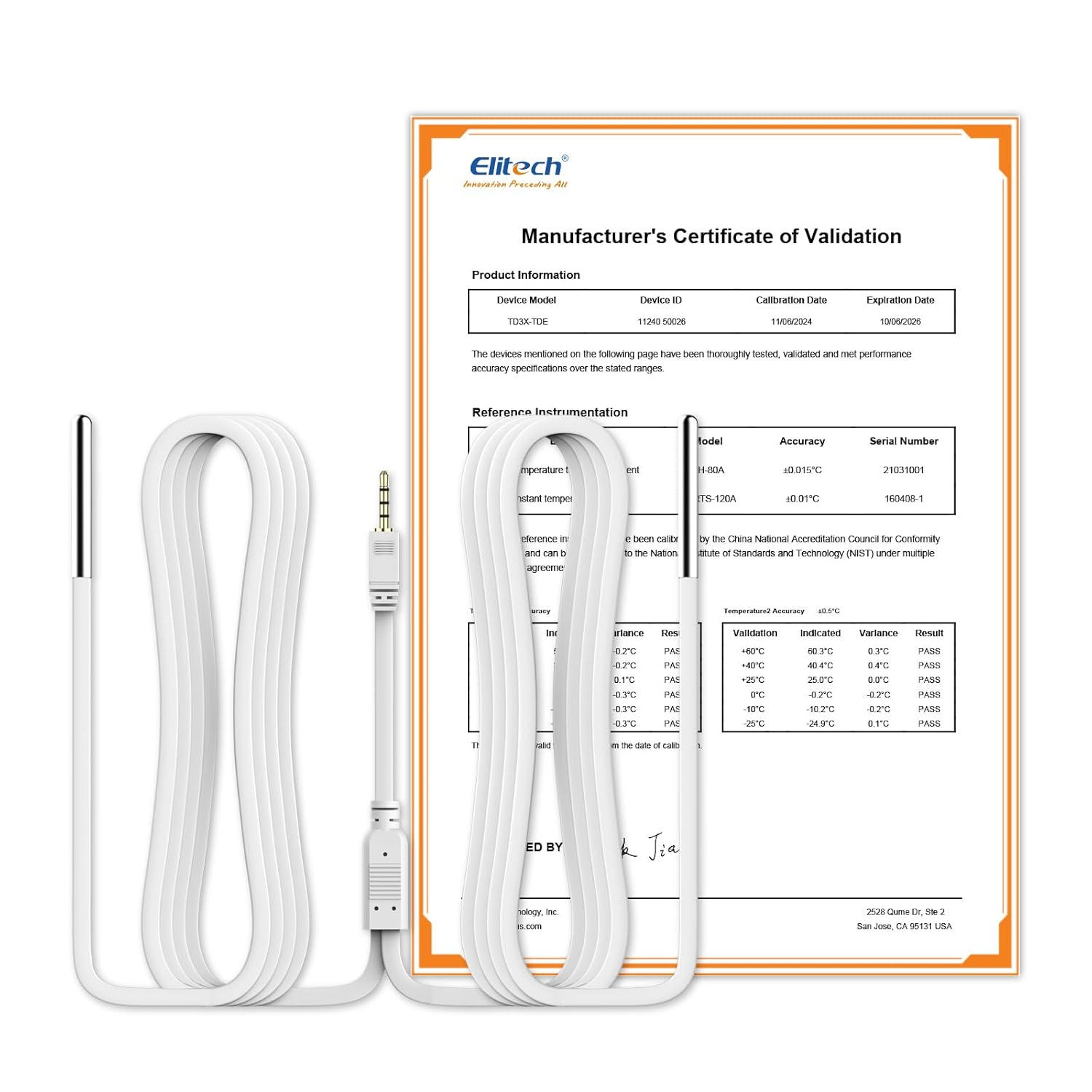
Image: The Elitech Dual Temperature Probe displayed alongside its Manufacturer's Certificate of Validation, detailing product information, reference instrumentation, and temperature accuracy.
4.2 പൊതു പരിചരണം
- Keep the probe and cable clean and free from debris.
- Avoid bending or kinking the cable sharply to prevent internal damage.
- Store the probe in a dry, protected environment when not in use.
5. പ്രശ്നപരിഹാരം
- Probe Not Detected: Ensure the 3.5mm audio jack is fully inserted into the RCW-360Pro device. If the issue persists, try disconnecting and reconnecting the probe. Verify that the RCW-360Pro device is powered on.
- കൃത്യമല്ലാത്ത താപനില വായനകൾ: Check if the probe tips are properly positioned in the environment being monitored. Ensure the probe is not physically damaged. Refer to the calibration certificate for expected accuracy.
- Device Offline/Connectivity Issues: If your RCW-360Pro device is offline, check the SIM card installation and network signal strength. For Wi-Fi models, verify Wi-Fi connection. Consult the RCW-360Pro manual for specific network configuration steps.
- No Data on iCold Platform: Ensure the RCW-360Pro device is connected to the internet and successfully added to your iCold account. Check the device's display for any error messages.
കൂടുതൽ സഹായത്തിന്, ദയവായി എലിടെക് ഉപഭോക്തൃ പിന്തുണയുമായി ബന്ധപ്പെടുക.
6 സ്പെസിഫിക്കേഷനുകൾ
| സ്പെസിഫിക്കേഷൻ | മൂല്യം |
|---|---|
| മോഡൽ നമ്പർ | US-ProSensor-TDE |
| ഉൽപ്പന്ന അളവുകൾ | 2.56 x 1.97 x 5.51 ഇഞ്ച് |
| ഇനത്തിൻ്റെ ഭാരം | 7.05 ഔൺസ് |
| താപനില പരിധി | -40°F മുതൽ 176°F വരെ (-40°C മുതൽ 80°C വരെ) |
| കൃത്യത | ± 0.9 ° F (± 0.5 ° C) |
| കേബിൾ നീളം | 16.4 അടി (5 മീറ്റർ) |
| കണക്റ്റർ തരം | 3.5 മില്ലീമീറ്റർ ഓഡിയോ ജാക്ക് |
| അനുയോജ്യത | Exclusively with Elitech RCW-360Pro |
| നിർമ്മാതാവ് | എലിടെക് |
| ആദ്യ തീയതി ലഭ്യമാണ് | മെയ് 31, 2024 |

Image: A graphic detailing the Elitech Dual Temp Sensor, its audio plug, temperature range (-40°C~80°C / -40°F~176°F), and length (5M/16.4inch).

Image: An illustration showing the RCW-360Pro device and various compatible probes, including Gel Bottle Temp, Single Temp, Dual Temp, Temp&Humi, and Ultra-low Temp probes, each with their respective ranges.
7. വാറൻ്റിയും പിന്തുണയും
For warranty information and technical support, please refer to the documentation provided with your Elitech RCW-360Pro device or visit the official Elitech website. The individual calibration certificate included with this probe serves as proof of its initial accuracy and traceability.
നിങ്ങൾക്ക് സന്ദർശിക്കാനും കഴിയും Elitech Store on Amazon കൂടുതൽ ഉൽപ്പന്ന വിവരങ്ങൾക്കും പിന്തുണാ ഉറവിടങ്ങൾക്കും.


