1. ആമുഖം
This manual provides essential information for the safe and efficient operation of your Revolution R180 Connect Smart Toaster. Please read all instructions carefully before use and retain this manual for future reference.

Image 1.1: The Revolution R180 Connect Smart Toaster, featuring a touchscreen display and two toasting slots.
2 പ്രധാനപ്പെട്ട സുരക്ഷാ വിവരങ്ങൾ
ഇലക്ട്രിക്കൽ ഉപകരണങ്ങൾ ഉപയോഗിക്കുമ്പോൾ, ഇനിപ്പറയുന്നവ ഉൾപ്പെടെ അടിസ്ഥാന സുരക്ഷാ മുൻകരുതലുകൾ എല്ലായ്പ്പോഴും പാലിക്കണം:
- എല്ലാ നിർദ്ദേശങ്ങളും വായിക്കുക.
- ചൂടുള്ള പ്രതലങ്ങളിൽ തൊടരുത്. ഹാൻഡിലുകളോ നോബുകളോ ഉപയോഗിക്കുക.
- വൈദ്യുതാഘാതത്തിൽ നിന്ന് പരിരക്ഷിക്കുന്നതിന്, ചരട്, പ്ലഗുകൾ, ടോസ്റ്റർ എന്നിവ വെള്ളത്തിലോ മറ്റ് ദ്രാവകത്തിലോ മുക്കരുത്.
- കുട്ടികളോ സമീപത്തോ ഏതെങ്കിലും ഉപകരണം ഉപയോഗിക്കുമ്പോൾ സൂക്ഷ്മ മേൽനോട്ടം ആവശ്യമാണ്.
- ഉപയോഗത്തിലില്ലാത്തപ്പോഴും വൃത്തിയാക്കുന്നതിന് മുമ്പും ഔട്ട്ലെറ്റിൽ നിന്ന് അൺപ്ലഗ് ചെയ്യുക. ഭാഗങ്ങൾ ധരിക്കുന്നതിനോ എടുക്കുന്നതിനോ മുമ്പ് തണുപ്പിക്കാൻ അനുവദിക്കുക.
- കേടായ ചരടോ പ്ലഗോ ഉപയോഗിച്ച് അല്ലെങ്കിൽ ഉപകരണം തകരാറിലായതിനുശേഷം അല്ലെങ്കിൽ ഏതെങ്കിലും വിധത്തിൽ കേടുപാടുകൾ സംഭവിച്ചതിനുശേഷം ഒരു ഉപകരണവും പ്രവർത്തിപ്പിക്കരുത്. പരിശോധന, നന്നാക്കൽ അല്ലെങ്കിൽ ക്രമീകരണം എന്നിവയ്ക്കായി ഉപഭോക്തൃ സേവനവുമായി ബന്ധപ്പെടുക.
- അപ്ലയൻസ് നിർമ്മാതാവ് ശുപാർശ ചെയ്യാത്ത ആക്സസറി അറ്റാച്ച്മെൻ്റുകളുടെ ഉപയോഗം പരിക്കുകൾക്ക് കാരണമാകാം.
- വെളിയിൽ ഉപയോഗിക്കരുത്.
- മേശയുടെയോ കൗണ്ടറിൻ്റെയോ അരികിൽ ചരട് തൂങ്ങിക്കിടക്കാനോ ചൂടുള്ള പ്രതലങ്ങളിൽ തൊടാനോ അനുവദിക്കരുത്.
- ചൂടുള്ള വാതകത്തിലോ ഇലക്ട്രിക് ബർണറിലോ ചൂടാക്കിയ അടുപ്പിലോ വയ്ക്കരുത്.
- ചൂടുള്ള എണ്ണയോ മറ്റ് ചൂടുള്ള ദ്രാവകങ്ങളോ അടങ്ങിയ ഉപകരണം നീക്കുമ്പോൾ അതീവ ജാഗ്രത പാലിക്കണം.
- ഉദ്ദേശിച്ച ഉപയോഗത്തിനല്ലാതെ ഉപകരണം ഉപയോഗിക്കരുത്.
- തീപിടിത്തമോ വൈദ്യുതാഘാതമോ ഉണ്ടാകാൻ സാധ്യതയുള്ളതിനാൽ അമിത വലിപ്പമുള്ള ഭക്ഷണങ്ങൾ, മെറ്റൽ ഫോയിൽ പാക്കേജുകൾ അല്ലെങ്കിൽ പാത്രങ്ങൾ എന്നിവ ഒരു ടോസ്റ്ററിൽ ചേർക്കാൻ പാടില്ല.
- ടോസ്റ്ററുകൾ മൂടിയിരിക്കുകയോ അല്ലെങ്കിൽ കർട്ടനുകൾ, ഡ്രെപ്പറികൾ, ഭിത്തികൾ എന്നിവയുൾപ്പെടെ കത്തുന്ന വസ്തുക്കളിൽ സ്പർശിക്കുകയോ ചെയ്താൽ തീപിടുത്തമുണ്ടാകാം.
- ടോസ്റ്റർ പ്ലഗിൻ ചെയ്തിരിക്കുമ്പോൾ ഭക്ഷണം വലിച്ചെറിയാൻ ശ്രമിക്കരുത്.
- ശ്രദ്ധിക്കാതെ പ്രവർത്തിക്കരുത്.
- The Toastie Press accessory (sold separately) is designed for use with this toaster. Ensure proper installation and removal as per its instructions.
3. പാക്കേജ് ഉള്ളടക്കം
അൺപാക്ക് ചെയ്യുമ്പോൾ എല്ലാ ഇനങ്ങളും നിലവിലുണ്ടെന്നും നല്ല നിലയിലാണെന്നും ഉറപ്പാക്കുക:
- Revolution R180 Connect Smart Toaster
- നീക്കം ചെയ്യാവുന്ന ക്രംബ് ട്രേ
- ഉപയോക്തൃ മാനുവൽ (ഈ പ്രമാണം)
Note: The Toastie Press and Warming Rack are sold separately and are not included in the standard package.
4. സജ്ജീകരണം
4.1 പ്രാരംഭ പ്ലേസ്മെന്റ്
- Place the toaster on a stable, flat, heat-resistant surface.
- Ensure adequate clearance (at least 6 inches) from walls, cabinets, and other objects to allow for proper ventilation.
- Do not place the toaster directly under cabinets or near flammable materials.
4.2 പവർ കണക്ഷൻ
- പവർ കോർഡ് പൂർണ്ണമായും അഴിക്കുക.
- Plug the toaster into a standard 120V AC electrical outlet.
- The touchscreen will illuminate, indicating the toaster is powered on.
4.3 Wi-Fi Connectivity (Optional)
The R180 Connect features Wi-Fi connectivity for automatic clock setting, weather display, and over-the-air updates.
- On the touchscreen, navigate to the settings menu (gear icon).
- Select "Wi-Fi Setup" and follow the on-screen prompts to connect to your home network.
- Once connected, the toaster will automatically set the time and display local weather information.
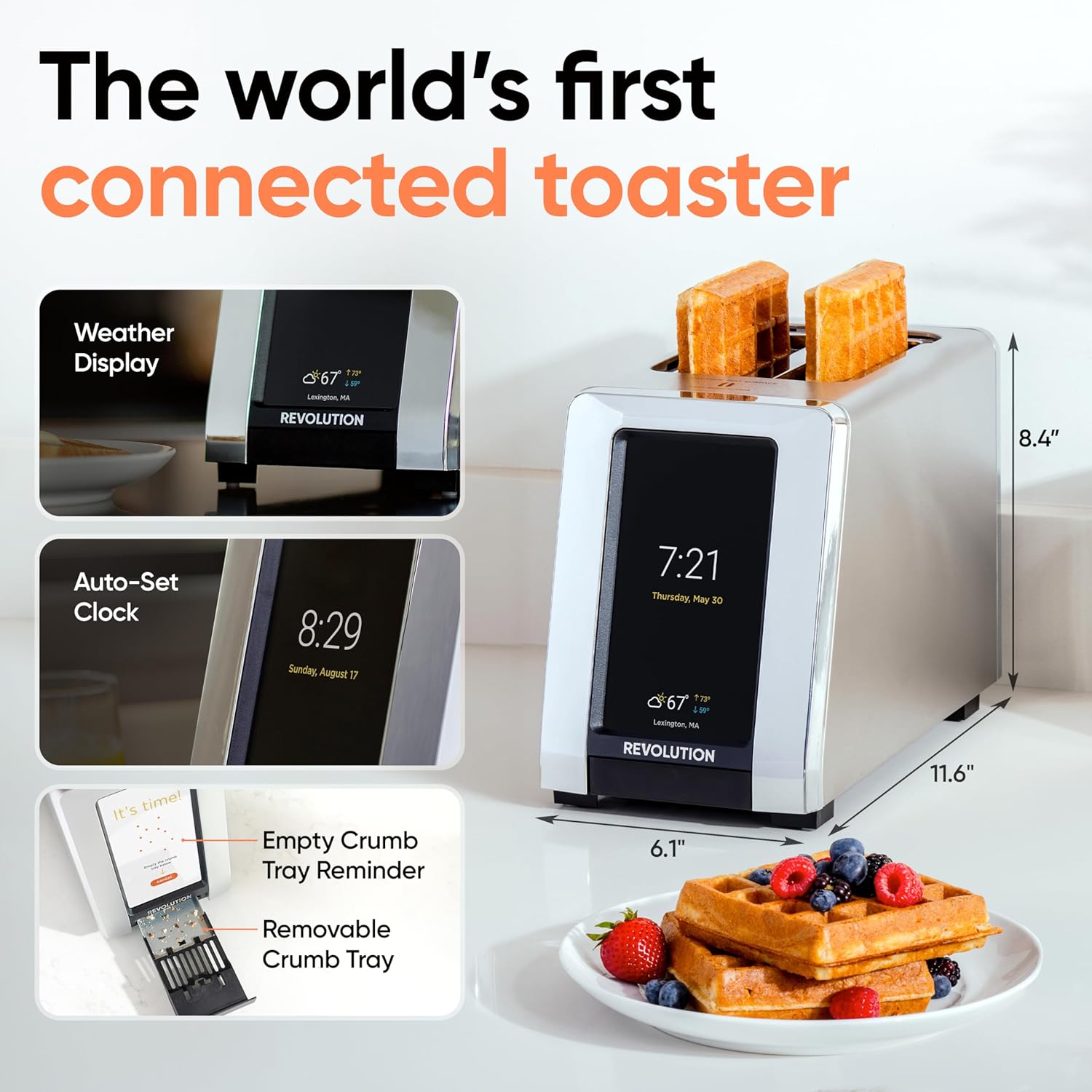
Image 4.1: The R180 Connect displaying weather and time, highlighting its smart features and dimensions.
5. പ്രവർത്തന നിർദ്ദേശങ്ങൾ
5.1 അടിസ്ഥാന ടോസ്റ്റിംഗ്
The R180 Connect simplifies toasting with a 3-tap process:
- Select Bread Type: On the touchscreen, choose the icon corresponding to your food item (e.g., bread, bagel, waffle).
- Choose State: Select whether the item is പുതിയത്, ശീതീകരിച്ചു, അല്ലെങ്കിൽ വേണ്ടി വീണ്ടും ചൂടാക്കുക.
- Adjust Browning Level: Use the slider or tap the desired browning level (1-7). The toaster remembers your last setting.
- ടോസ്റ്റിംഗ് ആരംഭിക്കുക: ടാപ്പ് ചെയ്യുക ആരംഭിക്കുക button. The toaster will automatically lower the food and begin the toasting cycle.

Image 5.1: The toaster's touchscreen interface, demonstrating the selection of bread type and browning preferences.
5.2 InstaGLO Technology
ഇൻസ്taGLO 2.0 heating technology rapidly reaches full heat in approximately 2 seconds. This process sears the outside of the food, locking in moisture and flavor, resulting in a crispy exterior and soft interior.

Image 5.2: Visual comparison illustrating the faster and tastier results achieved with InstaGLO technology.
5.3 Using the Toastie Press (Sold Separately)
The Revolution Toastie Press allows you to prepare grilled cheese, paninis, and quesadillas directly in your toaster without butter or oil. Refer to the Toastie Press instruction manual for detailed usage.
- Insert the Toastie Press into the toaster slots.
- Place your sandwich or food item inside the press.
- On the toaster's touchscreen, select "Toastie Mode" and choose your desired browning level.
- ടാപ്പ് ചെയ്യുക ആരംഭിക്കുക.
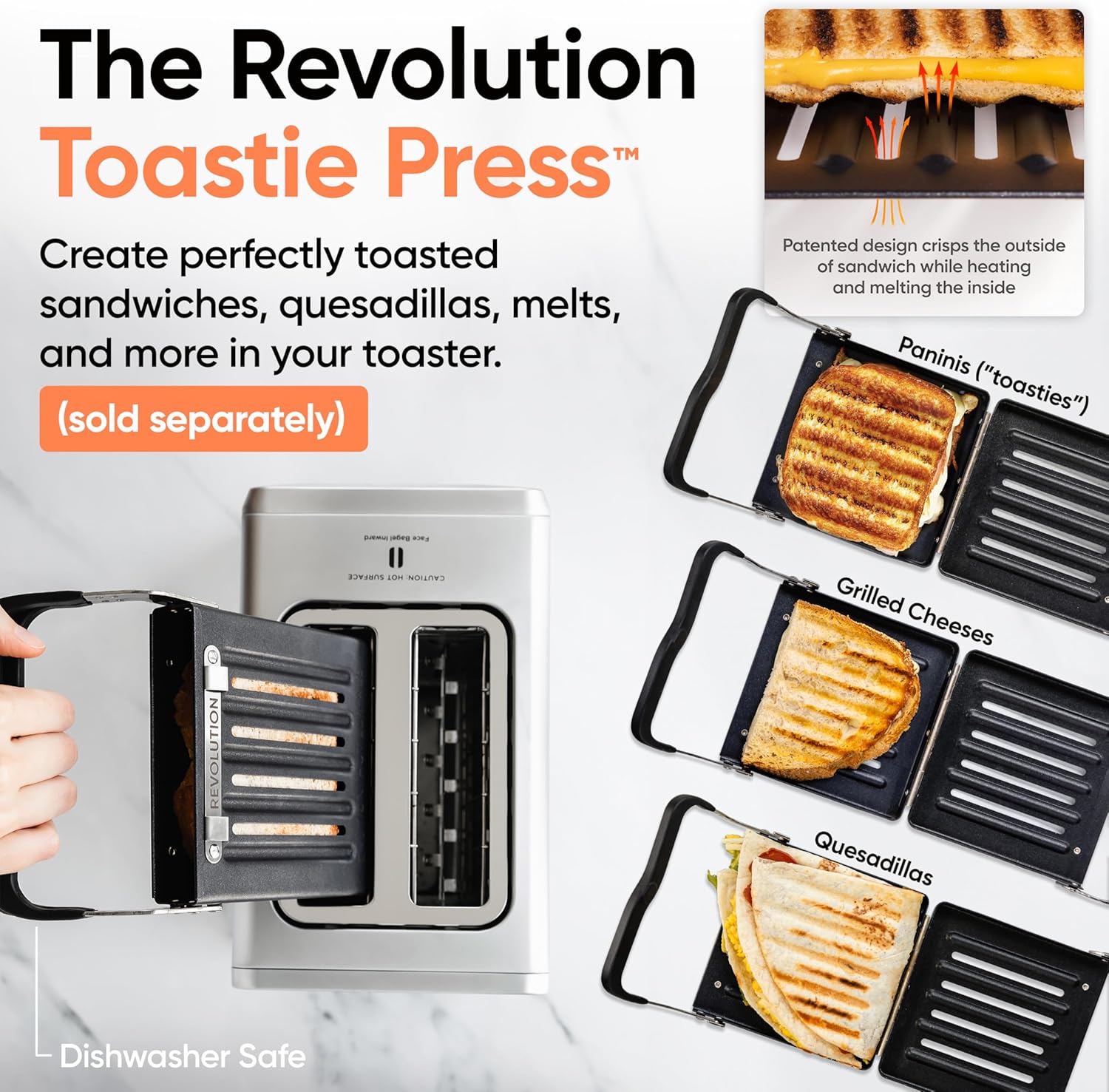
Image 5.3: The Revolution Toastie Press, an optional accessory for making toasted sandwiches.
6. പരിപാലനവും ശുചീകരണവും
6.1 ക്രംബ്സ് ട്രേ ക്ലീനിംഗ്
The toaster will periodically remind you to clean the crumb tray. Regular cleaning prevents crumb buildup and reduces fire risk.
- Unplug the toaster from the power outlet and allow it to cool completely.
- Locate the removable crumb tray at the bottom front of the toaster.
- Pull the tray out to remove it.
- നുറുക്കുകൾ ഉപേക്ഷിച്ച് പരസ്യം ഉപയോഗിച്ച് ട്രേ തുടച്ചു വൃത്തിയാക്കുക.amp തുണി.
- Ensure the tray is completely dry before reinserting it into the toaster.
Image 6.1: The removable crumb tray, shown being accessed for cleaning.
6.2 ബാഹ്യ ശുചീകരണം
- Ensure the toaster is unplugged and cool.
- ഒരു മൃദുവായ, ഡി ഉപയോഗിച്ച് ബാഹ്യ പ്രതലങ്ങൾ തുടയ്ക്കുകamp തുണി. ഉരച്ചിലുകളുള്ള ക്ലീനറുകളോ സ്കോറിംഗ് പാഡുകളോ ഉപയോഗിക്കരുത്.
- For stainless steel models, use a stainless steel cleaner if necessary, following the product's instructions.
- Do not spray cleaning solutions directly onto the toaster.
7. പ്രശ്നപരിഹാരം
| പ്രശ്നം | സാധ്യമായ കാരണം | പരിഹാരം |
|---|---|---|
| Toaster does not power on. | പ്ലഗ് ഇൻ ചെയ്തിട്ടില്ല; പവർ ഔട്ട്ലെറ്റ് തകരാറ്. | Ensure the toaster is securely plugged into a working outlet. Test the outlet with another appliance. |
| Food is not toasting evenly. | Incorrect bread type or browning level selected; crumb tray full. | Verify the correct bread type and browning level are selected. Clean the crumb tray. |
| വൈഫൈ കണക്ഷൻ പരാജയപ്പെടുന്നു. | തെറ്റായ പാസ്വേഡ്; പരിധിക്ക് പുറത്താണ്; നെറ്റ്വർക്ക് പ്രശ്നം. | Re-enter Wi-Fi password carefully. Move toaster closer to router. Restart router. |
| Toaster emits smoke. | Food lodged inside; crumb tray full; foreign object. | Immediately unplug the toaster. Allow to cool. Carefully remove any lodged food or foreign objects. Clean crumb tray. If smoke persists, discontinue use and contact customer support. |
8 സ്പെസിഫിക്കേഷനുകൾ
- മോഡൽ: R180 Connect (R180C-01)
- ബ്രാൻഡ്: വിപ്ലവം
- സ്ലൈസുകളുടെ എണ്ണം: 2
- വാട്ട്tage: 1500 വാട്ട്സ്
- വാല്യംtage: 120 വോൾട്ട് (എസി)
- മെറ്റീരിയൽ: സ്റ്റെയിൻലെസ്സ് സ്റ്റീൽ
- ഉൽപ്പന്ന അളവുകൾ: 11.65"D x 6.13"W x 8.4"H
- ഇനത്തിൻ്റെ ഭാരം: 7.17 പൗണ്ട്
- പ്രത്യേക സവിശേഷത: Touchscreen, Wi-Fi Connectivity, InstaGLO Technology
- UPC: 810034150882
9. വാറൻ്റിയും പിന്തുണയും
For warranty information, product registration, or technical support, please visit the official Revolution Cooking webസൈറ്റ് അല്ലെങ്കിൽ അവരുടെ ഉപഭോക്തൃ സേവന വിഭാഗവുമായി ബന്ധപ്പെടുക.
Revolution Cooking, LLC
Visit the Revolution Store on Amazon
Note: Specific warranty terms may vary by region and purchase date. Please refer to the documentation provided with your purchase for precise details.


