1. ആമുഖം
1.1 ഉൽപ്പന്നം കഴിഞ്ഞുview
The Formuler Z10 NEO is an Android 10-based streaming media player designed to deliver 4K resolution content. It features a single-band 2.4GHz Wi-Fi connection and 10/100M Ethernet for network connectivity. With 2GB RAM and 4GB ROM, it provides a stable platform for streaming applications. This manual provides detailed instructions for setting up, operating, and maintaining your device.

ചിത്രം 1.1: മുകളിൽ view of the Formuler Z10 NEO Streaming Media Player, showcasing അതിന്റെ ഒതുക്കമുള്ള ഡിസൈൻ.
1.2 എന്താണ് ഉൾപ്പെടുത്തിയിരിക്കുന്നത്
താഴെ കൊടുത്തിരിക്കുന്ന എല്ലാ ഇനങ്ങളും നിങ്ങളുടെ പാക്കേജിൽ ഉണ്ടെന്ന് ദയവായി ഉറപ്പാക്കുക:
- Formuler Z10 NEO Streaming Media Player
- IR റിമോട്ട് കൺട്രോൾ
- HDMI കേബിൾ
- പവർ കേബിൾ
- Extra Air Remote Keyboard (Backlit)
- Extra Magnetic Mount

Image 1.2: All components included in the Formuler Z10 NEO package, including the device, remotes, and accessories.
2. സജ്ജീകരണ ഗൈഡ്
2.1 ഉപകരണം ബന്ധിപ്പിക്കുന്നു
- ടിവിയിലേക്ക് കണക്റ്റ് ചെയ്യുക: Plug one end of the HDMI cable into the HDMI port on the Formuler Z10 NEO and the other end into an available HDMI input on your television.
- പവറിലേക്ക് ബന്ധിപ്പിക്കുക: Connect the power adapter to the DC 12V/1A port on the device and then plug the adapter into a wall outlet.
- നെറ്റ്വർക്കിലേക്ക് കണക്റ്റുചെയ്യുക (ഓപ്ഷണൽ): For a wired internet connection, connect an Ethernet cable from your router to the LAN port on the Formuler Z10 NEO. Alternatively, you can use Wi-Fi after initial setup.

ചിത്രം 2.1: പിൻഭാഗം view of the Formuler Z10 NEO, showing the 12V/1A power input, LAN port, HDMI output, and USB port.
2.2 പ്രാരംഭ പവർ ഓൺ
- എല്ലാ കേബിളുകളും സുരക്ഷിതമായി ബന്ധിപ്പിച്ചിട്ടുണ്ടെന്ന് ഉറപ്പാക്കുക.
- നിങ്ങളുടെ ടെലിവിഷൻ ഓണാക്കി ശരിയായ HDMI ഇൻപുട്ട് ഉറവിടം തിരഞ്ഞെടുക്കുക.
- The Formuler Z10 NEO will automatically power on and begin the boot process.
- Follow the on-screen instructions to complete the initial setup, including language selection, network configuration (if not using Ethernet), and Google account login.
3. പ്രവർത്തന നിർദ്ദേശങ്ങൾ
3.1 ഇന്റർഫേസ് നാവിഗേറ്റ് ചെയ്യൽ
The Formuler Z10 NEO runs on Android 10, providing a user-friendly interface. Use the included remote controls to navigate through menus, select applications, and control media playback.
- ദിശാസൂചന പാഡ്: Use the up, down, left, and right buttons to move the cursor or highlight items.
- ശരി/സെലക്ട് ബട്ടൺ: Press to confirm a selection or open an application.
- ബാക്ക് ബട്ടൺ: മുമ്പത്തെ സ്ക്രീനിലേക്കോ മെനുവിലേക്കോ മടങ്ങുന്നു.
- ഹോം ബട്ടണ്: പ്രധാന ഹോം സ്ക്രീനിലേക്ക് മടങ്ങുന്നു.
3.2 അടിസ്ഥാന പ്രവർത്തനങ്ങൾ
- Launching Apps: From the home screen, navigate to the desired application icon and press OK to launch it.
- വോളിയം ക്രമീകരിക്കുന്നു: Use the Volume Up/Down buttons on the remote control.
- പവർ ഓൺ/ഓഫ്: Press the Power button on the remote control to put the device into standby mode or power it off.
- നെറ്റ്വർക്ക് ക്രമീകരണങ്ങൾ: Access network settings via the Android settings menu to configure Wi-Fi or check Ethernet status.
4. റിമോട്ട് കൺട്രോൾ ഗൈഡ്
4.1 Standard IR Remote Control
The standard IR remote control provides essential functions for navigating the Formuler Z10 NEO. It includes dedicated buttons for power, navigation, volume, channel control, and media playback.
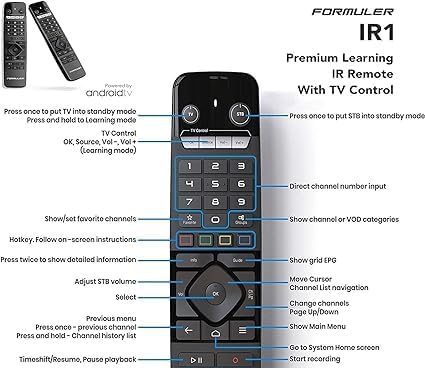
Image 4.1: Detailed layout of the Formuler Z10 NEO IR Remote Control, indicating the function of each button, including power, navigation, volume, and media controls.
4.2 Air Remote Keyboard (Backlit)
The included Air Remote Keyboard offers enhanced control with a full QWERTY keyboard and air mouse functionality, making text input and navigation more convenient. It also features backlighting for use in low-light conditions.

Image 4.2: The Formuler Z10 NEO Air Remote Keyboard, featuring a full QWERTY layout and an integrated USB dongle for wireless connectivity.
5. പരിപാലനം
5.1 വൃത്തിയാക്കൽ
To maintain the device's appearance and functionality, regularly clean it with a soft, dry cloth. Avoid using liquid cleaners or abrasive materials, as these can damage the surface or internal components.
5.2 സോഫ്റ്റ്വെയർ അപ്ഡേറ്റുകൾ
Periodically check for software updates to ensure optimal performance and access to the latest features. Updates can typically be found in the device's settings menu under 'About' or 'System Update'. Follow the on-screen prompts to download and install any available updates.
6. പ്രശ്നപരിഹാരം
This section addresses common issues you might encounter with your Formuler Z10 NEO.
- ശക്തിയില്ല:
പരിഹാരം: Ensure the power cable is securely connected to both the device and a working power outlet. Check if the power adapter is functioning correctly. - ടിവിയിൽ ചിത്രമില്ല:
പരിഹാരം: Verify the HDMI cable is properly connected to both the device and the TV. Ensure your TV is set to the correct HDMI input source. Try a different HDMI port or cable. - ഇൻ്റർനെറ്റ് കണക്ഷൻ ഇല്ല:
പരിഹാരം: If using Wi-Fi, check your Wi-Fi settings in the device menu and ensure you are connected to the correct network with the right password. If using Ethernet, ensure the cable is securely connected to both the device and the router, and that your router is working. Restart your router and the Formuler Z10 NEO. - റിമോട്ട് കൺട്രോൾ പ്രതികരിക്കുന്നില്ല:
പരിഹാരം: Replace the batteries in the remote control. Ensure there are no obstructions between the remote and the device. For the Air Remote Keyboard, ensure its USB dongle is plugged into the Formuler Z10 NEO. - Applications Crashing/Freezing:
പരിഹാരം: Close and restart the application. Clear the app's cache and data through the Android settings menu (Settings > Apps > [App Name] > Storage). If the issue persists, try uninstalling and reinstalling the application. Ensure the device's software is up to date.
7 സ്പെസിഫിക്കേഷനുകൾ
| ഫീച്ചർ | സ്പെസിഫിക്കേഷൻ |
|---|---|
| ഔട്ട്പുട്ട് റെസല്യൂഷൻ | 4K (3840 x 2160) |
| റാം | 2GB DDR @2400MHz |
| സംഭരണം | 4GB eMMC |
| ഓപ്പറേറ്റിംഗ് സിസ്റ്റം | ആൻഡ്രോയിഡ് 10 |
| വയർലെസ് കണക്റ്റിവിറ്റി | Single-Band 2.4Ghz Wi-Fi |
| ഇഥർനെറ്റ് | 10/100M |
| Dimensions (Length / Width) | 88 മിമി (3.46 ഇഞ്ച്) |
| Dimensions (Thickness) | 16 മിമി (0.64 ഇഞ്ച്) |
| നിറം | കറുപ്പ് |
| ഇനത്തിൻ്റെ ഭാരം | 1.43 പൗണ്ട് |
| ബാറ്ററികൾ (റിമോട്ടിന്) | 2 AA ബാറ്ററികൾ (ഉൾപ്പെട്ടിരിക്കുന്നു) |
8. വാറൻ്റിയും പിന്തുണയും
For warranty information and technical support, please refer to the documentation provided with your purchase or visit the official Formuler webസൈറ്റ്. വാറന്റി ക്ലെയിമുകൾക്കായി നിങ്ങളുടെ വാങ്ങലിന്റെ തെളിവ് സൂക്ഷിക്കുക.


