ആമുഖം
This manual provides detailed instructions for the Keychron K10 Max Wireless Custom Mechanical Keyboard. It covers initial setup, operational procedures, maintenance guidelines, troubleshooting tips, and product specifications. Please read this manual thoroughly to ensure proper use and optimal performance of your keyboard.
പാക്കേജ് ഉള്ളടക്കം
നിങ്ങളുടെ പാക്കേജിൽ എല്ലാ ഇനങ്ങളും ഉണ്ടെന്ന് ഉറപ്പാക്കുക:
- Keychron K10 Max വയർലെസ് കസ്റ്റം മെക്കാനിക്കൽ കീബോർഡ്
- ടൈപ്പ്-എ മുതൽ ടൈപ്പ്-സി വരെയുള്ള കേബിൾ
- Type-A 2.4GHz Receiver
- കീക്യാപ് പുള്ളർ
- Hex Key & Screwdriver
- Additional Windows Keycaps

Image: The Keychron K10 Max keyboard displayed with its accessories, including the USB-C cable, 2.4GHz receiver, keycap puller, hex key, screwdriver, and extra keycaps.
സജ്ജമാക്കുക
1. പ്രാരംഭ സജ്ജീകരണം
Before first use, it is recommended to fully charge the keyboard using the provided Type-A to Type-C cable. Connect the USB-C end to the keyboard and the USB-A end to a power source (e.g., computer USB port, USB wall adapter).
2. കണക്റ്റിവിറ്റി മോഡുകൾ
The K10 Max supports three connectivity options: 2.4 GHz wireless, Bluetooth 5.1, and wired USB-C.

Image: The Keychron K10 Max keyboard on a desk, illustrating its three connectivity options: USB Wired, 2.4GHz, and Bluetooth 5.1, connecting to a monitor, tablet, and smartphone.
2.1. 2.4 GHz വയർലെസ് കണക്ഷൻ
- Locate the 2.4 GHz receiver (USB-A dongle) included in the package.
- Plug the 2.4 GHz receiver into an available USB-A port on your computer.
- On the keyboard, slide the mode switch (located on the back or side) to the "2.4G" position.
- The keyboard should automatically connect. The 2.4 GHz connection provides a 1000 Hz polling rate for responsive performance.
2.2. ബ്ലൂടൂത്ത് 5.1 കണക്ഷൻ
- On the keyboard, slide the mode switch to the "BT" (Bluetooth) position.
- അമർത്തിപ്പിടിക്കുക Fn + 1 (അല്ലെങ്കിൽ Fn + 2 / Fn + 3) key combination for 4 seconds until the backlight flashes rapidly. This indicates the keyboard is in pairing mode.
- നിങ്ങളുടെ ഉപകരണത്തിൽ (കമ്പ്യൂട്ടർ, ടാബ്ലെറ്റ്, സ്മാർട്ട്ഫോൺ), ബ്ലൂടൂത്ത് പ്രവർത്തനക്ഷമമാക്കി പുതിയ ഉപകരണങ്ങൾക്കായി തിരയുക.
- Select "Keychron K10 Max" from the list of available devices to pair.
- The keyboard can store up to three Bluetooth devices. Switch between them by pressing Fn + 1, Fn + 2, അല്ലെങ്കിൽ Fn + 3.
2.3. വയർഡ് യുഎസ്ബി-സി കണക്ഷൻ
- Connect the provided Type-A to Type-C cable to the keyboard's USB-C port and to a USB-A port on your computer.
- Slide the mode switch on the keyboard to the "Cable" position.
- The keyboard will function as a wired device. This mode also supports a 1000 Hz polling rate.
3. Operating System Toggle
The K10 Max is compatible with both macOS and Windows/Linux operating systems. Use the OS toggle switch located on the back or side of the keyboard to select the appropriate layout.

Image: A close-up of the Keychron K10 Max keyboard's side, showing the physical toggle switch to select between Windows/Android and macOS modes, along with the connectivity switch for Cable or Bluetooth.
- Mac/iOS: Use this setting for Apple devices. The keyboard includes Mac multimedia keys and specific keycaps.
- Win/Android: Use this setting for Windows and Android devices. Additional Windows keycaps are provided for customization.
പ്രവർത്തന നിർദ്ദേശങ്ങൾ
1. Key Remapping and Customization (QMK Firmware & Keychron Launcher)
The K10 Max is powered by QMK open-source firmware, allowing for extensive customization of key functions, macros, and lighting effects. The Keychron Launcher web application provides an intuitive interface for these customizations.
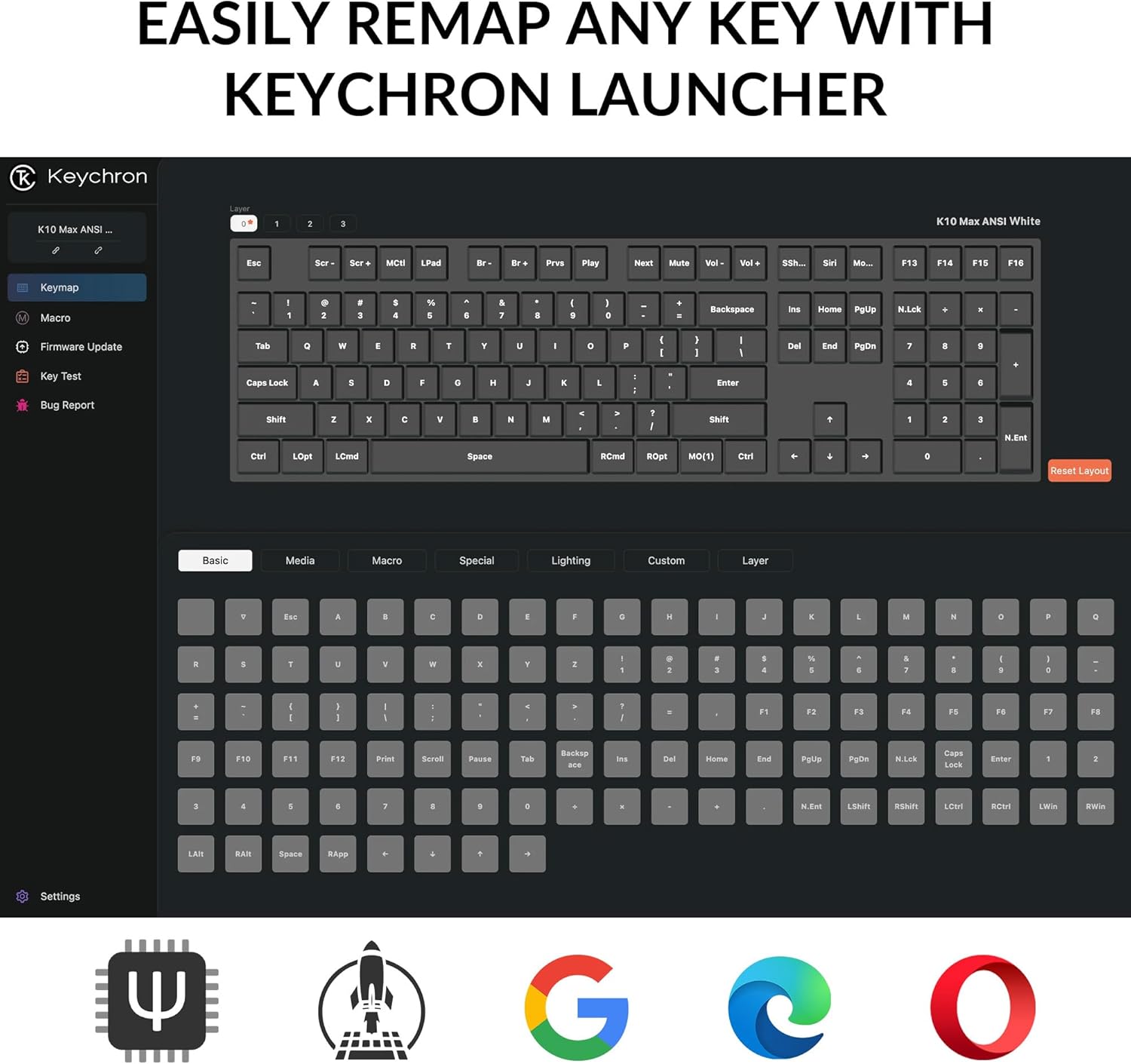
ചിത്രം: കീക്രോൺ ലോഞ്ചറിന്റെ ഒരു സ്ക്രീൻഷോട്ട് web application, showing the graphical interface for remapping keys and configuring keyboard settings.
- കീക്രോൺ ലോഞ്ചർ ആക്സസ് ചെയ്യുക web app through your web ബ്രൗസർ.
- Connect your keyboard to your computer via the USB-C cable.
- Follow the on-screen instructions in the Launcher to remap keys, create macros, and adjust lighting.
- Save your changes to the keyboard's firmware.
2. ബാക്ക്ലൈറ്റ് നിയന്ത്രണം
The keyboard features a south-facing white LED backlight. Use the following key combinations to control the backlight:
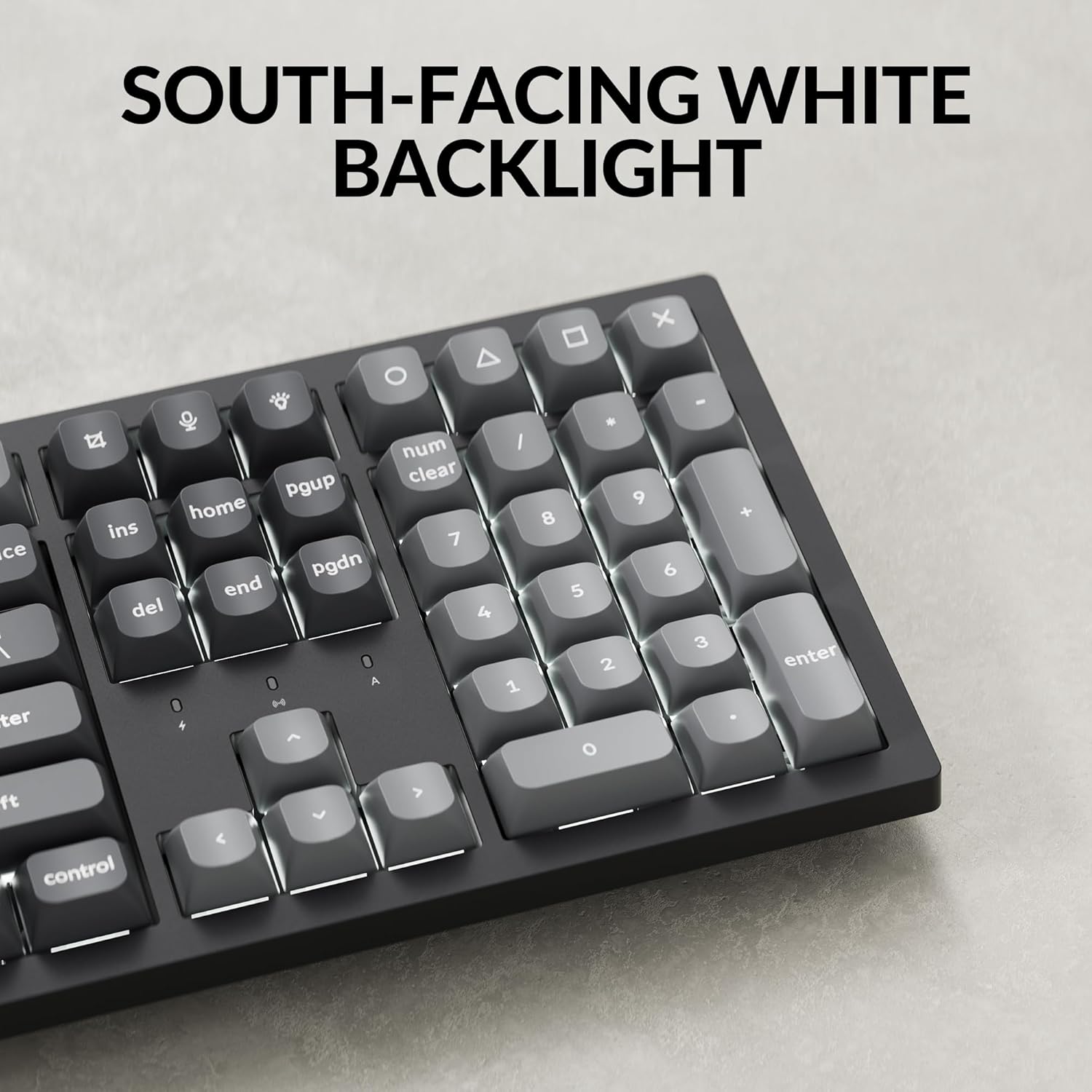
ചിത്രം: ഒരു ക്ലോസ്-അപ്പ് view of the Keychron K10 Max keyboard's number pad and arrow keys, showcasing the south-facing white LED backlight illuminating the key legends.
- Fn + Light Key (usually F5 or a dedicated key): Cycle through backlight effects.
- Fn + Arrow Up/Down: ബാക്ക്ലൈറ്റിന്റെ തെളിച്ചം ക്രമീകരിക്കുക.
- Fn + Arrow Left/Right: Adjust backlight effect speed (if applicable).
3. ബാറ്ററി മാനേജ്മെന്റ്
The K10 Max is equipped with a 4000 mAh rechargeable battery. To maximize battery life:
- Turn off the backlight when not needed.
- Use the wired connection when possible to conserve battery.
- The keyboard can last up to 190 hours with the backlight off and approximately 100 hours at the lowest brightness setting.
- A low battery indicator (usually a flashing LED) will notify you when charging is required.
മെയിൻ്റനൻസ്
1. വൃത്തിയാക്കൽ
കീബോർഡിന്റെ രൂപവും പ്രവർത്തനക്ഷമതയും നിലനിർത്താൻ പതിവായി വൃത്തിയാക്കൽ സഹായിക്കുന്നു.
- കീബോർഡ് വൃത്തിയാക്കുന്നതിന് മുമ്പ് എല്ലാ വൈദ്യുതി സ്രോതസ്സുകളിൽ നിന്നും ഉപകരണങ്ങളിൽ നിന്നും വിച്ഛേദിക്കുക.
- മൃദുവായ, ലിൻ്റ് രഹിത തുണി ഉപയോഗിക്കുകampened with water or a mild cleaning solution to wipe the keycaps and frame. Avoid excessive moisture.
- കീക്യാപ്പുകൾക്കിടയിലുള്ള പൊടിയും അവശിഷ്ടങ്ങളും ഉണ്ടെങ്കിൽ, കംപ്രസ് ചെയ്ത വായു അല്ലെങ്കിൽ ഒരു ചെറിയ ബ്രഷ് ഉപയോഗിക്കുക.
- The PBT keycaps are durable and oil-resistant, making them easy to clean.
2. Keycap Removal
To remove keycaps for cleaning or replacement:

Image: A close-up of the Keychron K10 Max keyboard, showing several double-shot PBT keycaps removed, revealing their construction and the underlying switches.
- നൽകിയിരിക്കുന്ന കീക്യാപ്പ് പുള്ളർ ഉപയോഗിക്കുക.
- Gently hook the puller onto the sides of the keycap.
- Pull straight up with even pressure to remove the keycap. Avoid twisting or excessive force to prevent damage to the switch.
- When reattaching, align the keycap with the switch stem and press down firmly until it clicks into place.
ട്രബിൾഷൂട്ടിംഗ്
- കീബോർഡ് പ്രതികരിക്കുന്നില്ല:
- കീബോർഡ് ചാർജ് ചെയ്തിട്ടുണ്ടെന്ന് ഉറപ്പാക്കുക.
- Check the connectivity mode switch (2.4G, BT, Cable) is set correctly.
- For 2.4 GHz, ensure the receiver is securely plugged in.
- For Bluetooth, re-pair the device or try a different Bluetooth slot (Fn+1/2/3).
- For wired, ensure the USB-C cable is properly connected to both the keyboard and the computer.
- നിങ്ങളുടെ കമ്പ്യൂട്ടറിലെ മറ്റൊരു യുഎസ്ബി പോർട്ടിലേക്ക് കണക്റ്റുചെയ്യാൻ ശ്രമിക്കുക.
- രജിസ്റ്റർ ചെയ്യാത്തതോ ഇരട്ട ടൈപ്പ് ചെയ്യാത്തതോ ആയ കീകൾ:
- Clean around the affected keycap to remove any debris.
- കീക്യാപ്പ് സ്വിച്ചിൽ ശരിയായി സ്ഥാപിച്ചിട്ടുണ്ടെന്ന് ഉറപ്പാക്കുക.
- If using wireless, ensure there is no interference and the keyboard is within range.
- Consider updating the keyboard firmware via the Keychron Launcher.
- ബാക്ക്ലൈറ്റ് പ്രവർത്തിക്കുന്നില്ല:
- കീബോർഡിൽ ആവശ്യത്തിന് ബാറ്ററി ചാർജ് ഉണ്ടെന്ന് ഉറപ്പാക്കുക.
- ഉപയോഗിച്ച് തെളിച്ചം ക്രമീകരിക്കുക Fn + മുകളിലേക്കുള്ള അമ്പടയാളം.
- ബാക്ക്ലൈറ്റ് ഇഫക്റ്റുകളിലൂടെ സൈക്കിൾ ചവിട്ടുക ഉപയോഗിച്ച് എഫ്എൻ + ലൈറ്റ് കീ.
- OS layout issues (e.g., Alt/Cmd keys swapped):
- Verify the OS toggle switch on the keyboard is set to the correct operating system (Mac/iOS or Win/Android).
സ്പെസിഫിക്കേഷനുകൾ
| മോഡലിൻ്റെ പേര് | K10 മാക്സ് |
| മോഡൽ നമ്പർ | K10M-A3 |
| ലേഔട്ട് | 100% Full-sized, 108 Keys |
| കണക്റ്റിവിറ്റി | 2.4 GHz വയർലെസ്, ബ്ലൂടൂത്ത് 5.1, USB-C വയേർഡ് |
| പോളിംഗ് നിരക്ക് | 1000 Hz (2.4 GHz & വയേർഡ്), 90 Hz (ബ്ലൂടൂത്ത്) |
| കീകാപ്പുകൾ | Double-shot PBT (non-shine-through) |
| ബാക്ക്ലൈറ്റ് | South-facing White LED |
| സ്വിച്ചുകൾ | Keychron Super Mechanical Switch (Super Red Switch) |
| സ്റ്റെബിലൈസറുകൾ | Screw-in PCB Stabilizers |
| ഫേംവെയർ | QMK (Open-source), Keychron Launcher compatible |
| ബാറ്ററി ശേഷി | 4000 mAh |
| ബാറ്ററി ലൈഫ് | Up to 190 hours (backlight off), approx. 100 hours (lowest brightness) |
| അനുയോജ്യമായ OS | macOS, Windows, Linux |
| ഫ്രെയിം മെറ്റീരിയൽ | എബിഎസ് |
| ഉൽപ്പന്ന അളവുകൾ | 13.94 x 4.89 x 0.64 ഇഞ്ച് (447.37 x 139.82 മിമി) |
| ഇനത്തിൻ്റെ ഭാരം | 1.1 പൗണ്ട് (1530 ഗ്രാം ± 10 ഗ്രാം) |
| എൻ-കീ റോൾഓവർ (NKRO) | അതെ |
വാറൻ്റിയും പിന്തുണയും
വാറന്റി വിവരങ്ങൾക്കും സാങ്കേതിക പിന്തുണയ്ക്കും, ദയവായി ഔദ്യോഗിക കീക്രോൺ പരിശോധിക്കുക. website or contact Keychron customer service. Details regarding warranty periods and service procedures are available through these channels.
ഔദ്യോഗിക കീക്രോൺ Webസൈറ്റ്: www.keychron.com


