1. ആമുഖം
This manual provides detailed instructions for the safe and efficient operation of your WEST TUNE WTMS-380T Hotplate Magnetic Stirrer. This device is designed for laboratory use, primarily for stirring low-viscosity liquids and solid-liquid mixtures, with integrated heating capabilities.
പ്രധാന സവിശേഷതകളിൽ ഇവ ഉൾപ്പെടുന്നു:
- Touchable LCD screen for convenient and accurate setting of stirring speed, heating temperature, and stirring time.
- Real-time display of set and actual values.
- Program control function with 5 memory options and 5 program control settings for automated operation.
- Upgraded aluminum hot plate (5.5 inches diameter) for fast, uniform heat transfer, durability, and corrosion resistance.
- Internal and external temperature sensors for precise temperature control of the heating plate or sample.
- Speed range: 200-1500 rpm.
- Temperature range: RT+10-380℃/716℉.
- Timer range: 1s-99m59s.
- Maximum stirring volume: 3L.
- Ultra-temperature and over-speed alarm displays for safety.

Figure 1: WEST TUNE WTMS-380T Hotplate Magnetic Stirrer with accessories.
2. സുരക്ഷാ മുൻകരുതലുകൾ
- മുന്നറിയിപ്പ്: Do not touch the heating plate before it cools down completely to avoid burns.
- ഉപകരണം ഒരു സ്ഥിരതയുള്ള, നിരപ്പായ പ്രതലത്തിൽ സ്ഥാപിച്ചിട്ടുണ്ടെന്ന് ഉറപ്പാക്കുക.
- Always use appropriate personal protective equipment (PPE) such as gloves and eye protection when operating.
- തീപിടിക്കുന്ന വസ്തുക്കൾക്ക് സമീപം ഉപകരണം പ്രവർത്തിപ്പിക്കരുത്.
- ജോലിസ്ഥലത്ത് ശരിയായ വായുസഞ്ചാരം ഉറപ്പാക്കുക.
- വൃത്തിയാക്കുന്നതിനോ പരിപാലിക്കുന്നതിനോ മുമ്പായി വൈദ്യുതി വിച്ഛേദിക്കുക.
- The magnetic stirrer has ultra-temperature and over-speed alarm displays. Pay attention to these warnings.
- Only use the device for its intended purpose as described in this manual.
3. ബോക്സിൽ എന്താണുള്ളത്?
അൺപാക്ക് ചെയ്യുമ്പോൾ, എല്ലാ ഘടകങ്ങളും ഉണ്ടെന്ന് ഉറപ്പാക്കുക:
- WEST TUNE WTMS-380T Hotplate Magnetic Stirrer Unit
- പവർ കോർഡ്
- പിന്തുണ വടി
- Temperature sensor (external probe)
- Magnetic stir bar
- ഫ്യൂസ്
4. സജ്ജീകരണം
- പ്ലേസ്മെൻ്റ്: Place the stirrer on a stable, flat, and heat-resistant surface in a well-ventilated area.
- സപ്പോർട്ട് റോഡ് ഇൻസ്റ്റാൾ ചെയ്യുക: Insert the support rod into the designated hole at the rear of the unit and tighten the securing screw.
- Connect Temperature Sensor: If external temperature control is desired, connect the temperature probe to the port on the rear of the unit. Secure the probe to the support rod using the provided clamp, ensuring the probe tip is immersed in the liquid to be heated/stirred without touching the bottom or sides of the beaker.
- പവർ കണക്ഷൻ: Connect the power cord to the unit and then to a grounded electrical outlet.
- പ്രാരംഭ പരിശോധന: Ensure the main power switch (located on the side/rear) is in the OFF position before connecting to power.

Figure 2: Key components and features of the stirrer.

Figure 3: Temperature probe and clamp അസംബ്ലി.
5. പ്രവർത്തന നിർദ്ദേശങ്ങൾ
5.1 പവർ ഓൺ/ഓഫ്
Flip the main power switch (usually on the side or rear of the unit) to the "ON" position. The LCD screen will illuminate.

Figure 4: Touch LCD Screen Interface.
5.2 സ്റ്റിറിംഗ് വേഗത ക്രമീകരിക്കൽ
- On the LCD screen, touch the "Speed" display area.
- Use the numeric keypad to enter the desired stirring speed in RPM (Revolutions Per Minute).
- Confirm the setting. The actual speed (PV) will adjust to the set value (SV).
5.3 ചൂടാക്കൽ താപനില ക്രമീകരണം
- Touch the "Heating plate temperature" or "Sample temperature" display area, depending on whether you are using the internal sensor or external probe.
- Enter the desired temperature in Celsius or Fahrenheit using the numeric keypad.
- Confirm the setting. The heating will begin, and the actual temperature (PV) will rise towards the set value (SV).
5.4 Setting Working Time
- Touch the "Time" display area.
- Enter the desired working duration in minutes and seconds.
- Confirm the setting. The timer will start once the stirring and/or heating functions are activated.
5.5 Program Control Function
The device supports 5 sets of memory options and 5 sets of program control operations for automated processes.
- മെമ്മറി ഓപ്ഷനുകൾ:
- Touch "Memory 1" (or Memory 2-5) to access saved settings.
- To save current settings, adjust speed, temperature, and time as desired, then long-press the desired "Memory" button until a save confirmation appears.
- Program Control Operations:
- Touch "Program control" to enter the program setting interface.
- Select "Program 1" (or Program 2-5) to configure a sequence of operations.
- For each step in the program, set parameters such as speed, temperature, and duration.
- Save the program. The device can automatically run up to 5 sets of programs simultaneously.

Figure 5: Program and Memory Settings Interface.
5.6 Video Tutorial: Operation Overview
Video 1: Introduction to the operation of the hotplate magnetic stirrer. This video demonstrates basic setting of speed, heating temperature, and working time using the touch screen interface.
6. പരിപാലനം
- വൃത്തിയാക്കൽ: Always disconnect the power cord before cleaning. Use a soft, damp cloth with a mild detergent to clean the exterior surfaces. Do not use abrasive cleaners or solvents. Ensure no liquid enters the internal components.
- Hot Plate Care: Allow the hot plate to cool completely before cleaning. Wipe away any spills immediately.
- സംഭരണം: ഉപയോഗത്തിലില്ലാത്തപ്പോൾ ഉപകരണം വൃത്തിയുള്ളതും വരണ്ടതുമായ അന്തരീക്ഷത്തിൽ സൂക്ഷിക്കുക.
- ഫ്യൂസ് മാറ്റിസ്ഥാപിക്കൽ: If the unit fails to power on, check the fuse located near the power inlet. Replace with a fuse of the same type and rating as specified in the specifications.
7. പ്രശ്നപരിഹാരം
| പ്രശ്നം | സാധ്യമായ കാരണം | പരിഹാരം |
|---|---|---|
| യൂണിറ്റ് പവർ ഓണാക്കുന്നില്ല. | No power supply; Blown fuse; Power switch off. | Check power cord connection and outlet; Replace fuse; Ensure power switch is ON. |
| Stirring motor not working. | Speed setting too low; Stir bar not present or improperly placed; Motor malfunction. | Increase speed setting; Ensure stir bar is in the vessel and centered; Contact support if problem persists. |
| Heating plate not heating or inconsistent temperature. | Temperature setting too low; External probe not properly immersed or faulty; Internal sensor issue; Heating element malfunction. | Increase temperature setting; Ensure external probe is correctly positioned; Verify probe connection; Contact support if problem persists. |
| ഡിസ്പ്ലേ പിശക് സന്ദേശം കാണിക്കുന്നു. | System error; Sensor fault; Over-temperature/over-speed alarm. | Refer to specific error codes in a more detailed technical manual (if available); Check sensor connections; Reduce speed/temperature settings if alarms are active. If error persists, contact support. |
8 സ്പെസിഫിക്കേഷനുകൾ
The following table outlines the technical specifications for the WEST TUNE WTMS-380T Hotplate Magnetic Stirrer:
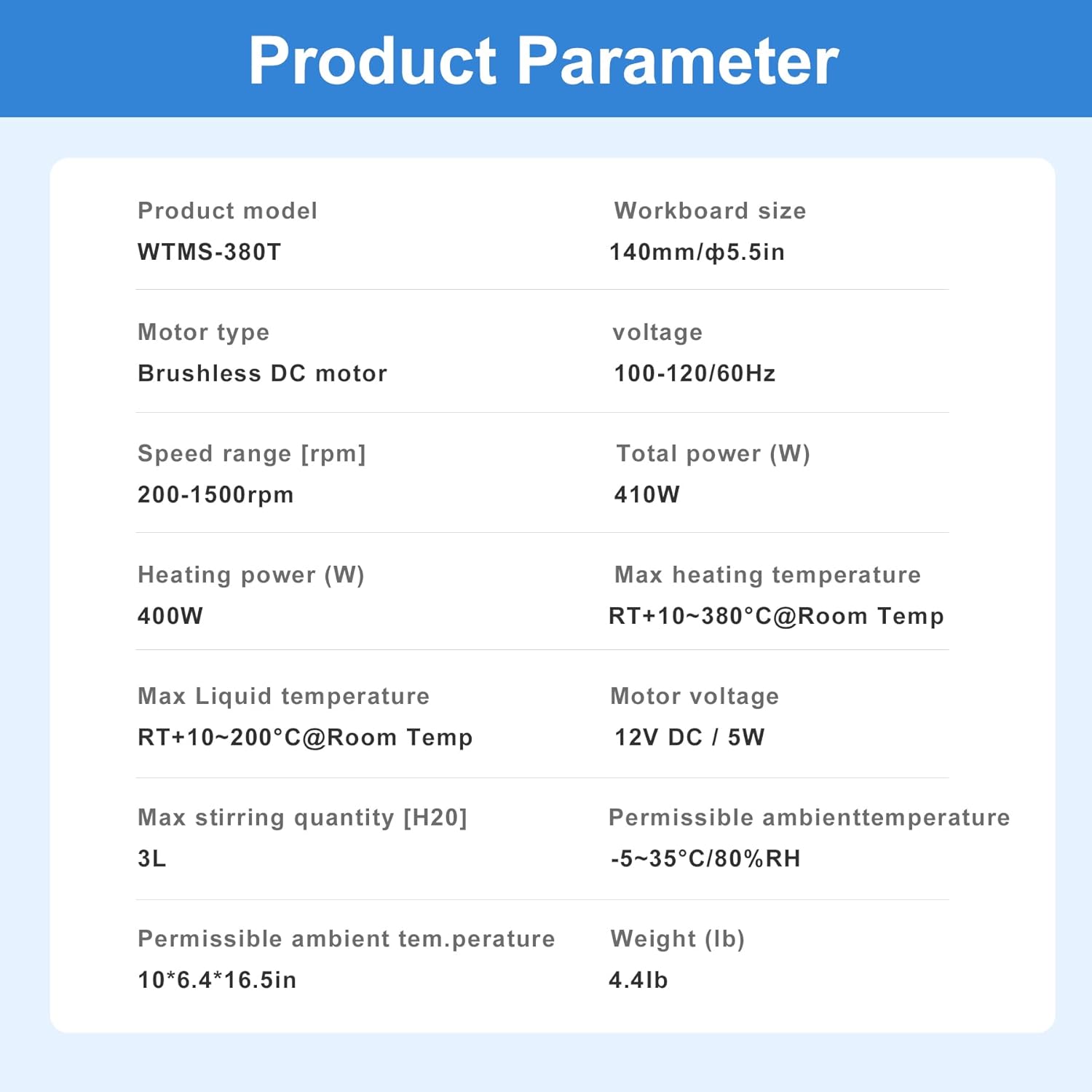
ചിത്രം 6: വിശദമായ ഉൽപ്പന്ന പാരാമീറ്ററുകൾ.
| പരാമീറ്റർ | മൂല്യം |
|---|---|
| ഉൽപ്പന്ന മോഡൽ | WTMS-380T |
| Workboard Size | 140 മിമി / 5.5 ഇഞ്ച് |
| മോട്ടോർ തരം | ബ്രഷ് ഇല്ലാത്ത ഡിസി മോട്ടോർ |
| വാല്യംtage | 100-120V / 60Hz |
| വേഗത പരിധി | 200-1500 ആർപിഎം |
| മൊത്തം പവർ | 410W |
| ചൂടാക്കൽ ശക്തി | 400W |
| പരമാവധി ചൂടാക്കൽ താപനില | RT+10-380℃ (716℉) @ Room Temp |
| പരമാവധി ദ്രാവക താപനില | RT+10-200℃ @ Room Temp |
| മോട്ടോർ വോളിയംtage | 12V DC / 5W |
| Max Stirring Quantity [H2O] | 3L |
| അനുവദനീയമായ അന്തരീക്ഷ താപനില | -5~35℃ / 80% RH |
| ഉൽപ്പന്ന അളവുകൾ | 10 x 6.4 x 4.7 ഇഞ്ച് |
| ഭാരം | 4.4 പൗണ്ട് |
9. വാറൻ്റിയും പിന്തുണയും
For warranty information, technical support, or service inquiries, please contact the WEST TUNE customer service team. Refer to your purchase documentation or the official WEST TUNE webബന്ധപ്പെടാനുള്ള വിശദാംശങ്ങൾക്കുള്ള സൈറ്റ്.
If there is any problem with the product, please contact us for satisfactory service.


