1. ആമുഖം
Thank you for choosing the Armitron Sport Kids Easy to Read Resin Strap Watch, Model 27-1007. This manual provides essential information for the proper setup, operation, and maintenance of your watch. Please read these instructions carefully to ensure optimal performance and longevity of the product.
2 സുരക്ഷാ വിവരങ്ങൾ
- ജല പ്രതിരോധം: This watch is water resistant to 100 feet (30 meters). It is suitable for splashes, rain, and brief immersion in water. It is അല്ല recommended for swimming, diving, or prolonged water activities. Do not operate the crown while the watch is wet.
- ബാറ്ററി: Do not attempt to open the watch case or replace the battery yourself. Battery replacement should be performed by a qualified watch technician.
- വൃത്തിയാക്കൽ: വൃത്തിയാക്കാൻ മൃദുവായതും ഉണങ്ങിയതുമായ തുണി ഉപയോഗിക്കുക. കഠിനമായ രാസവസ്തുക്കളോ ഉരച്ചിലുകളോ ഉള്ള വസ്തുക്കൾ ഒഴിവാക്കുക.
- ചെറിയ ഭാഗങ്ങൾ: This product contains small parts and is suitable for ages 6 and up. Keep out of reach of very young children to prevent choking hazards.
3. ഉൽപ്പന്നം കഴിഞ്ഞുview
The Armitron Sport Kids Watch features a clear analog display designed for easy time-telling. Key components include the watch face, hands (hour, minute, second), a rotating bezel, a crown for setting time, and a durable resin strap.
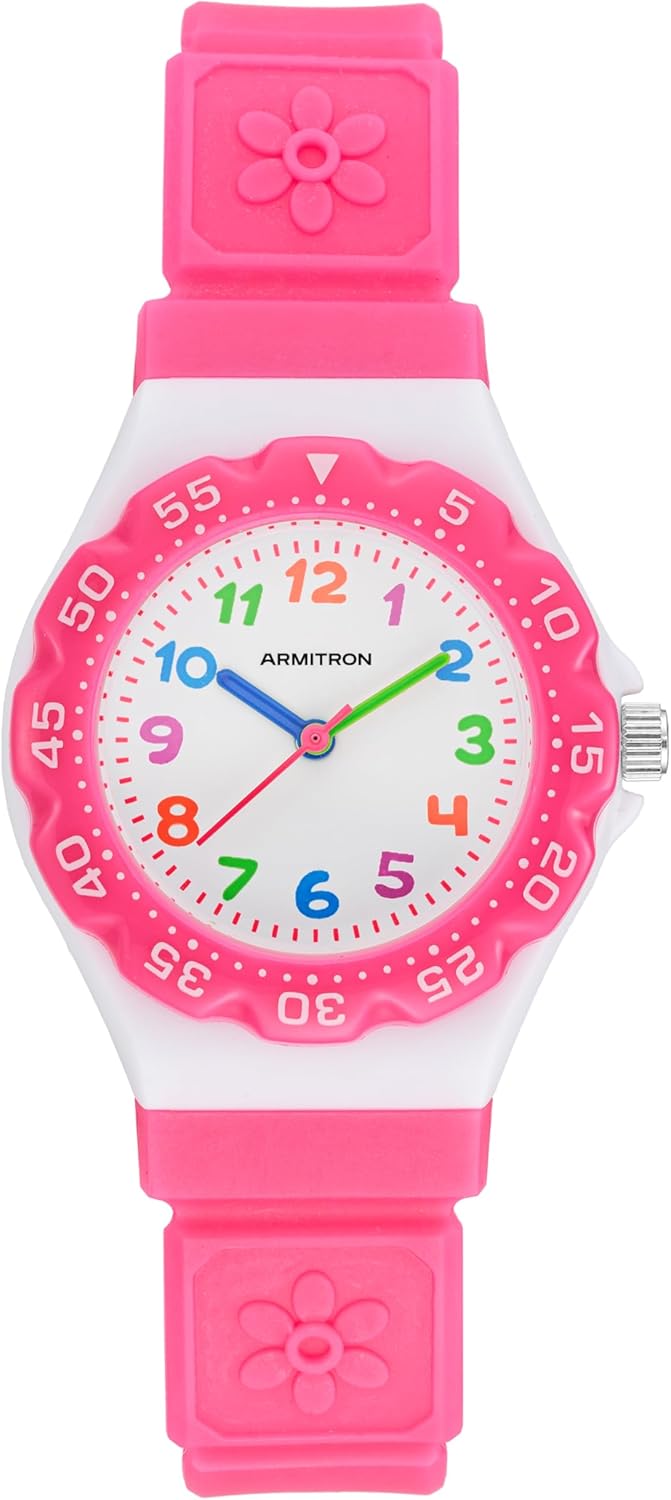
ചിത്രം 3.1: ഫ്രണ്ട് view of the Armitron Sport Kids Watch. This image displays the watch face with its multicolored Arabic numerals, the pink movable top ring (bezel), and the pink resin strap with flower details.

ചിത്രം 3.2: വശം view വാച്ചിന്റെ, സമയം ക്രമീകരിക്കാൻ ഉപയോഗിക്കുന്ന കിരീടം എടുത്തുകാണിക്കുന്നു.

ചിത്രം 3.3: തിരികെ view of the watch, illustrating the pink resin strap and the buckle closure mechanism.
4. സജ്ജീകരണം: സമയം ക്രമീകരിക്കൽ
- കിരീടം വലിക്കുക: Gently pull the crown (the small knob on the side of the watch case) outwards until you feel a click. The second hand will stop moving.
- സമയം ക്രമീകരിക്കുക: മണിക്കൂർ, മിനിറ്റ് സൂചികൾ ശരിയായ സമയത്തിലേക്ക് നീക്കാൻ കിരീടം ഘടികാരദിശയിലോ എതിർ ഘടികാരദിശയിലോ തിരിക്കുക.
- Push the Crown: Once the correct time is set, push the crown back into its original position. The second hand will resume movement, indicating the watch is now running.
5. Operating Instructions: Using the Rotating Bezel
This watch features a rotating bezel (the outer ring with minute markings). This bezel can be used as a simple timer to track elapsed time.
- Align the Bezel: Rotate the bezel so that the triangle marker (or "0" mark) aligns with the current position of the minute hand on the watch face.
- Track Elapsed Time: As time passes, the minute hand will move. The number on the bezel that the minute hand points to will indicate the number of minutes that have elapsed since you set the bezel.
- ExampLe: If you need to track 30 minutes, align the bezel's triangle with the minute hand. When the minute hand reaches the "30" mark on the bezel, 30 minutes have passed.
6. പരിചരണവും പരിപാലനവും
- വൃത്തിയാക്കൽ: Wipe the watch regularly with a soft, lint-free cloth. For stubborn dirt, a slightly damp തുണി ഉപയോഗിക്കാം, തുടർന്ന് ഉടനടി ഉണക്കാം.
- രാസവസ്തുക്കൾ ഒഴിവാക്കുക: Do not expose the watch to solvents, detergents, perfumes, or cosmetic sprays, as these can damage the case, strap, or internal components.
- താപനില തീവ്രത: Avoid exposing the watch to extreme temperatures (hot or cold) or sudden temperature changes, which can affect accuracy and water resistance.
- സംഭരണം: When not in use, store the watch in a cool, dry place away from direct sunlight.
7. പ്രശ്നപരിഹാരം
| പ്രശ്നം | സാധ്യമായ കാരണം | പരിഹാരം |
|---|---|---|
| Watch stops or runs inaccurately. | കുറഞ്ഞ ബാറ്ററി. | Contact a qualified watch technician for battery replacement. |
| വാച്ചിനുള്ളിൽ കണ്ടൻസേഷൻ. | തീവ്രമായ താപനില വ്യതിയാനങ്ങൾ അല്ലെങ്കിൽ ജല പ്രതിരോധത്തിൽ വിട്ടുവീഴ്ച ചെയ്ത എക്സ്പോഷർ. | Avoid extreme temperature changes. If condensation persists, seek professional service. |
| Strap discomfort or irritation. | Strap too tight or allergic reaction. | Adjust strap for a comfortable fit. If irritation continues, discontinue use and consult a doctor. |
8 സ്പെസിഫിക്കേഷനുകൾ
- മോഡൽ നമ്പർ: 27-1007WPK
- കേസ് മെറ്റീരിയൽ: റെസിൻ
- സ്ട്രാപ്പ് മെറ്റീരിയൽ: റെസിൻ
- ലെൻസ് മെറ്റീരിയൽ: മിനറൽ ക്രിസ്റ്റൽ
- ജല പ്രതിരോധം: 100 അടി (30 മീറ്റർ)
- പ്രസ്ഥാനം: അനലോഗ് ക്വാർട്സ്
- ശുപാർശ ചെയ്യുന്ന പ്രായം: 6 വർഷവും അതിൽ കൂടുതലും
- പാക്കേജ് അളവുകൾ: 10.12 x 2.76 x 1.26 ഇഞ്ച്
- ഇനത്തിൻ്റെ ഭാരം: 4.02 ഔൺസ്
9. വാറൻ്റിയും പിന്തുണയും
Armitron watches are manufactured to high-quality standards. For specific warranty details and customer support, please refer to the warranty card included with your purchase or visit the official Armitron webസൈറ്റ്. ഏതെങ്കിലും വാറന്റി ക്ലെയിമുകൾക്ക് നിങ്ങളുടെ വാങ്ങലിന്റെ തെളിവ് സൂക്ഷിക്കുക.
For further assistance, please contact Armitron customer service.


