1. ഉൽപ്പന്നം കഴിഞ്ഞുview
The SMARTGEN HGM1791CAN Genset Controller is designed for single unit automation and monitoring control of gensets, including pumping units. It facilitates both manual and automatic start/stop operations based on remote signals. The controller continuously monitors and protects genset operation by collecting and analyzing critical data such as generation voltage, current, water temperature, and oil pressure. It provides fault indications and supports timely maintenance actions.
The HGM1791CAN features a 128x64 LCD display with backlight, offering both Chinese and English language interfaces for user convenience. Its touch-button operation ensures clarity and intuitive control. Parameters and delay values can be adjusted via the front panel or through PC software connected via a USB port.
പ്രധാന സവിശേഷതകൾ:
- 128x64 LCD display with backlight, supporting Chinese and English interfaces.
- Durable hard screen acrylic material for display protection.
- Silicone panel and buttons for enhanced high and low-temperature adaptation.
- Wide power supply range of DC (8~35)V, compatible with 12V or 24V starting batteries.
- Measurement and display of generator single-phase voltagഇ, കറന്റ്, ഫ്രീക്വൻസി, പവർ, ലോഡ് ശതമാനംtage.
- Precision measurement and display of engine parameters: Oil Pressure, Temperature, Fuel Level, Total Running Time, Battery Voltage, Engine Speed, and Accumulated Start Times.
- Integrated genset fault protection and display functions.
- Three operational modes: Manual, Auto, and Stop.
- Compatibility with multiple temperature, pressure, and fuel level sensors, which can be user-defined.
- Multiple crank disconnection conditions (engine speed sensor, oil pressure, generator frequency).
- Three configurable input ports (digital or sensor input).
- Two fixed relay outputs (fuel relay, start relay).
- Three configurable output ports (common alarm, preheat, idle control).
- User-settable parameters retained during power loss, adjustable via front panel or PC software (Type-C USB).
- Digital regulation for reliable and stable control.
- Modular design, self-extinguishing ABS plastic enclosure, pluggable terminal blocks, embedded installation.
2. സജ്ജീകരണവും ഇൻസ്റ്റാളേഷനും
The HGM1791CAN controller is designed for embedded installation. Ensure the mounting location is secure and protected from excessive vibration or moisture. The compact structure and pluggable terminal blocks facilitate straightforward wiring.
2.1. മൗണ്ടിംഗ്
Install the controller into a suitable panel cutout. Secure it using the provided mounting hardware. Ensure adequate space for wiring connections at the rear.
2.2. വയറിംഗ് കണക്ഷനുകൾ
All connections are made via pluggable terminal blocks. Refer to the wiring diagram provided with your product for specific terminal assignments. Ensure all connections are secure and correctly polarized.
- വൈദ്യുതി വിതരണം: Connect DC (8~35)V power to the designated terminals. The controller is compatible with both 12V and 24V starting batteries.
- Generator Connections: Connect generator voltage, current transformer (CT) inputs, and frequency inputs as per the wiring diagram.
- Engine Sensors: Connect oil pressure, water temperature, and fuel level sensors. The controller supports various sensor types, which can be user-defined.
- ഇൻപുട്ട് പോർട്ടുകൾ: Utilize the three configurable input ports for digital signals or additional sensor inputs as required by your application.
- ഔട്ട്പുട്ട് പോർട്ടുകൾ: Connect the two fixed relay outputs (fuel, start) and three configurable output ports (common alarm, preheat, idle control) to the respective actuators or indicators.
- USB പോർട്ട്: The Type-C USB port is for connecting to a PC for parameter configuration using dedicated software.
പ്രധാനപ്പെട്ടത്: Always ensure power is disconnected before making or changing any wiring connections to prevent damage to the controller or associated equipment.
3. പ്രവർത്തന നിർദ്ദേശങ്ങൾ
The HGM1791CAN controller features an intuitive LCD display and touch-button interface for easy operation.
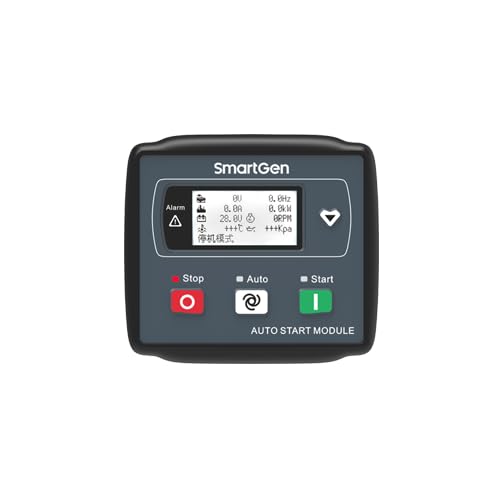
Figure 1: Front panel of the SMARTGEN HGM1791CAN Genset Controller. It features an LCD screen displaying various parameters, along with 'Stop', 'Auto', and 'Start' buttons.
3.1. ഡിസ്പ്ലേയും നാവിഗേഷനും
The 128x64 LCD displays real-time genset and engine parameters. Use the navigation buttons (typically arrow keys or dedicated menu buttons) to scroll through different screens and access settings.
3.2 ഓപ്പറേറ്റിംഗ് മോഡുകൾ
The controller supports three primary operating modes, selected via dedicated buttons on the front panel:
- സ്റ്റോപ്പ് മോഡ്: The genset is stopped and will not start automatically. This mode is typically used for maintenance or when the genset is not required.
- യാന്ത്രിക മോഡ്: The genset will automatically start and stop based on a remote start signal or pre-configured conditions (e.g., low battery voltage, utility power failure).
- മാനുവൽ മോഡ്: The genset can be manually started and stopped using the 'Start' and 'Stop' buttons on the front panel.
3.3. Parameter Monitoring
The LCD provides real-time data for comprehensive monitoring:
- Generator Parameters: വാല്യംtage (V), Frequency (Hz), Current (A), Power (kW), Load Percentagഇ (%).
- Engine Parameters: Oil Pressure (kPa), Temperature (°C), Fuel Level (%), Battery Voltage (V), Engine Speed (RPM).
- പ്രവർത്തന ഡാറ്റ: Total Running Time (H), Accumulated Start Times.
3.4 പാരാമീറ്റർ കോൺഫിഗറേഷൻ
Parameters can be adjusted to suit specific application requirements:
- ഫ്രണ്ട് പാനൽ: Basic parameters and delay values can be set directly using the controller's buttons and LCD menu.
- പിസി സോഫ്റ്റ്വെയർ: For advanced configuration and comprehensive parameter adjustment, connect the controller to a PC via the Type-C USB port and use the dedicated SMARTGEN configuration software. All parameters are digitally regulated for enhanced reliability.
കുറിപ്പ്: All user-configured parameters are stored in non-volatile memory and will not be lost in the event of a power failure.
4. പരിപാലനം
Regular maintenance ensures the longevity and reliable operation of your HGM1791CAN Genset Controller.
- വൃത്തിയാക്കൽ: Periodically clean the controller's front panel and display with a soft, dry cloth. Avoid using abrasive cleaners or solvents.
- കണക്ഷൻ പരിശോധനകൾ: Annually inspect all wiring connections for tightness and signs of corrosion. Loose connections can lead to intermittent operation or damage.
- സോഫ്റ്റ്വെയർ അപ്ഡേറ്റുകൾ: Check the SMARTGEN website periodically for any available firmware updates for your controller model.
- പരിസ്ഥിതി വ്യവസ്ഥകൾ: Ensure the operating environment remains within the specified temperature and humidity ranges to prevent premature component failure.
The controller's robust design, including its silicone panel and buttons, contributes to its high and low-temperature adaptation, reducing the need for frequent physical maintenance.
5. പ്രശ്നപരിഹാരം
The HGM1791CAN controller includes comprehensive fault protection and display functions to assist in diagnosing issues. When a fault occurs, the controller will indicate the condition on the LCD.
പൊതുവായ പ്രശ്നങ്ങളും പരിഹാരങ്ങളും:
- കൺട്രോളർ ഓണാക്കുന്നില്ല:
- Check the DC power supply connections (8-35V).
- ബാറ്ററി വോളിയം പരിശോധിക്കുകtage സ്വീകാര്യമായ പരിധിക്കുള്ളിലാണ്.
- Inspect fuses in the power supply line.
- Genset Fails to Start:
- Ensure the controller is in 'Auto' or 'Manual' mode.
- Check for active fault alarms displayed on the LCD.
- Verify fuel level and battery charge.
- Inspect start relay and fuel relay connections.
- Confirm crank disconnection conditions are met (engine speed, oil pressure, generator frequency).
- Incorrect Sensor Readings:
- Check sensor wiring for loose connections or damage.
- Verify the sensor type configured in the controller matches the installed sensor.
- Ensure sensors are correctly calibrated if applicable.
- Communication Issues (PC Software):
- Ensure the Type-C USB cable is securely connected.
- Verify the correct drivers are installed on the PC.
- Confirm the SMARTGEN configuration software is running and correctly configured for the controller model.
For persistent issues or faults not listed, consult the detailed troubleshooting guide available from SMARTGEN or contact technical support.
6 സാങ്കേതിക സവിശേഷതകൾ
| ഫീച്ചർ | സ്പെസിഫിക്കേഷൻ |
|---|---|
| മോഡൽ | HGM1791CAN |
| പ്രദർശിപ്പിക്കുക | 128x64 LCD with Backlight |
| വൈദ്യുതി വിതരണ ശ്രേണി | ഡിസി (8~35)വി |
| അനുയോജ്യത | 12V or 24V Starting Batteries |
| ഓപ്പറേറ്റിംഗ് മോഡുകൾ | Manual, Auto, Stop |
| Configurable Input Ports | 3 (Digital or Sensor Input) |
| Fixed Relay Outputs | 2 (Fuel Relay, Start Relay) |
| Configurable Output Ports | 3 (Common Alarm, Preheat, Idle Control) |
| ആശയവിനിമയ ഇൻ്റർഫേസ് | Type-C USB (for PC software) |
| എൻക്ലോഷർ മെറ്റീരിയൽ | Self-extinguishing ABS Plastic |
| ഇൻസ്റ്റലേഷൻ തരം | ഉൾച്ചേർത്തത് |
| ഇനത്തിൻ്റെ ഭാരം | 6 ഔൺസ് |
| നിർമ്മാതാവ് | SMARTGEN |
7. വാറൻ്റിയും പിന്തുണയും
For warranty information, technical support, or service inquiries regarding your SMARTGEN HGM1791CAN Genset Controller, please contact your authorized SMARTGEN dealer or the manufacturer directly. Details can typically be found on the SMARTGEN official website or through the seller from whom the product was purchased (e.g., SmartGen-America).
Please have your product model number (HGM1791CAN) and purchase details ready when contacting support.


